
How a 3D Web Globe Works: Map Projections, Borders and Country Data
What happens between a flat satellite image and a spinning globe in your browser, why the date line trips up distance maths, and how to treat country facts you read online.
· 6 min read
Click the sea just east of Fiji on a naive map app and it can tell you the nearest country is somewhere in South America. The numbers say so: Fiji sits at longitude +179.4, your click is at -179.9, and 359 degrees looks like a long way. On a real sphere they are less than 100 km apart. Little bugs like that are the gap between a flat map and a globe, and they are a good way into how a 3D web globe works.
This guide walks through what the Interactive 3D Earth Globe does under the hood: how a flat picture becomes a sphere, where the borders come from, how a click becomes a country, and how much to trust the facts on each card.
From a flat image to a sphere
The Earth on screen starts as an ordinary rectangular image: NASA's Blue Marble, a cloud-free composite of satellite photos. It uses the equirectangular projection (also called plate carrée), which is the simplest possible map: longitude runs straight across the x axis from -180 to +180, and latitude runs straight up the y axis from -90 to +90. The image is exactly twice as wide as it is tall.
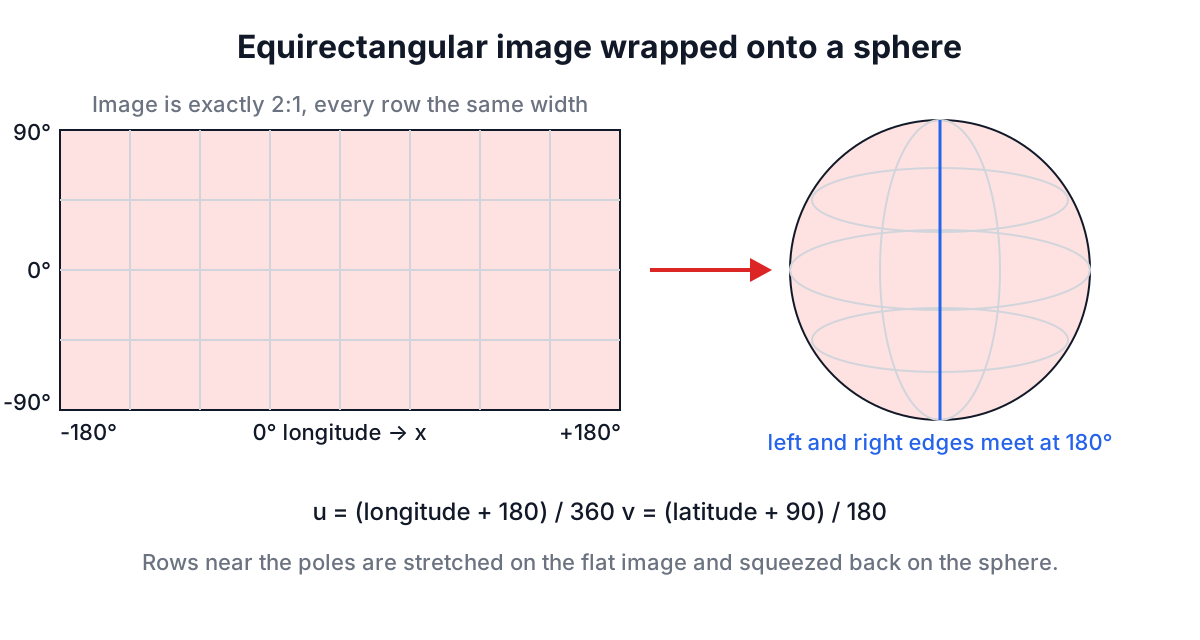
That simplicity is why it is the standard texture for globes. A 3D sphere in three.js has texture coordinates (u, v) from 0 to 1 around and up the surface, and an equirectangular image maps onto them directly: u is (longitude + 180) / 360, v is (latitude + 90) / 180. No reprojection, no lookup table.
The cost shows up near the poles. On the flat image, Greenland and Antarctica are stretched wide because every row of pixels has the same width, even though the circle of latitude it represents shrinks to a point at the pole. On the sphere those rows get squeezed back to their real size, which is why the globe looks right and the flat image looks wrong.
The page draws all of this with globe.gl, a library on top of three.js, which itself sits on WebGL. That chain is why the tool needs a browser with WebGL turned on, and why it loads its 3D code only when the globe is about to appear.
Where the country borders come from
Borders are vector data, not part of the image. The globe loads the Natural Earth "admin 0 countries" dataset at 1:110 million scale, published as GeoJSON. Natural Earth is a public domain dataset maintained by volunteer cartographers and is the default choice for small-scale world maps.
1:110m is the coarsest of Natural Earth's three scales. It keeps file sizes small and keeps a spinning globe smooth, but it simplifies coastlines heavily and drops many small islands. That has visible effects:
| What you see | Why |
|---|---|
| Monaco, Vatican City, Tuvalu are not clickable | Too small for the 1:110m polygons |
| Greenland and Antarctica have borders but no fact card | They are territories, not countries in the data |
| France and Norway still work | Natural Earth marks them with ISO code -99, so the tool matches by name |
Each polygon carries properties such as ADMIN (the name) and ISO_A2 (the two-letter ISO 3166 code, like FR or JP). The tool matches clicked polygons to its 194 country records by that ISO code first and falls back to the name. Matching on codes rather than names avoids a whole class of bugs: "United States of America" in one dataset and "United States" in another are the same place, but only the code makes that obvious to a program.
From a click to a country
When you click a polygon, the library reports which feature was hit and the latitude and longitude of the click. For a land click, the polygon tells you the country.
Ocean clicks are different. Small island states are hard to hit, so the tool picks the country whose reference point is nearest. Nearest has to mean distance along the surface of the Earth, the great-circle distance, and the usual way to compute it is the haversine formula:
function greatCircleKm(lat1, lng1, lat2, lng2) {
  const toRad = (d) => (d * Math.PI) / 180;
  const dLat = toRad(lat2 - lat1);
  const dLng = toRad(lng2 - lng1);
  const a = Math.sin(dLat / 2) ** 2 +
            Math.cos(toRad(lat1)) * Math.cos(toRad(lat2)) * Math.sin(dLng / 2) ** 2;
  return 2 * 6371 * Math.asin(Math.sqrt(a)); // 6371 km = mean Earth radius
}
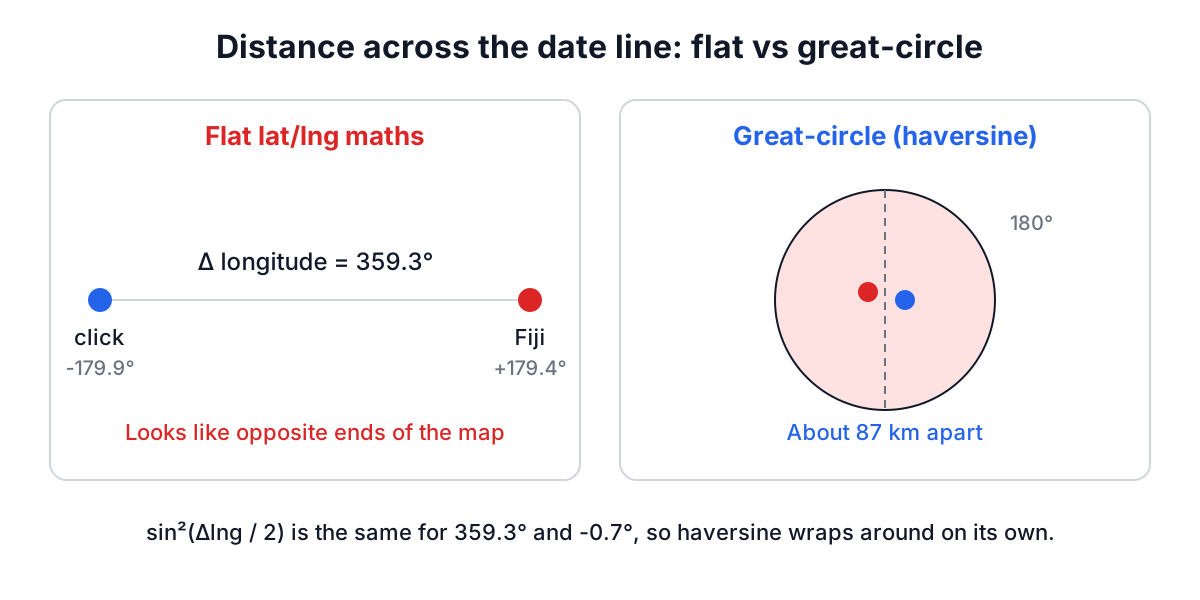
The trick is in sin(dLng / 2) squared. A longitude difference of 359.3 degrees and one of -0.7 degrees give the same value, so the formula wraps around the date line on its own. A flat Pythagoras on latitude and longitude does not, which is exactly the Fiji bug from the opening. A second, smaller error in the flat approach: a degree of longitude is 111 km at the equator but only about 56 km at 60 degrees north, so flat distances overstate how far apart northern places are.
A worked example
- Open the Interactive 3D Earth Globe and spin it to the South Pacific.
- Click the open sea at about 17 degrees south, just east of the 180th meridian.
- The card that opens is Fiji: capital Suva, Fijian dollar, around 900,000 people.
Haversine says the click is about 87 km from Fiji's reference point (the centre of the main island group). Flat lat/lng maths would have measured 359 degrees of longitude and picked somewhere far away.
How much to trust the country facts
Each card holds a capital, a rounded population, main languages, currency, continent, national bird and song, a popular dish and destination, and four short facts. They are written for browsing, so treat them like a good encyclopaedia summary:
- Capitals change. Kazakhstan's capital was renamed Nur-Sultan in 2019 and went back to Astana in 2022. Indonesia is building a new capital, Nusantara. When a card disagrees with the news, the news is probably newer.
- Currencies change. Croatia moved to the euro in 2023 and Bulgaria in 2026. Zimbabwe introduced the ZiG in 2024 alongside the US dollar.
- Populations are rounded and dated. For anything you will cite, use the UN World Population Prospects or the country's statistics office.
- "Firsts" and "largest" claims are contested. Several countries claim the origin of the same dish or dance. The cards stick to widely accepted claims, but they are trivia, not scholarship.
Common problems and fixes
The globe area is empty or shows a WebGL message. Hardware acceleration is off, or you are on a remote desktop without GPU access. Turn acceleration on in browser settings and reload. The country list still works without the globe.
Borders never appear. They are fetched from the unpkg CDN when the page opens; a strict network filter can block that. The satellite texture comes from the same place.
The page gets slow after many visits. Every WebGL page holds a GPU context, and browsers cap how many can be open. The globe releases its context when you navigate away, but closing old tabs still helps.
Keep exploring
If you are teaching time zones alongside geography, pair the globe with the World Clock and the Time Zone Converter: spin to a country, then check what time it is there. The IP Address Lookup shows which country your own connection appears to come from, which is a nice prompt for why that guess is sometimes wrong.
For a classroom, open the globe with ?fs=on on the end of the address, accept the fullscreen prompt, and let students take turns finding a country before anyone reads its card.