
AI for Executive Assistants and Front Desk Staff: A Practical Playbook
Prompts for inbox triage, briefings, itineraries, appointment reminders and difficult callers, plus what never to paste into a chatbot and how to check the drafts.
· 9 min read
Executive assistants and front desk staff are the people other people write to. Much of the day is spent turning a short instruction ("tell them no, nicely", "remind everyone about Thursday", "find a time that works for Singapore and Chicago") into a clear message, and handling the conversations nobody else wants to take. That makes both roles a natural fit for AI drafting: the facts are usually known, the format is predictable, and tone matters as much as content.
It also makes both roles exposed. Inboxes, calendars and appointment books are full of other people's personal data, and an assistant who pastes an executive's inbox into a consumer chatbot may have shared confidential board material, client details or health information without meaning to. This article covers the tasks where AI helps, what to keep out of it, worked prompts, how to check drafts and a 30-day plan. The AI Prompts for Executive Assistants and AI Prompts for Front Desk Staff kits hold ready versions of these prompts and run entirely in your browser.
Tasks where AI saves real time
| Executive assistant | Front desk |
|---|---|
| Inbox triage into act, delegate, file and ignore | Appointment reminder and confirmation messages |
| One-page briefing before a meeting | Reschedule and cancellation messages |
| Meeting agenda with timings and owners | Phone scripts for common calls |
| Minutes and action lists from rough notes | Calm replies to an upset caller or visitor |
| Travel itinerary from confirmation emails | Check-in and parking instructions |
| Polite declines and holding replies | Answers to frequently asked questions |
| Board pack summary with decisions needed | Waitlist offers and no-show follow-ups |
Every task in that table starts from information you already have. The model's job is to arrange it, choose words and keep the tone right. Where it goes wrong is when it is asked to know something: whether the CEO is free on Tuesday, what the clinic's cancellation policy is, which hotel the delegation is booked into. If the fact is not in the prompt, a model will often supply a believable one. Every prompt in the kits therefore includes a constraint like "use only the details provided; write [CONFIRM: ...] for anything missing".
Time zones are a good example. Ask a model to propose meeting slots across London, Chicago and Singapore and it may get daylight saving wrong. Check proposed times with the Time Zone Converter or the World Clock before sending.
What to keep out of a general AI tool
An executive's inbox and a reception desk both handle information that other people trusted you with. Before pasting anything, apply three rules.
Use only approved tools. Many organisations now have an enterprise AI assistant with contractual limits on how inputs are stored and used. Use that, not a personal account. Under the GDPR, a vendor processing personal data for your organisation needs a processor contract (Article 28), and you should only process the personal data the task needs (Article 5(1)(c)).
Paste the minimum. To draft a decline, the model needs the request and your reason, not the full email thread with signatures, phone numbers and forwarded attachments. To write an appointment reminder template, it needs the appointment type and the practice's instructions, not the day's list of patients.
Know when health data is involved. A front desk in a medical, dental or therapy practice handles protected health information. In the US, HIPAA allows a covered entity to share PHI with a vendor only under a business associate agreement (45 CFR 164.502(e) and 164.504(e)), and consumer chat apps generally do not sign one. Even "Mrs. Lopez, 3pm Thursday, dermatology follow-up" reveals that a named person is a patient. Write templates with placeholders and fill in names in your scheduling system, not in the chatbot.
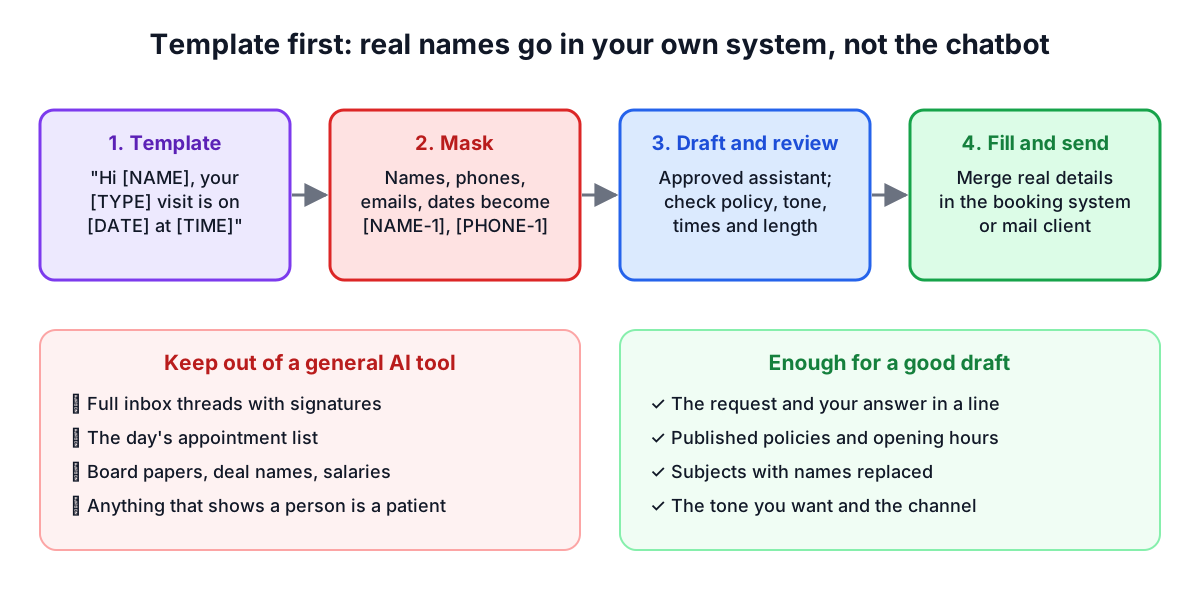
The kits include a masking helper that scans your pasted text and replaces common identifiers with tokens such as [NAME-1] or [PHONE-1]. It is pattern-based: it finds names after a title or a label like "Caller:", email addresses, phone numbers, dates, ages over 89, record, policy and account numbers, card numbers, street addresses, ZIP codes and postcodes, URLs and IP addresses. It does not recognise a first name on its own, a company name or a job title that identifies one person ("the new CFO"), so read the text yourself before copying.
Worked prompts
The kits use a five-part structure: role, context, task, constraints, output format.
Inbox triage for an executive assistant:
## Role
You are an assistant to an executive assistant supporting a managing director at a mid-sized company. You draft summaries and replies for the EA to review; you never send anything.

## Context
Email subjects and one-line summaries (names replaced):
1. [NAME-1] asks to move Thursday's 1:1 to Friday
2. Finance: Q3 board pack draft attached, comments needed by Wednesday
3. Conference invitation to speak in Lisbon in March
4. Newsletter from a supplier
5. [NAME-2] asks for a reference for a former employee

## Task
Sort these into Act today, Delegate, Decide (needs the executive), File and Ignore.

## Constraints
- Do not invent deadlines; use only those stated.
- For each Decide item, write the one-line question the executive needs to answer.

## Output format
A table: item | category | reason | suggested next step. Then the Decide questions as a list.
Handling an upset caller at a front desk:
## Role
You are a coach for front desk staff at a physiotherapy clinic. You write calm, respectful phone scripts that staff adapt in their own words.

## Context
- Situation: caller's appointment was cancelled by the clinic at short notice because the therapist is ill. Caller took the afternoon off work and is angry.
- What we can offer: first available slot tomorrow at 8:00 or Saturday morning; no cancellation fee applies.

## Task
Write a short script for the call.

## Constraints
- Acknowledge the inconvenience without blaming the therapist or the caller.
- Offer only the options listed. Do not promise compensation.
- Include a line for when the caller raises their voice, and when to hand over to a manager.

## Output format
Opening, acknowledge, offer, handle pushback, close. Each part one to three sentences.
The second prompt never contains the caller's name or health details. It does not need them.
Checking the drafts
A quick review before anything goes out:
- Names, dates and times. Check every one against the calendar or booking system. A wrong day in a reminder causes more work than no reminder.
- Time zones and daylight saving. Recheck any time that crosses a border.
- Policies and promises. Fees, refunds, cancellation windows and parking arrangements must match what your organisation actually does.
- Tone for the reader. A board member, an anxious patient and a supplier need different registers. Read the draft as the recipient.
- Confidential content. Make sure a summary written for the executive does not end up in a reply to someone outside.
- Length. SMS reminders should fit one message where possible; the Word Counter shows character counts.
For a recurring message such as a reminder template, get the wording approved once by whoever owns the policy, then reuse it rather than generating a new version every time.
A 30-day plan
| Week | What to do |
|---|---|
| 1 | Ask IT or your manager which AI tools are approved and for what data. Agree with your executive or practice manager what you may use it for. |
| 2 | Start with tasks that involve no personal data: phone script drafts, FAQ answers from your published policies, agenda templates. |
| 3 | Add one task with masked data, such as inbox triage from subject lines or minutes from notes with names replaced. Record how long review takes. |
| 4 | Keep the templates that saved time after review. Export the library as Markdown from the kit and save it where the team can reuse it. |
For an executive assistant, the result should be more time for the work that needs judgement: knowing which request matters to the executive, protecting their time and spotting the problem in the itinerary before it happens. For front desk staff, it should be consistent, kind wording on the calls and messages that repeat every day, and more attention left for the person in front of you.
To refine prompts of your own, try the AI Prompt Builder, and run long prompts through the Prompt Quality Checker before you rely on them. The Meeting Cost Calculator is a useful companion when you are asked to justify a shorter agenda.