
Barcode Types and Check Digits: EAN, UPC, Code 128 and More
Which barcode to use for products, cartons and asset tags, how the GS1 mod-10 check digit works step by step, why you need GS1 numbers to sell at retail, and print size rules.
· 10 min read
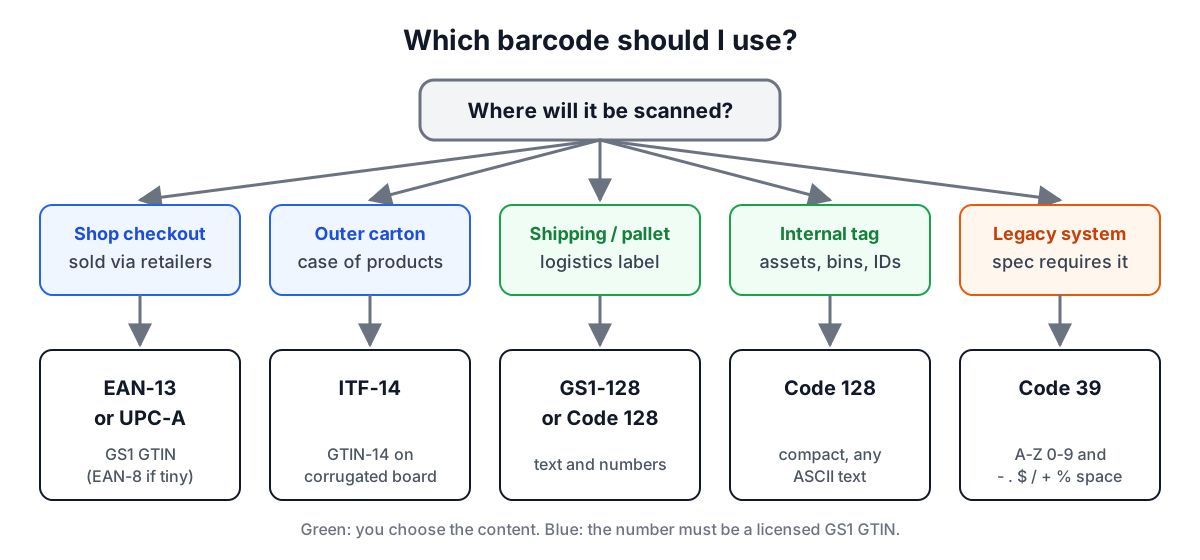
A barcode is a number or a short piece of text written in bars and spaces that a scanner can read in a fraction of a second. Which symbology you use depends on where the barcode goes: a supermarket till, a warehouse dock, a laptop asset tag or an event badge each expect a different one. This guide explains the common types, works through the check digit that keeps retail barcodes honest, and covers the rules on numbers and print size that decide whether a code actually scans. You can try every example in the Barcode Generator.
The main barcode types at a glance
| Symbology | Encodes | Typical use | Check |
|---|---|---|---|
| EAN-13 | 13 digits | Retail products worldwide | GS1 mod 10 |
| UPC-A | 12 digits | Retail products in the US and Canada | GS1 mod 10 |
| EAN-8 | 8 digits | Small retail packs | GS1 mod 10 |
| ITF-14 | 14 digits | Outer cartons and cases | GS1 mod 10 |
| Code 128 | All 128 ASCII characters | Shipping labels, serials, logistics | Mod 103, automatic |
| Code 39 | A-Z, 0-9, space, - . $ / + % | Badges, automotive, older systems | Optional mod 43 |
| Interleaved 2 of 5 | Digits in pairs | Warehousing, base of ITF-14 | Optional |
The first four belong to the GS1 system and carry a GTIN, a Global Trade Item Number. The others are general-purpose: you decide what the text means.
Retail barcodes and GTINs
When a shop scans a product, the till looks up the number in its product file. For that to work across thousands of retailers and suppliers, the numbers must be unique worldwide, and that is what GS1, a not-for-profit standards body with member organisations in over 100 countries, manages. A company licenses a GS1 Company Prefix and assigns item numbers under it. Every variant that is sold separately (size, colour, pack count) gets its own GTIN.
The first item scanned at a checkout using a UPC barcode was a 10-pack of Wrigley's Juicy Fruit gum at a Marsh supermarket in Troy, Ohio, on 26 June 1974. UPC-A, with 12 digits, became the North American standard; EAN-13 was created soon after as a 13-digit superset for the rest of the world. A UPC-A is the same number as an EAN-13 with a leading zero, so 036000291452 and 0036000291452 identify the same item and modern scanners read both.
Can you make up your own numbers? You can draw any number as bars, but retailers and marketplaces expect GTINs that trace back to a licensed GS1 prefix. A made-up number may already belong to someone else's product. For internal use (stock you never sell through another retailer) a Code 128 label with your own SKU is the safer choice.
How the GS1 check digit works
Every GS1 number ends in a check digit calculated from the others. The rule is the same for GTIN-8, 12, 13 and 14:
- Take the data digits (everything except the check digit).
- Starting from the rightmost data digit, multiply digits alternately by 3 and 1.
- Add the products.
- The check digit is the number you add to reach the next multiple of 10 (0 if the sum is already a multiple of 10).
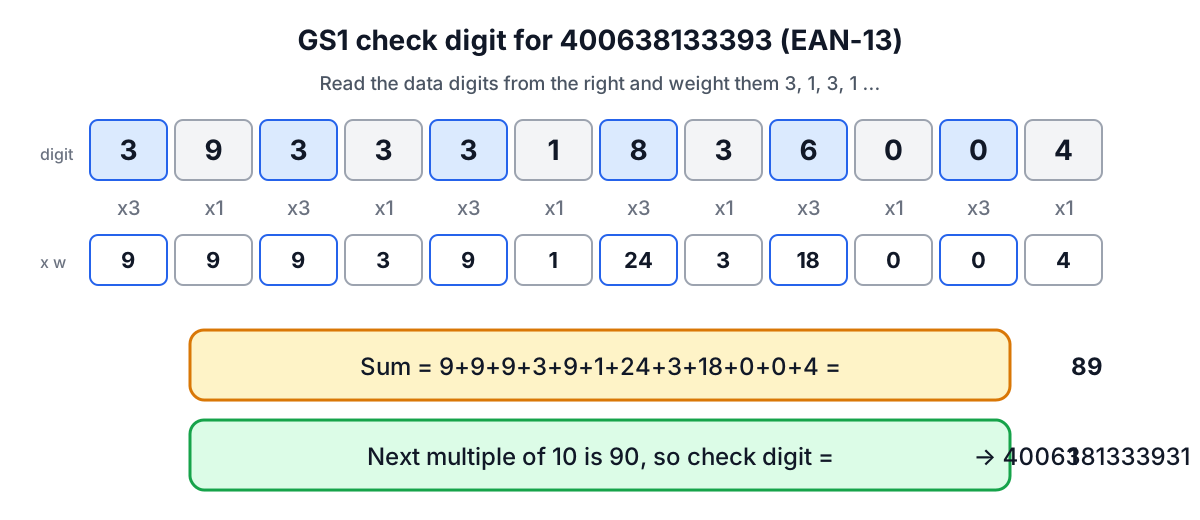
Worked example: EAN-13 4006381333931
Data digits 400638133393. Reading from the right, with weights 3, 1, 3, 1 and so on:
| Digit (from right) | 3 | 9 | 3 | 3 | 3 | 1 | 8 | 3 | 6 | 0 | 0 | 4 |
|---|---|---|---|---|---|---|---|---|---|---|---|---|
| Weight | 3 | 1 | 3 | 1 | 3 | 1 | 3 | 1 | 3 | 1 | 3 | 1 |
| Product | 9 | 9 | 9 | 3 | 9 | 1 | 24 | 3 | 18 | 0 | 0 | 4 |
The products add up to 89. The next multiple of 10 is 90, so the check digit is 1 and the full code is 4006381333931.
More examples
- UPC-A 03600029145 gives a check digit of 2: 036000291452.
- EAN-8 9638507 gives 4: 96385074.
- ITF-14 1540014128876 gives 3: 15400141288763.
Why the check digit matters
A single wrong digit changes the weighted sum by a non-multiple of 10 (because 3 and 1 are both coprime with 10), so every single-digit error is caught. Swapping two neighbouring digits changes the sum by 2 x their difference, which is caught unless the digits differ by 5. That is why a scanner rejects a damaged or misprinted code rather than ringing up the wrong product, and why the generator refuses to draw a full-length code whose last digit is wrong. You can also verify numbers from a supplier spreadsheet with the check digit calculator on the same page.
Code 128 and Code 39 for everything else
Code 128 was introduced in 1981 and is now the general-purpose workhorse. It encodes all 128 ASCII characters using three code sets (one for upper case and control characters, one for upper and lower case, and one that packs two digits per symbol), and the encoder switches between them to keep the barcode short. A modulo-103 check symbol is always added by the encoder, so you never type it. GS1-128, used on pallet and shipping labels, is Code 128 with special application identifiers.
Code 39 dates from 1974 at Intermec. It encodes 43 characters (A to Z, 0 to 9, space and - . $ / + %) plus a start and stop character, usually printed as an asterisk. It is wider than Code 128 for the same text but very tolerant of low-resolution printers, and some industries (automotive, defence, healthcare badges) still specify it. The check character is optional; when used, it is the sum of the character values modulo 43.
Interleaved 2 of 5 encodes digits in pairs, the first in the bars and the second in the spaces, which makes it compact but means the number of digits must be even. Add a leading zero to an odd-length number. ITF-14 is Interleaved 2 of 5 with a 14-digit GTIN and usually a thick bearer bar around it, so it scans when printed directly on corrugated cardboard.
Printing barcodes that scan
A correct number is only half the job. Scan failures usually come from the print.
Quiet zones. Every barcode needs blank space on both sides so the scanner can find where it starts. For EAN-13 the GS1 specification asks for 11 module widths on the left and 7 on the right; Code 128 needs at least 10 modules on each side. Do not let packaging artwork, text or the edge of a label intrude.
Size and magnification. EAN-13 and UPC-A have a nominal module (narrowest bar) of 0.33 mm at 100% magnification, giving an EAN-13 about 37 mm wide including quiet zones. GS1 allows magnifications from about 80% to 200%. Below that range, ordinary retail scanners struggle; above it, the code may not fit a handheld scanner's field. Do not cut the height to fit a small pack; use EAN-8 instead.
Colour and contrast. Most laser scanners use red light, so red bars disappear and red backgrounds look white. Black, dark blue or dark green bars on white or light yellow are safe. Avoid printing on transparent film without a white underlay.
Vector files for print. Download SVG for packaging and labels so the bar edges stay sharp at any size. A PNG scaled up in layout software gets soft edges, which reduces the contrast between bars and spaces. If you need a bitmap, use the 4x PNG from the generator and place it at its native size or smaller.
Bar width reduction. Commercial printers often ask for bars to be thinned slightly to allow for ink spread. That is a pre-press setting for your printer to apply, not something to approximate by shrinking the barcode.
Common mistakes
- Using a made-up EAN or UPC for a product sold through retailers or marketplaces.
- Mistyping one digit of a GTIN; the check digit will catch it, so verify before printing.
- Shrinking a barcode to fit the design, or cutting off the human-readable digits.
- Putting the code on a curved surface or across a seam.
- Choosing Code 39 for long text where Code 128 would be half the width.
Sources
- GS1 General Specifications, sections on GTIN, check digit calculation, symbol dimensions and quiet zones.
- GS1 US, "History of the barcode" (first UPC scan, Troy, Ohio, 1974).
- ISO/IEC 15417 (Code 128), ISO/IEC 16388 (Code 39), ISO/IEC 16390 (Interleaved 2 of 5).
- JsBarcode documentation for supported formats and options.
Make your own in the Barcode Generator. For links and contact details rather than product numbers, a QR code from the QR Code Generator holds far more data.
Related searches
- ean 13 check digit calculation
- upc vs ean
- code 128 vs code 39
- itf 14 carton barcode
- gs1 company prefix
- barcode quiet zone
- barcode print size
- gtin explained
- how barcode check digits catch errors