
Why 0.1 + 0.2 Is Not 0.3: Calculator Precision, Precedence and Radians
Floating point rounding, operator precedence, radians versus degrees and bitwise maths: the four places calculators and code most often disagree, with worked examples.
· 6 min read
Open a browser console, type 0.1 + 0.2, and you get 0.30000000000000004. Type the same sum into a desk calculator and you get 0.3. Neither is broken. They store the same number and differ only in how many digits they show you. Most "the calculator is wrong" reports come from four places: floating point rounding, operator precedence, angle units and the difference between arithmetic and bitwise operators. Each one is easy to check once you know where to look.
The examples below use the Scientific Calculator, which evaluates expressions with the mathjs library and has Basic, Scientific and Programming modes.
Floating point: why 0.1 cannot be stored exactly
Almost every calculator app and programming language stores numbers as IEEE 754 double-precision floats. A double has a sign bit, 11 exponent bits and 52 stored mantissa bits (53 with the implied leading 1). That gives about 15 to 17 significant decimal digits.
The catch is that the mantissa is binary. Fractions whose denominator is a power of 2 (0.5, 0.25, 0.375) are exact. Fractions with a factor of 5 or 3 in the denominator are not. One tenth in binary is a repeating pattern, 0.000110011001100..., so it has to be cut off and rounded.
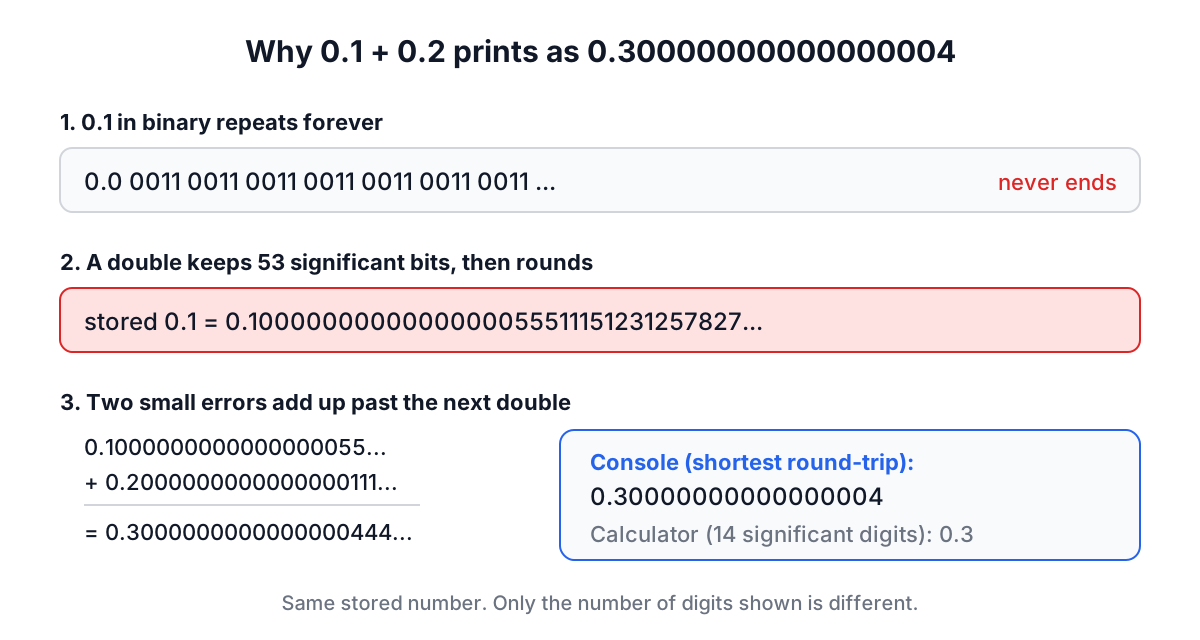
The stored value of 0.1 is 0.1000000000000000055511151231257827.... The stored 0.2 is a little high too. Add them and the result rounds to the double just above 0.3, which prints as 0.30000000000000004 when a language shows the shortest string that round-trips.
A calculator can hide that noise by rounding the display. The Scientific Calculator formats non-integer results to 14 significant digits:
| Input | Raw double | Displayed |
|---|---|---|
| 0.1 + 0.2 | 0.30000000000000004 | 0.3 |
| 1 ÷ 3 | 0.3333333333333333 | 0.33333333333333 |
| 1 ÷ 10^12 | 1e-12 | 1e-12 |
| 2^40 | 1099511627776 | 1099511627776 |
Rounding to a fixed number of significant digits matters. An older version of this calculator used toFixed(10), which rounds to ten decimal places, so 1e-12 displayed as 0. Significant digits keep small numbers visible.
In code, the fix depends on the job. Never compare floats with ===; compare with a tolerance such as Math.abs(a - b) < 1e-9. For money, store integer cents or use a decimal type (BigDecimal in Java, decimal in Python and C#, NUMERIC in SQL). Rounding at display time is fine for a calculator but not for a ledger.
Operator precedence and associativity
Precedence is the order operators bind. Every mainstream language and mathjs agree on the basics: parentheses first, then exponentiation, then multiplication and division, then addition and subtraction.
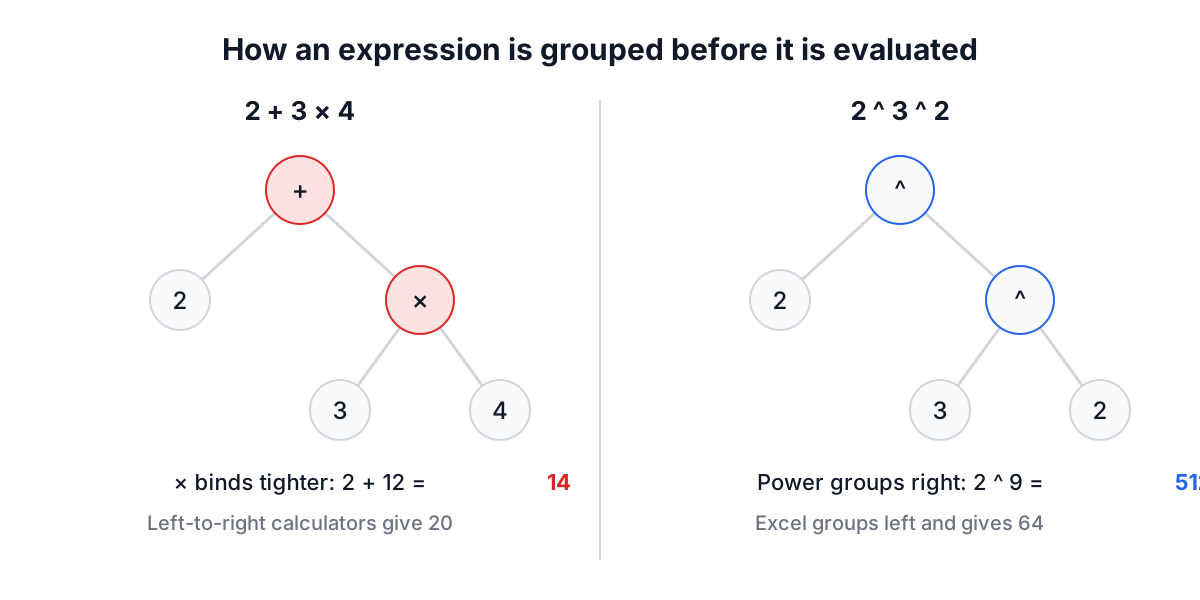
So 2 + 3 × 4 is 14, not 20. Cheap four-function calculators that evaluate strictly left to right give 20, and that is one of the most common reasons two calculators disagree.
Associativity decides how operators of the same level group. Subtraction and division group left: 8 - 3 - 2 is (8 - 3) - 2 = 3. Exponentiation groups right: 2^3^2 is 2^(3^2) = 2^9 = 512, not (2^3)^2 = 64. Python's ** and JavaScript's ** agree with mathjs here. Excel does not: in a spreadsheet =2^3^2 returns 64 because Excel evaluates ^ left to right.
Unary minus is the other trap. In mathematics and in Python, -2**2 is -4, because the power binds tighter than the minus sign. JavaScript refuses to guess and throws a syntax error for -2 ** 2, requiring you to write (-2) ** 2 or -(2 ** 2). When a result surprises you, add parentheses until the question is unambiguous.
Radians, degrees and which log you meant
Trigonometric functions in mathjs, JavaScript, Python, C, Excel and this calculator take radians. A full circle is 2π radians, so 180 degrees is π radians.
| What you type | What it computes | Result |
|---|---|---|
| sin(30) | sine of 30 radians | -0.98803162409286 |
| sin(30 × π ÷ 180) | sine of 30 degrees | 0.5 |
| π ÷ 2, then sin | sine of 90 degrees | 1 |
If a trig result looks random, you almost certainly mixed units. To convert, multiply degrees by π/180; to go back, multiply radians by 180/π. Inverse functions such as sin⁻¹ return radians as well, so asin(1) is 1.5707963267949, not 90.
Logarithms have a similar naming problem. On a desk calculator, log means base 10 and ln means base e. In most programming languages, including JavaScript (Math.log), Python (math.log) and mathjs, a bare log is the natural logarithm and base 10 is log10. The calculator follows the desk convention, so log(1000) is 3 and ln(e) is 1. When you copy a formula into code, check which one you need.
Programmer mode: bits, bases and XOR
Programmer mode works on integers and shows the same value in hexadecimal, decimal, octal and binary. Here is a quick worked example:
- Click HEX.
- Type
F,F, then AND, then0,F, then =. - The display shows
F, and the readouts show DEC 15, OCT 17, BIN 1111.
0x0F is a low-nibble mask: AND keeps only the bits set in both numbers, so the top four bits of 0xFF are cleared. The same pattern pulls flags out of a permission field or a hardware register.
Three conventions catch people out:
^is XOR, not power. In C, Java, JavaScript and Python,12 ^ 10is 6 (binary1100XOR1010=0110). Programmer calculators follow the language convention. In Scientific mode the same symbol means exponentiation.- Division truncates.
7 ÷ 2in programmer mode is 3, like integer division in C orMath.trunc(7 / 2)in JavaScript. Python's//floors instead, so-7 // 2is -4 there but -3 here. - NOT depends on width.
~5is -6 in two's complement, whatever the word size. What changes with width is how that negative number looks in hex:FFFFFFFAin 32 bits,FFFFFFFFFFFFFFFAin 64. The calculator shows it as-6in DEC and-6in HEX rather than picking a width for you.
Shifts are multiplication and division by powers of two: 1 << 10 is 1024, and x >> 1 halves a non-negative integer. In JavaScript the << and >> operators convert to 32-bit signed integers first, so 1 << 31 is negative there. Keep that in mind when a result from code and a result from the calculator disagree for large values.
Common mistakes
- Comparing floats for equality.
0.1 + 0.2 === 0.3is false in every IEEE 754 language. Use a tolerance or integers. - Using a calculator's percent key as a formula. On this calculator
%divides the preceding number by 100, so200 + 10 %is 200.1. Many desk calculators treat it as "add 10% of 200" and show 220. If you mean a 10% increase, type200 × 1.1. - Forgetting that function keys wrap the whole expression. Pressing √ after typing
9 + 16computessqrt(9 + 16) = 5, not9 + 4. - Trusting 16th-digit differences. Two systems that agree to 14 or 15 significant digits are giving the same answer.
For related conversions, the Unit Converter uses exact definitions such as 1 inch = 2.54 cm, the IP Address Converter shows dotted IPv4 addresses as 32-bit integers, and the Binary Hex Editor lets you inspect raw bytes. When a number looks wrong, check the representation, the grouping and the units before blaming the arithmetic.