
Calligraphy Fonts vs Fancy Unicode Text: Choosing and Using Script Fonts
Why copied calligraphy text loses its font, what "fancy text" generators really paste, and how to pick, pair and license a script font for invitations, logos and the web.
· 6 min read
Someone finds a lovely script for their bakery name, copies it, pastes it into Word, and gets plain Calibri. A friend copies "𝓕𝓻𝓮𝓼𝓱 𝓑𝓪𝓴𝓮𝓼" from a fancy text site, pastes it into Instagram, and the style survives. The second one looks like the better tool. It is actually doing something quite different, with costs most people never see.
This guide explains the difference between real fonts and Unicode "fancy text", how to choose a script font that works, and how to use what you find in the Calligraphy Font Generator in Canva, Word, Figma or on a website.
Fonts style text; they are not part of it
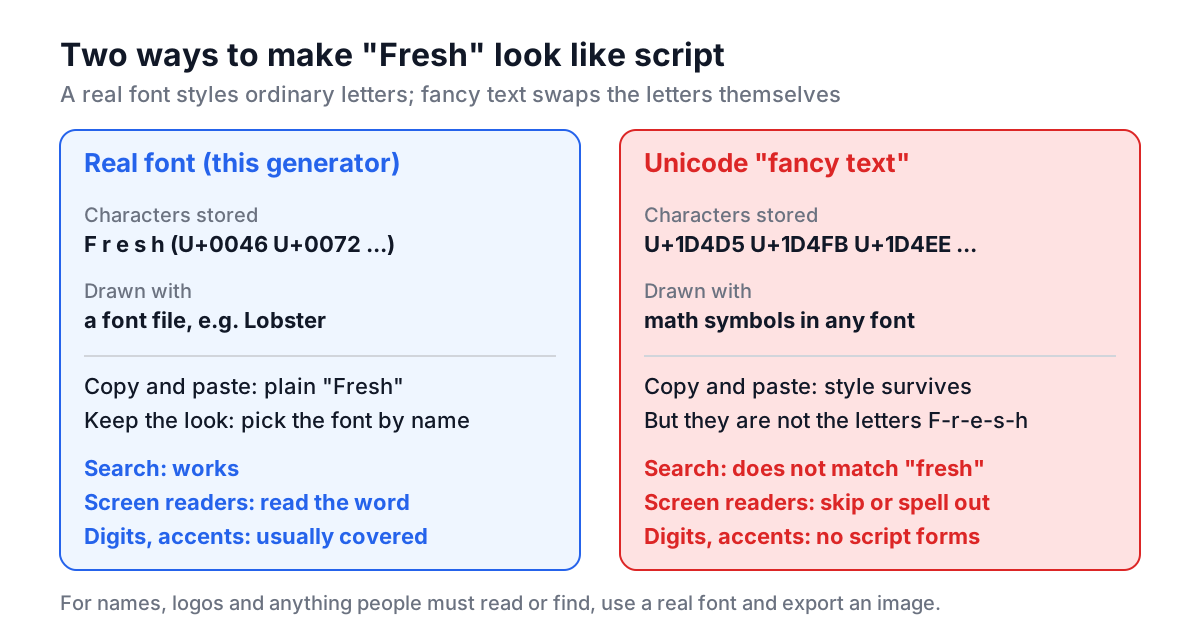
Text on a computer is a sequence of characters. A font is a separate file that says how to draw each character. When you type "Fresh Bakes" in the generator, the page stores eleven ordinary characters and asks the browser to draw them with, say, Lobster.
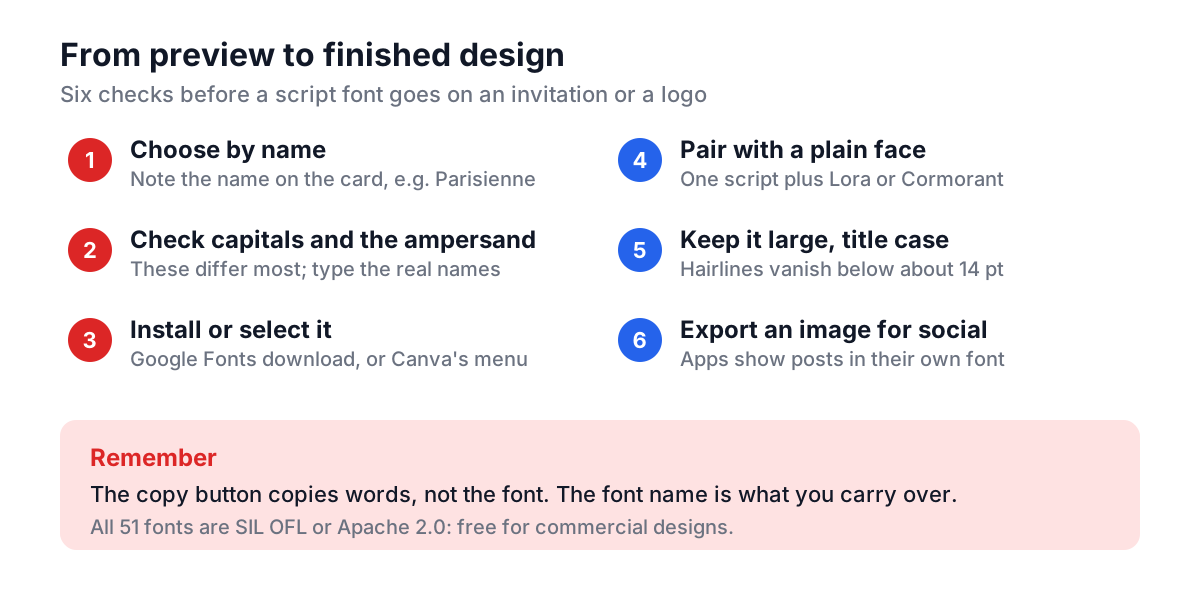
Copy and paste moves the characters, not the drawing instructions. Some apps carry rich-text styling along on the clipboard, but only when the destination has the same font installed, and a web page's preview usually gives you nothing but plain text. That is why the generator's copy button says what it does: it copies your words, and you pick the font by name where you paste.
What "fancy text" generators really paste
Unicode includes a block called Mathematical Alphanumeric Symbols (U+1D400 to U+1D7FF). It exists so mathematicians can tell a bold script A from a plain A in a formula. Fancy text generators map each letter to one of these symbols:
| You type | Fancy generator pastes | Code point |
|---|---|---|
| A | 𝓐 | U+1D4D0 MATHEMATICAL BOLD SCRIPT CAPITAL A |
| a | 𝓪 | U+1D4EA MATHEMATICAL BOLD SCRIPT SMALL A |
| B | 𝓑 | U+1D4D1 MATHEMATICAL BOLD SCRIPT CAPITAL B |
Because these are different characters, the style survives anywhere text goes. The costs:
- Screen readers either skip them or read "mathematical bold script capital F" letter by letter.
- Search and hashtags do not match. Searching a profile for "bakes" will not find "𝓫𝓪𝓴𝓮𝓼".
- Coverage gaps. There is no script form for digits or most punctuation, and some fonts show empty boxes.
- Length limits. Each symbol takes two UTF-16 code units, so a 30-character bio can count as 60 in some systems.
For a username joke, fine. For a business name, a bio people need to read, or anything accessible, use a real font in an image or a design file instead.
Script styles and when each works
The generator groups its 51 Google Fonts into styles. They come from different writing tools, and that history tells you where they work:
| Style | Examples | Origin | Best for |
|---|---|---|---|
| Pointed pen (formal) | Great Vibes, Parisienne, Allura, Petit Formal Script | Copperplate and Spencerian penmanship | Wedding names, certificates |
| Brush | Kaushan Script, Pacifico, Lobster | Brush lettering and sign painting | Logos, food and retail signage |
| Handwriting | Caveat, Indie Flower, Shadows Into Light | Felt-tip and ballpoint | Notes, casual social graphics |
| Classic serif | Cinzel, Cormorant Garamond, Playfair Display, Lora | Roman inscriptions and book type | Pairing text, headings |
| Decorative | Uncial Antiqua, Rye, Creepster | Medieval, Western, horror posters | Themed one-offs |
Pointed-pen scripts have very thin hairlines. They look elegant at 48 pt on an invitation and fall apart at 10 pt on a phone screen. Brush scripts are heavier and survive small sizes and busy backgrounds better.
Worked example: a wedding invitation
- Open the Calligraphy Font Generator and type
Emma & James. - Scroll to the Elegant and Formal groups. Compare Great Vibes, Parisienne and Petit Formal Script. Look hardest at the ampersand and at the capital E and J, which vary most.
- Say you choose Parisienne. Pair it with a plain serif for the date and venue: Cormorant Garamond or Lora, both also in the list.
- In Canva, select the text box and type "Parisienne" in the font menu. In Word or Figma, download the family from fonts.google.com and install it first.
- Set the names in title case. Connected scripts look broken in ALL CAPS, because capitals were never designed to join.
For the website version, the same choice in CSS:
<link rel="preconnect" href="https://fonts.gstatic.com" crossorigin>
<link href="https://fonts.googleapis.com/css2?family=Parisienne&family=Lora:wght@400;600&display=swap" rel="stylesheet">
<style>
  h1 { font-family: "Parisienne", cursive; font-size: 3rem; }
  body { font-family: "Lora", serif; }
</style>
display=swap shows fallback text until the font arrives, so the page is readable even on a slow connection. Pick colours for the script and body text with the Color Picker, and check contrast; thin scripts need more of it than body text.
Licensing: can you use these commercially?
Every family in the generator comes from Google Fonts and is released under the SIL Open Font License or the Apache License 2.0. Both allow commercial use: invitations you sell, logos for clients, product packaging and websites. The one thing the OFL forbids is selling the font files on their own.
Two cautions. A logo built on a free font is not exclusive, since anyone can use the same font; designers often customize a few letters for that reason. And fonts copied from random download sites can carry personal-use-only licences, so get Google Fonts from fonts.google.com.
Common mistakes
- Expecting the font to paste. Only characters paste. Choose the font by name, or screenshot the preview card for a quick image.
- Setting body text in script. Use script for a few words: names, headings, a logo. Paragraphs become unreadable.
- All caps in a connected script. Use title case.
- Too small. Thin hairlines vanish below about 14 pt in print and 20 px on screens.
- Two scripts on one page. Pair one script with one plain serif or sans instead.
- Not checking accents. Type "Zoë", "Ñuñoa" or "Øystein" into the generator before committing; some decorative fonts cover only basic Latin.
When you find a font you like in an image rather than by name, the Font Picker from Image can help identify it, and the Case Converter quickly fixes text that was typed in caps. Then choose the font by name in your app, keep it big, and let a plain typeface do the reading work.