
Playing Piano on a Computer Keyboard: Note Names, Keys and First Songs
How the A-to-apostrophe row maps to C4 through F5, why A4 is 440 Hz, how to read note names like C#4, and five songs you can play today with one hand.
· 7 min read
You do not need a piano to learn your first tune. A QWERTY keyboard already has a row of eleven keys in a straight line and a row above it with gaps in useful places, which is almost exactly the shape of a piano. Music software has used that trick for years, and once you know the mapping, Happy Birthday takes about ten minutes to learn.
This guide explains the layout, the note names, why the pitches are what they are, and a handful of songs to practise. Open the Online Piano in another tab and play along.
The layout: home row is white, top row is black
The Online Piano has 18 keys, from middle C (C4) up to F5. The home row plays the white keys and the row above plays the black keys (the sharps):
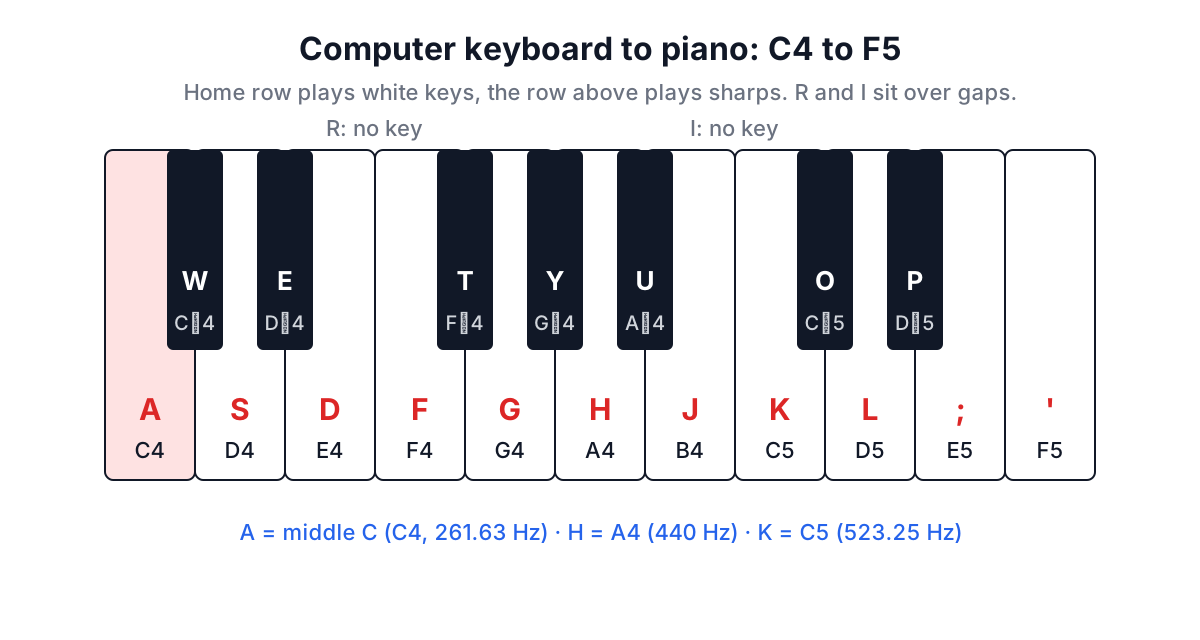
| Letter | Note | Letter | Note |
|---|---|---|---|
| A | C4 (middle C) | W | C#4 |
| S | D4 | E | D#4 |
| D | E4 | T | F#4 |
| F | F4 | Y | G#4 |
| G | G4 | U | A#4 |
| H | A4 | O | C#5 |
| J | B4 | P | D#5 |
| K | C5 | ||
| L | D5 | ||
| ; | E5 | ||
| ' | F5 |
Notice that R and I are skipped. On a real piano there is no black key between E and F, or between B and C, and those letters sit right over those gaps. That is the whole design: the letters you skip are the black keys a piano does not have. GarageBand, Ableton Live and most other DAWs call this "musical typing" and use the same arrangement, so what you learn here carries over.
Reading note names
A name like C#4 has three parts. The letter (A to G) is the note. The symbol is the accidental: # means sharp, one semitone up, and b means flat, one semitone down, so C#4 and Db4 are the same key. The number is the octave in scientific pitch notation. Octave numbers change at C, not at A, which catches a lot of people: B3 is directly below C4, and A4 is above C4.
Middle C is C4. It is the C nearest the middle of a full 88-key piano and the note that sits between the treble and bass staves in written music. On the computer keyboard it is the A key.
Those seven letters repeat. After B comes C again, one octave higher. On the Online Piano, A and K are both C, an octave apart, and you can hear that they sound like "the same note, higher".
Why A is 440 Hz
Pitch is frequency: how many times per second the sound wave repeats. Concert pitch, fixed by the ISO 16 standard, sets A4 at 440 Hz. Everything else comes from one rule called twelve-tone equal temperament: an octave doubles the frequency, and it is split into 12 equal steps (semitones), so each step multiplies the frequency by the twelfth root of 2, about 1.05946.
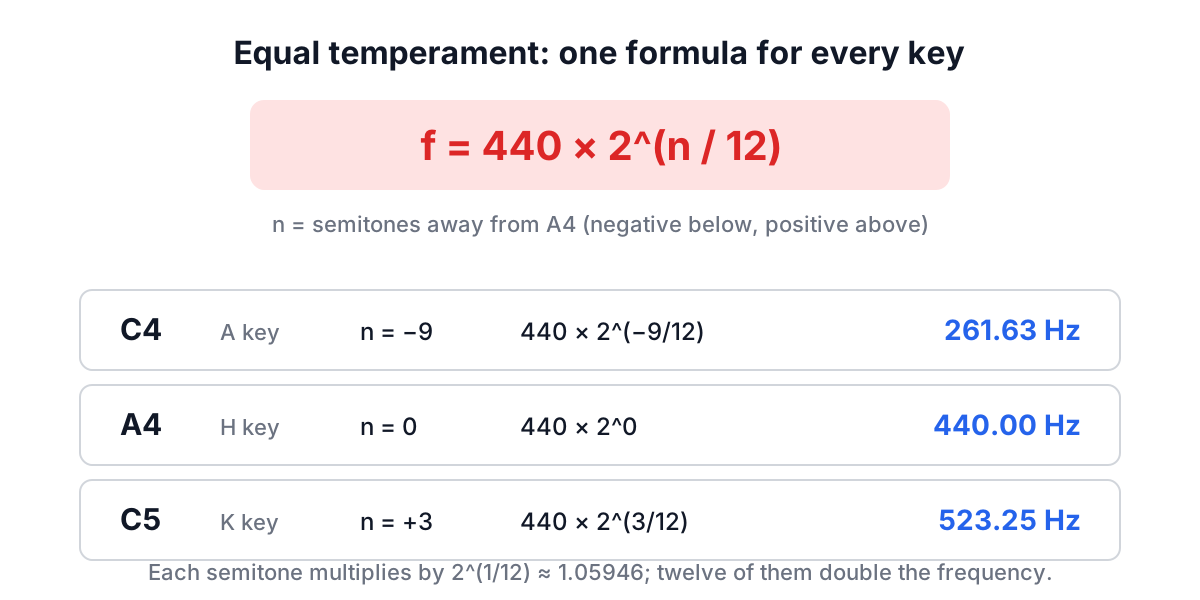
In code it is one line. The MIDI standard numbers notes so that A4 is 69 and middle C is 60:
// f = 440 * 2^((midi - 69) / 12)
const freq = (midi) => 440 * Math.pow(2, (midi - 69) / 12);
freq(69); // 440    (A4, the H key)
freq(60); // 261.63 (C4, the A key)
freq(72); // 523.25 (C5, the K key)
The piano plays each note as a sine wave through the Web Audio API: an oscillator at that frequency, a gain node that fades in over 10 milliseconds and out over about a third of a second, then silence. A sine wave has no overtones, which is why the sound is pure and a little flat compared with a real piano, whose strings ring with a whole series of harmonics.
One practical detail: browsers usually block Web Audio until the person has interacted with the page. That rule exists so websites cannot blare sound on load. If the first key press seems silent, click the page once and try again.
Five first songs
Each song below is written as letters for the computer keyboard. A comma marks a short pause. Play slowly and evenly first; speed comes on its own.
Mary Had a Little Lamb (four keys only):
D S A S D D D,  S S S,  D G G,
D S A S D D D D S S D S A
Twinkle Twinkle Little Star:
A A G G H H G,  F F D D S S A,
G G F F D D S,  G G F F D D S,
A A G G H H G,  F F D D S S A
Happy Birthday (in F major, the black key U is B-flat):
A A S A F D,  A A S A G F,
A A K H F D S,  U U H F G F
Jingle Bells (chorus):
D D D,  D D D,  D G A S D,
F F F F F D D D D S S D S,  G
Amazing Grace (also in F major):
A F H F H G F S A,  A F H F H G K,
H K H K H F A S F F S A,  A F H F H G F
If you would rather watch than read, every one of these is built into the tool. Press Mount Notes next to a song and it shows one note at a time with the letter to press, and Previous and Next step through the tune. Press the play button and it plays the song while lighting the keys.
Make it personal: the birthday song with a name
Happy Birthday is the song most people want first, and its third line is the one with the name in it: "Happy birthday, dear Sam". In the notation above that is A A K H F D S, the big jump up to K (C5) and the walk back down, with the longest note of the song on "Sam".
The Happy Birthday Song With Name tool builds on that. Type a name and it plays the melody on a small piano with the name on screen, then gives you a link ending in ?to-you=Sam. When Sam opens the link, the song plays and the screen fills with balloons and fireworks before a birthday card appears. You can also download the tune as a 15-second WAV file. The melody there runs at 0.6 seconds per beat, and the whole song is 25 beats.
The tune itself is old. It started as "Good Morning to All" by Mildred and Patty Hill in 1893. A US court ruled in 2015 that the long-claimed copyright on the birthday lyrics was not valid, and since a 2016 settlement it has been treated as public domain in the United States.
Common mistakes
Pressing R or I. They sit over the gaps between E-F and B-C and do nothing. If a note seems missing, check that your finger has not landed on one of them.
Holding a key to sustain a note. Each press is one short note. Auto-repeat from a held key is ignored, so hold-and-wait gives you one note; press again to repeat.
Counting octaves from A. C#4 is above middle C; B3 is below it. The octave number ticks over at C.
Keyboard shortcuts. Cmd+S or Ctrl+F would otherwise play a note as well as running the shortcut, so the piano ignores keys pressed with Ctrl, Cmd or Alt. Use plain letters.
Using a non-QWERTY layout. On AZERTY or Dvorak the letters move but the piano listens for characters, not positions. The songs above assume QWERTY.
Where to go next
Once a song is under your fingers, press Record, play it through, press Stop and download the take. For a birthday, send the personal link from the Happy Birthday tool instead, and if the team is celebrating something else, the Celebration Effects screen has confetti and a candle to blow out. If you need to convert a recording to MP3, the Audio Format Converter does that in the browser.
Start with Mary Had a Little Lamb. It uses four keys and takes two minutes. Then try Twinkle Twinkle, which adds the jump up to G and H, and you will have half the home row learned before you notice.