
Cron Schedules Across Platforms: Crontab, GitHub, Kubernetes, AWS
Building a cron schedule that does what you mean: the five fields, the day-of-month OR rule, time zones and daylight saving, and how GitHub, Kubernetes, Quartz and EventBridge read it.
· 11 min read

A cron expression is five short fields, and it is still easy to write one that runs on the wrong days, at the wrong hour or not at all. The syntax itself is covered in our crontab syntax guide; this article is about turning an intention ("every weekday at half past nine, London time") into a schedule that does exactly that on the platform you deploy to. It covers the rule that makes day fields behave unexpectedly, time zones and daylight saving, and how crontab, GitHub Actions, Kubernetes, Quartz and AWS EventBridge read the same schedule differently. The Cron Expression Generator builds the expression from plain choices and shows the next run times and the platform versions side by side.
The five fields, briefly
┌ minute (0-59)
│ ┌ hour (0-23)
│ │ ┌ day of month (1-31)
│ │ │ ┌ month (1-12 or JAN-DEC)
│ │ │ │ ┌ day of week (0-6 or SUN-SAT, 7 is also Sunday)
30 9 * * 1-5
Each field takes *, a number, a list (1,15), a range (1-5) or a step (*/10, 0-30/10). Steps start at the field's minimum, so */10 in the minute field means 0, 10, 20, 30, 40, 50, and in the day-of-month field */10 means 1, 11, 21, 31. A step with a start but no range, such as 5/15, is accepted by some parsers but not by classic Vixie cron, which most Linux systems run; write 5-59/15 to be safe. That is the form the generator uses.
Start from the sentence, not the syntax
The most reliable way to write a schedule is to say it in words first, then fill the fields one at a time, then read it back. The generator does the reading back for you with cronstrue, which turns 30 9 * * 1-5 into "At 09:30, Monday through Friday". A few translations people often need:
| Intention | Expression |
|---|---|
| Every 5 minutes | */5 * * * * |
| Every hour at :17 | 17 * * * * |
| Every 6 hours | 0 */6 * * * (00:00, 06:00, 12:00, 18:00) |
| Weekdays at 09:30 | 30 9 * * 1-5 |
| Twice a day, 08:00 and 20:00 | 0 8,20 * * * |
| Every 15 minutes in business hours | */15 9-17 * * 1-5 (last run 17:45) |
| 1st and 15th at 06:00 | 0 6 1,15 * * |
| Quarterly, first day at 06:00 | 0 6 1 1,4,7,10 * |
| Sundays at 03:30 | 30 3 * * 0 |
Notice the business-hours row: 9-17 in the hour field includes 17, so the job also runs at 17:00, 17:15, 17:30 and 17:45. If the window ends at 17:00, use 9-16 and add a separate 0 17 * * 1-5 line if you need the final run.
The day-of-month OR rule
This one surprises nearly everyone once. When both the day-of-month field and the day-of-week field are restricted (neither is *), cron runs the job when either matches. The crontab(5) manual states it directly, and POSIX specifies the same behaviour.
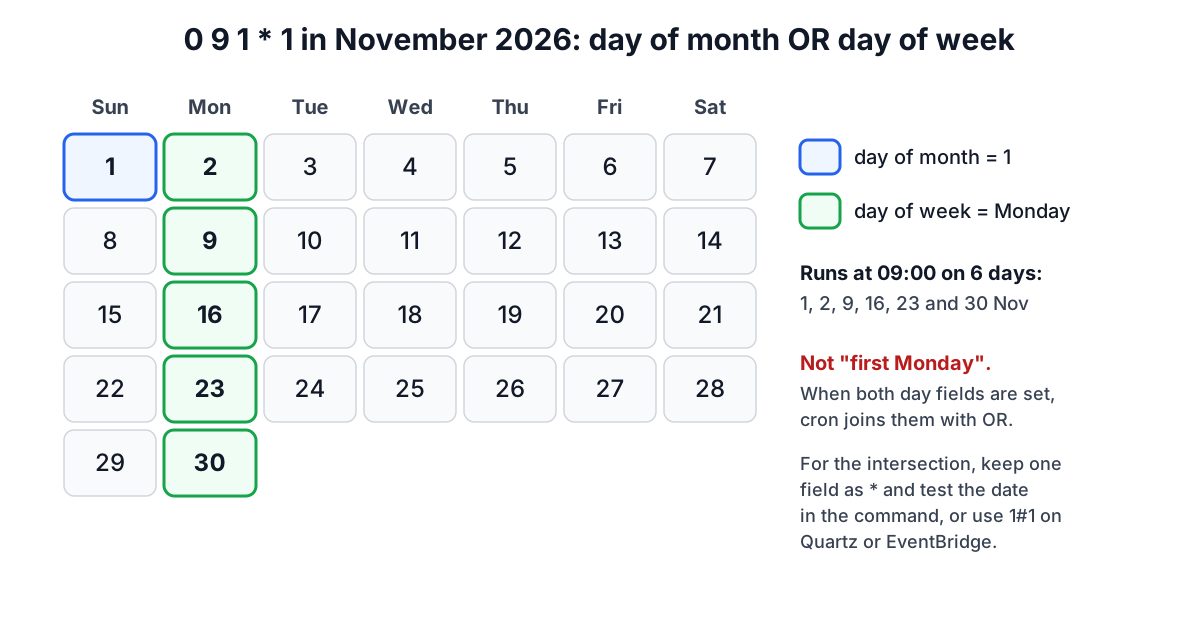
So 0 9 1 * 1 does not mean "the first of the month if it is a Monday". It means "the first of every month, and also every Monday". There is no five-field expression for "first Monday of the month". The usual workaround is to run on Mondays that fall on days 1 to 7 by putting the date test in the command:
0 9 * * 1 [ "$(date +\%d)" -le 07 ] && /opt/jobs/monthly-report
The % must be escaped as \% inside a crontab, because cron turns an unescaped % into a newline. Quartz and EventBridge offer 1#1 (first Monday) instead, which is one reason to schedule such jobs there.
Two related traps: day 31 simply does not occur in April, June, September or November, so 0 0 31 * * silently skips five months a year, and 0 0 30 2 * never runs at all. The generator warns about both. For "last day of the month" in five fields, run on days 28 to 31 and test whether tomorrow is the 1st.
Time zones and daylight saving
Classic cron runs in the daemon's local time zone, which on servers is often UTC but on a laptop or a VM built from a desktop image may be local time. In a zone with daylight saving, local times between roughly 01:00 and 03:00 can be skipped or repeated once a year. Implementations differ in how they compensate: some run a skipped job once at the change, others do not. The safe habits are to run servers in UTC, or to keep daily jobs away from the change window.
When you preview a schedule in the generator, the next run times are computed by cron-parser in the zone you choose, with daylight saving applied. A job at 0 9 * * 1-5 in America/New_York runs at 13:00 UTC until the first Sunday of November and at 14:00 UTC after it. If you copy that expression to a UTC-only platform, it will run at the same UTC time all year, which means an hour off local time for half of it.
Some cron implementations, including cronie, accept a CRON_TZ=Europe/London line in the crontab to set the zone for the entries that follow. Check your system's crontab(5) page before relying on it.
Platform by platform
The same intention is written differently on each platform.
| Platform | Fields | Time zone | Notable rules |
|---|---|---|---|
| crontab (Vixie, cronie) | 5 | daemon's local zone, CRON_TZ on some | OR rule for day fields; % must be escaped |
| Kubernetes CronJob | 5 | controller's zone unless spec.timeZone is set | timeZone stable since 1.27; concurrencyPolicy controls overlap |
| GitHub Actions | 5 | always UTC | minimum interval 5 minutes; runs can be delayed under load |
| Quartz / Spring | 6 or 7 (seconds first, optional year) | JVM or trigger zone | one of the day fields must be ? in Quartz; 1 = Sunday |
| AWS EventBridge | 6 (year last), wrapped in cron() | UTC for rules; Scheduler lets you pick | one of the day fields must be ?; 1 = Sunday; supports L, W, # |
Here is "weekdays at 09:30" on each:
crontab / Kubernetes / GitHub   30 9 * * 1-5
Quartz                          0 30 9 ? * MON-FRI
AWS EventBridge                 cron(30 9 ? * MON-FRI *)
The day-of-week numbering is the classic off-by-one. Unix counts Sunday as 0; Quartz and EventBridge count Sunday as 1, so Unix 1-5 (Monday to Friday) would mean Sunday to Thursday if pasted unchanged. Using names such as MON-FRI avoids the problem, and the generator writes names for those two platforms. Because Quartz and EventBridge require ? in one day field, they cannot express the Unix OR behaviour at all; if both day fields are restricted, the generator tells you to create two schedules.
On GitHub Actions, scheduled workflows run on the default branch, are evaluated in UTC, and GitHub notes that runs can be delayed during periods of high load, especially at the start of every hour. An odd minute such as 17 tends to start closer to its time than 0. Very frequent schedules are throttled to once every five minutes.
On Kubernetes, also set concurrencyPolicy: Forbid if two runs must never overlap, and startingDeadlineSeconds so a CronJob that missed its time because the controller was down does not run late at an unexpected moment.
Worked examples
- Nightly backup at 02:30, server in Europe/Berlin.
30 2 * * *falls inside the daylight saving change window on the last Sunday of March, when 02:00 to 03:00 does not exist locally. Moving it to30 3 * * *, or running the server in UTC, removes the ambiguity. - A GitHub Actions report at 08:00 New York time. In winter that is 13:00 UTC, in summer 12:00 UTC. Pick one (
0 13 * * 1-5) and accept an hour's shift, or run at both times and have the job exit when it is not 08:00 locally. - Billing on the 1st and 15th.
0 6 1,15 * *is safe in every month. The preview shows both dates for the next few months. - Converting a Linux job to EventBridge.
0 */4 * * *becomescron(0 0/4 * * ? *): steps are written start/step, the day-of-week field takes?and a year field is added.
A checklist before you deploy a schedule
- Read the English description and the next five runs; do they match the sentence you started from?
- Is either day field
*? If not, do you really want OR? - Which time zone will the platform use, and does daylight saving shift it?
- For Quartz or EventBridge, did Sunday stay Sunday?
- Can two runs overlap? Use
flock -nin crontab orconcurrencyPolicy: Forbidin Kubernetes. - Does the command use absolute paths and log its output somewhere you will see it?
To check an expression someone else wrote, the Cron Expression Validator explains it and lists its next runs, and the Time Zone Converter helps when you are translating local times to UTC.
Sources
- crontab(5) manual page (cronie and Vixie cron), including the day-of-month and day-of-week rule and
%handling. - The Open Group, POSIX.1-2017, crontab utility.
- GitHub Docs, "Events that trigger workflows: schedule".
- Kubernetes documentation, "CronJob" (timeZone, concurrencyPolicy, startingDeadlineSeconds).
- Quartz Scheduler documentation, CronTrigger tutorial; Spring Framework CronExpression reference.
- AWS documentation, "Cron expressions reference" for EventBridge Scheduler and EventBridge rules.
- cron-parser and cronstrue project documentation.
Related searches
- cron expression generator
- cron day of month and day of week
- github actions cron utc
- kubernetes cronjob timezone
- aws eventbridge cron format
- quartz cron question mark
- cron daylight saving time
- cron last day of month
- cron every weekday
- convert crontab to eventbridge