
From curl to Code: What Each curl Option Means in Your Language
The curl options behind every API example, the defaults that differ between curl and fetch, requests, Axios and Go, and how to turn a browser Copy as cURL into clean code.
· 11 min read

Almost every API reference shows its examples as curl commands, and every major browser can copy a network request as one. curl is the shared language of HTTP. Sooner or later you need the same request inside a program, and translating it by hand is where subtle mistakes creep in: a missing header that curl added silently, a body that gets encoded differently, a redirect that curl did not follow but your library does. This guide walks through the curl options you will meet in practice and what each one means in fetch, Axios, Python requests, Go and PHP. The cURL to Code Converter applies all of these rules automatically.
Anatomy of a curl command
curl -X POST 'https://api.example.com/v1/orders?expand=items' \
  -H 'Authorization: Bearer sk_test_123' \
  -H 'Content-Type: application/json' \
  -d '{"customer":"cus_42","items":[{"sku":"ABC-1234","qty":2}]}' \
  --max-time 10
A command is a list of shell words. The shell removes the quotes before curl sees them, and the backslash at the end of each line joins the lines. Single quotes keep everything literal, double quotes still expand $variables and backslash escapes, and bash's #x27;...' form decodes escapes like \n (Chrome uses it for bodies that contain newlines or quotes). On Windows, Chrome's "Copy as cURL (cmd)" escapes special characters with ^ instead. A converter has to undo all of this the way the shell would before it can look at the options.
The URL is the first argument that is not an option. Everything else is options, and a short option can take its value attached (-XPOST, -H'Accept: */*') or several flags can be combined (-sSL).
The options that matter
| Option | Meaning | Default effect |
|---|---|---|
-X, --request | Method | Otherwise GET, or POST when there is a body |
-H, --header | Add a header | Name: with no value removes a header curl would send |
-d, --data | Body, sent as typed | POST, Content-Type: application/x-www-form-urlencoded |
--data-raw | Like -d, but @ is not special | Same as -d |
--data-binary | Body; @file sent byte for byte | Same as -d |
--data-urlencode | URL-encode the value part | Same as -d |
--json | JSON body (curl 7.82.0+) | POST, Content-Type and Accept application/json |
-G, --get | Put -d data in the query string | GET |
-F, --form | Multipart form field or file | POST, multipart/form-data with boundary |
-u, --user | Credentials | Authorization: Basic base64(user:pass) |
-b, --cookie | Cookies (name=value) or a cookie file | Cookie header |
-A, -e | User-Agent, Referer | Header |
-L, --location | Follow redirects | Off without it |
-k, --insecure | Skip TLS certificate checks | Verification on without it |
-m, --max-time | Total timeout in seconds | No timeout |
-I, --head | HEAD request |
Options like -s (silent), -v (verbose), -o (output file) and -i (include headers in output) change what curl prints, not the request, so converters ignore them.
The body rules that trip people up
-d sends exactly what you type. curl -d 'name=Ada Lovelace' sends the bytes name=Ada Lovelace, space included, with a form Content-Type. It does not URL-encode. If you need encoding, use --data-urlencode 'name=Ada Lovelace', which sends name=Ada%20Lovelace. curl encodes everything except letters, digits and -._~, so a space becomes %20, not +.
Repeated -d values are joined with &. The curl manual says the pieces are merged with a separating &, so -d a=1 -d b=2 sends a=1&b=2. --json is the exception: repeated --json pieces are concatenated with nothing between them.
-d @file strips line breaks; --data-binary does not. When -d reads from a file, curl removes carriage returns, newlines and null bytes. Use --data-binary @file to send a JSON or XML file unchanged.
-G moves data to the URL. curl -G https://api.example.com/search --data-urlencode 'q=rust toml' -d limit=5 requests https://api.example.com/search?q=rust%20toml&limit=5. This is how many API docs show query parameters.
-d and -F do not mix. -F builds a multipart/form-data body, and curl refuses to combine it with -d. When you translate a multipart request, never set the Content-Type header yourself: the library must add the boundary parameter, and a hand-written multipart/form-data header without it produces a body the server cannot parse.
Defaults that differ between curl and your library
This is where hand translations usually go wrong. The table shows what each library does by default compared with curl.
| Behaviour | curl | fetch | Axios (Node) | Python requests | Go net/http | PHP ext-curl |
|---|---|---|---|---|---|---|
| Follows redirects | Only with -L | Yes | Yes, up to 21 | Yes (not for HEAD) | Yes, up to 10 | Only with CURLOPT_FOLLOWLOCATION |
| Content-Type for a string body | form-urlencoded with -d | text/plain;charset=UTF-8 | depends on data type | none | none | form-urlencoded |
| Verifies TLS certificates | Yes | Yes | Yes | Yes | Yes | Yes |
| Timeout | None | None | None | None | None | None |
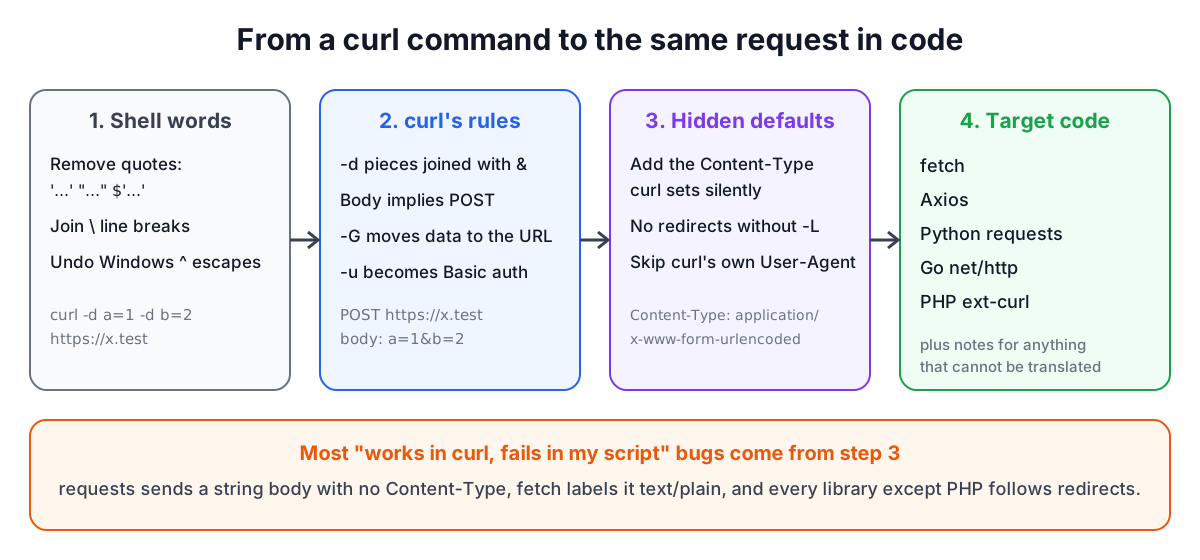
Two rows explain most "works in curl, fails in my script" bugs.
Content-Type. If you translate curl -d 'a=1' to requests.post(url, data='a=1'), requests sends no Content-Type at all, and many servers then ignore the body. fetch with a string body labels it text/plain. The converter makes curl's implicit header explicit in every target, so the server sees the same request.
Redirects. curl does not follow a 301 or 302 unless you pass -L; it returns the redirect response itself. Every library except PHP's follows by default. For a faithful translation the converter turns redirects off in Python (allow_redirects=False), Axios (maxRedirects: 0) and Go (a CheckRedirect that returns http.ErrUseLastResponse). Browsers cannot make fetch return a redirect response to your code, so the fetch output only notes the difference. If you want to follow redirects, add -L to the command or remove those settings.
JSON bodies, idiomatically
When the body is JSON (from --json, or -d with a JSON Content-Type), the converter parses it and writes it the way each ecosystem expects:
json_data = {
    "customer": "cus_42",
    "gift": False,
}
response = requests.post(url, headers=headers, json=json_data)
const response = await fetch(url, {
  method: "POST",
  headers: { "Content-Type": "application/json" },
  body: JSON.stringify({ customer: "cus_42", gift: false }),
});
Python needs True, False and None instead of true, false and null, which is a classic copy-and-paste error. Go keeps the body as a raw string in a strings.NewReader, using a backtick literal when the JSON contains double quotes.
Authentication
-u user:password sends HTTP Basic authentication as defined in RFC 7617: the header Authorization: Basic followed by the Base64 encoding of user:password. For octocat:TOKEN that is a fixed string you could paste, but it is clearer to use each library's own feature: requests' auth=(user, password), Axios' auth: { username, password }, Go's req.SetBasicAuth and PHP's CURLOPT_USERPWD. Base64 is an encoding, not encryption, so Basic auth must only be used over HTTPS.
Bearer tokens arrive as an ordinary -H 'Authorization: Bearer ...' header and are copied as they are. Wherever they end up, move them into environment variables before the code goes into version control.
Copy as cURL from the browser
In Chrome, Edge and Firefox, open developer tools, select the Network tab, reproduce the request, right-click it and choose Copy, then Copy as cURL. The command includes every header the browser sent: cookies, sec-ch-ua client hints, accept-language, referer and more. That makes it a faithful replay, but most of those headers are irrelevant to a script and session cookies expire. Trim the header list to what the API needs (usually authorization, content type and accept), and replace cookies with proper credentials.
Remember that browser fetch is subject to CORS. A request copied from one site and replayed with fetch from another origin will be blocked unless the API allows it. The same code runs without that restriction in Node.js 18 and later, where fetch is built in.
A worked example
curl -F 'file=@report.pdf' https://x.test/upload
becomes, in PHP:
$ch = curl_init();
curl_setopt($ch, CURLOPT_URL, 'https://x.test/upload');
curl_setopt($ch, CURLOPT_RETURNTRANSFER, true);
curl_setopt($ch, CURLOPT_POSTFIELDS, [
    'file' => new CURLFile('report.pdf'),
]);
$response = curl_exec($ch);
Passing an array to CURLOPT_POSTFIELDS makes PHP send multipart form data, and CURLFile marks the file to upload. In Python the same request uses files={"file": ("report.pdf", open("report.pdf", "rb"))}, and in Go a mime/multipart writer with CreateFormFile.
Checklist
- Make curl's implicit Content-Type explicit in your code.
- Decide on purpose whether to follow redirects; curl does not by default.
- Use
--data-urlencodeor the library's own encoding when values contain spaces or&. - Never set a multipart Content-Type by hand.
- Strip browser-only headers and session cookies from copied commands.
- Move tokens and passwords out of the code.
Related tools: the API Tester sends requests from the browser, HTTP Status Codes explains the responses, and the JWT Decoder reads the bearer tokens you find in copied commands.
Related searches
- curl to python requests
- curl options explained
- curl -d vs --data-binary
- curl -G query string
- copy as curl chrome
- curl does not follow redirects
- curl --json option
- curl -u basic auth header