
Date Math for Developers: Month Ends, DST Days and Unix Time
Counting days between dates, adding months without landing in March, surviving 23-hour days and reading Unix timestamps in the right unit.
· 6 min read
A subscription renews "one month" after 31 January. A nightly job that should run every 24 hours fires an hour early in March. A log line says 1700000000 and nobody is sure whether that is seconds or milliseconds. Date bugs rarely come from hard maths. They come from units that look interchangeable but are not: a day is not always 24 hours, a month is not a fixed number of days, and a timestamp is not useful until you know its unit.
This article walks through the three date operations developers do most often, with a tool for each: measuring the gap between two dates, adding time to a date, and converting Unix timestamps. Every example can be reproduced in the browser.
Counting the days between two dates
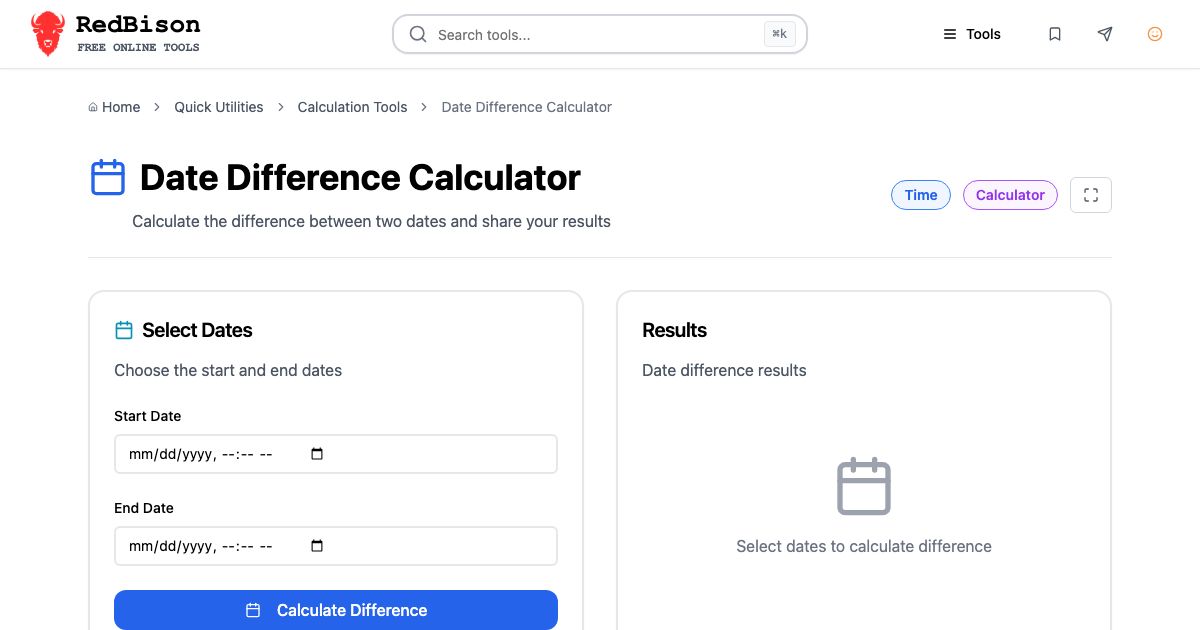
The Date Difference Calculator takes a start and an end date and time and reports the gap in years, months, weeks, days, hours and minutes, plus business days.
The first question is what "days between" means. The calculator measures the gap, so 1 January to 2 January is one day, the same as Excel's DATEDIF or end - start in most date libraries. If both the first and last days count (a hotel stay counted in days rather than nights, or an event that runs on both dates) add one.
Months and years are calendar units, not averages. A worked example:
- Set Start Date to 31 January 2024, 00:00.
- Set End Date to 1 March 2024, 00:00.
- Read the result: 30 days, 1 month, a breakdown of 4 weeks and 2 days, and 22 business days.
A calculator that divides by an average month of 30.44 days would say 0 months here. Counting calendar months gives the answer people expect, and matches how differenceInMonths in date-fns, Period.between in Java and relativedelta in Python work.
Business days count Monday to Friday from the start date up to, but not including, the end date. Friday to the following Monday is one business day. That convention means you can chain ranges without counting any day twice. Holidays are local, so no generic calculator can subtract them for you; keep a list for your region and subtract it.
| Question | Unit to read | Why |
|---|---|---|
| How old is this account? | Years, Months | Calendar units match how people count |
| How long was the outage? | Hours, Minutes | Elapsed time, DST included |
| How many working days until launch? | Business Days | Weekdays only, end date excluded |
| How many nights in a booking? | Days | Gap between check-in and check-out |
Adding and subtracting time
The Date Arithmetic tool adds or subtracts minutes, hours, days, weeks, months or years from a date. Two cases deserve care: month ends and leap days.
Month ends clamp
In JavaScript, date.setMonth(date.getMonth() + 1) on 31 January asks for 31 February, which does not exist, so the Date object rolls forward to 2 March (or 3 March in a non-leap year). That is how billing systems end up skipping February.
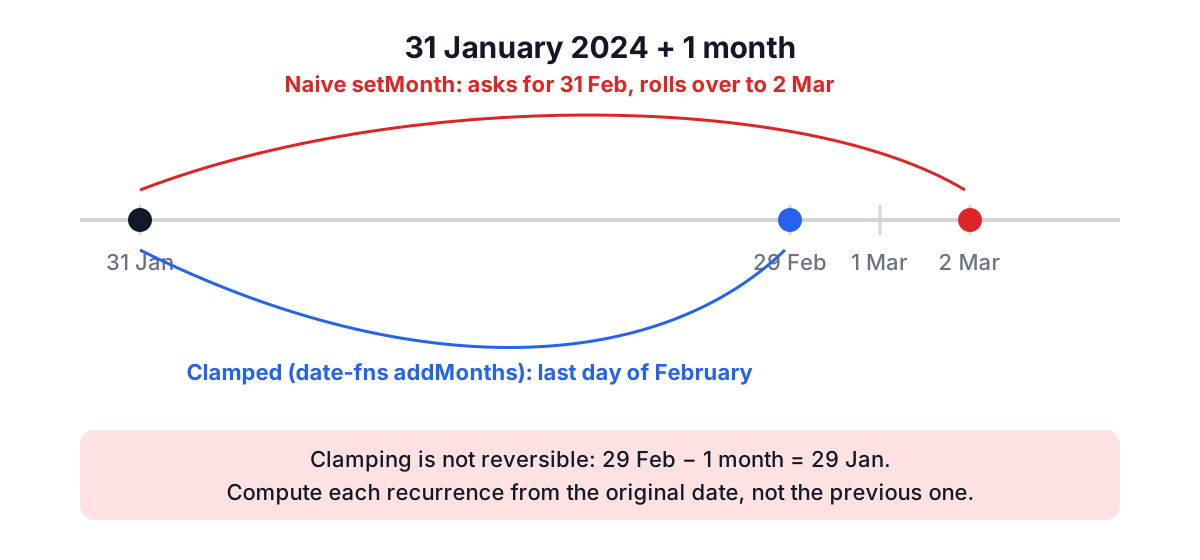
The tool clamps to the last day of the target month instead, which is what date-fns addMonths, Java's plusMonths and PostgreSQL's + interval '1 month' all do:
| Start | Operation | Result |
|---|---|---|
| 2024-01-31 | + 1 month | 2024-02-29 |
| 2023-01-31 | + 1 month | 2023-02-28 |
| 2024-03-31 | − 1 month | 2024-02-29 |
| 2024-02-29 | + 1 year | 2025-02-28 |
| 2024-02-29 | + 4 years | 2028-02-29 |
Clamping is not reversible. 31 January plus one month is 29 February, and 29 February minus one month is 29 January. If you schedule recurring monthly events, always compute each one from the original anchor date ("start + n months"), not from the previous occurrence, or a 31st will drift to the 28th and stay there.
Leap years follow the Gregorian rule: divisible by 4, except century years, unless also divisible by 400. 2000 was a leap year; 2100 will not be.
Days are not 24 hours
Where daylight saving time applies, one calendar day a year has 23 hours and one has 25. That is why "add 1 day" and "add 24 hours" are different operations.
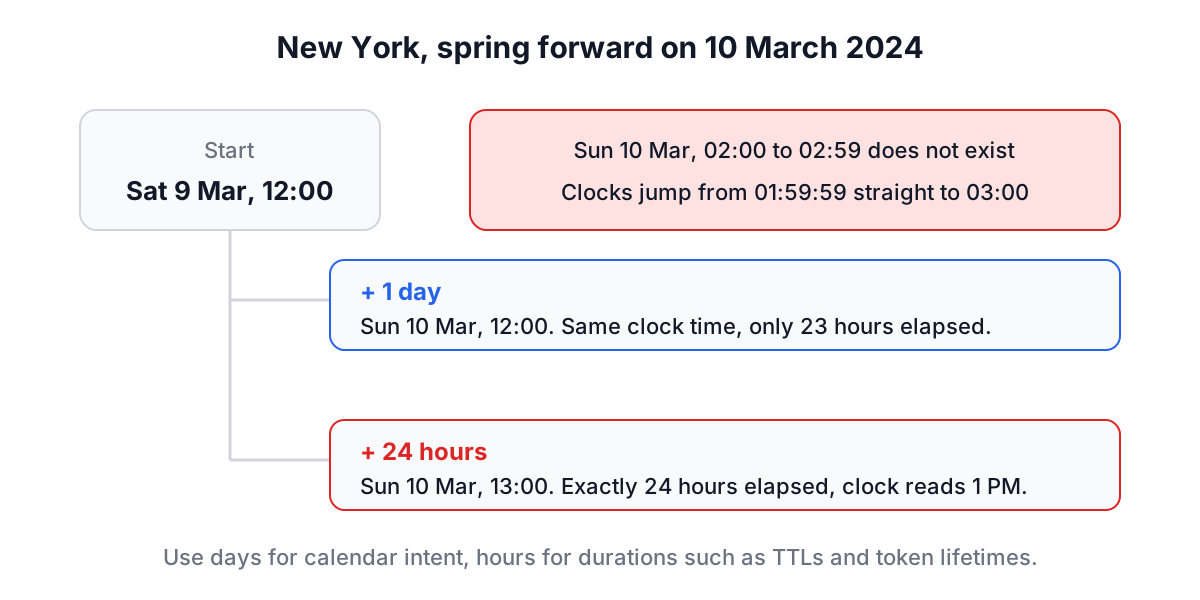
Adding days keeps the wall-clock time, which is what people want for "same time tomorrow" reminders. Adding hours adds elapsed time, which is what you want for token lifetimes, cache TTLs and rate limits. The Date Difference Calculator shows the same effect from the other direction: midnight 10 March to midnight 11 March 2024 in New York is 1 day but 23 hours.
A practical rule: store and compute instants in UTC, and only convert to local time for display or for calendar rules ("every day at 9 AM local").
Unix timestamps: seconds, milliseconds and nanoseconds
The Time Converter turns Unix timestamps into dates and dates into timestamps, and shows a live clock for UTC, your zone and one more zone.
Unix time counts seconds since 1970-01-01 00:00:00 UTC and ignores leap seconds, so every day is exactly 86,400 seconds. It is the same number everywhere on Earth at a given instant, which is why it is the safest format for logs and APIs. The trouble is the unit:
| Digits today | Unit | Typical source |
|---|---|---|
| 10 | seconds | Unix date +%s, JWT exp, PostgreSQL extract(epoch ...) |
| 13 | milliseconds | JavaScript Date.now(), Java System.currentTimeMillis() |
| 19 | nanoseconds | Go time.Now().UnixNano(), OpenTelemetry spans |
Read a seconds value as milliseconds and you land in January 1970. Read milliseconds as seconds and you land tens of thousands of years in the future. If a converted date looks absurd, the unit is the first suspect.
Nanosecond values need care in JavaScript. A 19-digit integer is larger than Number.MAX_SAFE_INTEGER (2^53 − 1, a 16-digit number), so parseInt silently rounds it. The Time Converter parses timestamps with BigInt before dividing down to milliseconds:
// Exact: BigInt keeps all 19 digits, then drops sub-millisecond precision
const ns = 1640995200123456789n;
new Date(Number(ns / 1_000_000n)).toISOString();
// '2022-01-01T00:00:00.123Z'
A worked round trip in the tool:
- Set Format to Seconds, type
1640995200, click From Unix. - UTC Time shows
2022-01-01 00:00:00.000 UTC. In New York the date picker shows 31 December 2021, 19:00:00, because the picker is local time. - Click To Unix and you get
1640995200back.
That last step is worth checking in any converter you use. A common bug fills a local date field with toISOString().slice(0, 16), which is UTC; converting back then shifts the result by your UTC offset.
The 2038 problem is the other date to know. A signed 32-bit seconds counter overflows at 2147483647, which is 2038-01-19 03:14:07 UTC. JavaScript, modern Linux and 64-bit databases are fine, but old C structs, embedded firmware and INT database columns still turn up.
Common mistakes
- Using
setMonthorsetFullYearfor calendar maths. Use a library that clamps, such as date-fns, Luxon, java.time or dateutil. - Adding 86,400 seconds for "tomorrow". That is 24 hours, not one day, wherever DST exists.
- Mixing local and UTC fields. A
datetime-localinput is local time; an ISO string ending inZis UTC. Convert explicitly. - Guessing the timestamp unit. Count the digits before converting.
- Counting the end date by accident. Decide whether a range is inclusive and write it down in the code.
For converting a meeting time between several cities, the Time Zone Converter shows many zones side by side, and the Epoch Converter detects timestamp units automatically. With those three habits (UTC for storage, calendar-aware libraries for months, and digits counted before converting) most date bugs never get written.