
How to Decode Binary Formats Without the Schema
A payload that is not JSON: protobuf, MessagePack, CBOR or a ZIP in disguise. How to tell them apart from the first bytes, decode each honestly, and list archives without extracting.
By Redbison Dev · · Updated · 9 min read
A payload lands in front of you that is not JSON: a base64 string in a log line, a hex dump from a packet capture, a .bin attachment, an archive you were told not to open. You do not have the schema, the producing code, or time. The order of work is always the same: identify the format from its first bytes, decode the structure with a tool that admits what the bytes cannot say, and only then go hunting for names and meaning. The four tools in this guide, the Protobuf Wire Decoder, MessagePack Decoder, CBOR Decoder and ZIP File Inspector, do all of that in your browser, so sensitive payloads never leave the machine.
Telling the formats apart from the first bytes
Containers announce themselves. 50 4b 03 04 ("PK") opens the ZIP family, which includes .jar, .apk, .docx and .xlsx; 1f 8b is gzip; 53 51 4c 69 starts an SQLite database, covered in the file analysis guide. Serialization formats are harder because the efficient ones spend no bytes on magic numbers.
A workable triage for a short payload: if the first byte is between 80 and 8f it is plausibly a MessagePack map, between a0 and b7 a CBOR map or text string, and 7b is just {, meaning you had JSON all along. Protobuf is the one with no signature at all; its tell is structural, a plausible tag byte like 08, 0a, 12 or 1a at the start. These are probabilities, not proofs, so the real test is to paste the bytes into the matching decoder and see whether the whole payload parses cleanly. A wrong guess fails loudly at a named byte offset; a right one consumes every byte.
Executables, WebAssembly modules, pprof profiles and font files announce themselves the same way; reading binary files without running them covers those signatures and what their headers state.
Protobuf: structure without names
Protocol Buffers deliberately ship no self-description. A message is tag-value records, each tag holding (field_number << 3) | wire_type, and the encoding guide at protobuf.dev is blunt about the consequence: the name and declared type of each field "can only be determined on the decoding end by referencing the message type's definition (i.e. the .proto file)".
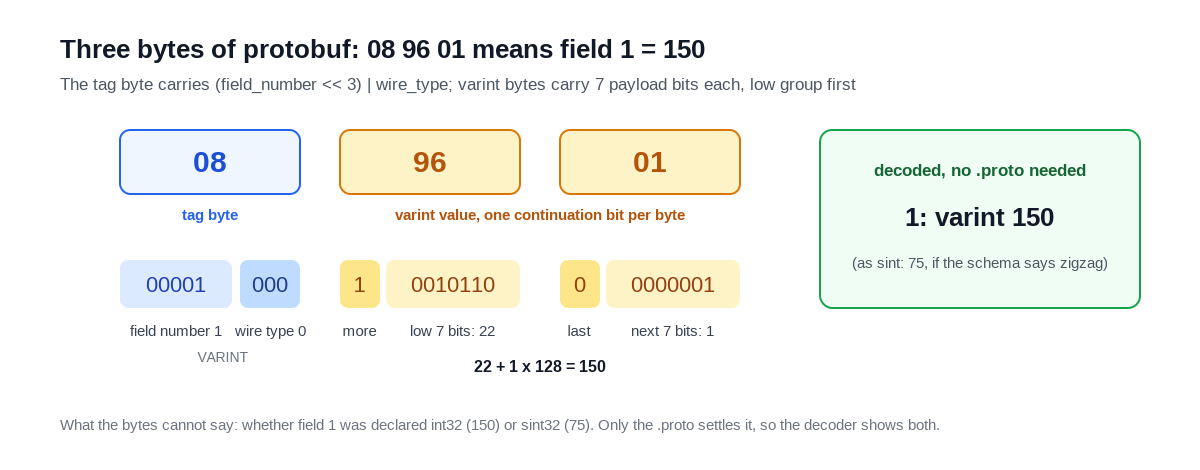
The guide's own first example is the three bytes 08 96 01. Paste them into the Protobuf Wire Decoder and it prints 1: varint 150 (as sint: 75): field 1, wire type VARINT, value 150, or 75 if the schema declared a zigzag sint32. Both readings appear because both are true of the bytes.
The deep ambiguity lives in wire type LEN, which carries strings, bytes, embedded messages and packed repeated fields, four declared types behind one wire shape. The decoder trial-parses every LEN payload as a message and keeps whichever readings fit. The four bytes 0a 02 68 69 are the canonical trap: the payload is the string "hi" and simultaneously a well-formed message holding field 13 = 105, and nothing in the bytes says which was meant. The tool prints the nested decode marked message? with the note that it also reads as text, which is the same honesty protoscope, the schema-less disassembler from the protocolbuffers project, shows when its README calls its own heuristics "necessarily imperfect".
In practice the decode is still decisive. Field numbers and types let you line the output up against any .proto you suspect, confirm what a producer actually sent, or reconstruct a workable schema for an undocumented API. Two mechanical gotchas: gRPC prefixes every message with 5 framing bytes (a compression flag and a big-endian length), so strip those first, and packed repeated numbers arrive as one LEN payload that decodes as neither text nor a message.
MessagePack and CBOR: binary JSON, two dialects
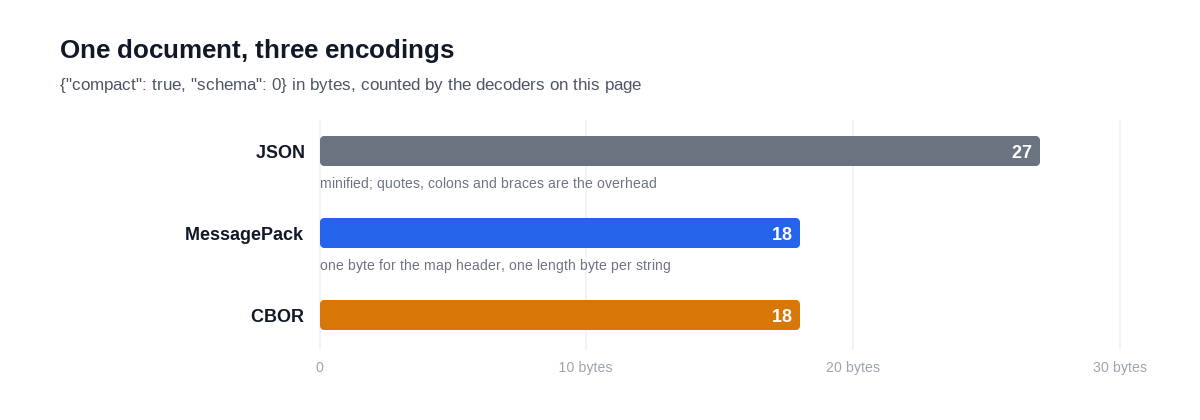
Both formats keep JSON's data model and drop its text. The pair {"compact": true, "schema": 0} is 27 bytes minified; as MessagePack (82 a7 63 6f 6d 70 61 63 74 c3 a6 73 63 68 65 6d 61 00) it is 18 bytes, and its CBOR twin (a2 67 63 6f 6d 70 61 63 74 f5 66 73 63 68 65 6d 61 00) is also 18. Paste either into its decoder and the same JSON comes back.
The decode direction is where the two tools earn their keep, because both formats say things JSON cannot, and a careless converter destroys exactly those values:
- Integers past 2^53. Both formats carry full 64-bit integers; JavaScript numbers round above 9007199254740991. The decoders return
{"$int64": "18446744073709551615"}with every digit, instead of a silently different ID. - Binary. MessagePack bin and CBOR byte strings become
$byteshex previews rather than mojibake. - Time. MessagePack's one predefined extension is type -1, timestamp: the six bytes
d6 ff 5e 0b e1 00render as 2020-01-01T00:00:00.000Z. CBOR uses tags 0 and 1 from RFC 8949;c1 1a 51 4b 67 b0, the RFC's own example, renders as epoch 1363896240, which is 2013-03-21T20:04:00Z. - Non-string map keys. COSE and WebAuthn key their CBOR maps with integers on purpose. Those survive as
"$key:1"instead of colliding.
Which dialect you are holding is usually decided by the ecosystem: Redis values, Fluentd events and game traffic lean MessagePack; WebAuthn attestations, COSE tokens and CoAP devices are CBOR by standard. When unsure, try both decoders; the CBOR Decoder is pinned in this site's test suite against RFC 8949's Appendix A vectors, down to the half-precision float f9 00 01 = 5.960464477539063e-8, so a clean parse there is strong evidence. Streams are normal in both worlds: each decoder reports how many bytes follow the first object, and you trim and repeat. For byte-level spelunking when neither parses, the Binary Hex Editor shows the raw dump.
The ZIP family: list before you extract
Archives are the opposite problem: the format is self-describing, and the risk is acting on it. Every ZIP carries a central directory at the end of the file, defined in PKWARE's APPNOTE.TXT, that records each entry's name, sizes, method and timestamp. Reading that index lists the archive completely without decompressing anything, which is how the ZIP File Inspector works.
The JDK-built JAR in this site's test suite lists as: JAR, 6 entries, 247 B packed, 268 B unpacked (1.1:1), with the manifest panel showing Main-Class: A and Created-By: 17.0.21.1 (Homebrew). The manifest is the one entry the inspector does decompress, through a built-in RFC 1951 inflate, because Main-Class is the line that decides whether java -jar runs at all. The same listing works for anything ZIP-shaped: an .apk shows its AndroidManifest.xml and libraries, a .docx its XML parts.
Listing first is a security posture, not a convenience. The index exposes the three classic attacks before any extractor runs: entry names with ../ segments (the Zip Slip pattern Snyk disclosed across dozens of extraction libraries in 2018, which writes files outside the destination directory), absolute path names, and claimed sizes whose compression ratio has the zip-bomb shape. The inspector flags all three; ordinary archives sit around 3:1 to 10:1, so a claim of hundreds to one across gigabytes deserves the warning it gets. If the archive then needs unpacking or repacking, the Archive Converter does it in the browser; if it is a JAR you are debugging rather than distrusting, the dump analysis guide covers what to do once the process is running.
Tools for this job
- Protobuf Wire Decoder: hex or base64 protobuf without the .proto; every plausible reading per field, nested messages found by trial decode.
- MessagePack Decoder: msgpack bytes to JSON with $int64, $bytes, $ext and $timestamp keeping the lossy edges visible.
- CBOR Decoder: RFC 8949 decoding with tags rendered, half-floats, indefinite lengths and the Appendix A vectors pinned in tests.
- ZIP File Inspector: central-directory listing with folder sizes, the JAR manifest and traversal, absolute-path and bomb warnings.
- Binary Hex Editor: the raw byte view for payloads that none of the parsers accept.
- Protocol Buffers Tools: the schema side of the protobuf workflow, for when you do have the .proto and want to validate JSON against it.
Frequently asked questions
How do I identify an unknown binary file or payload?
First bytes, then structure. Check for container magic (PK for the ZIP family, 1f 8b for gzip, "SQLite format 3" for databases), then try the serialization decoders in likelihood order for your context. A correct guess consumes every byte cleanly; a wrong one fails at a named offset. Only unidentifiable payloads need byte-level work in a hex editor.
Is it safe to paste production payloads into these tools?
The four tools here decode with local JavaScript and transmit nothing, so the payload never leaves your tab, which is the property to demand before pasting anything sensitive anywhere. The remaining care is human: decoded output can contain tokens, IDs and personal data, so treat the result with the same caution as the bytes.
Can I recover the original field names from protobuf or MessagePack bytes?
From MessagePack and CBOR, yes: both encode map keys inline, so the names are in the bytes. From protobuf, no: the wire format carries field numbers only, and the encoding guide states the names live exclusively in the .proto. You can recover the structure and values, then match field numbers against candidate schemas.
Why do decoded 64-bit integers show up as strings?
Because the output is JSON and JavaScript numbers hold integers exactly only up to 2^53. Both decoders tag anything larger as a $int64 decimal string so that no digit changes. If you re-encode the JSON elsewhere, handle those tagged values first; they are precisely the ones a naive round trip corrupts.
Sources and further reading
- Protocol Buffers: Encoding, Protocol Buffers documentation. The wire format: tags, wire types, varints, zigzag and the 08 96 01 example.
- Protoscope, protocolbuffers on GitHub. The schema-less disassembler whose heuristic honesty these tools mirror.
- MessagePack specification, msgpack on GitHub. The format table, limits, str/bin split and the timestamp extension.
- RFC 8949: Concise Binary Object Representation (CBOR), IETF. Major types, tags, indefinite lengths and the Appendix A test vectors.
- APPNOTE.TXT - .ZIP File Format Specification, PKWARE. The central directory and end-of-central-directory records this listing reads.
- JAR File Specification, Oracle. The manifest format, its 72-byte lines and Main-Class.
- Zip Slip Vulnerability, Snyk. Path traversal through archive entry names.
Open the Protobuf Wire Decoder
More Data Formats
Every tool in the Data Formats section, free and in your browser.