
How to Write a Technical Design Doc Reviewers Actually Read
The sections that matter, the ones people skip, and how to write alternatives, risks and rollout plans that settle arguments before the code is written.
· 6 min read
Most design docs fail in one of two ways. Some are written after the code, as a record nobody reads. Others are 30 pages of architecture diagrams that never say which problem is being solved or what was rejected. The useful ones sit in between: short enough to read in one sitting, specific enough that a reviewer can say "this will not work because..." before anyone writes the code.
This guide covers what a technical design document is for, the sections that carry the weight, and how to write them so review meetings settle decisions instead of reopening them. The Design Document Generator produces the structure described here from a short questionnaire.
What a design doc is for
A design doc is a tool for getting disagreement out early. Changing a plan in a document costs an afternoon; changing it after three weeks of implementation costs three weeks. The doc also has a second life: six months later, when someone asks why the service uses a queue instead of direct calls, the answer is written down.
Companies use different names. Some call them design docs, some technical specs, and many engineering organizations and open source projects (the Rust project is a well-known example) run an RFC process, "request for comments". The names matter less than the habit: write the plan, circulate it, collect objections, decide.
Not every change needs one. A reasonable rule of thumb is to write a design doc when a change crosses team boundaries, introduces a new dependency or data store, changes a public API, or will take more than a couple of weeks. A bug fix does not need one. A new billing pipeline does.
The sections that carry the weight
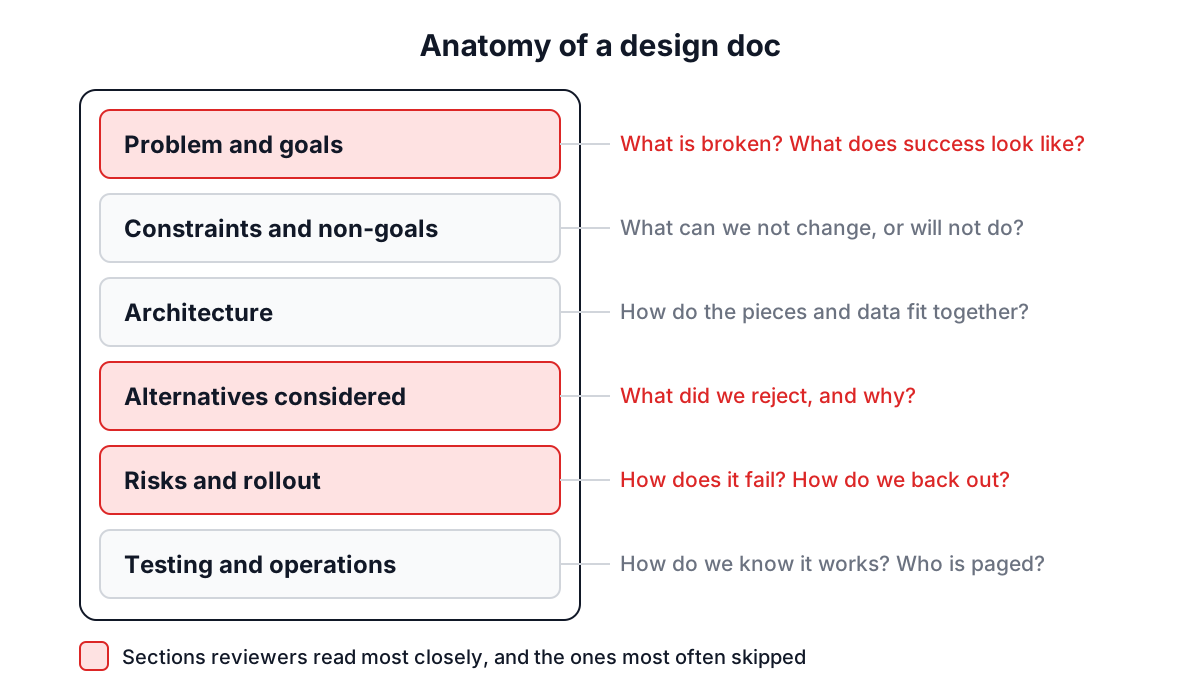
| Section | Question it answers | Common failure |
|---|---|---|
| Overview and problem | What is broken and why fix it now? | Starts with the solution |
| Goals and non-goals | How will we know it worked? What are we not doing? | Goals with no numbers |
| Constraints | What can we not change? | Unstated, discovered in review |
| Architecture | How do the pieces fit? | A diagram with no data flow |
| Alternatives considered | What else did we look at? | Missing, so review re-litigates it |
| Risks and rollout | How does this fail, and how do we back out? | "Deploy to prod" as the plan |
| Testing and operations | How do we know it works and who gets paged? | Left for later |
Problem first
Write the problem statement before you write a word about the solution. If you cannot describe the problem in three or four sentences, with a number in at least one of them ("checkout p95 latency is 2.4 s and rising 10% a month"), the design will wander. Reviewers who agree on the problem argue productively about solutions; reviewers who do not are arguing past each other.
Goals with numbers, and non-goals
"Make it fast" is not a goal. "p95 under 300 ms at 2,000 requests per second" is. Measurable goals also feed the observability section later, because each goal needs a metric that proves it.
Non-goals are the most underrated section in any design doc. "We will not support multi-region writes in this phase" saves a 40-minute tangent in review. In the generator, put non-goals in the Constraints field so they appear next to the hard limits.
Alternatives considered
This section is what separates a design doc from a description. List the two or three serious options, the strongest argument for each, and why you chose against it. If the obvious alternative is missing, someone will raise it in the meeting, and you will spend the meeting rebuilding the comparison you should have written.
A short format works well:
Option B: synchronous calls to the ledger service
+ simpler, no queue to operate
- checkout fails when the ledger is down (it was down 3 times last quarter)
- ledger latency adds directly to checkout p95
Rejected: availability goal requires checkout to survive ledger outages.
Risks and rollout
Every design has a way it fails in production. Write it down with what you will do about it. "Data migration could corrupt balances: run the migration in shadow mode for a week and compare totals daily" is a risk entry a reviewer can evaluate. In the generator, put one risk per line in the form risk: mitigation and each becomes its own entry.
The rollout plan should say how the change reaches users gradually and how you back out. Feature flags, a percentage rollout, a dual-write period and a rollback rehearsal are all worth naming.
A worked example
Open the Design Document Generator and press Load Sample. It fills in an authentication microservice. Look at two fields in particular.
Success Criteria is one sentence listing four targets separated by commas, starting with "Sub-100ms response time, 99.9% uptime". The generator turns it into four separate goals, and it does not split "99.9%" at the decimal point.
Implementation Plan reads: "Phase 1: Core auth service, Phase 2: OAuth integration, Phase 3: Migration tooling, Phase 4: Performance optimization and monitoring." Written on one line, it still becomes four phases. Add a timeline in parentheses at the end of a phase, such as "(weeks 3-4)", and it is used as that phase's timeline.
Press Generate Design Document. You get a preview and a Markdown file with headings and bullet lists ready for a wiki or a repository. Sections you left empty show prompts like "State the expected load and how the design grows past it" instead of invented numbers, so reviewers can see at a glance what is still missing.
Design docs, ADRs and PRDs
Three documents get confused:
- A product requirements document says what to build and why, from the user's side. The PRD guide covers it.
- A design doc says how to build it, and what was rejected.
- An Architecture Decision Record, a format Michael Nygard described in 2011, captures a single decision with its context and consequences, usually after it is made. ADRs are short and accumulate in the repository over time.
A healthy flow uses all three: the PRD sets the goal, the design doc proposes the approach, and ADRs record the individual decisions that come out of review.
Common mistakes
- Writing it after the code. Then it is documentation, not design. Write it when changing direction is still cheap.
- Leaving the template text in. Delete generic scaling and telemetry bullets that do not apply; boilerplate trains readers to skim.
- No owner for operations. Name the team that is paged when it breaks.
- Diagrams without arrows that mean something. Label what flows along each line: requests, events, rows.
- Too long. If a section runs past a page, move the detail to an appendix and keep the decision in the body.
Related tools help with specific sections: the Diagram Tool for architecture sketches, the Risk Matrix for ranking risks, and the Database ERD Generator for data models.
Getting it reviewed
Send the doc with a deadline and a short list of questions you most want answered ("Is the queue worth operating?"). Ask reviewers to comment in the document rather than in chat, so the reasoning stays attached to the text. When the review settles a question, update the doc and record the decision. A design doc that matches what was built is worth more than a perfect one that does not.