
From docker run to Docker Compose: Every Flag Mapped
How docker run flags become Compose keys, named volumes versus bind mounts, networks and service DNS, GPUs, health checks, the flags with no equivalent, the obsolete version key, and going back again.
· 11 min read
Most container documentation starts with a docker run command, because it fits on one line. Most real deployments end up in a Compose file, because a file can be versioned, reviewed and started again after a reboot without anyone remembering twelve flags. Moving between the two is mostly mechanical, but a handful of flags change shape, a few have no equivalent, and Compose quietly renames volumes and networks in a way that matters if data already exists. This article walks through the mapping and the traps. The Docker Run to Compose Converter does the conversion in either direction and lists anything it could not carry over.
The shape of a Compose file
A Compose file is YAML following the Compose Specification. Its top level has services, and optionally volumes, networks, configs and secrets. Each service corresponds roughly to one docker run:
services:
  db:
    image: postgres:16
    environment:
      POSTGRES_PASSWORD: change-me
    volumes:
      - pgdata:/var/lib/postgresql/data
    ports:
      - "5432:5432"
    restart: unless-stopped
volumes:
  pgdata:
There is no version: line. The Compose Specification merged the old version 2 and 3 formats, and Docker Compose v2 ignores the key and prints a warning that it is obsolete. If you copy an old file that starts with version: "3.8", delete that line.
Flag by flag
Most docker run options have a direct key with the same idea and a slightly different name.
| docker run | Compose key | Notes |
|---|---|---|
--name db | container_name: db | Also a good service name; fixed names prevent scaling |
-p 8080:80 | ports: ["8080:80"] | Quote ports in YAML; "22:22" could otherwise be read oddly by YAML 1.1 parsers |
-e KEY=value, -e KEY | environment: {KEY: value} | A bare KEY passes the variable through from the shell |
--env-file .env | env_file: [.env] | Different from the .env Compose reads for interpolation |
-v name:/path | volumes: ["name:/path"] | Named volume: also declare under top-level volumes |
-v ./dir:/path:ro | volumes: ["./dir:/path:ro"] | Bind mount; relative to the compose file |
--mount type=bind,... | long volume syntax | type, source, target, read_only |
--restart unless-stopped | restart: unless-stopped | |
--network mynet | networks: [mynet] | Declare the network at the top level |
--network host | network_mode: host | Also none, bridge, container:name |
-w, -u, -h | working_dir, user, hostname | |
--entrypoint sh | entrypoint: sh | |
| args after the image | command: [...] | A list avoids shell quoting surprises |
-i, -t | stdin_open: true, tty: true | |
-m 512m, --cpus 1.5 | mem_limit: 512m, cpus: 1.5 | |
--health-cmd "..." | healthcheck: {test: ["CMD-SHELL", "..."]} | Plus interval, timeout, retries, start_period |
--stop-timeout 30 | stop_grace_period: 30s | |
--ulimit nofile=1024:2048 | ulimits: {nofile: {soft: 1024, hard: 2048}} | |
--log-driver, --log-opt | logging: {driver, options} | |
--cap-add, --device, --add-host | cap_add, devices, extra_hosts | Lists |
The converter handles the shell side too: quoted values with spaces, backslash line continuations, --flag=value, -p8080:80, and combined boolean flags such as -dit.
Volumes: named or bind
The single most important distinction is between a named volume and a bind mount. In -v pgdata:/var/lib/postgresql/data, the source has no slash, so Docker treats it as the name of a volume it manages. In -v ./init:/docker-entrypoint-initdb.d:ro or -v /srv/www:/usr/share/nginx/html, the source is a path on the host. In Compose, a named volume must be declared in the top-level volumes section, while a bind mount needs nothing extra. Relative bind paths are resolved from the directory containing the compose file, which is usually what you want. In plain docker run, relative paths in -v are only accepted by Docker 23 and later.
Networks and service names
When you run docker compose up, Compose creates a network for the project and attaches every service to it, with the service name as a DNS alias. That is why a web service can connect to db:5432 without any links. With docker run, containers on the default bridge network cannot resolve each other by name, which is why older instructions use --link or ask you to create a network first.
A --network mynet flag implies the network already exists. The converter therefore declares it with external: true, which tells Compose to use an existing network instead of creating <project>_mynet. If you would rather Compose create and own it, remove external: true.
Project names change resource names
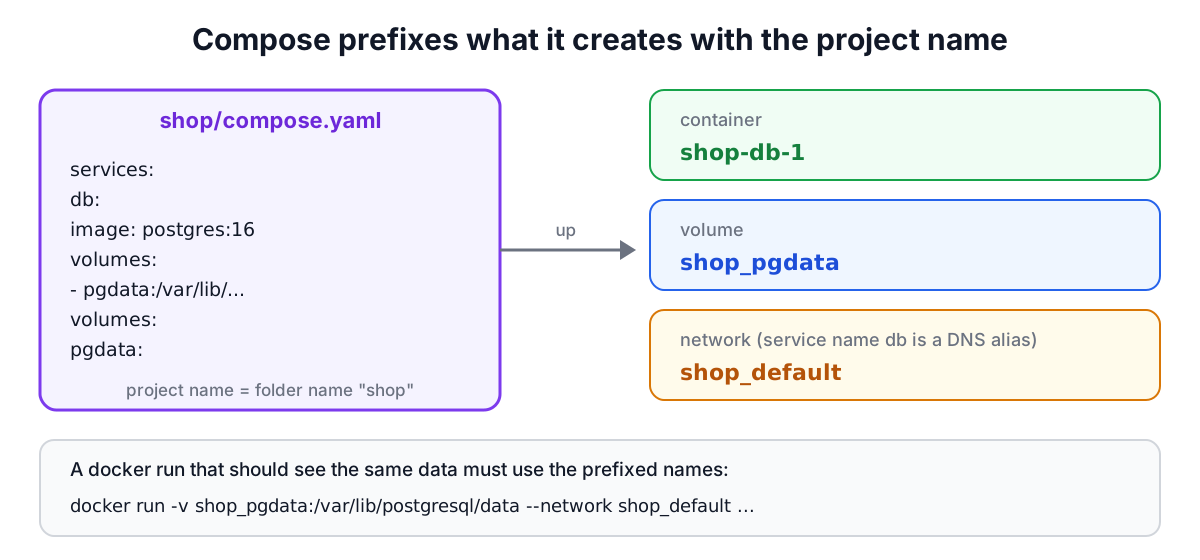
Compose prefixes everything it creates with the project name, which defaults to the name of the directory holding the file. In a folder called shop, the volume pgdata is really shop_pgdata, the default network is shop_default and containers are named like shop-db-1 unless container_name is set. You can override the project with -p or the top-level name: key.
This matters in two situations. Converting an existing docker run -v pgdata:... setup to Compose creates a new empty volume shop_pgdata, not the one with your data; declare the volume with name: pgdata (or external: true) to reuse the old one. And going the other way, a docker run that should see data Compose stored must mount shop_pgdata. The converter's Compose-to-run direction asks for the project name and generates docker volume create and docker network create commands with the prefixed names for exactly this reason.
GPUs
docker run --gpus all asks the NVIDIA Container Toolkit for every GPU. Compose expresses device requests as resource reservations:
deploy:
  resources:
    reservations:
      devices:
        - driver: nvidia
          count: all
          capabilities: [gpu]
--gpus 2 becomes count: 2, and --gpus '"device=0,1"' becomes device_ids: ["0", "1"]. The toolkit must be installed on the host either way.
Flags with no Compose equivalent
A few options belong to the act of running a container from a shell, not to its definition:
-dis implied bydocker compose up -d.--rmremoves the container when it exits. Compose removes containers withdocker compose down, anddocker compose run --rm serviceexists for one-off tasks.-Ppublishes every exposed port to a random host port. Compose needs explicitports.--attachand--sig-proxyonly affect the terminal session.
In the other direction, depends_on, profiles, build and extends have no docker run flag. Start containers in dependency order by hand, and build images with docker build -t name . first. The converter reports all of these as warnings rather than dropping them silently.
Worked example
A home server runs two containers started by hand:
docker run -d --name db -e POSTGRES_PASSWORD=change-me \
  -v pgdata:/var/lib/postgresql/data --restart unless-stopped postgres:16
docker run -d --name app -p 3000:3000 -e DATABASE_URL=postgres://postgres:change-me@db/postgres \
  --restart unless-stopped ghcr.io/example/app:1.4
The converter produces two services, db and app, with a top-level pgdata volume. Two things need a human decision. First, the app reaches the database as db, which works in Compose because both services share the project network; with the original commands it only worked if they shared a user-defined network. Second, the existing data lives in the volume pgdata, but in a folder named home Compose would create home_pgdata. Adding name: pgdata under the volume keeps the data. Finally, move the password into an .env file and add it to the repository's ignore list with the .gitignore Generator.
Tips
- Pin image tags (
postgres:16.4) sodocker compose pulldoes not upgrade a database by surprise. - Use
docker compose configto see the fully resolved file, with variables substituted, before starting. - Prefer
commandandentrypointas lists to avoid shell parsing differences. - Remove
container_namefrom services you may want to scale. - Health checks plus
depends_on: {db: {condition: service_healthy}}give real start-up ordering in Compose. - If files in a bind mount come out owned by root, set
user:and check permissions with the Chmod Calculator.
Sources
- Docker documentation,
docker container runCLI reference. - Compose Specification and Docker Docs, "Compose file reference" (services, volumes, networks, deploy).
- Docker Docs, "Networking in Compose" and "Specify a project name".
- Docker Docs, "GPU support in Docker Compose"; NVIDIA Container Toolkit documentation.
- Docker Engine 23.0 release notes (relative bind mount paths in docker run).
Related searches
- docker run to docker compose
- docker compose equivalent of docker run flags
- docker compose gpus
- docker compose named volume
- docker compose version obsolete
- docker compose network external
- docker run -it compose
- docker compose healthcheck
- compose to docker run
- docker compose project name prefix