
Inside an EPUB: Structure, Fixed Layout, Kindle Formats and DRM
What is inside an EPUB file, reflowable versus fixed layout, how EPUB compares with PDF, MOBI and AZW3, and why DRM-protected ebooks cannot be converted.
· 8 min read
An EPUB looks like a single file, but it is closer to a small website zipped up with a manifest. Knowing what is inside explains most ebook problems: why a store rejects a file that opens fine on your phone, why a comic turns into a jumble on a Kindle, why a book you paid for refuses to convert, and why Kindle formats are a different story altogether.
This guide walks through EPUB's structure, the difference between reflowable and fixed-layout books, how EPUB compares with PDF and Amazon's formats, and what DRM does. The examples use the EPUB Converter, which reads and builds EPUB files in the browser.
What is inside an EPUB
EPUB is maintained by the W3C (it came from the IDPF, which merged into the W3C in 2017), and EPUB 3.3 became a W3C Recommendation in 2023. Its container format, OCF, is a ZIP archive with a few non-negotiable rules.
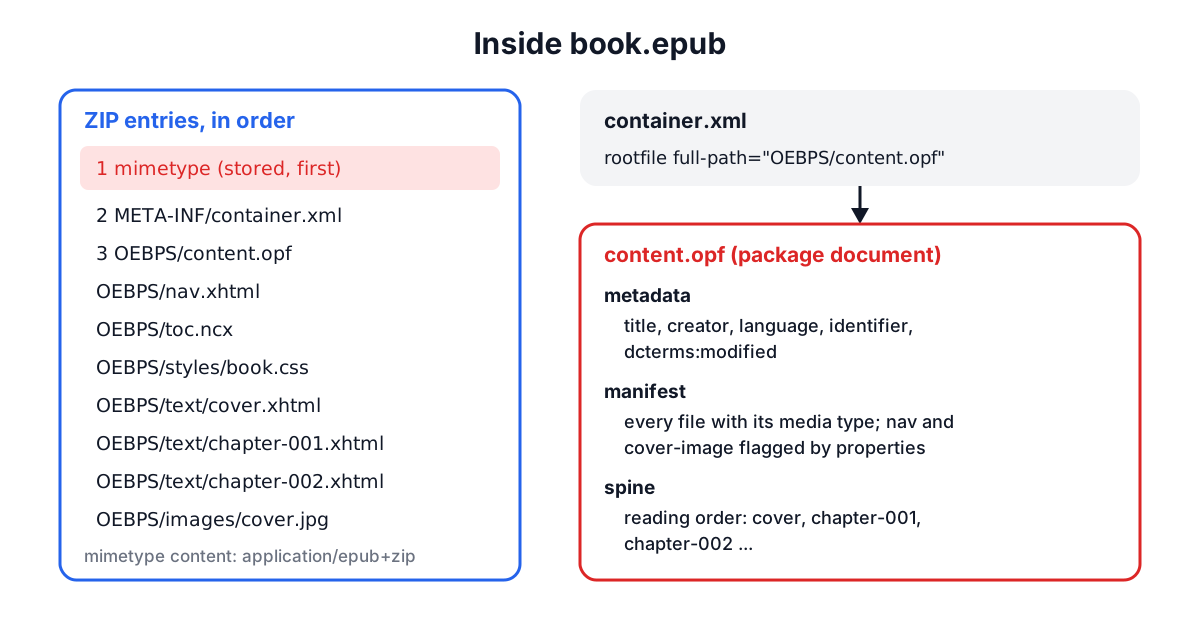
mimetypefirst. The first entry in the ZIP must be a file namedmimetype, stored without compression and without extra fields, containing exactlyapplication/epub+zip. A reader can then recognise the file by looking at byte 30 onwards. Zipping a folder with a normal archiver usually breaks this rule, which is the most common reason EPUBCheck fails a hand-made book.META-INF/container.xmlnames the package document, for exampleOEBPS/content.opf.- The package document (OPF) has three parts.
metadataholds the title, creator, language, a unique identifier and adcterms:modifiedtimestamp.manifestlists every file with its media type.spinelists manifest items in reading order. - Content documents are XHTML (so they must be well-formed XML: every tag closed, attributes quoted), styled with CSS and illustrated with PNG, JPEG, GIF, WebP or SVG images.
- The navigation document is an XHTML file with a
nav epub:type="toc"element, the table of contents reading apps show. EPUB 2 used an NCX file for this, and many tools still include one for older readers.
Fonts embedded in an EPUB may be obfuscated, a light scrambling defined by the IDPF so the font file cannot simply be copied out. That is recorded in META-INF/encryption.xml, but it is not DRM: the text is readable.
The EPUB Converter builds books exactly this way. It writes mimetype first and stored, then container.xml, an EPUB 3 package with title, author, language, a random urn:uuid identifier and the modification time, a navigation document, an NCX for older readers, one XHTML file per chapter, the cover image marked with the cover-image property, and any embedded images.
Reflowable and fixed layout
Most EPUBs are reflowable. There are no pages in the file. The reading app lays the text out for the screen size, font and margin the reader chose, and page numbers are computed on the fly. This is the right model for novels, non-fiction and documentation, and it is why a reflowable EPUB reads well on a phone and a tablet alike.
Fixed-layout EPUBs set rendition:layout to pre-paginated in the package metadata. Each content document is a designed page with absolute positions, like a PDF page made of HTML. Children's picture books, comics, cookbooks and textbooks with complex spreads use it. Fixed layout gives designers control but does not adapt: small screens show a shrunken page.
Converting a fixed-layout book to another format means choosing between keeping the page design (which needs a renderer that executes the book's CSS) and keeping the text. The EPUB Converter extracts text and images and reflows them, and it warns you when the source was fixed layout.
EPUB, PDF and Kindle formats compared
| EPUB | MOBI | AZW3 (KF8) | ||
|---|---|---|---|---|
| Owner | W3C open standard | ISO 32000 | Amazon (from Mobipocket) | Amazon |
| Layout | Reflowable or fixed | Fixed pages | Reflowable | Reflowable or fixed |
| Inside | ZIP of XHTML, CSS, images | Objects and content streams | PalmDOC database | Binary container with HTML and CSS |
| Read on | Apple Books, Kobo, Google Play Books, most apps | Everything | Older Kindles | Kindle devices and apps |
| DRM | Adobe, Apple, Readium LCP | Optional | Amazon | Amazon |
PDF fixes every glyph at a position on a page. That is perfect for print and forms and poor on a six-inch screen, where you pan and zoom. Converting EPUB to PDF is useful for printing, annotating in a PDF editor or archiving, and the converter lets you pick an A5 page that matches a paperback.
MOBI is the old Mobipocket format Amazon acquired in 2005; it has no real CSS support and is effectively retired. AZW3 (Kindle Format 8) added HTML5 and CSS3 features, and Kindles now also use KFX. These are binary containers, and books from the Kindle store carry Amazon's DRM, so the EPUB Converter does not read them. Amazon itself moved towards EPUB: since 2022 its Send to Kindle service accepts EPUB files and converts them, and it no longer accepts MOBI there. For a DRM-free Kindle file you own, the free Calibre application can convert it to EPUB.
DRM: why some books cannot be converted
Digital rights management encrypts the content documents inside an EPUB. The archive structure is normal, so a reading app can show the cover and title, but the chapter files are ciphertext. Only an app holding a licence for the buyer can get the key.
The schemes you will meet:
- Adobe ADEPT, used by many library lending services and independent stores through Adobe Digital Editions. It adds
META-INF/rights.xmland lists encrypted files inMETA-INF/encryption.xml. - Apple FairPlay, for books from Apple Books, recorded in
META-INF/sinf.xml. - Readium LCP, an open DRM standard increasingly used by libraries, with a licence file at
META-INF/license.lcpl.
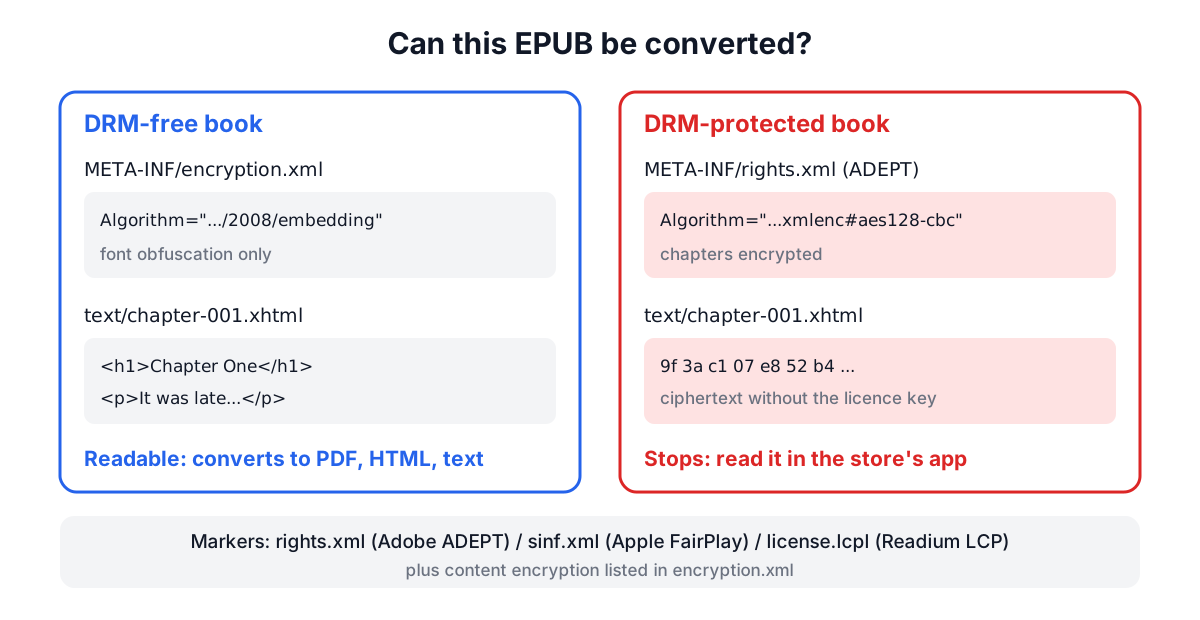
The EPUB Converter checks for these markers before reading anything. If encryption.xml lists only font obfuscation, the book is readable. If it lists encrypted content, or a rights or licence file is present, the tool stops and says which scheme it found. Removing DRM is restricted by law in many countries and is not something the converter does. Books from Project Gutenberg, Standard Ebooks, many technical publishers and most self-published authors are DRM-free.
Building a good EPUB from your own text
When you turn a manuscript, a set of notes or a long guide into an EPUB:
- Mark chapters with top-level headings.
#in Markdown orh1in HTML becomes a new XHTML file and a table of contents entry. Split at the second level too if chapters are long, since reading apps load one content file at a time. - Embed images in the source. Images inside a DOCX or ODT, or data URLs in HTML and Markdown, go into the EPUB's
images/folder and the manifest. Images referenced by web URL are not downloaded. - Set the language. The
dc:languagecode (en,fr-CA,ja) drives hyphenation and text-to-speech in reading apps. - Add a cover. About 1600 x 2560 pixels (a 1:1.6 ratio) suits most stores. The cover image is flagged with the
cover-imageproperty and placed on its own page. - Validate before publishing. Run the file through EPUBCheck, the W3C's reference validator. Stores such as Apple Books and Kobo reject files that fail it.
For converting an existing document first, the Document Converter turns DOCX, ODT, RTF and HTML into Markdown or HTML you can tidy, and the Word to PDF Converter covers the print side.
Picking a format for a book
Choose EPUB for anything people will read on phones, tablets and e-readers, reflowable unless the page design is the content. Choose PDF when pages must look identical everywhere or will be printed. Send EPUB to Kindle through Send to Kindle rather than building MOBI. And keep the source (Markdown, DOCX or HTML) as the master copy: an EPUB is a build output, easy to regenerate whenever the text changes.