
Escape Sequences Explained: Backslashes in JSON, JavaScript, Python and SQL
Why \n is two characters in one place and one in another, how each language escapes quotes, and how to untangle text that has been escaped twice.
· 7 min read
You open a production log and the error reads Failed to open C:\\\\Users\\\\ana\\\\report.txt\\n. Four backslashes where the path had one, and a visible \\n where there should be a line break. Nothing is broken in the file system. The message has simply been escaped twice on its way to you, once when it was written into a JSON string and again when that JSON was embedded in another string.
Escaping is one of those things everyone learns in the first week of programming and then gets subtly wrong for years. This guide covers what escape sequences are for, where languages agree and disagree, the other escaping schemes that get confused with backslashes, and how to unpick text that has been escaped more than once.
Why escape sequences exist
A string literal has delimiters, usually quotes. The moment you want a quote inside the string, you need a way to say "this one is content, not the end". You also need a way to write characters that are invisible or impossible to type inside a single line of source code: line breaks, tabs, the null character.
C solved both problems in the early 1970s with the backslash. A backslash tells the parser "the next character means something special": \" is a literal quote, \n is a line feed, \\ is a literal backslash. Java, JavaScript, C#, Python, PHP, Go and JSON all inherited the idea, and most of the C set, which is why the same handful of sequences works almost everywhere.
The important point is that an escape sequence exists only in the source text. "a\nb" in JavaScript is a three-character string: a, a line feed, b. The backslash and the n are gone once the code is parsed. Escaping is the translation from real characters to source text; unescaping is the reverse.
The shared backslash set
| Sequence | Character | Code point | JS | JSON | Python | C / Java |
|---|---|---|---|---|---|---|
\n | Line feed | U+000A | yes | yes | yes | yes |
\r | Carriage return | U+000D | yes | yes | yes | yes |
\t | Tab | U+0009 | yes | yes | yes | yes |
\" | Double quote | U+0022 | yes | yes | yes | yes |
\' | Single quote | U+0027 | yes | no | yes | yes |
\\ | Backslash | U+005C | yes | yes | yes | yes |
\b | Backspace | U+0008 | yes | yes | yes | yes |
\f | Form feed | U+000C | yes | yes | yes | yes |
\v | Vertical tab | U+000B | yes | no | yes | C only |
\0 | Null | U+0000 | yes | no | yes | C only |
\uXXXX | Any BMP character | varies | yes | yes | yes | yes |
Java has no \v escape and no dedicated \0, but it does have octal escapes, so \0 still works there as an octal zero. C has accepted \uXXXX as a universal character name since C99. JSON is the strictest of the group. RFC 8259 allows exactly \", \\, \/, \b, \f, \n, \r, \t and \uXXXX, and requires every control character below U+0020 to be escaped. A single quote does not need escaping in JSON, and \' is a syntax error.
Where languages disagree
The differences show up at the edges, and they cause real bugs.
Unknown escapes. In JavaScript, "\q" silently becomes "q": the backslash is dropped. In Python, "\q" keeps the backslash, and Python 3.12 started emitting a SyntaxWarning for it. In JSON, "\q" is invalid and the parser throws. Windows paths are the usual victim: "C:\new\table" in JavaScript contains a line feed and a tab, not two directory names.
Raw strings. Several languages let you switch escaping off. Python has r"C:\new", C# has verbatim strings @"C:\new" (where a quote is written ""), Go has backtick strings, and JavaScript has String.raw. Raw strings are the right answer for regular expressions and Windows paths.
import re
re.compile("\\d+\\.\\d+")   # escaped twice: once for Python, once for regex
re.compile(r"\d+\.\d+")     # raw string: only the regex escapes remain
Shell quoting. Inside single quotes in a POSIX shell nothing is special, not even the backslash, and there is no way to include a single quote. The idiom 'It'\''s' closes the quote, adds an escaped quote and reopens it.
Other escaping schemes
Backslashes are one scheme among several. Each format has its own, and using the wrong one is a common source of both bugs and security holes.
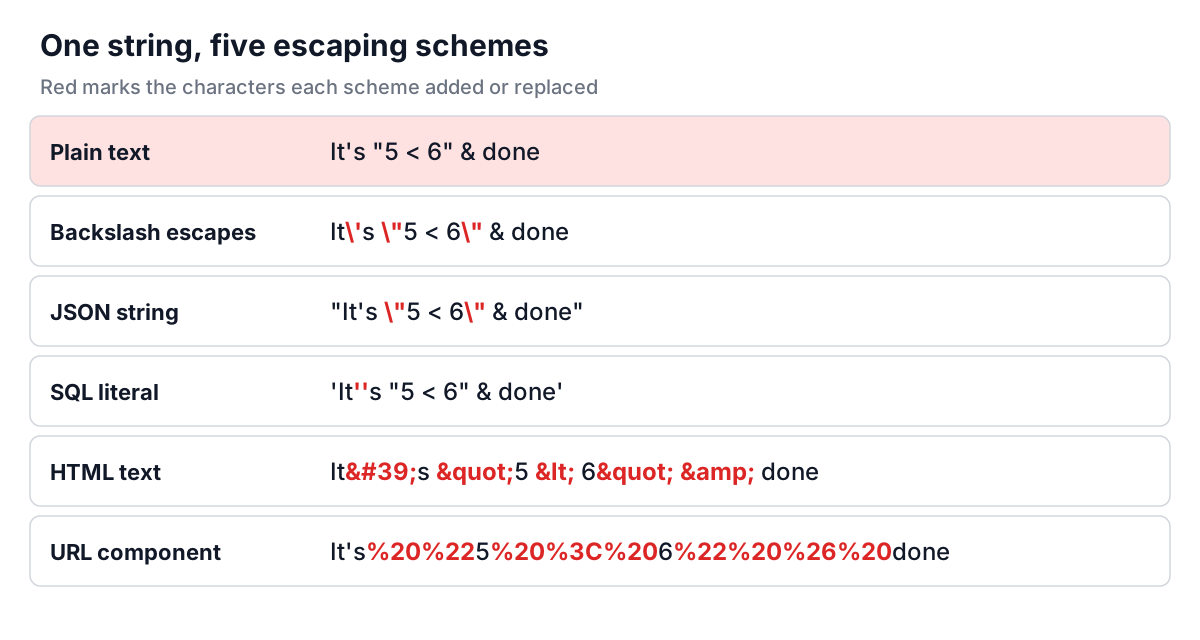
- SQL string literals double the single quote:
'It''s'. Standard SQL, PostgreSQL and SQL Server do not treat the backslash as special in ordinary strings. MySQL does by default, unless theNO_BACKSLASH_ESCAPESmode is set, which is one reason hand-escaping SQL is fragile. - HTML uses character references:
<,>,&,"and'. - URLs use percent-encoding from RFC 3986: a space is
%20, a double quote%22. JavaScript'sencodeURIComponentleaves'unencoded, as the example shows. - CSV (RFC 4180) wraps a field in double quotes and doubles any quote inside it:
"She said ""hi""". - Regular expressions use the backslash again, but for metacharacters:
\.matches a literal dot.
None of these is a security measure on its own. Escaping a string by hand before putting it in SQL does not stop injection; parameterised queries do. Escaping text for HTML in the wrong context (inside a <script> block or an attribute) does not stop XSS; context-aware output encoding in a template engine does.
Double escaping, and how to undo it
Every layer that serialises a string adds its own escapes. A file path that passes through two of them doubles its backslashes twice:
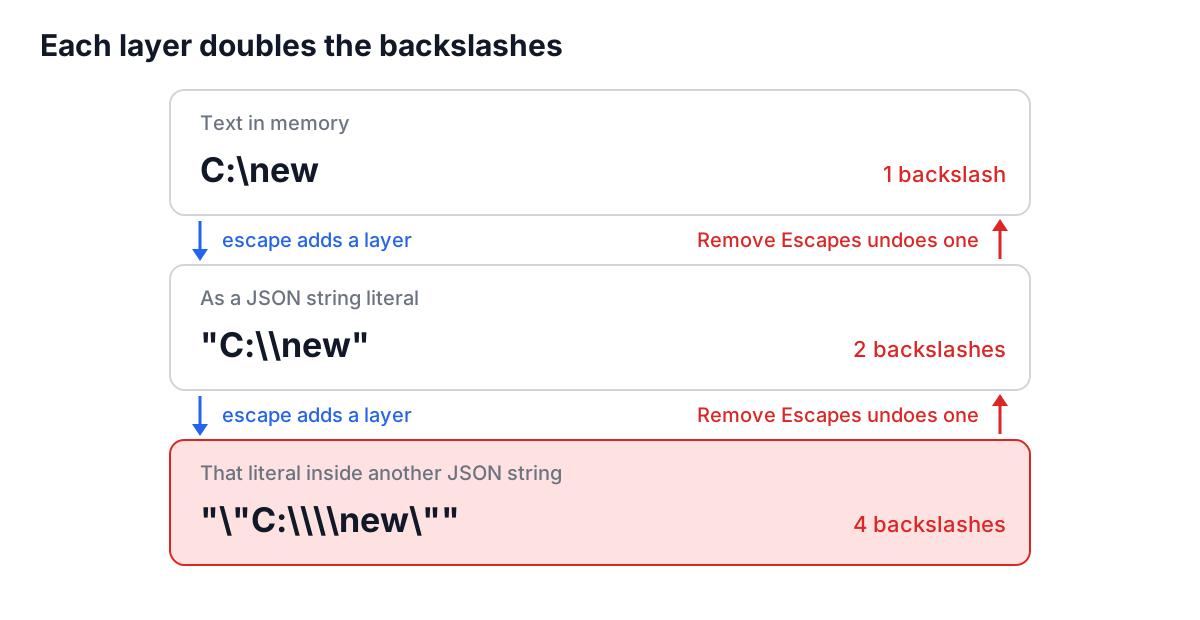
The giveaway is a run of backslashes whose length is a power of two, or a visible \n in text that should have line breaks. The fix is to unescape once per layer, not to run a find and replace on \\, which corrupts any backslash that was meant to be there.
The Escape Characters tool is built for this. Paste the text, click Remove Escapes, and look at the result. If it still contains \\ or \n, click again. Each click removes exactly one layer, because the conversion reads the text in a single pass: an escaped backslash followed by a letter, as in C:\\new, is read as a backslash and then the letter, giving C:\new. A naive chain of replacements that handles \n before \\ turns the same input into C: followed by a line break and ew.
A worked example
Suppose you need a multi-line SQL snippet inside a JavaScript test fixture:
SELECT name
FROM "users"
WHERE path = 'C:\temp'
Paste it into the tool and click Add Escapes. The output is one line:
SELECT name\nFROM \"users\"\nWHERE path = \'C:\\temp\'
The line breaks became \n, the double quotes \", the single quotes \' and the backslash \\. Wrap it in double quotes and it is a valid JavaScript or Java string. For strict JSON, generate the value with JSON.stringify instead, because JSON rejects \'. Clicking Remove Escapes on the output gives back the original three lines exactly.
The reverse case is more common in day-to-day work: a stack trace copied from a JSON log, full of \n\tat. Remove Escapes turns it back into a readable, indented trace.
Common mistakes
- Escaping with find and replace. Replacing
\nbefore\\, or the other way round, corrupts input that contains both. Use a single-pass escaper or the language's own serialiser. - Hand-building JSON. String concatenation plus a few replacements always misses a control character. Use
JSON.stringify,json.dumpsor your language's equivalent, and check the result in the JSON formatter. - Confusing schemes. Backslashes in HTML or
%20in a JavaScript string do nothing useful. Pick the scheme for the destination; the encoding guide covers Base64, URL and HTML encoding. - Forgetting regex has its own layer. A regex in a normal string literal needs every backslash doubled. Use a raw string or
String.raw, and test the pattern in the Regex Tester. - Treating escaping as sanitising. It is not. Use parameters for SQL and template engines for HTML.
When a string looks wrong, count the layers it has passed through before reaching for a fix. Write each layer down (file, database, JSON API, log line), unescape once per layer, and the text usually comes back exactly as it started.