
Excel to JSON: Dates, Empty Cells and Other Spreadsheet Traps
Why Excel dates turn into numbers like 45306, how empty cells and merged cells should look in JSON, and a checklist for getting clean data out of a spreadsheet.
· 6 min read
The spreadsheet looks perfect: a tidy header row, a "Start date" column showing 15/01/2024, a "ZIP" column with 00123. You convert it to JSON, load it into the database, and the start date is 45306 and the ZIP code is 123. Nothing failed. The converter faithfully exported what Excel stores, which is not what Excel shows.
Getting clean JSON out of a spreadsheet is mostly about knowing those gaps between display and storage. This guide covers how Excel stores dates, what to do with empty and merged cells, how headers become keys, and the CSV-specific traps, with examples from the Excel to JSON Converter.
What is inside an .xlsx file
An .xlsx file is a zip archive of XML parts, defined by the Office Open XML standard (ECMA-376, also ISO/IEC 29500). Each worksheet is an XML file of cells, and each cell has a value, a type (number, string, boolean, error) and a reference to a style that carries its number format. The older .xls format is a binary file (BIFF8) with the same concepts. CSV is just text: no types, no formats, one sheet.
That split between value and format is the root of most conversion bugs. A cell that displays "15/01/2024", "Jan 15" or "2024-01-15" holds the same number. A cell that displays "12%" holds 0.12. A cell that displays "$1,200.00" holds 1200.
Why Excel dates become numbers
Excel stores a date as a serial number: the count of days since the start of 1900, with the time of day as a fraction. Noon on 15 January 2024 is 45306.5.
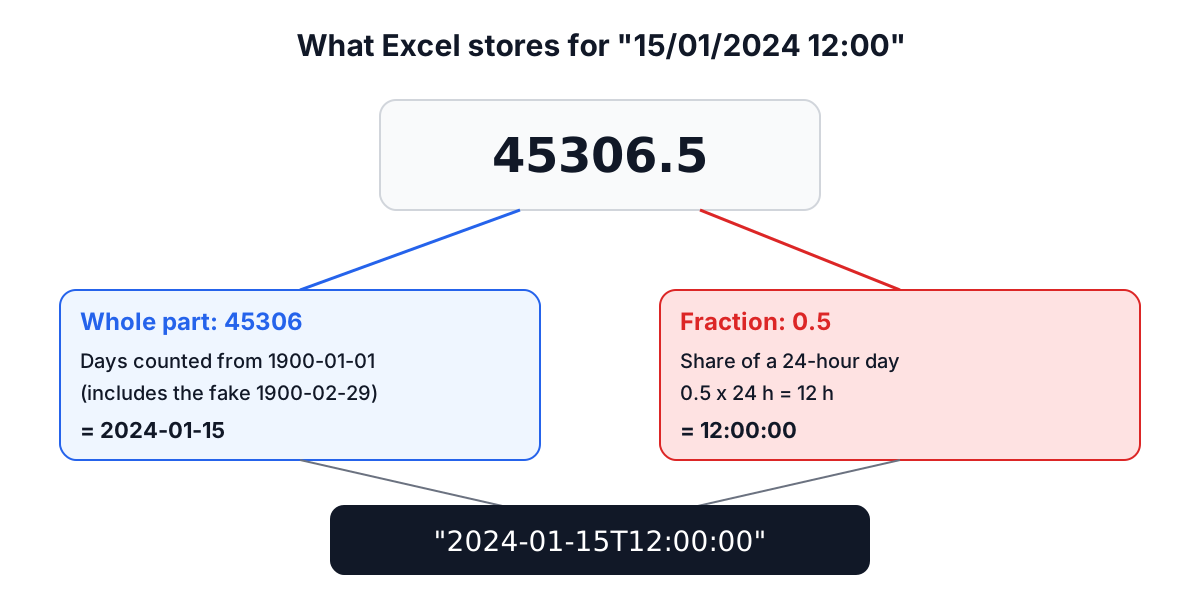
Two historical details matter if you ever convert serials yourself:
- The 1900 leap-year bug. Excel treats 29 February 1900 as a real day. It was not (1900 is not a leap year), but Lotus 1-2-3 had the bug and Excel kept it for compatibility. Serials from 61 onward are one higher than a plain day count from 1 January 1900.
- The 1904 date system. Workbooks created by early Mac versions of Excel count from 1 January 1904. The same serial is four years and a day later. The workbook carries a flag saying which system it uses.
A converter that reads only values gives you 45306. A good one checks the cell's number format, sees that it is a date format, and converts. The Excel to JSON Converter does that and writes ISO 8601 strings:
| Cell shows | Stored value | JSON output |
|---|---|---|
| 15/01/2024 | 45306 | "2024-01-15" |
| 01/06/2024 13:30 | 45444.5625 | "2024-06-01T13:30:00" |
| 18:00 | 0.75 | "18:00:00" |
| 1,200.00 | 1200 | 1200 |
The conversion is done from the serial number directly, not through a JavaScript Date. That detail matters: building a Date at local midnight and calling toISOString() gives 2024-01-14T23:00:00.000Z for a user in Paris (UTC+1), and the off-by-one-day bug only shows up for some users.
The output has no time zone, because Excel dates have none. If the times in your sheet are in a specific zone, record that in the column name or add the offset when you load the data.
Empty cells, merged cells and headers
Empty cells. There are two reasonable ways to represent an empty cell in an array of objects: leave the key out, or set it to null. Leaving keys out makes every consumer handle "missing" and "null" separately. The converter writes null, so every object has every column:
[
  { "name": "Ada", "joined": "2024-01-15", "zip": "00123", "score": 5 },
  { "name": "Lin", "joined": "2024-06-01T13:30:00", "zip": null, "score": null }
]
Blank rows. In Array of Objects mode, completely blank rows are skipped. In Array of Arrays mode they are kept as rows of nulls, because there the row position itself may matter.
Merged cells. Only the top-left cell of a merged range holds a value. The others are empty and come out as null. If a sheet uses merged cells as group labels (a "Region" cell spanning five rows), fill the value down in Excel before converting.
Headers. Keys are taken from the first row exactly as written, spaces and capitals included. Two quirks of the SheetJS library, which does the parsing, are worth knowing: an empty header cell becomes a key like __EMPTY, and a repeated header name gets a suffix, so a second name column becomes name_1. If the sheet has no header row at all, turn off Include Headers in object mode and the keys become the column letters A, B, C.
CSV: the format with no types
When the input is CSV, there is no number format to consult, so every converter has to guess types. Spreadsheet software guesses aggressively. That is how ZIP codes lose leading zeros, how long account numbers turn into 1.23457E+15, and how gene names like SEPT2 became dates often enough that the gene was renamed.
The converter guesses as little as possible for CSV input:
- Plain numbers such as
42,-3.5or1e6become JSON numbers. TRUEandFALSEbecome booleans.- Everything else stays a string exactly as written, including
00123,2024-01-15and1/2/2024.
Keeping dates as written means you decide how to parse 1/2/2024, which is 1 February in most of the world and 2 January in the United States. If you need typed values from CSV, the CSV to JSON guide covers parsing rules in more depth, and the CSV to JSON Converter keeps every value as text.
Formulas, hidden rows and other surprises
- Formulas are not evaluated. The converter reads the value Excel cached when the file was last saved. A workbook generated by a script and never opened in Excel may have formula cells with no cached value, which come out empty.
- Hidden rows and columns are exported like any other. Delete them if they should not be in the data.
- Number formats on plain numbers (currency, percentages, thousands separators) are ignored. You get the stored number: 12% is
0.12. - File size: the tool reads files up to 10 MB in the browser. For bigger exports, split the sheet or use a script with the same SheetJS library.
A checklist for clean conversions
- Make the first row a single header row with unique, non-empty names. Rename
Start datetostartDateif your code expects camelCase. - Format ID, ZIP and phone columns as Text before entering data, so leading zeros are stored.
- Unmerge cells and fill values down.
- Check that date columns use a date format, not text that looks like a date.
- Convert one sheet, open the preview, and check the first and last few objects.
- Validate the shape in code. Paste a sample into the JSON to TypeScript Generator to get an interface, then check the data against it when you load it.
Once the JSON looks right, the JSON Formatter helps you query a large export with JSONPath, and the CSV Chart Maker is a quick way to plot a column and spot outliers before the data reaches production.