
FMEA and RPN Explained: Severity, Occurrence, Detection
How to rate failure modes, calculate and read the Risk Priority Number, why equal RPNs can hide very different risks, and what AIAG-VDA Action Priority changed.
· 7 min read
A checkout team has a list of things that could go wrong before a peak trading weekend: payment timeouts, carts lost when a session expires, stock sold twice when two orders land in the same second. Each one has a champion arguing it is the most urgent. Failure Mode and Effects Analysis (FMEA) settles that argument with a worksheet: list every way the process can fail, rate how bad, how likely and how hard to catch each failure is, and work down the list from the top.
This guide covers where FMEA came from, how the Risk Priority Number (RPN) works and where it misleads, why the automotive industry moved to Action Priority in 2019, and how to run a worksheet in the FMEA Worksheet and RPN Calculator.
Where FMEA came from
FMEA started as a US military procedure, MIL-P-1629, issued in 1949 to evaluate the effects of system and equipment failures. NASA applied it in the Apollo programme in the 1960s, and the automotive industry took it up in the 1970s. Ford was an early adopter, and the Automotive Industry Action Group (AIAG) and SAE J1739 later made it standard practice for suppliers. Today it is used in medical devices, aerospace, food production and, increasingly, software and service operations.
There are two main types:
- Design FMEA (DFMEA) asks how a product design can fail to do its job.
- Process FMEA (PFMEA) asks how a manufacturing or business process can fail to produce the intended result.
The worksheet and scoring are the same for both.
The three ratings and the RPN
Each row in an FMEA describes one failure mode of one component or process step, with its effect, its cause and the controls already in place. Then it gets three ratings from 1 to 10.
| Rating | Question | 1 means | 10 means |
|---|---|---|---|
| Severity (S) | How bad is the effect if it happens? | No noticeable effect | Hazardous, safety or legal failure |
| Occurrence (O) | How likely is the cause? | Practically never | Almost certain |
| Detection (D) | How likely are current controls to catch it before the customer? | Almost certain to be caught | Almost certain to escape |
Detection runs backwards compared with the other two, and that trips people up. A strong automated test that catches every case is a 1. A failure you would only hear about from an angry customer is a 10.
The classic score multiplies the three:
RPN = Severity x Occurrence x Detection
so it runs from 1 to 1000. A payment timeout rated 8, 4 and 3 has an RPN of 96.
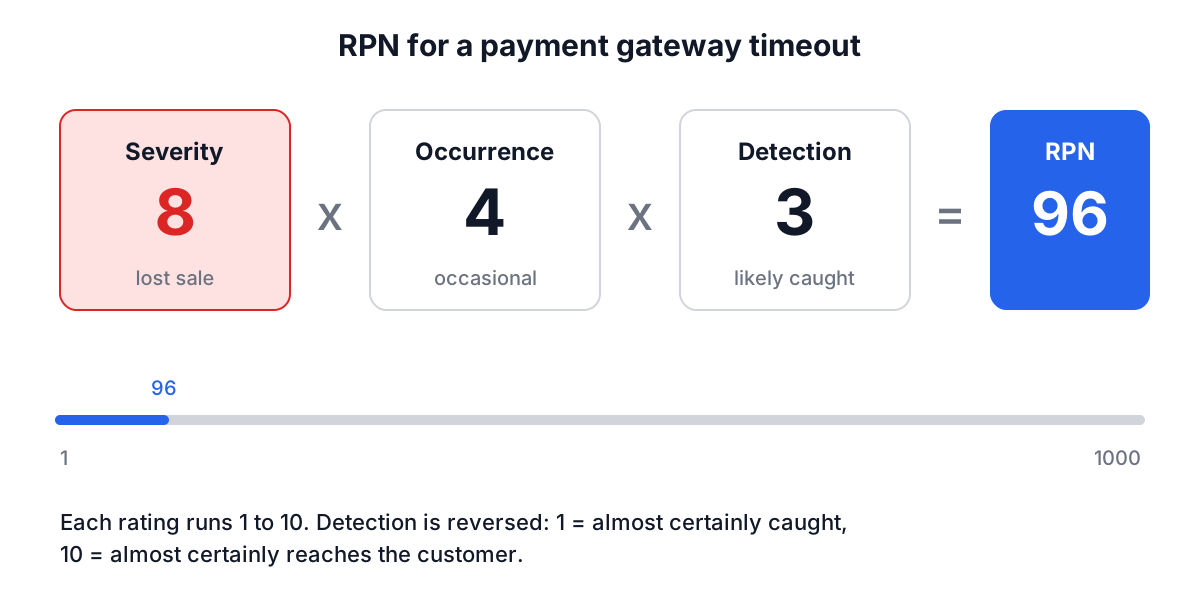
There is no standard RPN threshold. The tool bands RPN as Low below 80, Medium from 80 to 119, High from 120 to 199 and Critical at 200 and above, but those cut-offs are its own guide. Many teams pick a threshold such as 100 or 120 and treat everything above it as needing action.
Where RPN misleads
RPN has the same weakness as any score built by multiplying ordinal ratings: different combinations give the same number.
| Failure | S | O | D | RPN |
|---|---|---|---|---|
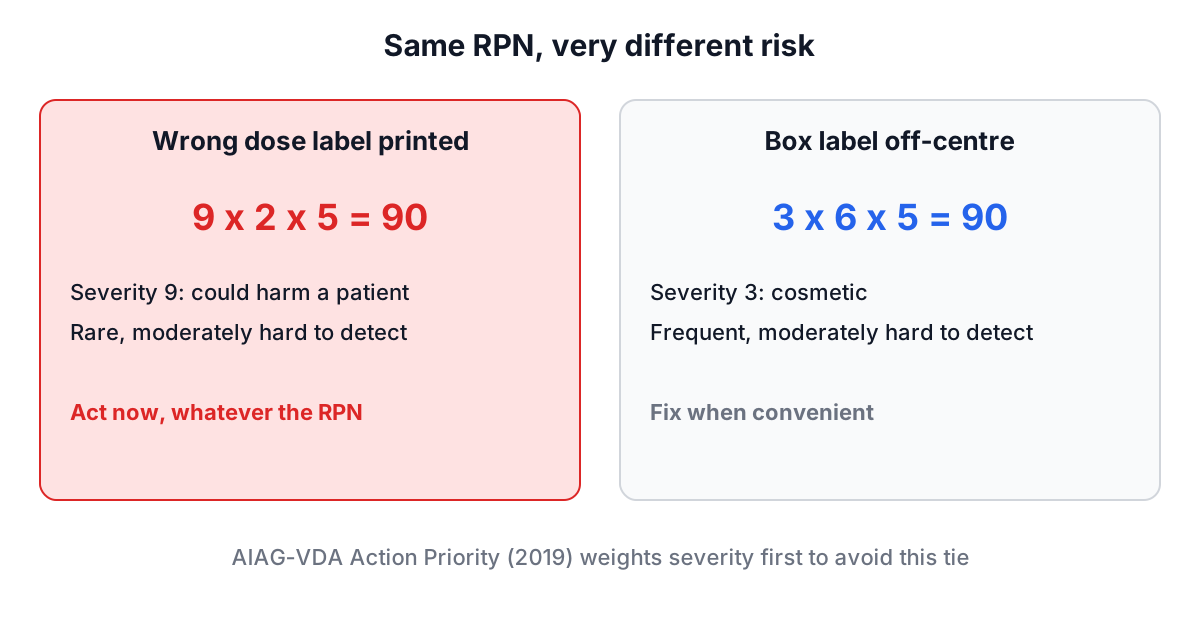
| Wrong dose label printed | 9 | 2 | 5 | 90 |
| Box label slightly off-centre | 3 | 6 | 5 | 90 |
Both score 90. Nobody would treat them the same: the first could hurt a patient, the second is cosmetic. A team that sorts only by RPN can spend its effort on the frequent, trivial failure and leave the rare, serious one alone.
That is why most practitioners add a rule that any severity 9 or 10 failure gets action regardless of its RPN. It is also why the automotive industry changed its method.
Action Priority: the AIAG-VDA change
In 2019 the AIAG and the German automotive association VDA published a joint FMEA Handbook that replaced RPN with Action Priority (AP). Instead of multiplying, AP uses lookup tables that combine the three ratings and give severity the most weight. Each failure mode is rated High, Medium or Low priority. A high-severity failure can come out as High priority even when occurrence and detection are good, which closes exactly the gap shown above.
If you supply the automotive industry or work to that handbook, use AP from its tables for decisions. RPN is still widely used elsewhere and remains a convenient way to sort a worksheet, which is how the tool uses it.
Worked example: an e-commerce checkout
Click Load Sample in the FMEA Worksheet and RPN Calculator to load this checkout analysis, or build it yourself:
- Fill in Analysis Title ("E-Commerce Checkout Process FMEA"), Process/Product Name ("Online Payment Processing"), Prepared By and Date.
- Click Add Failure Mode for each row. Enter the Component/Process Step and Potential Failure Mode (both required), the effect, cause and current controls, then pick Severity, Occurrence and Detection. The RPN updates as you choose. Add recommended actions, a responsibility and a target date, then Add Item.
| Component | Failure mode | S | O | D | RPN | Level |
|---|---|---|---|---|---|---|
| Inventory Check | Stock discrepancy (race condition) | 9 | 3 | 5 | 135 | High |
| Cart Session | Cart data loss | 6 | 5 | 4 | 120 | High |
| Payment Gateway | Transaction timeout | 8 | 4 | 3 | 96 | Medium |
The worksheet sorts itself by RPN, so the inventory race condition is at the top. It also has the highest severity (overselling stock means cancelled orders and refunds), so RPN and severity agree here.
- When a row is added, its Post-Action Ratings start equal to the current ratings, so the worksheet shows no reduction until you record one. After the team implemented optimistic locking for inventory, persistent cart storage and a circuit breaker with a second payment provider, they expanded each row and set the new ratings:
| Component | New S | New O | New D | New RPN | Reduction |
|---|---|---|---|---|---|
| Inventory Check | 9 | 1 | 2 | 18 | 117 |
| Cart Session | 6 | 2 | 3 | 36 | 84 |
| Payment Gateway | 8 | 2 | 2 | 32 | 64 |
Severity did not change for any row. That is normal: severity describes the effect, and only a design change that alters the effect can lower it. Actions usually work on occurrence (prevent the cause) or detection (catch it earlier).
- The FMEA Summary shows 3 items, an Average RPN of 117 ((135 + 120 + 96) / 3), High or Critical (RPN 120+) of 2, and an Avg RPN Reduction of -88 ((117 + 84 + 64) / 3 = 88.3, rounded).
Use Export to save the worksheet as JSON and Import to load it later; the page does not autosave, and the Share button copies the tool's address, not your data. Download as Image saves the summary card as a PNG for a report.
Common mistakes
- No agreed rating scales. Write down what a 7 for occurrence means in your context (once a month? once per 1,000 orders?) before rating anything.
- Detection scored the wrong way round. Remember that better detection means a lower number.
- Sorting only by RPN. Check severity 9 and 10 rows separately, or use Action Priority.
- Rating the cause instead of the failure mode. "Network latency" is a cause; "transaction timeout" is the failure mode.
- Treating the worksheet as finished. FMEA is a living document. Update it after incidents, design changes and process changes.
Where FMEA fits
FMEA looks forward at many possible failures. When one of them actually happens, a 5 Whys root cause analysis works back from the incident to its cause, and the finding should feed back into the worksheet as a new or re-rated row. For project-level risks that do not break down into components, such as a key person leaving or a supplier going under, a risk matrix is simpler. Engineering teams can also record the wider incident story in the incident review tool.
Pick one process that worries you, list five ways it can fail, and rate them in the FMEA Worksheet and RPN Calculator. Then look past the RPN at any row with severity 9 or 10, because that is where the score is most likely to understate the risk.