
.gitignore Patterns Explained: Rules, Negation and What to Ignore
How git matches .gitignore patterns, why a negation sometimes cannot work, where else ignore rules live, how to stop tracking committed files, and what each stack should and should not ignore.
· 10 min read

A .gitignore file looks like a list of file names, and for the first few lines it behaves like one. Then someone adds !logs/keep.txt and it does nothing, or build ignores a source folder three levels down, or a secret keeps showing up in git status even though .env is right there in the file. The rules are short and precise, and once you know them these cases stop being mysterious. This article explains how git matches patterns, where else ignore rules can live, what each common stack should and should not ignore, and how to debug a rule. The .gitignore Generator builds a file from 38 templates and includes a path tester that applies the same rules.
What .gitignore does and does not do
A .gitignore tells git which untracked files to leave out of git status and git add. It has no effect on files git already tracks. If config/secrets.yml was committed last month, adding it to .gitignore today changes nothing; git keeps tracking it and shows every edit. To stop tracking it, remove it from the index while keeping it on disk, then commit:
git rm --cached config/secrets.yml
git rm -r --cached node_modules
git commit -m "Stop tracking generated and secret files"
If the file held a real secret, that is not enough: it is still in history. Rotate the secret, then rewrite history with a tool such as git filter-repo if you must remove it.
The matching rules
The gitignore(5) manual defines the rules. Each line is a pattern, and patterns are matched against paths relative to the directory that contains the .gitignore.
| Pattern | Matches | Why |
|---|---|---|
*.log | app.log, server/logs/app.log | No slash: matches the name at any depth |
build/ | directory build anywhere, not a file named build | Trailing slash: directories only |
/build | build at the root only | Leading slash anchors to this directory |
docs/*.pdf | docs/a.pdf, not docs/x/a.pdf or src/docs/a.pdf | A middle slash also anchors; * stops at / |
**/tmp | tmp, a/tmp, a/b/tmp | **/ matches any number of directories |
a/**/z | a/z, a/b/z, a/b/c/z | /**/ matches zero or more directories |
logs/** | everything inside logs | Trailing /** matches contents |
!important.log | re-includes it | A leading ! negates an earlier match |
\#notes | a file literally named #notes | Backslash escapes # and ! |
Blank lines are ignored and lines starting with # are comments. ? matches one character other than /, and [a-z] matches a range. Trailing spaces are ignored unless escaped with a backslash. When several patterns match, the last one wins, which is why negations go after the patterns they override.
The anchoring rule surprises people most. build without any slash matches a directory called build anywhere in the tree, including packages/ui/src/build if your source happens to have one. If you only mean the top-level output folder, write /build/.
The negation trap
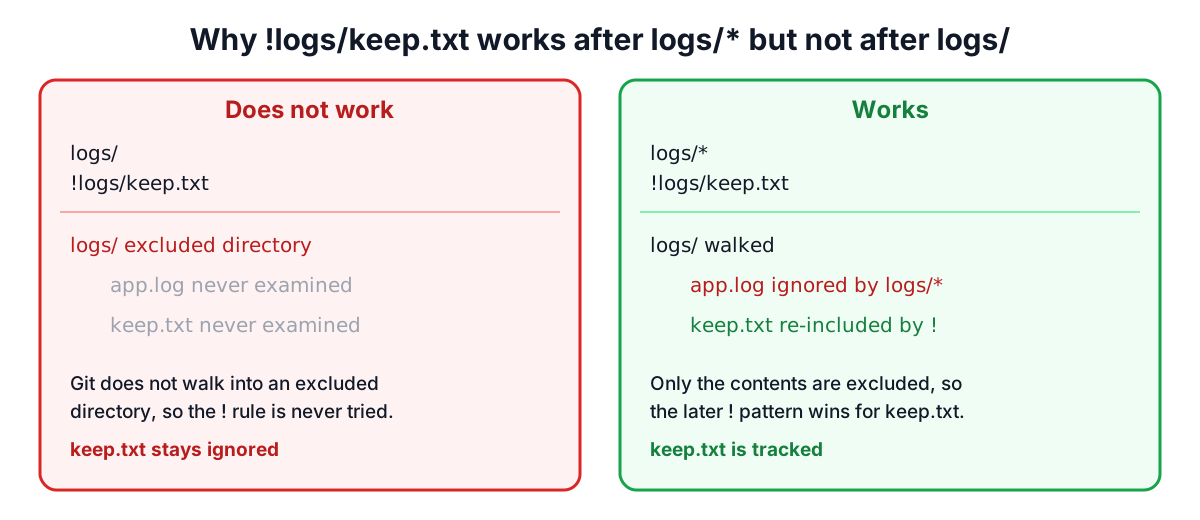
The manual puts it plainly: "It is not possible to re-include a file if a parent directory of that file is excluded." Git does not descend into an excluded directory at all, for performance, so a ! rule for something inside it is never even considered.
This does not work, because logs/ excludes the directory itself:
logs/
!logs/keep.txt
This works, because it excludes the contents and keeps the directory walkable:
logs/*
!logs/keep.txt
The same applies at more depth. To keep only config/defaults/ inside an ignored config/, you must un-ignore each level: config/*, !config/defaults/. The generator's tester shows this case explicitly: it reports the file as ignored "via" the excluded parent, so you know the negation cannot help.
Where ignore rules can live
.gitignore in the repository is only one of three places, and they are checked in this order of precedence, highest first:
- Patterns in a .gitignore in the same directory as the path, then in parent directories up to the repository root. Deeper files override shallower ones.
.git/info/exclude, which is local to your clone and never committed. Good for personal scratch files in one project.- The file named by
core.excludesFile, by default~/.config/git/ignore. Good for editor and operating system junk that you never want in any repository.
A sensible split is to keep project-specific patterns (build output, dependencies, environment files) in the committed .gitignore, and personal ones (.DS_Store, .idea/, *.swp) in your global file:
git config --global core.excludesFile ~/.gitignore_global
Teams often add the common editor and OS patterns to the project file anyway, so that a new contributor without a global file does not commit them. The generator's macOS, Windows, VS Code and JetBrains templates exist for that.
What each stack should ignore
The templates follow the community github/gitignore collection. The common thread is to ignore what can be regenerated or is personal or secret, and to commit what is needed to reproduce a build.
| Stack | Ignore | Do not ignore |
|---|---|---|
| Node.js | node_modules/, dist/, coverage/, .env, logs, caches | package-lock.json, yarn.lock, pnpm-lock.yaml, .env.example |
| Python | __pycache__/, *.py[cod], .venv/, *.egg-info/, .pytest_cache/ | requirements.txt, poetry.lock, uv.lock |
| Java | target/, .gradle/, build/, *.class | mvnw, gradlew and their wrapper jars |
| Go | binaries, *.test, coverage output | go.mod, go.sum |
| Rust | target/ | Cargo.lock for applications (libraries may ignore it) |
| Terraform | .terraform/, *.tfstate, *.tfvars | .terraform.lock.hcl, *.tf |
| Next.js | .next/, out/, .vercel, .env*.local | next.config.js |
| VS Code | .vscode/* | .vscode/settings.json, launch.json, tasks.json, extensions.json |
Lockfiles deserve emphasis because they are often ignored by mistake. They pin the exact versions of every dependency, so CI and teammates install the same tree you tested. Terraform state files are the opposite case: they can contain secrets in plain text and belong in a remote backend, never in git.
Debugging a rule
Git can tell you which line ignores a path:
git check-ignore -v path/to/file
.gitignore:14:*.log    path/to/file.log
The output names the file, line number and pattern. No output means the path is not ignored. Add --no-index to test a path that is already tracked. To list everything currently ignored in the working tree, git status --ignored works. The generator's tester does the same check in the browser before you commit the file, which is handy when you are writing a new .gitignore for a repository you do not have locally.
Worked examples
- Monorepo with a frontend and infrastructure. Select Node.js, Next.js, Terraform, macOS and VS Code. Duplicated patterns such as
node_modules/and*.tsbuildinfoappear once. Testinginfra/.terraform/providers/xshows it ignored by**/.terraform/*, whileinfra/.terraform.lock.hclstays tracked. - Keeping an empty folder. Git does not track empty directories. Put a
.gitkeepfile inuploads/, then useuploads/*and!uploads/.gitkeep, notuploads/. - A source folder named build. A Python package has
src/mylib/build/containing real code, and a plainbuild/pattern hides it. Changing the pattern to/build/anchors it to the root. - Secrets in .env. The Node template ignores
.envand.env.*but re-includes.env.example, so you can commit a template with dummy values for new developers.
Sources
- Git documentation, gitignore(5): pattern format, precedence, and the parent directory rule.
- Git documentation, git-check-ignore(1), git-rm(1) and git-config(1) (core.excludesFile).
- github/gitignore repository, CC0-1.0 licensed templates.
- HashiCorp Terraform documentation on the dependency lock file and state.
- npm documentation on package-lock.json.
Related searches
- gitignore patterns
- gitignore negation not working
- gitignore double asterisk
- gitignore leading slash
- git rm cached
- git check-ignore
- global gitignore
- should lockfile be gitignored
- gitignore templates
- gitignore env file