
How PDF Compression Works: DPI, JPEG Quality and Lossless Tricks
Where the bytes in a PDF go, why scans shrink and text files do not, choosing DPI and JPEG quality, what lossless optimisation can do, and the cost of turning text into images.
· 11 min read
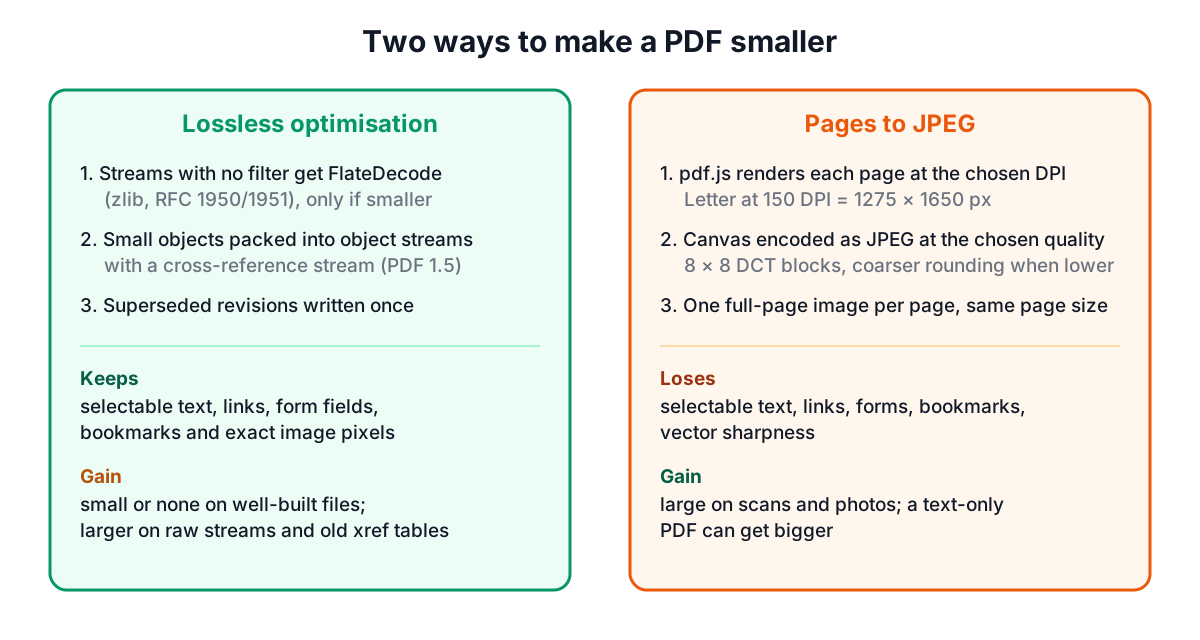
"Compress PDF" covers two very different operations. One rewrites the file more efficiently without changing a single pixel or letter. The other redraws every page as a photograph at a lower resolution, which can shrink a scan by a large factor but turns text into an image. Knowing which one you need, and which settings to use, is the difference between a file that fits under an email limit and one that is unreadable or no smaller. This guide explains where the bytes in a PDF go and how the two modes of the Compress PDF tool work. Both run in your browser, so the document is never uploaded.
Where the bytes in a PDF go
A PDF is a collection of numbered objects. Most of the size sits in streams: page content streams (the drawing instructions for text and vector graphics), embedded font programs and images. Each stream can carry a filter that says how it is compressed. The two you meet most often are:
- FlateDecode (ISO 32000-1, 7.4.4): lossless zlib/deflate compression (RFC 1950 and RFC 1951), used for content streams, fonts and many images.
- DCTDecode (7.4.8): baseline JPEG (ITU-T T.81), used for photographs and most scans.
That tells you where size comes from in practice:
| Kind of PDF | What fills it | What compression can do |
|---|---|---|
| Exported from Word, LaTeX or a web page | Text, vector drawings, a few fonts | Usually little: it is already compact |
| Scanned at 300 DPI or more | One large image per page | A lot, by lowering resolution and JPEG quality |
| Slides or brochures with photos | Full-resolution photos dropped into pages | A lot, often several megabytes per photo |
| Written by a basic generator or an old scanner | Streams stored with no filter, old cross-reference tables | Lossless rewriting helps |
A 30-page text report is often under 1 MB already and will barely move. A 30-page scan at 300 DPI can be tens of megabytes, and that is where compression pays.
Mode 1: lossless optimisation
The lossless mode opens the PDF with pdf-lib and rewrites it, changing only how objects are stored:
- Unfiltered streams are Flate-compressed. Any stream with no /Filter and at least 64 bytes is deflated at the highest zlib level. If the compressed version is not smaller, the original bytes are kept. XMP metadata streams are skipped, because they are meant to stay readable by tools that do not parse PDF and are normally left uncompressed.
- Objects go into object streams. PDF 1.5 allows many small objects (dictionaries, arrays, numbers) to be packed into one compressed object stream (7.5.7), with a compressed cross-reference stream (7.5.8) replacing the plain-text table of byte offsets. On files with thousands of small objects this saves real space.
- Old revisions are written once. When a PDF has been edited and saved incrementally (7.5.6), it can contain several versions of the same object. Rewriting the file keeps only the current version.
What it does not do: re-encode images, subset fonts or delete content. Text stays selectable, links and form fields keep working, and every image keeps its exact pixels. The result card tells you how many streams were compressed. On a file that was already well built the gain may be zero, or the file may even grow by a few bytes; the tool then shows "Same size" or "larger than the original: keep the original" instead of pretending it helped.
Mode 2: re-render pages as JPEG
The strong mode uses pdf.js, the PDF renderer built into Firefox, to draw each page onto a canvas at the resolution you choose, encodes the canvas as a JPEG at the quality you choose, and builds a new PDF with pdf-lib in which each page is exactly the original page size with that one image filling it. The original's title and author are copied into the new file.
Two settings control the result.
Resolution (DPI). PDF measures pages in points, 72 to the inch, so a page rendered at D dots per inch is width × D / 72 pixels wide. Pixel count, and with it the raw data to compress, grows with the square of DPI:
| Page | DPI | Pixels | Uncompressed RGB (w × h × 3 bytes) |
|---|---|---|---|
| US Letter (612 × 792 pt) | 96 | 816 × 1056 | 2,585,088 bytes (about 2.5 MB) |
| US Letter | 150 | 1275 × 1650 | 6,311,250 bytes (about 6.0 MB) |
| US Letter | 200 | 1700 × 2200 | 11,220,000 bytes (about 10.7 MB) |
| US Letter | 300 | 2550 × 3300 | 25,245,000 bytes (about 24.1 MB) |
| A4 (595.28 × 841.89 pt) | 96 | 794 × 1123 | 2,674,986 bytes (about 2.6 MB) |
Halving the DPI quarters the pixels. Going from a 300 DPI scan to 150 DPI therefore removes three quarters of the image data before JPEG even starts.
JPEG quality. JPEG splits the image into 8 × 8 blocks, converts each to frequency coefficients with the discrete cosine transform, and divides them by a quantisation table (ITU-T T.81). The quality number scales that table: lower quality means coarser rounding, smaller files and more visible artefacts, which show first as ringing around sharp edges such as letters. The tool's slider runs from 20 to 95. Below about 50 the edges of small text start to look blocky.
The three presets are starting points, not rules:
| Preset | DPI | Quality | Good for |
|---|---|---|---|
| Smallest | 96 | 50 | Reading on screen, strict upload limits |
| Balanced | 150 | 70 | Email attachments that people may print at home |
| 200 | 80 | Forms and scans that will be printed or archived |
How small the result gets depends on the content: a mostly white page of text compresses far better as JPEG than a full-colour photo, so the tool reports the real before and after sizes rather than an estimate.
What the JPEG mode costs you
Because every page becomes a picture, this mode removes a lot more than bytes:
- Text is no longer text. You cannot select, search or copy it, screen readers cannot read it, and a search engine indexing the file sees nothing. If you need the words back, run the result through Image to Text for OCR, or keep the original.
- Links and form fields disappear, along with bookmarks and any annotations, since only the rendered appearance survives.
- Vector drawings are pixelated. A CAD drawing or chart that was sharp at any zoom now has a fixed resolution.
- A text-only PDF can grow. A 40 KB exported letter rendered at 150 DPI becomes a 1275 × 1650 photo per page and may end up several times larger. The tool flags that in amber.
There is also a browser limit: canvases above about 16.7 million pixels (16,777,216) fail in some browsers, so very large pages are rendered at a slightly lower DPI and the result says so. An 11 × 17 inch tabloid page at 300 DPI would be 3300 × 5100 = 16,830,000 pixels, just over that limit.
A practical routine
- Start with Lossless. If it gets the file under your limit, stop: nothing was lost.
- If not, and the PDF is a scan or full of photos, try Balanced (150 DPI, quality 70). Open the result and zoom to 100% on the smallest text.
- Too big still? Try 120 to 130 DPI before dropping quality below 60. Lowering resolution usually costs less legibility per byte saved than lowering quality.
- Needs to print well? Use 200 DPI and accept a bigger file.
- Keep the original. Image compression is one way.
The tool keeps the last few results side by side, each with its own size and percentage, so you can compare settings before downloading. If you only need a few pages small, split the PDF first and compress just that part.
Sources
- ISO 32000-1:2008, Portable document format, Part 1: PDF 1.7, sections 7.3.8 (stream objects), 7.4.4 (LZWDecode and FlateDecode filters), 7.4.8 (DCTDecode filter), 7.5.6 (incremental updates), 7.5.7 (object streams), 7.5.8 (cross-reference streams) and 14.3.2 (metadata streams). ISO 32000-2:2020 keeps these sections.
- IETF RFC 1950, ZLIB Compressed Data Format Specification version 3.3, and RFC 1951, DEFLATE Compressed Data Format Specification version 1.3.
- ITU-T Recommendation T.81 (ISO/IEC 10918-1), Digital compression and coding of continuous-tone still images.
- pdf-lib documentation,
PDFDocument.savewithuseObjectStreams(pdf-lib.js.org); Mozilla pdf.js documentation for page rendering.
Related searches
- compress pdf
- reduce pdf size for email
- what dpi for pdf compression
- jpeg quality for scanned pdf
- lossless pdf compression
- why is my pdf so large
- compress pdf under 2mb
- flatedecode object streams
- compressed pdf text not selectable