
How to Make a Meme: The Impact Font, Outlines and Caption Layout
Why classic memes use white Impact with a black outline, how caption text is wrapped and sized to fit, the newer caption-bar format, and the copyright and fair use basics.
· 8 min read
A meme caption has two jobs: be readable on any picture at thumbnail size, and get out of the way of the joke. The classic look, white capitals with a black outline at the top and bottom of an image, solved both problems so well that it became the format. This guide explains where that style comes from, how a caption is wrapped and sized to fit, when the newer caption-bar layout works better, and the copyright basics of captioning other people's pictures. The Meme Generator draws memes exactly this way, on your own picture, with no watermark.
Why Impact, white and outlined
The typeface behind the image macro is Impact, designed by Geoffrey Lee in 1965 for the Stephenson Blake foundry. Microsoft licensed it for its Core Fonts for the Web collection in the 1990s and it shipped with Windows 98 and with Mac OS, so it became one of the few heavy display fonts present on almost every computer. When early meme sites needed a font that would render the same everywhere, Impact was there.
Its design also suits the job:
- Condensed letters fit more characters per line, so captions stay large.
- Thick, even strokes survive JPEG compression and downscaling to a phone feed.
- A tall x-height keeps capitals readable when the text is small.
The black outline does the rest. White fill reads on dark areas, the black stroke reads on light areas, and together they read on anything, including the busy middle tones of a photo. Subtitles use the same principle.
Anatomy of a classic meme
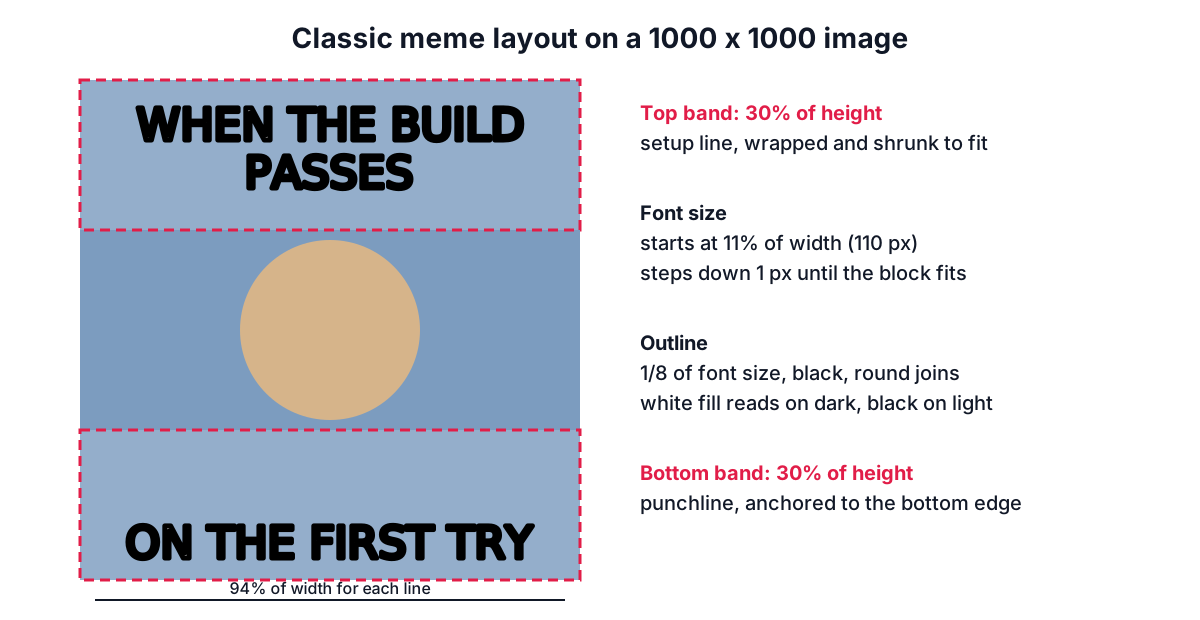
The layout is simple: top text centred near the top edge, bottom text centred near the bottom edge, both in capitals. The top line usually sets up the situation and the bottom line delivers the punchline, because readers scan in that order.
The Meme Generator uses these rules for the classic style:
| Setting | Value | Why |
|---|---|---|
| Line width limit | 94% of image width | Leaves a small margin so the outline is not clipped |
| Caption band height | 30% of image height, top and bottom | Keeps at least 40% of the picture clear in the middle |
| Largest font size | Your setting, default 11% of image width | 110 px on a 1000 px wide image |
| Smallest font size | 2.5% of width (at least 10 px) | Below that captions stop being readable |
| Line height | 1.08 x font size | Impact capitals have no descenders, so lines can sit close |
| Outline width | 1/8 of font size, at least 2 px | About half shows outside the letters |
| Edge padding | 2.5% of image height | Keeps text off the very edge |
How the caption is fitted
Fitting text into a box is a small layout algorithm, done once for the top caption and once for the bottom.
- Wrap. Words are added to a line until the next word would make it wider than the limit; then a new line starts. A line break you type is always kept. A single word longer than a whole line is split by character so nothing runs off the image.
- Measure. The wrapped block is n lines x font size x 1.08 tall.
- Shrink if needed. If the block is taller than the band, or any line is still too wide, the font size goes down by one pixel and the text is wrapped again. The first size that fits wins.
Take the bottom caption "ONE DOES NOT SIMPLY WALK INTO MORDOR" on a 600 x 600 image. The band is 180 px tall and lines may be 564 px wide. Suppose that at the default maximum of 66 px the text wraps to three lines; they need 3 x 66 x 1.08 = 214 px, too tall. The size steps down one pixel at a time, re-wrapping each time (a smaller font can fit more words per line), until the block fits in 180 px. The generator does this instantly, but the lesson is useful when you write captions: every extra word costs size. If your text shrinks a lot, cut words rather than accepting small type.
Measurement uses the browser's actual font metrics. If Impact is not installed, as on many Android phones and on iOS, a heavy fallback such as Arial Black or the system's bold sans-serif is used and measured, so the text still fits, though the shapes differ a little from the classic look.
The caption-bar format
Since the late 2010s a second format has become common: a white band above the picture with black text in a plain sans-serif, as if the image were a screenshot of a post. It has real advantages.
- The picture is not covered, which matters when the joke is in the details.
- Longer captions work, because the band grows to fit rather than squeezing the text.
- It reads like a sentence, which suits the observational style of many modern memes.
In the generator, choose Caption bar. The canvas becomes taller by the height of the wrapped text plus padding; the image keeps its full size below it. Text size is set as a share of the width (the default gives about 5.5% of the width) and capitals are optional; sentence case is more usual in this style.
Writing captions that land
- Short beats long. Two to six words per line keeps the text big.
- Setup on top, payoff at the bottom. If you have only one line, put it at the bottom.
- Match the picture's emotion. The caption should explain the expression or situation, not describe what is already visible.
- Use capitals for the classic style and sentence case for the caption bar; mixing them looks unintentional.
- Check at phone size. Most memes are seen as thumbnails in a chat. If the text is hard to read in the preview at small size, it will be in the feed too.
Copyright and likeness basics
Many memes reuse stills from films, news photos or other people's pictures. In the United States, commentary, criticism and parody can be fair use under 17 U.S.C. 107, which weighs four factors: the purpose of the use (transformative and non-commercial helps), the nature of the original, how much of it is used, and the effect on the market for the original. A caption that comments on an image is often transformative, but fair use is decided case by case, and the owners of several famous meme images license them commercially and have objected to unlicensed uses.
Two practical rules keep you on safe ground:
- Commercial use needs permission. A meme in an advertisement or on merchandise is a very different situation from one in a group chat. People's faces also carry rights of publicity in many places.
- Your own photos are always fine. The generator is built around captioning your own camera roll, screenshots of your own work or drawings you made.
Worked example
- Open the Meme Generator and choose a photo of your dog staring at an empty bowl.
- Top text: "When you hear the fridge open". Bottom text: "From three rooms away".
- Leave Classic and ALL CAPITALS on. The preview shows both lines in white Impact with a black outline; the top caption wraps to two lines on a square photo.
- Lower the largest text size to 9% if the captions cover the dog's face.
- Download as JPEG. To make the file smaller for a chat, run it through the Image Compressor; to trim the photo first, use Crop Image.
If you want a credit line on memes you post publicly, the Watermark Image tool can add a small handle in a corner.
Sources
- Monotype / Linotype type history for Impact (Geoffrey Lee, Stephenson Blake, 1965); Microsoft Core Fonts for the Web.
- 17 U.S.C. 107, limitations on exclusive rights: fair use.
- US Copyright Office Fair Use Index.
Related searches
- how to make a meme with your own picture
- what font is used for memes
- impact font white with black outline
- top text bottom text meme
- caption meme with white bar on top
- are memes fair use
- meme text too long to fit
- make a meme without watermark