
How to Sign a PDF Electronically: Drawn, Typed and Digital Signatures
Drawn, typed and scanned signature images versus certificate-based digital signatures, what ESIGN, UETA and eIDAS say about electronic signatures, flattening, and when a signature image is not enough.
· 11 min read

Printing a PDF, signing it with a pen, scanning it and emailing it back is still a common routine, and it is rarely necessary. Most everyday documents (lease renewals, permission slips, supplier forms, timesheets, NDAs) can be signed electronically by placing an image of your signature on the page. This guide explains the three ways to make that image, how the Sign PDF tool puts it into the file, the difference between an electronic signature and a certificate-based digital signature, and what the main laws in the US and EU say. It describes the law in general terms; it is not legal advice, and for anything with real stakes ask the recipient or a lawyer what they accept.
Electronic signature or digital signature?
The two terms are often used as if they were the same. They are not.
An electronic signature is a legal concept: any electronic sign that a person adopts with the intent to sign. A typed name at the end of an email, a click on "I agree", and a drawn signature placed on a PDF can all qualify. The US ESIGN Act defines it as "an electronic sound, symbol, or process, attached to or logically associated with a contract or other record and executed or adopted by a person with the intent to sign the record" (15 U.S.C. 7006(5)).
A digital signature is a cryptographic mechanism. In a PDF it is a signature field whose value is a PKCS#7 or CMS object computed over a byte range of the file with the signer's private key, usually backed by a certificate from a certificate authority (ISO 32000-1, section 12.8). Any later change to the signed bytes makes the signature show as invalid, and the certificate identifies the signer.
| Signature image (this tool) | Certificate-based digital signature | |
|---|---|---|
| What is added | A picture drawn on the page | A signature field with a cryptographic value |
| Shows who signed | Only by appearance and context | Certificate names the signer |
| Detects later changes | No | Yes, the signature becomes invalid |
| Needs | A browser | A certificate, signing software or service |
| Typical legal category | Simple electronic signature | Advanced or qualified electronic signature (EU), depending on certificate and device |
The Sign PDF tool makes the first kind. It places a visual signature that shows your intent to sign and prints like ink, but it does not add a certificate or tamper detection.
Three ways to create the signature
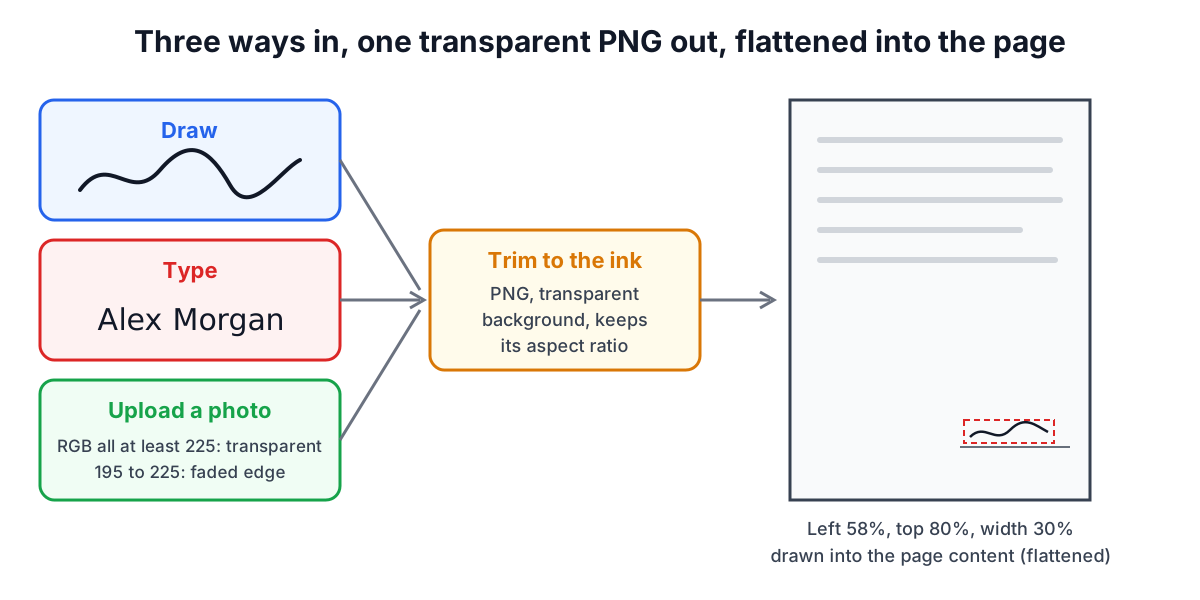
Draw. Sign with a mouse, trackpad, finger or stylus in the drawing area (a 900 × 300 pixel canvas that scales to your screen). Strokes are smoothed with curves, the pen width is adjustable, and ink can be black or blue. Blue ink is a common way to make an original signature stand out from black print. On a phone, sign in landscape for more room.
Type. Enter your name and pick one of five handwriting fonts: Great Vibes, Dancing Script, Allura, Sacramento or Caveat. The text is rendered at a large size (120 px) so it stays sharp when scaled down. These fonts come from Google Fonts, so the font files are downloaded when the Type tab opens; your name and your PDF are not sent anywhere. A typed signature is legally an electronic signature in most places as long as you adopt it with intent to sign, but some recipients prefer a drawn one because it looks more personal.
Upload. Sign a sheet of white paper with a dark pen, photograph or scan it, and upload the PNG, JPG or WebP. With "Remove white paper background" on, every pixel whose red, green and blue values are all 225 or higher becomes transparent, and pixels between 195 and 225 fade gradually so the pen edges stay smooth. Images wider than 1,600 pixels are scaled down first. Good light and a flat sheet matter more than camera quality: shadows and a grey cast survive the cut-off and show as a smudge.
In every mode the result is trimmed to the ink with a few pixels of padding and saved as a PNG with a transparent background, so only the signature appears on the page, not a white box.
Placing the signature on the page
Open the PDF and the tool shows the last page first, because that is where signature lines usually are. Use the arrows to go to another page.
- Click Add signature to this page. The signature appears near the bottom right, 30% of the page width wide.
- Drag the box onto the signature line and drag the round corner handle to resize it. The height follows the signature's own proportions, so it never stretches.
- For initials on every page, size and place it once, then click Same spot on every page. Each page gets the signature at the same relative position, kept inside the page if sizes differ.
- Click Sign and save PDF and download the result.
Positions are stored as fractions of the page as you see it (for example 58% from the left, 80% from the top, 30% wide), then converted into points when the file is written. That keeps the signature exactly where you put it on the preview, including on landscape pages stored with a /Rotate value (ISO 32000-1, section 7.7.3.3).
Worked example: on a US Letter page (612 × 792 pt), a signature 30% wide is 183.6 pt, about 2.55 in. A typed signature with an aspect ratio of 4 to 1 is then 45.9 pt (0.64 in) tall, which fits a typical signature line. Placed with its top-left corner at 58% across and 80% down, its left edge is 355 pt from the left side and its bottom edge 112.5 pt (about 1.56 in) above the bottom of the page.
Flattening: why the signature cannot be dragged off later
The tool draws the signature image into the page's content stream rather than adding it as a movable annotation or form field. This is called flattening. A flattened signature shows in every PDF reader, survives printing and "Print to PDF", and cannot be accidentally moved or deleted by clicking it in a reader.
Flattening is not protection. Anyone with a PDF editor can still delete or copy the image, and a picture of a signature can be pasted into another document. That is why signature images are used where the relationship and the surrounding communication (an email thread, a portal login) carry the proof of who signed, and digital signatures are used where the document itself must prove it.
What the law says (US and EU)
United States. The federal ESIGN Act (15 U.S.C. 7001 and following) says a signature, contract or other record relating to a transaction in or affecting interstate or foreign commerce may not be denied legal effect, validity or enforceability solely because it is in electronic form. The Uniform Electronic Transactions Act, adopted in nearly every state, says the same in section 7: if a law requires a signature, an electronic signature satisfies it. New York uses its own Electronic Signatures and Records Act instead of UETA.
Both have exceptions. ESIGN section 7003 excludes, among others, wills, codicils and testamentary trusts; adoption, divorce and other family law matters; court orders, notices and official court documents; notices of cancellation of utility services; notices of default, foreclosure or eviction on a primary residence; cancellation of health or life insurance; product recall notices; and documents that must accompany hazardous materials. Many states also require notarisation or wet ink for deeds and certain filings.
European Union. The eIDAS Regulation (EU) No 910/2014, amended by Regulation (EU) 2024/1183, defines three levels in Article 3:
| Level | Definition (Article 3) | Legal effect |
|---|---|---|
| Electronic signature (10) | Data in electronic form attached to or logically associated with other data and used by the signatory to sign | Cannot be denied legal effect or admissibility solely because it is electronic (Article 25(1)) |
| Advanced electronic signature (11) | Meets Article 26: uniquely linked to and capable of identifying the signatory, under their sole control, and detects later changes | As above, often required by contracts and some procedures |
| Qualified electronic signature (12) | Advanced signature created by a qualified signature creation device and based on a qualified certificate | Equivalent to a handwritten signature (Article 25(2)) |
A signature image placed with this tool is a simple electronic signature in eIDAS terms. Whether it is enough depends on the document and the national law that applies, and courts weigh the evidence of who applied it. Other countries have their own rules, often modelled on the UNCITRAL Model Law on Electronic Signatures.
The practical rule: for everyday agreements a signature image is commonly accepted; for property, wills, notarised documents, government filings and anything the other side says must be "digitally signed", ask what is required before you send.
Practical tips
- Keep the unsigned original and save the signed copy with a new name (the tool adds _signed).
- Sign last. Fill in any text, add page numbers or merge files first, because some tools rebuild the file and a later edit is harder to justify if questioned.
- Reduce the file size of a scanned contract before signing with Compress PDF, not after, so the signature is not re-encoded as a blurry JPEG.
- Store your signature image carefully. A transparent PNG of your signature is a sensitive file; do not leave it in shared folders. The tool does not save it anywhere; it disappears when you close the tab.
- Filling form fields is a separate step. This tool places a signature image; it does not fill text fields in an interactive form.
Sources
- Electronic Signatures in Global and National Commerce Act (ESIGN), 15 U.S.C. 7001 (general rule of validity), 7003 (specific exceptions) and 7006(5) (definition of electronic signature).
- Uniform Law Commission, Uniform Electronic Transactions Act (1999), section 7 (legal recognition of electronic records, electronic signatures and electronic contracts).
- Regulation (EU) No 910/2014 (eIDAS), Article 3(10) to (12) (definitions), Article 25 (legal effects of electronic signatures) and Article 26 (requirements for advanced electronic signatures), as amended by Regulation (EU) 2024/1183.
- ISO 32000-1:2008, PDF 1.7, section 7.7.3.3 (page objects and /Rotate) and section 12.8 (digital signatures).
- UNCITRAL Model Law on Electronic Signatures (2001).
Related searches
- sign pdf
- sign a pdf without printing
- electronic signature vs digital signature
- is a typed signature legally binding
- esign act electronic signature
- eidas simple electronic signature
- add signature image to pdf
- remove white background from signature
- flatten signature in pdf