
How to Watermark Photos: Placement, Opacity and What It Really Protects
Where to put a watermark so it cannot be cropped off in seconds, how big and how transparent it should be, tiled versus corner marks, and what watermarks do and do not do legally.
· 9 min read

A watermark is a compromise. Make it small and faint and it credits you without spoiling the picture, but anyone can crop or clone it away. Make it large and repeated and it is hard to remove, but it also gets in the way of people simply enjoying the photo. This guide explains how to choose between those, how to size a mark so a mixed batch looks consistent, what opacity and colour work over busy backgrounds, and what a watermark does and does not do legally. The Watermark Image tool implements each option described.
Decide what the watermark is for
Before choosing a position or opacity, decide which job the mark has.
| Goal | Typical mark | Example |
|---|---|---|
| Credit and discovery | Small text or logo in a corner, 40 to 70% opacity | Portfolio, Instagram, blog photos |
| Deterrence on previews | Repeated diagonal text across the image, 20 to 35% opacity | Client proofs, stock previews |
| Limiting reuse of a document | Text across the middle stating the purpose | "Copy for rental application only" on an ID scan |
A credit mark accepts that some people will remove it; its job is to travel with honest reposts so people can find you. A deterrent mark accepts some damage to the viewing experience in exchange for making a clean copy too much effort. A purpose stamp on a document is about making misuse obvious rather than impossible.
Size the mark relative to the image
Fixed pixel sizes fail as soon as a batch mixes sources. Forty-pixel text is bold on a 1080-pixel phone export and barely visible on a 6000-pixel camera file. The tool therefore sizes marks as a percentage:
- Text height as a percentage of the image's shorter side. At 5%, a 4000 x 3000 photo gets 150 px text and a 1000 x 750 photo gets 38 px text. Both cover the same share of the picture.
- Logo width as a percentage of the image width, keeping the logo's own aspect ratio. A 500 x 250 logo at 20% on a 2000 x 1000 photo becomes 400 x 200.
- Margin from the edges as a percentage of the shorter side, so a 3% margin is 30 px on a 1000 px tall image and 90 px on a 3000 px one.
Good starting points: text at 3 to 6% for a corner credit, logos at 12 to 20% of the width, and a 2 to 4% margin. Check the result at the size people will view it, often a phone screen, where a mark that looked fine on a monitor may shrink to a smudge.
Position: corners versus the subject
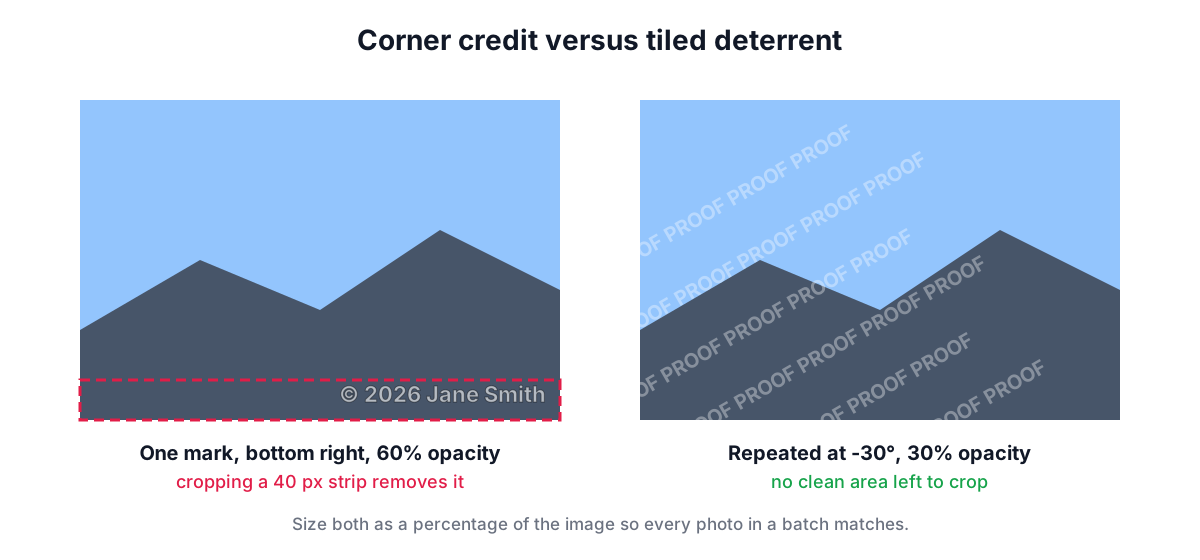
The 3 x 3 position grid offers corners, edge centres and the middle. Corners are tidy and traditional, but a corner mark can be removed with a crop that loses only a few percent of the picture. Moving the mark inward, overlapping part of the subject, makes cropping cost more of the photo and makes cloning harder because the background behind it is detailed.
For deterrence, use Repeat across image. The tool lays out copies of the mark in rows offset by half a step, like brickwork, and rotates the whole pattern by the chosen angle. It extends the grid beyond the image diagonal, so a pattern rotated by -30° still reaches every corner without bare patches. The gap between repeats is a percentage of the shorter side; 5 to 15% keeps the pattern dense enough that no clean region large enough to reuse remains.
When you switch to the tiled layout with no rotation set, the tool suggests -30° and lowers the opacity to at most 35%, because a pattern at full strength makes the photo unusable even for viewing.
Opacity, colour and the outline
A watermark sits on backgrounds you do not control: a bright sky on one photo, a dark forest on the next. Three settings handle that.
Opacity. 40 to 70% is a sensible range for a single mark; 20 to 35% for a repeated one. Below about 15% the mark disappears on light areas.
Colour. White reads on most photos because subjects are usually mid-tone or darker. Black or a dark grey suits product photos on white backgrounds.
Contrast outline. The tool can draw a thin stroke around text: dark around light text and light around dark text. The stroke is one tenth of the text height (at least 1.5 px). It keeps letters legible where the background matches the fill colour, the same trick subtitles and memes use.
For logos, use a PNG, WebP or SVG with a transparent background. A logo inside a white rectangle looks like a sticker and hides far more of the image than the logo itself.
What a watermark means legally
In the US and the other countries of the Berne Convention, copyright exists from the moment a photo is taken; it does not depend on a notice or a watermark. The watermark's legal value is indirect.
- It makes ownership visible, which helps people who want to license or credit the image find you.
- In the US, a name, copyright notice or other identifying information conveyed with a work counts as copyright management information under 17 U.S.C. 1202. Removing or altering it knowing that this will help conceal infringement is a separate violation, with statutory damages under section 1203 of $2,500 to $25,000 per violation, on top of any infringement claim.
- A visible mark makes "I did not know it was yours" harder to argue.
A watermark does not stop copying. Image editors and AI inpainting can remove corner marks quickly. It also does not stop a photo being collected for AI training. Treat it as attribution and friction, not a lock, and keep unmarked originals somewhere safe, because the mark is part of the pixels in the saved file.
Worked example: a batch for a client proof
A photographer has 40 event photos, a mix of 6000 x 4000 camera files and 1080 x 1350 crops, and wants proofs the client can review but not publish.
- Load all 40 in Watermark Image.
- Choose Text and type "PROOF · Smith Photography".
- Set text height to 4%, Repeat across image, rotation -30°, opacity 30%, gap 10%, with the contrast outline on.
- Click through a few images in the list. The pattern looks the same on the large files (160 px text) and the crops (43 px text), because both are 4% of the shorter side.
- Choose JPEG at 85% to keep proofs light, then Download all. The ZIP holds files named like
IMG_0412_watermarked.jpg.
For the final delivery, a discreet corner logo on the web versions is usually enough: Logo image, width 15%, bottom right, 3% margin, opacity 60%.
Practical tips
- Resize before watermarking when you post to the web. Marking a 6000-pixel file and letting a platform shrink it to 1080 pixels also shrinks the mark. The Image Resizer and Crop Image tools handle that step.
- Hide private details first. If a photo shows a number plate or a house number, use the Blur and Pixelate Image tool before adding your mark.
- Check metadata separately. The watermarked file is re-encoded from a canvas, so it carries no Exif data from the original. If you want credit in metadata as well, add it in your photo editor's IPTC fields before export; this tool's output will not keep them.
- Keep it consistent. Use the same text, font and corner across a portfolio so the mark becomes recognisable.
Sources
- 17 U.S.C. 1202 (integrity of copyright management information) and 1203(c)(3)(B) (statutory damages).
- Berne Convention for the Protection of Literary and Artistic Works, Article 5(2): enjoyment of rights not subject to formality.
- US Copyright Office, Circular 3, "Copyright Notice".
Related searches
- how to watermark photos for free
- best watermark opacity
- where to place a watermark
- tiled watermark pattern
- add logo to photos in bulk
- does a watermark protect copyright
- copyright management information 1202
- watermark size for instagram