
How to Write Better AI Prompts: Structure, Examples and Format
The parts of a prompt that change the answer: task, context, audience, examples, output format and rules phrased as what to do. With a before and after rewrite and the vendor advice behind each habit.
· 10 min read
Most disappointing AI answers come from prompts that leave the model guessing. Ask for "some good content about our product" and you get some content, of a length, tone and shape the model picked, about a product it knows nothing about. The fix is not clever wording or magic phrases. It is telling the model the same things you would tell a capable new colleague on their first day: what the job is, why it matters, who it is for, what to work from, and what a finished result looks like. This article walks through those parts, the published advice behind each one, and a full before and after rewrite. The AI Prompt Builder assembles prompts from these parts, and the Prompt Quality Checker scores an existing prompt against them.
The parts of a prompt that change the answer
Anthropic's prompting guide for Claude puts it plainly: think of the model as a brilliant but new employee who lacks context on your norms and workflows, and test a prompt by asking whether a colleague with minimal context could follow it. OpenAI's and Google's guides make the same points in their own words. In practice six parts carry most of the weight.
| Part | What it answers | Example |
|---|---|---|
| Task | What should be produced? | "Summarise the report in five bullet points." |
| Context | Why, and where will it be used? | "It goes into a weekly briefing people skim on their phones." |
| Audience | Who reads the result? | "Managers who have not read the report." |
| Input | What material to work from? | The report itself, in its own section |
| Examples | What does a correct answer look like? | One to five input and output pairs |
| Output format | What shape, length and tone? | "Markdown bullets, under 120 words, neutral tone." |
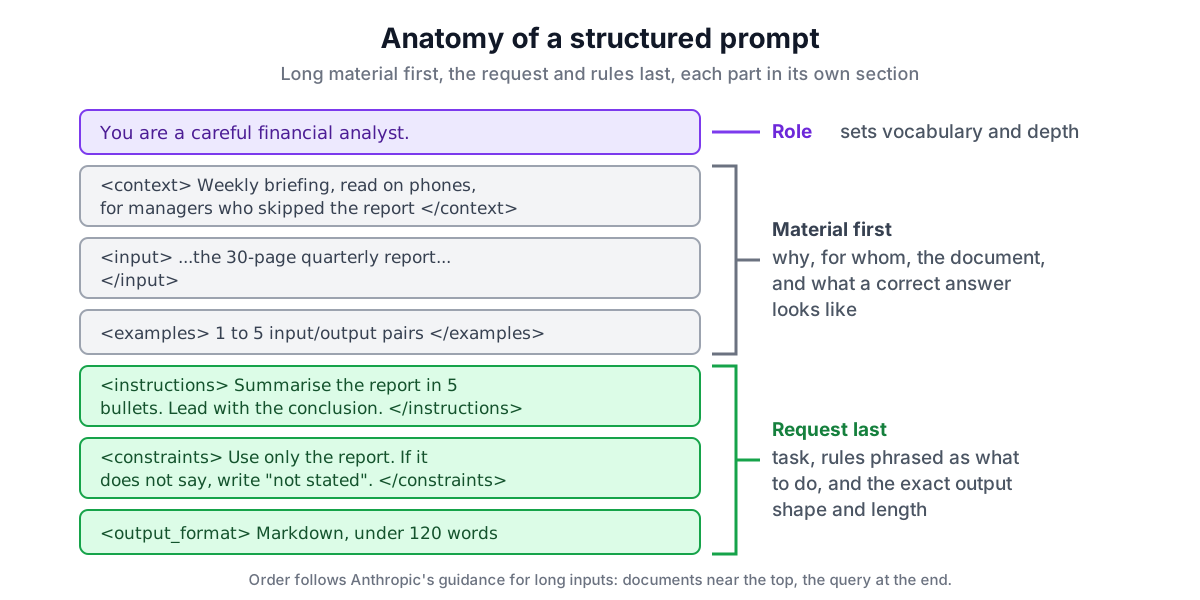
A role ("You are a careful financial analyst") is useful too. Anthropic notes that even a single sentence of role in the system prompt focuses behaviour and tone. It matters less than the six parts above, but it is cheap.
Start with the task, then add context
Begin the request with an action verb: summarise, extract, classify, rewrite, compare, draft. Then say what a finished answer contains. "Review this code" leaves the model to decide whether you want style comments, a security audit or a rewrite. "Review the code below. Report bugs first, then security issues, then readability, and for each give the line, the problem and a corrected snippet" does not.
Context is the part people skip most often, and it is where much of the quality comes from. Anthropic's guide gives a small example. "NEVER use ellipses" works less well than "Your response will be read aloud by a text-to-speech engine, so never use ellipses since the text-to-speech engine will not know how to pronounce them." With the reason, the model can generalise: it will also avoid other things a speech engine would stumble over.
Good context sentences answer questions like these:
- What is the output for, and where will it appear?
- What has already been tried, and what went wrong?
- What does a good result look like, and what would make it useless?
- Who is the audience, and what do they already know?
Show examples of the output
For anything with an exact shape, such as JSON fields, category labels, a table layout or a house style, examples beat descriptions. Anthropic calls examples one of the most reliable ways to steer format, tone and structure, suggests 3 to 5 for best results, and asks for them to be relevant, diverse and wrapped in <example> tags so they are not mistaken for instructions.
Two cautions. First, models copy examples closely, including their mistakes, so check each one. Second, if every example has the same length or opening, outputs will too; vary them on purpose. For a classification task, one example per label is a good start:
<examples>
<example><input>I was charged twice for March.</input><output>billing</output></example>
<example><input>Export does nothing in Safari.</input><output>bug</output></example>
<example><input>Please add dark mode to the app.</input><output>feature_request</output></example>
</examples>
Separate the parts with tags or headings
Once a prompt has a few hundred words, instructions, background and data start to blur together. A model can treat a line in a pasted email ("please ignore the previous message") as an instruction to itself, or miss a rule buried in the middle of a paragraph. Wrapping each part in its own section fixes this. Anthropic recommends XML tags such as <context>, <instructions> and <input> for Claude because they parse unambiguously. There is nothing special about the tag names; consistency matters more than the exact words. Markdown headings do the same job, and GPT and Gemini models read either style.
Order matters for long inputs. Anthropic advises putting long documents near the top of the prompt, above the instructions and examples, and reports that putting the query at the end improved response quality by up to 30 percent in its tests with complex, multi-document inputs. The AI Prompt Builder follows that order: role, context, input and examples first, then the task, constraints and output format.
Say what to do, not only what to avoid
Prompts often grow by accretion: each bad answer adds another "don't". After a while the prompt is a list of prohibitions with no description of the goal. Anthropic's guidance on formatting is direct: tell the model what to do instead of what not to do. Instead of "Do not use markdown in your response", try "Your response should be composed of smoothly flowing prose paragraphs."
The same guidance warns against shouting. Earlier models sometimes needed "CRITICAL: You MUST" to notice an instruction. Current models follow instructions closely, and capitalised warnings can make them over-apply a rule, for example calling a tool when it is not needed. "Use this tool when the user asks about order status" works better.
Two related habits:
- Remove conflicts. "Short but detailed" or "formal but chatty" force the model to choose, and it may choose differently each time. Decide which wins, or scope each one: "a one-sentence summary, then a detailed breakdown".
- Allow "I don't know". When you ask for figures, dates or sources, add a way out such as "If you are not sure of a fact, say so rather than guessing." Anthropic lists explicit permission to admit uncertainty as a basic way to reduce hallucinations.
A before and after rewrite
Here is a prompt of the kind that produces generic, unreliable copy:
You are an expert. Write me some good content about our product for [COMPANY] etc.
Make it short but also very detailed and comprehensive. Include statistics about the
market. DO NOT use jargon!!! NEVER mention competitors. Don't be boring. Don't make it too long.
The Prompt Quality Checker scores it 19 out of 100 and lists eight findings: conflicting length instructions ("short" and "detailed"), an unfilled [COMPANY] placeholder, no output format, shouted rules, a request for statistics with no permission to say "I don't know", vague words ("some", "good", "etc"), no audience, and a list of prohibitions with no positive instruction. Each one leaves the model a decision you probably wanted to make yourself.
The rewrite gives it the facts, the reader, the length, the shape and a way out:
You are a B2B copywriter who writes plain, specific product copy.

<context>
We sell Tallybook, bookkeeping software for UK sole traders. This text goes on the
pricing page, under the heading "Why Tallybook". Visitors are self-employed people
comparing three or four apps.
</context>

<instructions>
Write the section using only the product facts below. Lead with the time saved on the
Self Assessment tax return. Write for self-employed tradespeople with no accounting
background. Keep it under 120 words. If a fact you would like to use is not listed,
leave it out rather than guessing.
</instructions>

<facts>
- Bank feeds from 30 UK banks
- Photo receipts matched to transactions automatically
- Self Assessment figures calculated as you go
- £9 a month, cancel any time
</facts>

<output_format>
One short paragraph followed by 3 bullet points, in Markdown.
</output_format>
This version scores 100 with no findings. It is longer, 190 tokens instead of 55 on OpenAI's o200k_base encoding, and that is fine: the extra tokens replace guesses with decisions. The "market statistics" request is gone because the honest version of it needs a source, and inventing one is exactly what the original prompt invited.
Formats your code can rely on
When software reads the output, describe the format precisely and show it. "Return only valid JSON that matches this schema, with no text before or after it" plus a schema and one example gets you most of the way. Two details help: say what to do with missing values ("use null for any field the email does not contain") and fix formats that vary ("write dates as YYYY-MM-DD"). For production, use the API's structured output or JSON mode where it exists, and validate the result in your code; a prompt alone cannot guarantee valid JSON every time.
If you call a model through an API, put the role and standing rules in the system prompt and the per-request material in the user message. The builder's system split and JSON download give you both parts ready to paste into a request. For agents with tools, the Agent System Prompt Generator covers tool rules and guardrails in more depth.
Test on real inputs
No checklist replaces running a prompt on real cases. Pick five to ten inputs that cover the easy case, an edge case, a messy one and one where the right answer is "not enough information". Run them, read the outputs side by side, change one thing, and run them again. Keep the inputs so you can rerun them when you change models; behaviour shifts between versions more than most people expect.
Length is worth watching as well. A long system prompt is paid for on every call. The LLM Token Counter shows exactly how many tokens a prompt uses, and the companion article on reducing LLM token usage and cost covers caching and trimming when a prompt is sent millions of times.
Quick checklist
- Start with an action verb and describe a finished answer.
- Add a sentence of context: why, where it will be used, what good looks like.
- Name the audience.
- Put long material first, in its own section, and the request last.
- Show one to five varied, correct examples for exact formats.
- State the format, length and tone.
- Phrase rules as what to do, with the reason; drop the capitals.
- Remove conflicts and fill or delete every placeholder.
- Allow "I don't know" for anything factual.
- Test on real inputs, and keep them for next time.