
Formatting HTML, XML and YAML Without Changing What They Mean
Where whitespace is safe to move in HTML, XML and YAML, where it is data, and the formatter bugs (void tags, mixed content, duplicate keys) that quietly change files.
· 7 min read
A teammate runs a one-line "beautify" script over an email template, the diff looks harmless, and the next campaign goes out with a stray space between every price and its currency symbol. Another formats a Kubernetes manifest with a line-based re-indenter and a resources: block quietly moves from the container up to the pod spec. Neither formatter crashed. Both changed meaning while claiming to change only layout.
Pretty-printing feels like the safest operation in software, and for JSON it nearly is. HTML, XML and YAML are different: in each of them, some whitespace is decoration and some is data. A good formatter knows which is which. This guide goes through each format, shows where whitespace is safe to move, and lists the specific bugs to check for, using the HTML Beautifier, XML Beautifier and YAML Beautifier as worked examples.
The one rule: parse first, then print
Every reliable formatter works the same way. It parses the text into a tree using the real grammar of the format, then prints that tree back with new indentation. Formatters that skip the parse step and work on lines or regular expressions are the ones that break files, because they cannot tell a tag inside a script from a real tag, or a key at the wrong column from a key at the right one.
The practical test is simple. Format a file, then format the output again. A tree-based formatter gives you the same text the second time. Then diff the original against the output in a diff tool with whitespace changes ignored: if anything other than whitespace changed, the formatter touched content.
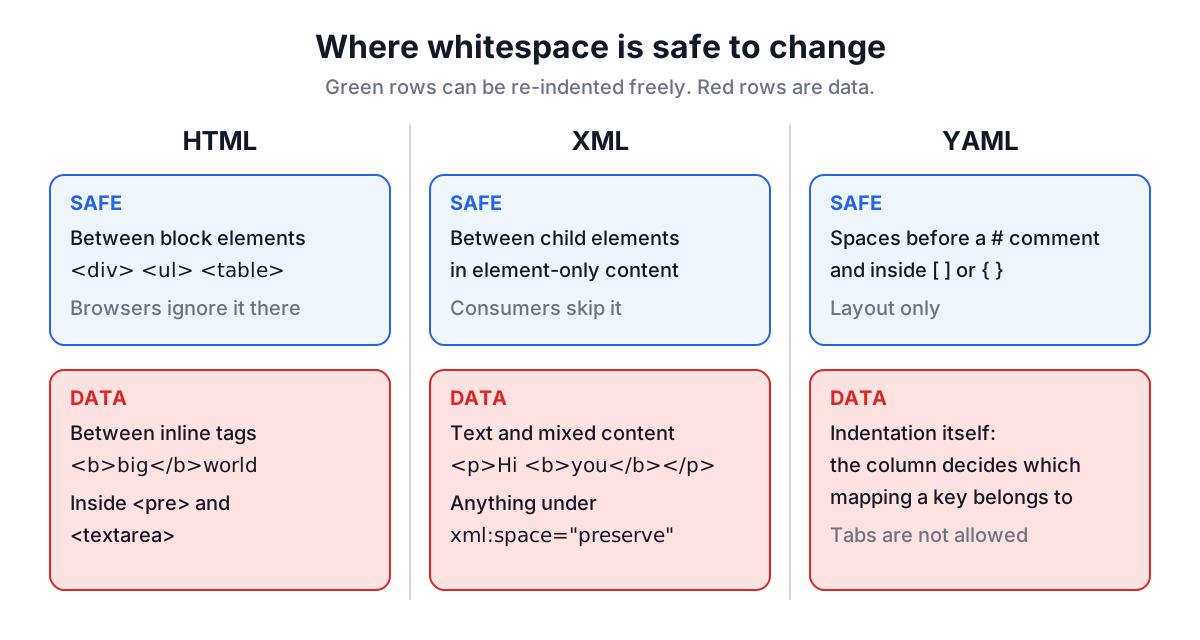
| Format | Whitespace that is safe to change | Whitespace that is data |
|---|---|---|
| HTML | Between block elements such as div, ul, table | Between inline elements and text; inside pre, textarea |
| XML | Between child elements in element-only content | Inside text, mixed content, xml:space="preserve" |
| YAML | Spaces before a comment, inside flow brackets | Indentation, which defines nesting |
HTML: void elements, implied end tags and inline text
HTML looks like XML but is parsed by different rules, and three of them catch naive formatters.
Void elements. The HTML Living Standard lists elements that never have an end tag: area, base, br, col, embed, hr, img, input, link, meta, source, track and wbr. A formatter that indents after every start tag walks to the right after each one and never comes back. Here is what a correct formatter produces for a small fragment:
<nav>
  <ul>
    <li><a href="/">Home</a>
    <li><a href="/docs">Docs</a>
  </ul>
</nav>
<p>Read the <code>README</code> first.<br>Then run it.</p>
That is the real output of the HTML Beautifier for the same markup written on one line.
Implied end tags. Notice the list items. The source wrote <li>Home<li>Docs without </li>, which is valid HTML: a new li closes the previous one. The same applies to p, td, th, tr, dt, dd and option. A formatter must know this to put the two items side by side instead of nesting the second inside the first. It should also not invent end tags you did not write, because that turns a formatting diff into a content diff.
Inline whitespace. Browsers collapse runs of whitespace in normal text to one space, but they do not drop it. <b>big</b>world renders as "bigworld"; split across two lines it renders as "big world". The only safe rule is to keep runs of text and inline elements (a, span, b, code, img and friends) on one line and only break lines between block elements. That is why the paragraph above stays on a single line.
Raw text. <pre> and <textarea> keep their whitespace exactly, so a formatter must copy them byte for byte. <script> and <style> bodies may contain < characters (if (a < b)), so they must be captured as a block up to their end tag, not tokenised as markup.
Common mistakes to check in any HTML formatter's output:
- Indentation that grows after
<meta>,<img>or<br>. - New spaces between a word and the link or bold text that follows it.
- Reflowed text inside
<pre>, which breaks code samples and ASCII art. - A script split at a less-than sign.
XML: well-formed first, then careful with text
XML is stricter than HTML. There are no void elements and no implied end tags; every element is closed, attributes are quoted, and & and < in text must be escaped as & and <. A document that breaks any rule is not well-formed and a conforming parser must stop. So the first job of an XML formatter is to refuse bad input instead of printing something that looks plausible.
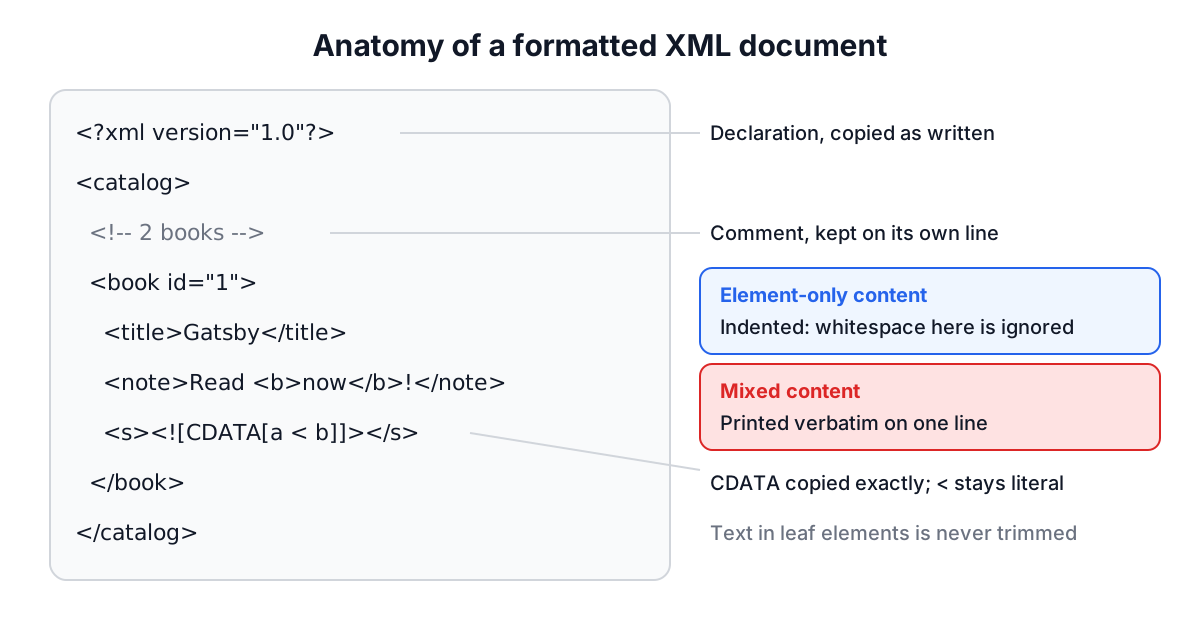
Element-only versus mixed content. To the parser, the line breaks between <book> elements are text nodes. Consumers of data formats ignore them, so indenting element-only content is safe. Mixed content is different: in <p>Hello <b>world</b>!</p> the text and the child element are interleaved, and any whitespace you add becomes part of the paragraph. The XML Beautifier prints any element that contains text exactly as it was, and honours xml:space="preserve", the attribute the XML 1.0 spec defines for "do not touch whitespace here".
Escaping on the way out. A DOM-based formatter reads & as &. If it writes the value back without re-escaping, the output is no longer well-formed. Check that this input survives:
<r><a t="x & y">1 < 2</a><s><![CDATA[a < b]]></s></r>
The correct output keeps & and < escaped and copies the CDATA section untouched, because inside CDATA the < is literal.
Comments, processing instructions and the DOCTYPE are part of the document too. Formatters that walk only elements drop them, which can remove a licence header or an xml-stylesheet instruction.
XPath and namespaces. Once a document is readable you usually want to query it. The XML Beautifier includes an XPath 1.0 panel. The gotcha is the default namespace: in a sitemap with xmlns="http://www.sitemaps.org/schemas/sitemap/0.9", the query //url matches nothing. Use //*[local-name()='url'] and it works. If you are building sitemaps, the XML Sitemap Generator produces files you can check this way.
YAML: indentation is the data
In HTML and XML, indentation is cosmetic. In YAML it is the structure. A key belongs to whichever mapping its column lines up with, so moving a line two spaces can move a setting to a different object without any syntax error. Tabs are not allowed for indentation at all.
That rules out line-based re-indenters. Consider:
a:
    b: 1
    c: 2
d: 3
A formatter that only increases indentation after a line ending in a colon, and never decreases it, prints d: 3 indented under a, and d silently becomes a child of a. A parser-based formatter gives the only correct answer:
a:
  b: 1
  c: 2
d: 3
The YAML Beautifier uses a YAML 1.2 parser and prints the parsed document, which preserves the things people care about:
- Comments, both full-line and inline. The space before an inline
#is normalised to one, so column-aligned comments lose their alignment. - Anchors and aliases, such as
defaults: &defaultsand<<: *defaults. They are printed as written, not expanded. - Multiple documents separated by
---, which matters for multi-resource Kubernetes files. - Block scalars (
|and>) and quoted strings, with no re-wrapping of long lines.
Duplicate keys deserve a special mention. The YAML spec requires unique keys in a mapping, but many parsers accept duplicates and keep the last value. A manifest with two image: lines deploys whichever comes second, with no warning. The YAML Beautifier reports the duplicate with its line and column instead of formatting it.
The YAML 1.1 versus 1.2 split also bites here. Under 1.1, used by PyYAML and older tools, no, off and yes are booleans, so country: NO becomes false. Under 1.2 they are strings. Formatting does not change your values, but if you are converting between JSON and YAML the JSON vs YAML guide covers the type rules in detail.
A quick checklist before you commit formatted files
- Format, then format again. The second pass should produce no changes.
- Diff the original and the formatted file with whitespace ignored. Only whitespace should differ.
- In HTML, scan paragraphs with links and bold text for new gaps, and check every
<pre>block. - In XML, confirm that escaped characters are still escaped and that comments and CDATA survived.
- In YAML, check that top-level keys are still at column zero and that no error about duplicate keys was hidden.
- Commit formatting changes separately from content changes so reviewers can skip the noise.
For JSON payloads the same habits apply, and the JSON Formatter guide covers validation and JSONPath. For the rest, paste the file into the matching beautifier, read the output once with the checklist above, and keep the formatter's output as the version you commit.