
.htpasswd Explained: Basic Auth, bcrypt and APR1 on Apache and nginx
How HTTP Basic auth uses an .htpasswd file, what each hash prefix means, why bcrypt beats APR1-MD5 and SHA-1, and where nginx differs from Apache.
· 8 min read
An .htpasswd file is the simplest way to put a password in front of part of a website: one line per user, a user name, a colon and a password hash. Apache httpd and nginx both read it, staging sites everywhere rely on it, and the format has quietly accumulated thirty years of hash schemes, some of which should no longer be used. This guide explains how Basic authentication works, what each line format means, why bcrypt is the right default and where nginx behaves differently from Apache.
To build or check lines as you read, use the Htpasswd Generator.
How HTTP Basic authentication works
Basic authentication is defined in RFC 7617. When a browser requests a protected URL, the server answers 401 Unauthorized with a header such as WWW-Authenticate: Basic realm="Staging". The browser shows its login dialog, then repeats the request with Authorization: Basic followed by the base64 encoding of user:password.
Two consequences follow. First, base64 is an encoding, not encryption: anyone who can see the request can read the password. Basic auth is only acceptable over HTTPS. Second, there is no session. The browser sends the credentials with every single request, and the server checks them every time, which matters when you choose how expensive the hash should be.
The realm string is just a label shown in some browsers' dialogs and used to group credentials. It provides no security.
What is inside an .htpasswd file
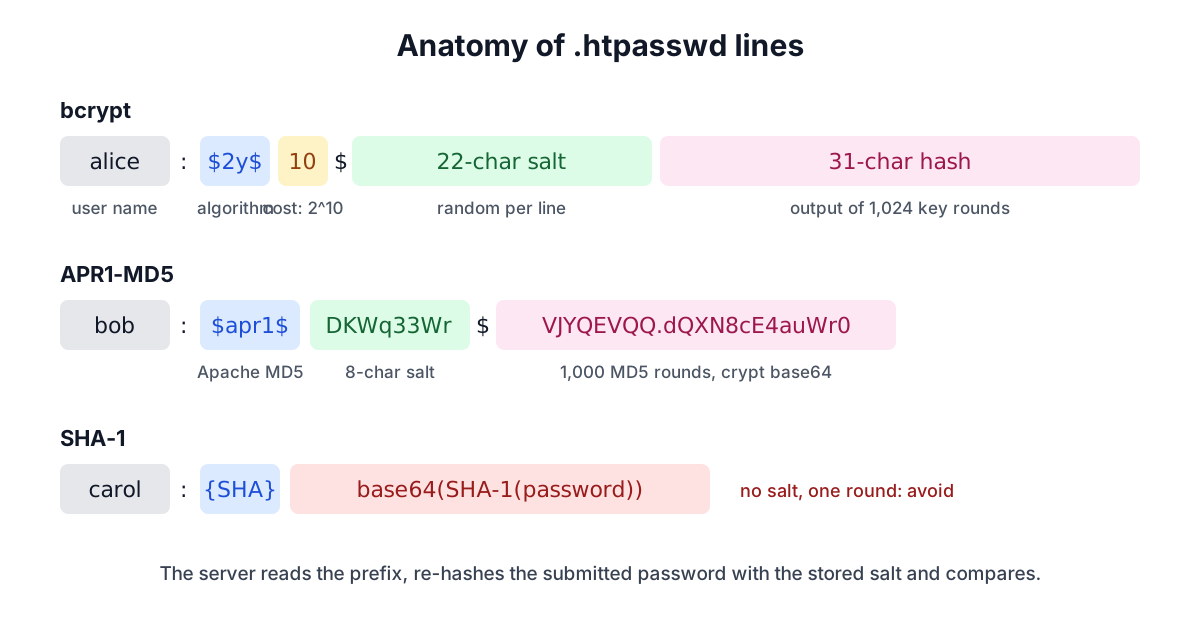
Each non-empty line holds username:hash. Blank lines and lines starting with # are skipped by both servers. The user name cannot contain a colon, and Apache's htpasswd limits it to 255 bytes. The hash starts with a prefix that tells the server which algorithm produced it.
| Prefix | Scheme | Salt | Work factor | Use today? |
|---|---|---|---|---|
$2y$, $2b$, $2a$ | bcrypt | 128-bit, random | 2^cost rounds, tunable | Yes |
$apr1$ | Apache MD5 (APR1) | up to 8 characters | 1,000 MD5 rounds, fixed | Only for old servers |
$1$ | FreeBSD md5crypt | up to 8 characters | 1,000 MD5 rounds, fixed | No |
{SHA} | SHA-1, base64 | none | one SHA-1 | No |
{SSHA} | salted SHA-1 (LDAP style) | yes | one SHA-1 | No (nginx only) |
| 13 characters, no prefix | DES crypt | 2 characters | 25 DES rounds | No |
| anything else | plain text | none | none | Never |
A short history: from DES crypt to APR1
The first htpasswd used the Unix crypt() function, which at the time meant DES-based crypt. It has a 2-character salt and silently ignores everything after the eighth character of the password, so password123 and password produce the same hash.
Poul-Henning Kamp wrote md5crypt for FreeBSD in 1994 to fix the length limit. It runs MD5 1,000 times, mixing in the password and salt in a fixed pattern, and encodes the result in crypt's own base64 alphabet. Apache needed a hash that behaved identically on every platform, including Windows where there was no system crypt(), so the Apache Portable Runtime adopted the same algorithm with a different marker, $apr1$. The two are byte-for-byte identical apart from that prefix, which is why an APR1 implementation can verify $1$ hashes by swapping the magic string. From Apache 2.2.18 onwards, APR1 was htpasswd's default.
The {SHA} format came later for interoperability with systems that already stored SHA-1 passwords. It is a single unsalted SHA-1, base64-encoded. Two users with the same password get the same line, and precomputed tables for SHA-1 have existed for decades.
Why bcrypt is the right default
A password file is designed to leak safely. If an attacker copies it, the hash format decides how many guesses per second they can test.
MD5 and SHA-1 were built to be fast. A single modern GPU computes billions of MD5 hashes per second, so even APR1's 1,000 rounds still allow millions of guesses per second against each line. Common and short passwords fall quickly.
bcrypt, published by Niels Provos and David Mazières in 1999, was designed for this situation. It has a 128-bit random salt, so no two lines are alike, and a cost parameter: each step up doubles the work. It also needs a small but awkward amount of memory that makes GPUs much less efficient than they are at MD5. Apache 2.4 added bcrypt to htpasswd with the -B flag and verifies it on every platform through APR's own implementation.
Apache writes bcrypt hashes with the $2y$ prefix. $2y$ (from PHP's crypt_blowfish fix in 2011) and $2b$ (OpenBSD's 2014 fix) both mark the corrected algorithm and produce identical output, so libraries generally accept either. $2a$ is the older marker and $2x$ marks hashes from the buggy pre-2011 implementation.
Two bcrypt details deserve attention:
- Only the first 72 bytes of the password count. Anything after that is ignored. Long passphrases with multibyte characters reach the limit sooner than you might expect.
- Cost costs you too. Because Basic auth re-checks the password on every request, a high cost multiplies across every page, image and API call behind the login. htpasswd defaults to cost 5; 10 to 12 is a reasonable range for a small protected area. The bcrypt guide explains how to pick a cost by timing it, and the Bcrypt Hash Generator lets you try different values.
Newer htpasswd builds also accept -2 and -5 for SHA-256-crypt and SHA-512-crypt ($5$ and $6$). Those rely on the server's system crypt() for verification, so check support on the target machine before using them.
Configuring Apache
In the main configuration or a virtual host:
<Location "/admin">
    AuthType Basic
    AuthName "Restricted area"
    AuthBasicProvider file
    AuthUserFile "/etc/apache2/.htpasswd"
    Require valid-user
</Location>
In an .htaccess file, drop the <Location> wrapper and keep the Auth* and Require lines; the directory containing the file is protected. AllowOverride AuthConfig must be enabled for that directory.
Keep the password file outside the document root. Apache's stock configuration denies requests for files beginning with .ht, but a file outside the web root cannot be served by mistake even if that rule is removed.
Configuring nginx and how it differs
location /admin {
    auth_basic           "Restricted area";
    auth_basic_user_file /etc/nginx/.htpasswd;
}
nginx reads the same file format but verifies it differently. According to its documentation, it handles APR1, {PLAIN}, {SHA} and {SSHA} itself, and passes every other hash to the operating system's crypt() function. That makes bcrypt support a property of the C library, not of nginx. Current Debian, Ubuntu and Fedora (which use libxcrypt) and Alpine (musl) support bcrypt; some older or stripped-down systems do not, and nginx then rejects the login and writes a crypt error to its error log.
If you cannot confirm bcrypt support on an nginx host, APR1 is the portable fallback. Combine it with long random passwords, which matter far more against a fast hash, and restrict the protected location by IP address where you can.
Another difference: nginx has no tool of its own to create the file. People install apache2-utils (Debian) or httpd-tools (Red Hat) for htpasswd, use openssl passwd -apr1, or generate the lines elsewhere, which is what the generator on this site is for.
Verifying and maintaining the file
To check whether a password matches a line, the server reads the prefix, extracts the salt (and cost for bcrypt), hashes the submitted password with them and compares the result. You can do the same by hand with htpasswd -v file user on Apache 2.4, or with the verifier in the Htpasswd Generator, which understands bcrypt, $apr1$, $1$, {SHA}, {SSHA} and plain entries.
A few maintenance habits keep the file healthy:
- Give every person their own line, so you can remove one without resetting everyone.
- Replace
{SHA}, DES and plain-text lines as soon as you find them. You cannot convert a hash to another format; ask the user for a new password. - Generate passwords instead of choosing them. The Password Generator makes long random ones.
- Treat Basic auth as a fence, not a vault. It has no logout, no rate limiting and no second factor. For anything beyond a staging site or a small admin area, put a real login in front.