
HTTP Status Codes Explained: What Each Class Means and When to Send It
How the five status classes work, the codes APIs get wrong (401 vs 403, 400 vs 422, 301 vs 308), what RFC 9110 changed, caching defaults, and the nginx and Cloudflare codes that show up in logs.
· 10 min read
Every HTTP response starts with a three-digit number, and that number is read by far more software than the body is. Browsers decide whether to follow a redirect or show an error page from it, caches decide whether to store the response, retry libraries decide whether to try again, search engines decide whether to keep a URL in the index, and monitoring decides whether to wake someone up. Getting it right is cheap; getting it wrong produces bugs that look like they are somewhere else. This article explains how the codes are organised, which ones matter in practice and where people go wrong. The HTTP Status Codes reference lists every registered code with its RFC section if you need to look one up while you read.
Where status codes are defined
The core codes live in RFC 9110, HTTP Semantics, published in June 2022. It replaced RFC 7231 (2014), which in turn replaced RFC 2616 (1999), and it brought every general-purpose code into one place in its section 15. Codes defined for narrower purposes stay in their own documents: 429 Too Many Requests, 428 and 431 come from RFC 6585, 451 Unavailable For Legal Reasons from RFC 7725, 425 Too Early from RFC 8470, 103 Early Hints from RFC 8297, and the WebDAV codes 207, 423, 424 and 507 from RFC 4918. IANA keeps the HTTP Status Code Registry that points at all of them.
RFC 9110 also renamed two codes to match how they are used. 413 is now "Content Too Large" (it was "Payload Too Large" and before that "Request Entity Too Large"), and 422, which used to be WebDAV-only, became the general "Unprocessable Content". If you see the old names in a framework, they mean the same thing.
The five classes and the fallback rule
The first digit carries most of the meaning, and software relies on it.
| Class | Meaning | What clients do |
|---|---|---|
| 1xx Informational | Interim response; a final one follows | Keep waiting (100 Continue, 103 Early Hints) |
| 2xx Successful | The request worked | Use the body, if there is one |
| 3xx Redirection | More action needed, usually follow Location | Follow automatically for 301, 302, 303, 307, 308 |
| 4xx Client error | The request is wrong or not allowed | Do not retry unchanged |
| 5xx Server error | A valid request failed on the server | Retrying later may work |
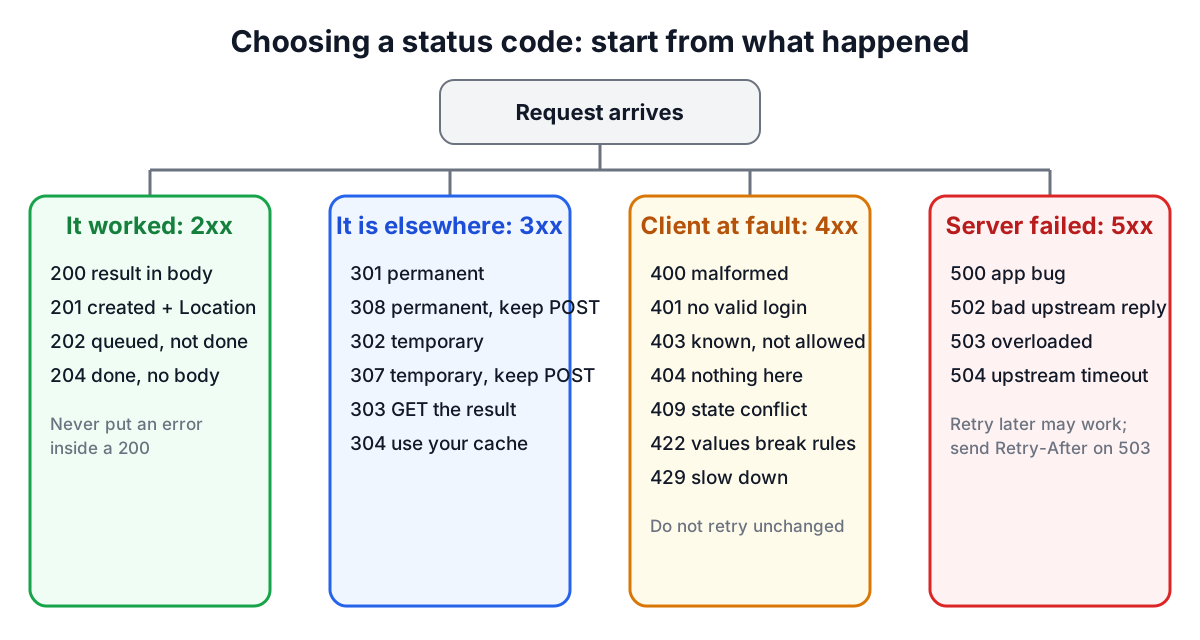
RFC 9110 section 15 adds an important rule: a client that receives a code it does not recognise must treat it as the x00 code of the same class. An unknown 299 is handled like 200, an unknown 460 like 400 and an unknown 599 like 500. That is why inventing a private status code buys you nothing. Proxies, browsers and libraries will only ever see the class, so put the detail in the body (RFC 9457 Problem Details is a good format for it) and keep the code standard.
The success codes worth knowing
Most APIs only need four 2xx codes. 200 OK is the default. 201 Created says a POST or PUT made something new and should carry a Location header pointing at it. 202 Accepted says the work was queued and has not finished, which is honest for asynchronous jobs: return a status URL the client can poll. 204 No Content says it worked and there is nothing to send back, common after DELETE.
Two details trip people up. A 204 response must not contain a body, and some proxies hang or corrupt the next response on the connection if you send one anyway. And returning 200 with {"error": "not found"} in the body is a bug, not a style choice: caches will store it, crawlers will index it and every client library will report success.
Redirects: permanence and method
The 3xx codes answer two independent questions: is the move permanent, and must the client repeat the same method and body?
| Code | Permanent | Keeps POST as POST | Typical use |
|---|---|---|---|
| 301 Moved Permanently | Yes | Not guaranteed | Pages that moved for good |
| 302 Found | No | Not guaranteed | Temporary moves, login bounces |
| 303 See Other | No | Always changes to GET | After a form POST (Post/Redirect/Get) |
| 307 Temporary Redirect | No | Yes | Temporary moves of API endpoints |
| 308 Permanent Redirect | Yes | Yes | Permanent moves of API endpoints |
The "not guaranteed" column is history. Early browsers turned a POST into a GET when following 301 and 302, and so many did it that RFC 9110 now allows it. HTTP/1.1 introduced 307 and RFC 7538 introduced 308 so that a server can ask for the method to be kept. For ordinary page links the difference does not matter, which is why 301 remains the usual choice for site moves. For an endpoint that receives uploads or form posts, use 307 or 308, or the body will be lost.
304 Not Modified sits in this class but is not really a redirect. It answers a conditional request (If-None-Match with an ETag, or If-Modified-Since) and tells the client to use its cached copy. If you are building redirect rules, the Redirect Rules Generator writes them for Apache, Nginx, Netlify and Vercel.
The client errors APIs most often confuse
400 versus 422. 400 Bad Request is for requests the server cannot parse or that miss required parts: broken JSON, a missing parameter, a wrong type. 422 Unprocessable Content is for requests that parse fine but break a rule, such as an end date before the start date. Both are legitimate. Pick one convention for validation errors, document it and use it everywhere.
401 versus 403. The names are misleading. 401 Unauthorized means unauthenticated: there are no valid credentials, and a fresh login or token might work. It must include a WWW-Authenticate header naming the scheme. 403 Forbidden means the server knows who you are and the answer is still no. Sending 401 for a permissions problem makes clients loop through re-authentication for nothing.
403 versus 404. A server may answer 404 instead of 403 to avoid confirming that a private resource exists. GitHub does this for private repositories. It is a deliberate choice, not an error.
409 versus 412. 409 Conflict describes a clash with current state, such as a duplicate username. 412 Precondition Failed is narrower: the client sent If-Match with an ETag that is no longer current, so the server refuses to overwrite a newer version. Using ETags and 412 is the standard way to prevent lost updates.
429. Rate limiting has its own code from RFC 6585. Send Retry-After with a number of seconds or an HTTP date. Do not use 503 for one client exceeding its quota; 503 says the whole service is unavailable.
Server errors and what they point at
The 5xx codes are most useful when they tell an on-call engineer where to look. 500 means the application itself failed, usually an unhandled exception. 502 Bad Gateway means a proxy or load balancer got an invalid response from the upstream, typically because the application crashed or closed the connection. 503 Service Unavailable means overloaded or in maintenance, ideally with Retry-After; Google treats a short 503 as temporary and keeps the page indexed. 504 Gateway Timeout means the proxy gave up waiting; nginx's proxy_read_timeout defaults to 60 seconds and Cloudflare waits 100 seconds before returning its own 524.
Caching defaults
RFC 9110 section 15.1 lists the codes a cache may store with a heuristic lifetime when the response has no explicit freshness information: 200, 203, 204, 206, 300, 301, 308, 404, 405, 410, 414 and 501. Two consequences catch people out. A permanent redirect sent by mistake can stay in browser caches long after you fix the server. And a 404 returned briefly during a deploy can be cached by a CDN. Send explicit Cache-Control headers on error responses if you want them treated differently.
Codes you will see that are not in any RFC
Logs and dashboards contain codes no standard defines. They come from a specific product and describe what that product saw.
| Code | Source | Meaning |
|---|---|---|
| 444 | nginx | nginx closed the connection without a response (return 444;) |
| 499 | nginx | The client closed the connection before nginx answered |
| 494 to 497 | nginx | Header too large, client certificate problems, HTTP sent to HTTPS port; clients see 400 |
| 520 to 526 | Cloudflare | Origin problems: unknown error, refused, TCP timeout, unreachable, HTTP timeout, TLS failures |
| 419 | Laravel | CSRF token missing or expired |
A wave of 499s means clients are giving up, often because the backend is slower than the client timeout. A 522 means Cloudflare could not even open a TCP connection to your origin, while 524 means it connected but the origin did not send an HTTP response in time. They point at different fixes: firewall and network for 522, slow requests for 524.
A short checklist
- Return 4xx when the caller can fix the request and 5xx when they cannot. Retry logic depends on it.
- Never wrap an error in a 200.
- Use 201 with Location for creation, 204 for empty success, 202 for queued work.
- Use 401 with WWW-Authenticate for missing credentials and 403 for missing permission.
- Use 308 or 307 when an endpoint that accepts POST moves.
- Send Retry-After with 429 and 503.
- Put details in the body with application/problem+json rather than inventing codes.
When a header in the response is the real question, the MIME Type Lookup covers Content-Type, and the Security Headers Analyzer checks the rest.
Sources
- RFC 9110, HTTP Semantics, section 15 (status codes) and 15.1 (cacheability), IETF, 2022.
- IANA, Hypertext Transfer Protocol (HTTP) Status Code Registry.
- RFC 6585, Additional HTTP Status Codes (428, 429, 431, 511).
- RFC 7538, The Hypertext Transfer Protocol Status Code 308 (Permanent Redirect).
- RFC 7725 (451), RFC 8470 (425), RFC 8297 (103), RFC 4918 (WebDAV codes), RFC 9457 (Problem Details).
- nginx documentation for ngx_http_proxy_module and the return directive; Cloudflare documentation on 5xx errors.
Related searches
- http status codes list
- rfc 9110 status codes
- 401 vs 403
- 400 vs 422 validation error
- 301 vs 308 redirect
- cacheable status codes
- nginx 499 meaning
- cloudflare 522 error
- 429 retry-after
- unknown status code handling