
Blameless Incident Postmortems: A Template and How to Run One
What goes in a postmortem, how to build a timeline people trust, the difference between time to mitigate and time to resolve, and action items that actually get done.
· 6 min read
At 09:14 an alert fires for a rising 5xx rate on checkout. At 09:20 someone declares an incident, at 09:39 a release is rolled back and errors stop, and at 10:44 the real fix ships. A week later, half the team remembers the rollback happening at 09:30 and the other half thinks the alert fired at 09:00. A good postmortem exists so that the organization remembers what actually happened, and changes something because of it.
This guide covers what to put in an incident review, how to run it without blame, the three durations worth tracking, and how to write action items that get done. The Incident Postmortem Generator builds a report with these sections from your notes.
Why blameless
The blameless postmortem became standard practice in web operations around 2010 to 2012, with Etsy's engineering writing among the best known early descriptions, and Google's Site Reliability Engineering book (2016) gave it a full chapter. The reasoning is practical, not soft. People make the decisions that seem right with the information they have. If the review punishes the person who ran the command, the next person hides the command they ran, and you lose the information you need to prevent a repeat.
So the review asks a different question. Not "who forgot to check the pool size?" but "what let a pool size change reach production without anyone checking it?" The first question has one answer and fixes nothing. The second usually has three or four, and each one is an action item.
A useful test while writing: if you can replace a person's name with "an engineer" and the sentence still makes sense, keep the sentence and drop the name.
What goes in the report
| Section | What to write |
|---|---|
| Summary | Two or three sentences a director can read: what broke, for how long, who noticed |
| Impact | Users affected, failed requests or orders, revenue if known, data loss if any |
| Timeline | Timestamped events in one time zone, from first symptom to all-clear |
| Detection | How you found out: alert, customer report, a colleague noticing a graph |
| Root cause | The underlying conditions, not just the trigger |
| Response | What went well, what was slow, what was confusing |
| Action items | Specific changes with one owner and a date each |
| Lessons learned | What the team now knows that it did not before |
The timeline is the backbone
Build the timeline from logs, alert history and the incident channel, not memory. Use one time zone, preferably UTC, and say so at the top. Mixed time zones are the most common timeline error, and they make durations wrong by whole hours.
In the generator, paste one event per line and start each with a time: 09:14 - Alert fired for 5xx rate, 2026-03-02 14:30 UTC: paged on-call, or T+5m rollback started. Lines with a time are split into time and event; lines without one are kept in order as plain events. Nothing is filled in for you.
Trigger versus root cause
A config change that halved the database pool size is the trigger. The root cause is whatever let that change ship unnoticed: no validation on pool settings, no alert on pool saturation, a dashboard nobody watched during deploys. Fix only the trigger and the next config change causes the same outage. The Root Cause Analysis tool helps work through 5 Whys and fishbone diagrams when the chain is long.
Detect, mitigate, resolve
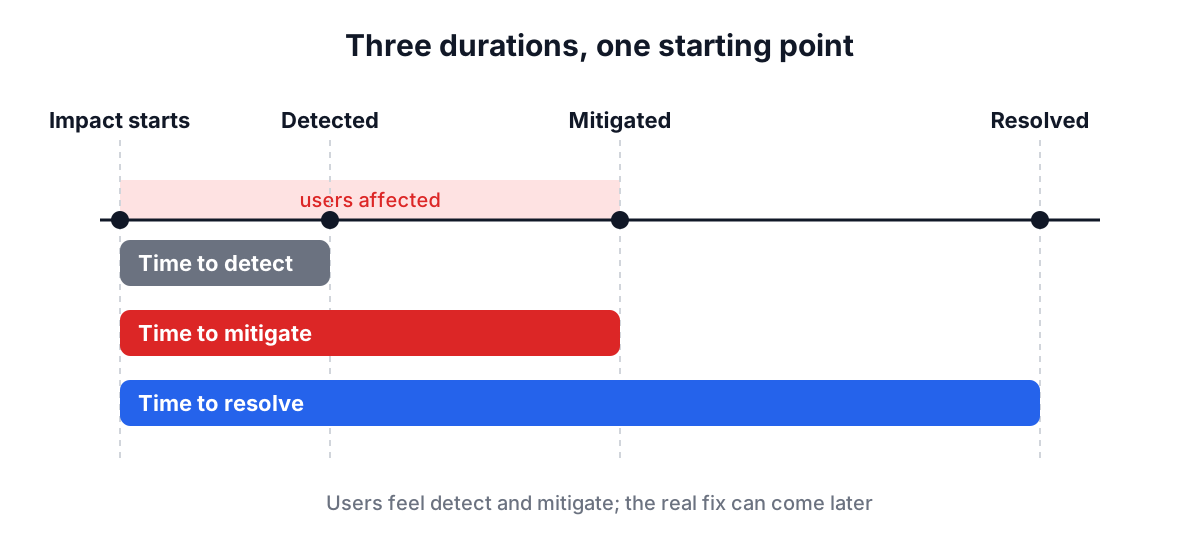
Three durations make incidents comparable over time:
- Time to detect: from the start of user impact to the first alert or report.
- Time to mitigate: from the start of impact until users stop being hurt. This is often a rollback, a failover or a feature flag, not a fix.
- Time to resolve: until the underlying problem is fixed.
They answer different questions. Slow detection means monitoring gaps. Slow mitigation means the team lacks a fast, safe way to back out. Slow resolution is often fine, as long as mitigation was quick.
In the example at the top, impact started around 09:14, so time to detect was close to zero, time to mitigate was 25 minutes and time to resolve was 90 minutes. Enter 25 and 90 in the generator's minute fields and the report shows "25 min" and "1 h 30 min". Leave a field blank and it says "Not recorded", which is better than a guess that someone later quotes as fact.
A worked example
Open the Incident Postmortem Generator and press Load Sample. It loads a database connection pool exhaustion: 45 minutes of 503 errors during peak traffic, a timeline from 14:30 to 15:20, and two action items.
Press Generate Incident Report. The executive summary combines your summary and impact. The timeline shows each of the seven timestamped lines you entered. Time metrics read 12 min, 30 min and 45 min. The root cause section shows your root cause and your response notes. Action items are grouped into detection, mitigation, prevention and solution, each with its description, owner, priority and due date.
Copy the Markdown or download it, then paste it into your wiki or incident tracker where the team can comment.
Action items that get done
Most postmortems fail here, months later, when nobody can say whether the action items happened. A few rules help:
- One owner per item, a person not a team. "Platform team" owns nothing.
- A due date. Items without dates drift to the bottom of every backlog.
- Specific and checkable. "Improve monitoring" cannot be finished. "Alert when pool usage exceeds 80% for 5 minutes" can.
- Balanced across categories. If every item is "fix the bug", nothing improves detection or mitigation for the next incident.
- Tracked where work is tracked. Copy the items into your issue tracker and link them from the report.
The generator groups items by category so a lopsided list is visible at a glance, and a report with no action items says so explicitly.
Running the review meeting
Hold the review within a week, while logs exist and memories are fresh. Share the draft a day before so the meeting discusses it instead of reading it. Have someone other than the incident commander facilitate. Walk the timeline first, because most disagreements turn out to be about what happened when. Then root cause, then action items.
For a larger failure, it can help to combine the postmortem with a failure mode analysis of the affected system, and to feed recurring themes into your team's retrospective.
Common mistakes
- Writing the cause as a person. Describe the system and process gaps.
- Inventing numbers. If you did not measure time to detect, say so; do not estimate in the report.
- Stopping at the trigger. Ask what allowed the trigger to cause harm.
- No follow-up. Review open action items in a regular meeting until they close.
- Only reviewing big outages. Near misses are cheaper lessons; a short review of a near miss often prevents the big one.
A postmortem is worth the hour it takes when it leaves behind a timeline people trust, a root cause that names systems rather than people, and three or four owned, dated changes. Write it from the incident channel the same week, keep the blanks honest, and check the action items until they are closed.