
Beautifying and Minifying JavaScript Without Breaking It
How js-beautify and Prettier differ, why automatic semicolon insertion makes naive minifiers dangerous, what TypeScript generics do to a JS formatter, and what real minifiers add.
· 10 min read

JavaScript travels in two shapes. The source you write is spread over many lines with comments and indentation; the file a browser downloads is often a single line with every space that the language allows you to drop already gone. Moving between the two shapes is routine: you unminify a bundle to understand an error, or you shrink a small script that has no build step. Both directions look trivial and both have traps. This guide explains what a formatter really does, why removing whitespace from JavaScript is not as safe as it sounds, and where a simple tool ends and a real minifier begins. The examples use the JavaScript Beautifier and Minifier, which runs the same logic in your browser.
Two kinds of formatter
There are two families of code formatter, and they behave differently enough that it is worth knowing which one you are using.
Token-based formatters such as js-beautify read the code as a stream of tokens (identifiers, strings, punctuation, keywords) and decide where to put spaces and line breaks as they go. They never build a full syntax tree. This makes them fast, tolerant of code that does not quite parse, and respectful of some of your existing choices, such as where you left blank lines. The cost is that they occasionally misjudge context, because they never saw the whole structure.
Tree-based formatters such as Prettier parse the file into an abstract syntax tree and print it again from scratch in one style. The output is completely consistent: two people who format the same code get byte-identical files, which is why teams put Prettier in a pre-commit hook. The cost is that the input must parse, and the formatter has few options by design.
For one-off jobs, a token-based formatter is often the better tool. You can paste half a function from a stack trace, a minified chunk with a syntax error at the end, or a snippet with a template literal that a strict parser would reject, and still get readable code back.
| js-beautify | Prettier | |
|---|---|---|
| Approach | Token stream | Syntax tree, reprinted |
| Needs valid input | No | Yes |
| Options | Many (indent, braces, wrapping) | Few, on purpose |
| Keeps your blank lines | Up to a limit | Up to one |
| Best for | Unminifying, quick cleanup | Enforcing a team style |
What beautifying changes, and what it must not
A formatter is allowed to change whitespace and nothing else. The tokens, in order, must be identical before and after. That gives you a simple way to check any formatter: split input and output into tokens, drop comments, and compare. The beautifier here does exactly that after every run and warns you if the sequences differ, which happens only when the input has a syntax error the formatter had to guess around.
The main choices you make are cosmetic:
- Indent: 2 spaces is the default in most JavaScript style guides (Airbnb, Google, StandardJS); 4 spaces and tabs are also common.
- Brace style: "collapse" keeps the opening brace on the same line (K&R, also called 1TBS). "Expand" puts it on its own line (Allman), the convention in C# codebases.
- Chained methods: putting each
.then()or.map()on its own line makes long promise chains and array pipelines readable. - Blank lines: keeping up to one or two of your blank lines preserves the paragraphs you wrote between logical blocks.
None of these affect what the code does. Missing semicolons are not added either; that is a linter's job.
The TypeScript problem
js-beautify was written for JavaScript, and TypeScript reuses the < and > characters for generics. A JavaScript tokenizer reads them as comparison operators and spaces them like a < b. Usually that is only ugly: Array < string > still compiles. One case is fatal. In
const get = async <T,>(url: string): Promise<T> => fetch(url).then(r => r.json());
the characters >=> at the end of the return type are greedily read as >= followed by >, and the formatter prints Promise < T >= >, which is no longer an arrow function.
The TypeScript mode in our tool fixes this in three steps. Before formatting it splits any >=> into > =>. After formatting it takes the spacing around generic brackets and optional ?: markers back to how you wrote them, matching tokens one to one between input and output so nothing else moves. Finally it puts the semicolon-separated members of interfaces and object types on their own lines, which js-beautify leaves on one line because it thinks they are an object literal. The test suite checks the output with the TypeScript parser for generics, decorators, satisfies, non-null assertions and private fields.
Minifying: why whitespace is not always optional
Removing comments is always safe. Removing whitespace between tokens is safe when no new token forms: a + b can become a+b, but a + +b cannot become a++b, because ++ is a different operator. A careful minifier checks each pair of neighbours and keeps one space when gluing them would change the tokens: between two words (return x, typeof y), between + and +, between a number and a dot (1 .toString()), and between a division sign and a regular expression (a / /re/).
Line breaks are harder, because JavaScript sometimes treats them as statement terminators. The language specification calls this automatic semicolon insertion (ASI). When the parser meets a token that cannot continue the current statement and there is a line break before it, it inserts a semicolon. A few constructs, called restricted productions, also forbid a line break at a specific spot:
return,throw,break,continueandyieldfollowed by a line break end the statement right there.- A postfix
++or--must be on the same line as its operand, so a line break before++attaches it to the next line. - An arrow
=>must be on the same line as its parameters, andasyncmust be on the same line asfunction.
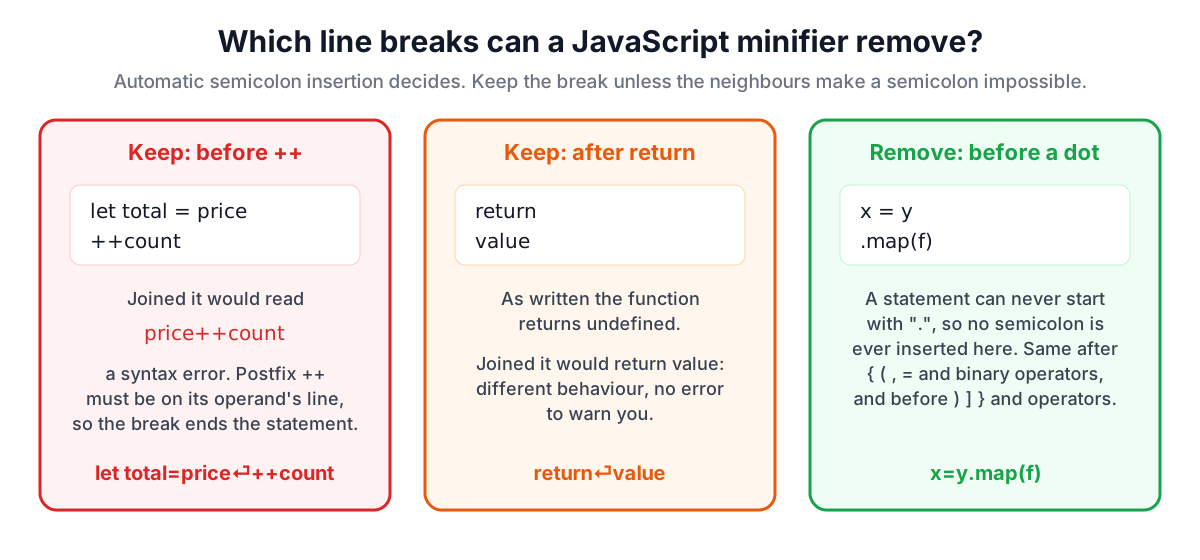
Consider:
let total = price
++count
With the line break, ASI ends the first statement after price and the second line increments count. Join the lines and you get let total = price++count, a syntax error. Or consider return followed by a value on the next line: as written the function returns undefined, and joining the lines would change the return value.
The minifier on this site therefore removes a line break only when the tokens on either side make ASI impossible. After {, (, ,, = or any binary operator, the statement obviously continues. Before ), ], }, ., , or a binary operator such as * or &&, the next token can only continue the expression. Everywhere else the line break stays. The result is slightly larger than a minifier that understands the full grammar, but it is correct for any input, which is what you want from a tool that sees a fragment of code with no build configuration.
How much does whitespace minification save?
It depends almost entirely on comments. We minified two libraries with the tool:
| File | Original | Minified | Saved |
|---|---|---|---|
| lodash 4.18.1, lodash.js | 545,945 bytes | 149,537 bytes | 72.6% |
| Papa Parse 5.7.0, papaparse.js | 51,214 bytes | 33,787 bytes | 34.0% |
Lodash ships its full JSDoc documentation in the source file, so most of its size is comments. Papa Parse has few comments, so the saving comes from indentation and spaces. In both cases the minified code still runs: our tests load the minified files and call _.chunk, _.camelCase and Papa.parse on them.
Remember that servers compress JavaScript with gzip or Brotli before sending it, and compression is very good at repetitive whitespace. The saving on the wire is smaller than the raw byte saving. Comments, on the other hand, are text that compression cannot remove, so stripping them still helps.
What real minifiers add
Production build tools such as terser, esbuild and SWC go much further than whitespace:
- Mangling renames local variables and parameters to one or two letters.
function add(firstNumber, secondNumber)becomesfunction add(n,r). Only names whose scope the tool can see are renamed; globals and object properties are left alone by default. - Compression rewrites code into shorter equivalents:
if (a) { b() }becomesa&&b(),truebecomes!0, constant expressions are folded and unreachable code after areturnis removed. - Tree shaking, done by bundlers, removes exported functions that nothing imports.
These steps typically remove another 30 to 50% beyond whitespace removal, but they need a full parser, knowledge of your target environments, and sometimes hints (for example, which functions have no side effects). They belong in a build pipeline, where the output is tested. A whitespace-only minifier is the right tool when there is no pipeline: a bookmarklet, an inline script in a CMS, a snippet in an email to a colleague.
Unminifying: what you can and cannot recover
Beautifying a minified bundle restores structure: indentation, one statement per line, readable control flow. It cannot restore what the minifier threw away. Local names stay as e, t and n, comments are gone, and code that was inlined or rewritten stays rewritten.
If the site ships source maps (.map files referenced by a //# sourceMappingURL= comment), your browser's developer tools can show the original files with their real names. Beautifying is the fallback when there is no map, and it is usually enough to follow the logic and find the line a stack trace points at. Many developer tools also have a "pretty print" button that uses the same token-based approach.
A short checklist
- Format with a token-based tool for one-off reading and cleanup; use Prettier in the editor for a team style.
- In TypeScript, check that arrow return types with generics survived formatting.
- When minifying by hand, keep line breaks after
returnand before++,--,(and[unless you are sure. - Keep
/*!licence comments in distributed files; most open-source licences require the notice. - For production bundles, let terser, esbuild or SWC do mangling and compression, and test the result.
Related tools: the CSS Beautifier and Minifier applies the same ideas to stylesheets, and the Online Diff Tool is handy for comparing two formatted versions of a file.
Related searches
- javascript beautifier
- unminify javascript
- automatic semicolon insertion minify
- js-beautify vs prettier
- whitespace minification vs terser
- format typescript generics
- how minifiers rename variables
- gzip and minified javascript size