
JSON Schema Validation: Drafts, Keywords and Reading Errors
JSON Schema from draft-07 to 2020-12: types, required, additionalProperties versus unevaluatedProperties, formats, $ref, reading Ajv errors and generating schemas from examples.
· 12 min read

JSON Schema is the most widely used way to say what a JSON document should look like. OpenAPI uses it for request and response bodies, editors use it to autocomplete configuration files, and test suites use it to check that an API still returns what clients expect. The idea is simple, a JSON document that describes other JSON documents, but the details have changed across several drafts, and the error messages a validator prints are easy to misread. This guide covers the keywords you use every day, the differences between drafts, how formats really work, and how to read validation errors. You can try every example in the JSON Schema Validator and Generator.
A schema in five keywords
Most schemas are built from a handful of keywords:
{
  "$schema": "https://json-schema.org/draft/2020-12/schema",
  "type": "object",
  "properties": {
    "host": { "type": "string", "format": "hostname" },
    "port": { "type": "integer", "minimum": 1, "maximum": 65535 },
    "tags": { "type": "array", "items": { "type": "string" } }
  },
  "required": ["host", "port"],
  "additionalProperties": false
}
typerestricts the JSON type:object,array,string,number,integer,booleanornull, or an array of them such as["string", "null"].propertiesgives a schema for each named key of an object. It says nothing about whether the key must be present.requiredlists the keys that must be present. A key inpropertiesbut not inrequiredis optional.itemsgives the schema every array element must match.additionalProperties: falserejects keys that are not listed inproperties.
Two consequences surprise people. First, keywords only apply to the types they are about: "minimum": 0 with no type happily accepts the string "abc", because minimum ignores non-numbers. Always set type. Second, an empty schema {} accepts everything, and so does true; false accepts nothing.
Constraints you will reach for
| Kind | Keywords | Example |
|---|---|---|
| Numbers | minimum, maximum, exclusiveMinimum, exclusiveMaximum, multipleOf | "multipleOf": 0.01 for cents |
| Strings | minLength, maxLength, pattern, format | "pattern": "^[A-Z]{3}-\\d{4}quot; |
| Arrays | minItems, maxItems, uniqueItems, contains | "uniqueItems": true |
| Objects | minProperties, propertyNames, dependentRequired | require zip when country is set |
| Fixed values | enum, const | "enum": ["draft", "published"] |
| Combining | allOf, anyOf, oneOf, not, if/then/else | different rules per type field |
pattern uses ECMA-262 regular expression syntax and is not anchored, so "pattern": "abc" matches any string containing abc. Add ^ and $ when you mean the whole string. oneOf requires exactly one branch to match, which makes errors noisy when branches overlap; anyOf is often what you want.
The drafts and what changed
JSON Schema has been published as a series of IETF Internet-Drafts. The ones you will meet:
| Draft | Year | Notable changes |
|---|---|---|
| draft-04 | 2013 | Long-lived baseline; id; boolean exclusiveMaximum |
| draft-06 | 2017 | const, contains, propertyNames, $id; numeric exclusiveMaximum |
| draft-07 | 2018 | if/then/else, readOnly, writeOnly, $comment |
| 2019-09 | 2019 | $defs, dependentRequired, unevaluatedProperties, vocabularies |
| 2020-12 | 2020 | prefixItems replaces array-form items, $dynamicRef |
OpenAPI 3.1 adopted draft 2020-12 for its schema objects, so new API work should use it. Draft-07 remains common in older tooling and in many published config schemas.
The change most likely to bite you is tuples. In draft-07, "items": [{...}, {...}] validated the first two elements positionally and additionalItems controlled the rest. In 2020-12 that array form is gone: positional schemas go in prefixItems, and items (always a single schema) applies to the remaining elements. A draft-07 tuple schema read by a 2020-12 validator is not a tuple any more, which is why the $schema line matters. Our validator reads $schema to pick the draft, defaults to 2020-12 when it is missing, checks draft-06 schemas with draft-07 rules (draft-07 only added keywords), and warns on draft-04 because its boolean exclusiveMaximum means something different.
additionalProperties versus unevaluatedProperties
additionalProperties only knows about properties and patternProperties in the same schema object. That breaks composition:
{
  "allOf": [{ "properties": { "name": { "type": "string" } } }],
  "properties": { "age": { "type": "integer" } },
  "additionalProperties": false
}
This rejects {"name": "Ada", "age": 36}, because from where additionalProperties sits, name is not declared. Draft 2019-09 added unevaluatedProperties, which sees every property that any applicator (including allOf, $ref and if/then) evaluated. Use "unevaluatedProperties": false when you combine schemas and want to reject unknown keys.
Formats: annotation or assertion?
format tags a string with a known meaning: date-time, date, time, email, hostname, ipv4, ipv6, uri, uuid, regex and others. Whether a validator enforces it has changed over time. Since 2019-09 the specification treats format as an annotation by default: a validator should record it but need not reject a value that does not match. Many validators enforce formats anyway when configured to. Ajv, for example, only enforces formats it has definitions for, which usually come from the separate ajv-formats package.
Our tool enforces the common formats with their RFC rules. date and date-time follow RFC 3339 with a real calendar check, so 2024-02-29 passes and 2023-02-29 fails, and the RFC's own examples such as 1985-04-12T23:20:50.52Z and the leap second 1990-12-31T23:59:60Z pass. ipv4 rejects octets above 255, ipv6 handles :: compression and embedded IPv4, and uuid checks the 8-4-4-4-12 hex layout. If your production validator does not enforce formats, a document can pass there and fail here; check how yours is configured.
Reading validation errors
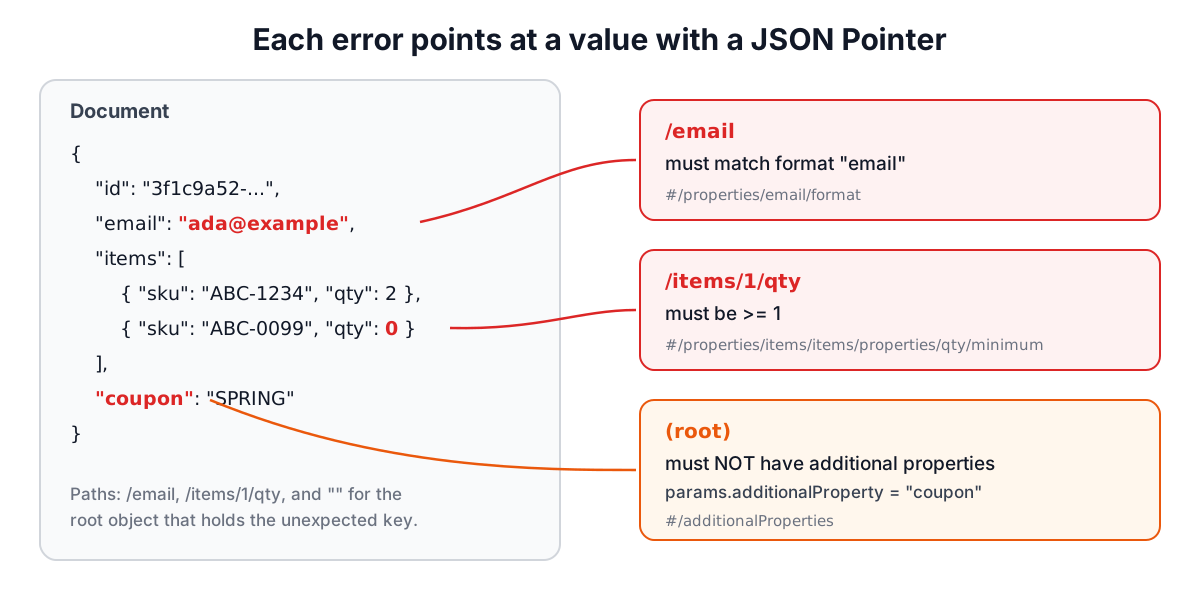
A good validator reports where the problem is, what rule failed and why. Ajv, which our tool uses with allErrors on, gives each error four parts:
- instancePath, a JSON Pointer (RFC 6901) to the failing value.
/items/1/qtyis theqtykey of the second element ofitems. The empty string is the root. A/inside a key is written~1and a~is written~0. - schemaPath, a pointer into the schema to the keyword that failed, such as
#/properties/items/items/properties/qty/minimum. - keyword, for example
required,typeorminimum. - message and params, such as "must be >= 1" with
{ comparison: ">=", limit: 1 }.
Two kinds of error report at the parent, not the child. A missing required key is reported on the object that should contain it, so required errors have the object's path and name the missing key in params.missingProperty. An unexpected key under additionalProperties: false is also reported on the object, with the key in params.additionalProperty. If you are looking for an error at /coupon and see it at the root instead, that is why.
With oneOf and anyOf, a failure produces an error for every branch that did not match, plus one for the combinator. Read from the most specific path outwards: the branch you intended usually has the error with the deepest path.
Generating a schema from examples
Writing a schema from scratch for a large payload is slow. Inferring one from a sample gets you most of the way. The generator in our tool walks the sample and records, for each position, the JSON types seen, the keys of objects and how often each appears, the merged schema of array elements, and whether every string at that position matches a known format.
Paste an array of several records rather than one, so the generator can tell optional keys from required ones:
[
  { "id": 1, "name": "Ada", "email": "ada@example.com", "score": 9.5 },
  { "id": 2, "name": "Grace", "score": 7, "manager": null }
]
Here id, name and score appear in both objects and become required, email and manager stay optional, score is number because one value has a fraction, email gets format: email, and manager is typed null because that is all the sample shows.
Treat the result as a draft. A sample cannot tell you that status only takes three values, that quantity must be at least 1, or that manager can also be an object. Add enum, ranges, patterns and descriptions, then validate a few real documents against it, including ones that should fail.
References with $ref and $defs
Reuse a definition by putting it under $defs (2019-09 and later; definitions in older drafts) and pointing to it:
{
  "$defs": { "address": { "type": "object", "required": ["city"] } },
  "properties": { "billing": { "$ref": "#/$defs/address" }, "shipping": { "$ref": "#/$defs/address" } }
}
References can also point to other files or URLs by $id. Our validator resolves references within the pasted schema but does not download remote ones, so it works offline and never makes requests on your behalf; paste external definitions into $defs.
Checklist
- Put
$schemaat the top so every tool uses the same draft. - Always set
type; constraints silently skip other types. - Remember that
propertiesdoes not make keys required. - Prefer
unevaluatedProperties: falsewhen composing schemas. - Anchor
patternwith^and$. - Find out whether your production validator enforces
format. - Validate failing examples too, not only the happy path.
Related reading: the JSON formatter guide covers JSON syntax errors, and the JSON to TypeScript Generator turns the same samples into type definitions.
Related searches
- json schema validator
- json schema 2020-12 vs draft-07
- additionalproperties vs unevaluatedproperties
- json schema format date-time
- generate json schema from example
- json pointer error path
- ajv allerrors
- prefixitems replaced items array