
From JSON to TypeScript Types: Inference, Optional Fields and Nulls
How a JSON sample becomes TypeScript interfaces, why optional and nullable are different, how mixed arrays become unions, and where generated types stop protecting you.
· 6 min read
You call an endpoint, log the response, and start typing data. in your editor. Without a type, autocomplete offers nothing and every property access is any. Writing the interface by hand for a 40-field payload is tedious and error-prone, so most developers paste a sample into a generator. That works well, as long as you know what a generator can and cannot infer from one sample.
This guide walks through how JSON maps to TypeScript, how a generator handles the hard cases (optional fields, nulls, mixed arrays, awkward keys), and what to fix by hand afterwards. The examples are real output from the JSON to TypeScript Generator.
How JSON values map to TypeScript
JSON has six kinds of value, and each has a direct TypeScript counterpart.
| JSON value | Example | TypeScript type |
|---|---|---|
| string | "ada" | string |
| number | 42, 3.14 | number |
| boolean | true | boolean |
| null | null | null |
| object | {"id": 1} | an interface or type alias |
| array | [1, 2] | number[] |
Two things are missing from that table, and both cause trouble later. JSON has one number type, so an integer ID and a price are both number. And JSON has no date type: "2024-01-15T10:00:00Z" is a string, and it stays a string in the generated type. If you want Date objects, you have to convert them when you parse.
TypeScript's type system is structural. An object matches an interface if it has compatible properties, regardless of where it came from. That is why generating types from data works at all: the generator only needs to describe the shape.
A worked example
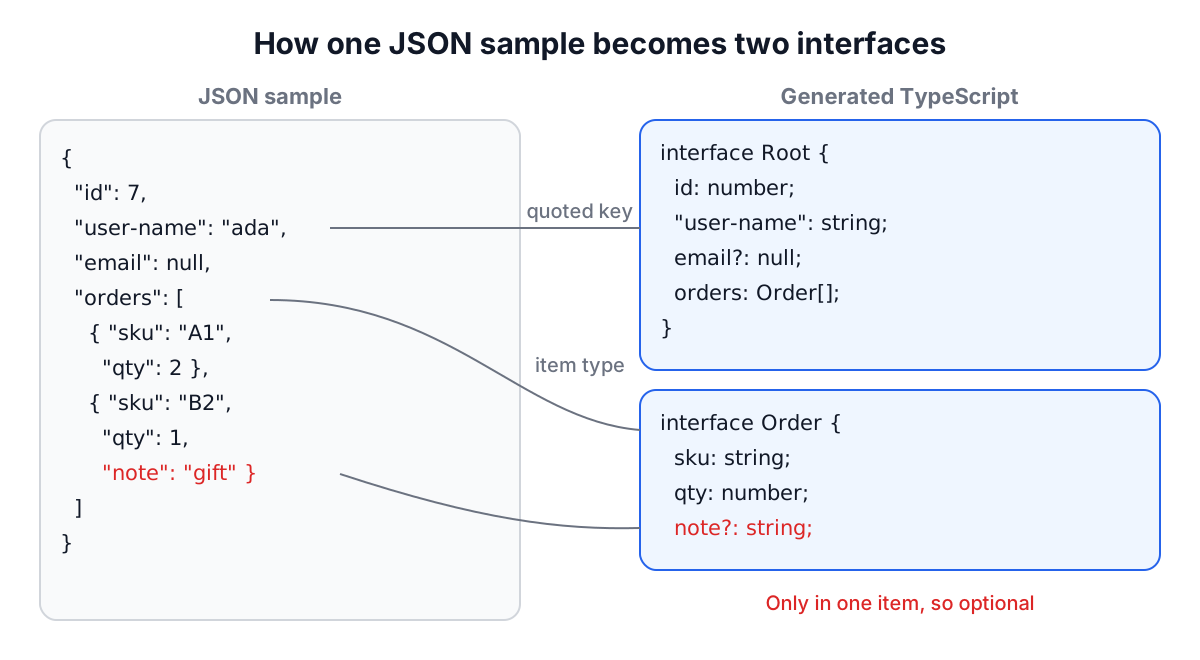
Paste this payload into the generator with the default options:
{
  "id": 7,
  "user-name": "ada",
  "email": null,
  "tags": ["a", "b"],
  "orders": [
    { "sku": "A1", "qty": 2 },
    { "sku": "B2", "qty": 1, "note": "gift" }
  ]
}
You get:
export interface Root {
  id: number;
  "user-name": string;
  email?: null;
  tags: string[];
  orders: Order[];
}

export interface Order {
  sku: string;
  qty: number;
  note?: string;
}
Each decision is worth reading:
ordersbecameOrder[]. The nested type is named after its key, singularised, because each element is one order.noteis optional. It appears in one of the two orders, so code reading it must handle its absence."user-name"is quoted. A dash is not allowed in an identifier, so the key is written as a string literal. You read it withdata["user-name"].emailisnull. The sample only ever shows null, so null is all the generator knows. This is the field you will almost always fix by hand.
Optional is not the same as nullable
These two declarations look similar and mean different things:
interface A { email?: string }        // may be missing; never null
interface B { email: string | null }  // always present; may be null
With strictNullChecks on, { email: null } does not satisfy A, and {} does not satisfy B. Many APIs send null for "no value", so string | null is usually the honest type.
The generator's Treat nulls as optional (?) switch is on by default because it produces tidier types when you are exploring. Switch it off when you are writing types for production code. With it off, a root array where one record has a null name gives:
export type Root = RootItem[];

export interface RootItem {
  id: number;
  name: string | null;
}
Note also how a top-level array is handled: the root becomes a type alias for an array of RootItem. A naive generator names both of them Root, which does not compile.
Arrays of mixed shapes
Real arrays are rarely uniform. Three cases come up:
Objects with different keys. The generator merges them into one interface and marks the keys missing from some items as optional. That is the note? above.
Different kinds of value. [1, "a"] becomes (number | string)[]. The parentheses are not decoration. Without them, number | string[] means "a number, or an array of strings", which is a different type. A surprising number of hand-written types get this wrong.
Objects mixed with primitives. [1, {"a": 1}, {"b": "x"}] becomes (number | Item)[], with all the object variants merged into one Item with a?: number and b?: string. You then narrow with typeof x === "number" before reading fields.
Empty arrays are the one case with nothing to infer from. They come out as any[]; add one element to the sample or edit the type.
Interfaces or type aliases?
For plain object shapes, interface and type behave almost the same. The differences that matter in practice:
- Interfaces can be extended with
extendsand merged by declaring them twice, which is how libraries let you augment their types. - Type aliases can express unions, tuples and mapped types, which interfaces cannot.
Pick one convention per codebase. The generator's Use interfaces (vs. type aliases) switch flips every declaration at once, and Readonly fields adds readonly to every property, which suits data you treat as immutable after parsing.
Where generated types stop protecting you
TypeScript types are erased at compile time. Writing const user = (await res.json()) as Root tells the compiler to trust you; it does not check anything at run time. If the API renames a field, your code compiles and fails in production.
For data that crosses a trust boundary, add a runtime check. A schema library such as Zod lets you write the schema once and infer the type from it:
import { z } from "zod";

const Order = z.object({ sku: z.string(), qty: z.number(), note: z.string().optional() });
type Order = z.infer<typeof Order>;

const order = Order.parse(await res.json()); // throws if the shape is wrong
A generated interface is a good starting point for writing that schema, because it lists every field and its type. If the API publishes an OpenAPI or JSON Schema document, generate from that instead: a contract describes every possible response, not just the one you happened to capture.
Common mistakes
- Generating from one record. Fields that are sometimes missing or sometimes null look required. Paste an array of several varied records.
- Keeping
?: null. A field typed only as null is a placeholder. Replace it with the real type. - Trusting
as. A cast is not validation. Parse untrusted data with a runtime validator. - Typing timestamps as
Date. They arrive as strings. Convert them explicitly after parsing. - Forgetting the parentheses.
(A | B)[]andA | B[]are different types.
If your data starts as a spreadsheet, the Excel to JSON Converter gives you a JSON sample to generate from, and the JSON Formatter helps you inspect a large payload before you pick the records to paste. For GraphQL APIs, the GraphQL TypeScript Generator works from the schema instead of a sample. Generate, rename the types to match your domain, fix the nullable fields, and commit the result next to the code that parses the data.