
Linux File Permissions and chmod: 755, 644 and Beyond
What read, write and execute mean on files and directories, octal and symbolic chmod, capital X, setuid, setgid and sticky, umask defaults, and safe recipes for web roots and SSH keys.
· 11 min read
"Permission denied" is one of the first errors anyone meets on Linux, and chmod 777 is one of the first wrong fixes they find for it. Unix permissions are a small system: three classes of user, three permissions each, three special bits and a mask for defaults. Once you can read -rwxr-x--- as quickly as 750, most permission problems become a one-line fix. This article covers what the bits mean on files and on directories, octal and symbolic chmod, setuid, setgid and the sticky bit, umask, and safe recipes for common jobs. The Chmod Calculator converts between every notation and applies symbolic changes the way chmod does.
Three classes, three permissions
Every file and directory has an owner (user), a group and everyone else (others). For each class there are three permissions: read, write and execute. When you access a file, the kernel picks exactly one class: if you are the owner, the owner bits apply; otherwise if you are in the file's group, the group bits apply; otherwise the others bits apply. The classes do not combine, so an owner with --- cannot read their own file even if others have r--.
ls -l shows the bits as ten characters:
-rwxr-x---  1 deploy www  2048 Oct 29 09:30 deploy.sh
drwxr-xr-x  3 deploy www  4096 Oct 29 09:30 public
The first character is the type (- regular file, d directory, l symbolic link). Then come three triplets for user, group and others.
Octal: adding up 4, 2 and 1
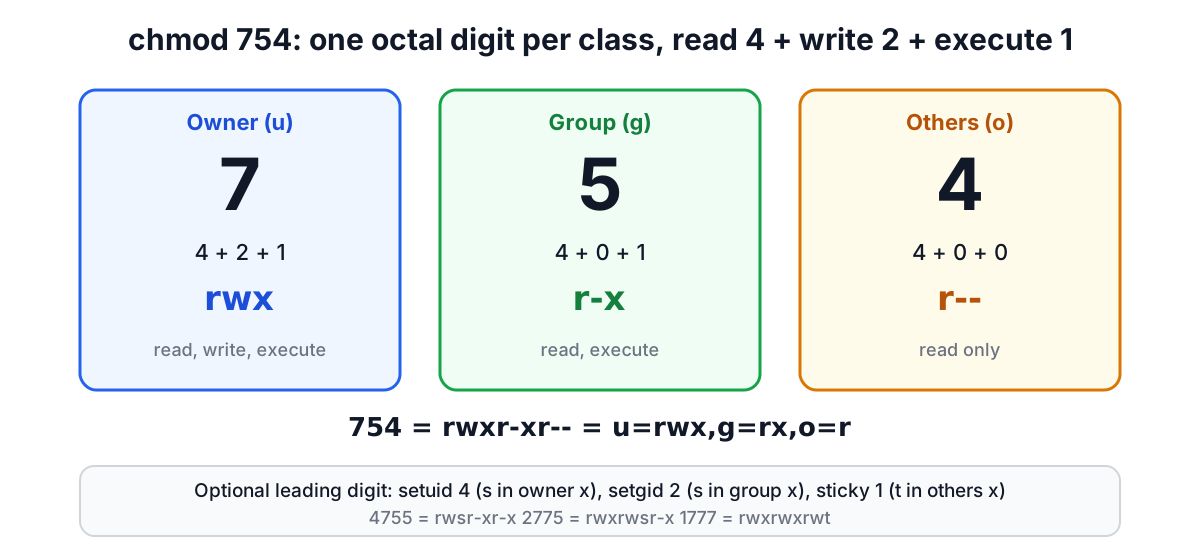
Each triplet is three bits, so it fits in one octal digit. Read is 4, write is 2, execute is 1, and you add the ones you want.
| Digit | Bits | Meaning |
|---|---|---|
| 7 | rwx | read, write, execute |
| 6 | rw- | read, write |
| 5 | r-x | read, execute |
| 4 | r-- | read only |
| 0 | --- | nothing |
So chmod 640 file gives the owner rw- (6), the group r-- (4) and others nothing (0). Three digits always mean user, group, others in that order. A fourth digit in front holds the special bits, covered below; chmod 0644 and chmod 644 are the same.
What the bits mean on directories
On a directory the same three bits mean different things, and this is where most confusion comes from.
| Bit | On a file | On a directory |
|---|---|---|
| r | read the contents | list the names inside (ls) |
| w | change the contents | create, delete and rename entries inside |
| x | run it as a program | enter it (cd) and reach files inside by name |
Two consequences follow. To read /srv/site/index.html, you need execute on /, /srv and /srv/site, and read on the file itself; a missing x on any parent directory gives "Permission denied" even if the file is 644. And deleting a file depends on write permission on its directory, not on the file: you can delete a read-only file in a directory you can write to. That is why directories are normally 755 and files 644, and why a directory with r but not x lets you see names you cannot open.
Symbolic chmod
The symbolic form says what to change rather than spelling out the whole mode. POSIX defines it as [ugoa][+-=][rwxXst], with several clauses separated by commas:
| Command | Effect |
|---|---|
chmod u+x deploy.sh | add execute for the owner |
chmod go-w file | remove write from group and others |
chmod a+r file | add read for everyone |
chmod u=rw,g=r,o= file | set exactly 640 |
chmod o=g file | give others the same bits as the group |
chmod -R a+rX dir | read for all, execute only where it makes sense |
Two details are easy to miss. When you leave out the class, as in chmod +w file, POSIX says the change applies to all classes except bits that are set in your umask. With the usual umask of 022, chmod +w only adds write for the owner, while chmod a+w adds it for everyone. And capital X adds execute only to directories and to files that already have at least one execute bit. That makes chmod -R a+rX the safe way to open up a tree: directories become enterable, scripts stay runnable, and plain files do not suddenly become executable.
Setuid, setgid and the sticky bit
The fourth octal digit holds three special bits: setuid 4, setgid 2 and sticky 1.
Setuid on an executable makes it run with the file owner's privileges instead of the caller's. /usr/bin/passwd is owned by root with mode 4755 so ordinary users can update the password database. ls -l shows it as s in the owner's execute position: -rwsr-xr-x. Linux ignores setuid on interpreted scripts, and a setuid binary that others can write to is a privilege escalation waiting to happen.
Setgid on an executable runs it with the file's group. On a directory it is far more common and useful: new files created inside inherit the directory's group instead of the creator's primary group. A shared team folder at 2775 keeps every file in the team's group. It shows as s in the group position: drwxrwsr-x.
Sticky on a directory means only a file's owner, the directory's owner or root can delete or rename files inside, even if others can write to the directory. /tmp is 1777 for this reason. It shows as t in the others position: drwxrwxrwt. Linux ignores the sticky bit on regular files.
When a special bit is set but the execute bit under it is not, ls prints a capital letter: S or T. A capital S on a file is usually a mistake, because setuid without execute does nothing useful. GNU chmod also keeps the setuid and setgid bits on a directory when you change its mode numerically, unless you clear them explicitly, which is why chmod 755 on a setgid directory may leave it as 2755.
umask: where default permissions come from
New files are not created with fixed permissions. Programs ask for 666 for files and 777 for directories, and the process's umask removes bits from that. The umask is written in octal like a mode, but it lists bits to take away.
| umask | New files | New directories | Typical use |
|---|---|---|---|
| 022 | 644 (rw-r--r--) | 755 (rwxr-xr-x) | Most Linux defaults |
| 002 | 664 (rw-rw-r--) | 775 (rwxrwxr-x) | User private groups, shared work |
| 027 | 640 (rw-r-----) | 750 (rwxr-x---) | Servers, nothing for others |
| 077 | 600 (rw-------) | 700 (rwx------) | Private accounts, secrets |
Run umask to see yours. Files never get execute by default, because the starting point is 666: you add it with chmod +x when something should be runnable.
Recipes
A web root. Directories 755 and files 644, owned by the deploy user, with the web server reading through others or through a shared group:
find /srv/site -type d -exec chmod 755 {} +
find /srv/site -type f -exec chmod 644 {} +
Using chmod -R 755 instead would make every file executable, which is harmless for HTML but sloppy, and chmod -R 644 would make directories impossible to enter.
SSH keys. OpenSSH checks permissions and refuses a private key that group or others can read, with the message "UNPROTECTED PRIVATE KEY FILE". The server side also refuses keys in an authorized_keys file or home directory that others can write, under the default StrictModes setting.
chmod 700 ~/.ssh
chmod 600 ~/.ssh/id_ed25519 ~/.ssh/authorized_keys ~/.ssh/config
chmod 644 ~/.ssh/id_ed25519.pub
Secrets and environment files. .env, database credentials and API keys should be 600 and owned by the user the application runs as.
A shared team directory. Create a group, give the directory that group, and set 2775 so new files inherit the group and members can write. Combine it with a umask of 002 for the team members.
Why not 777
chmod 777 gives every user on the system write access. On a shared host that means any compromised account, or any other site's vulnerable plugin, can change your files. On a single-user server it still means any compromised service account can. It also hides the real problem, which is almost always ownership: the web server runs as one user and the files belong to another. Fix it with chown, a shared group, or giving the process the specific write access it needs to one upload directory, not with world-writable modes. The calculator warns when a mode is world-writable for exactly this reason.
Worked examples
- Script will not run.
./backup.shsays Permission denied.ls -lshows-rw-r--r--(644).chmod u+x backup.shgives 744; usea+x(755) if other users must run it. - Uploads fail. PHP cannot write to
uploads/, mode 755, owned bydeploy. PHP runs aswww-data. Rather than 777,chown deploy:www-data uploadsandchmod 2775 uploadslets both write and keeps the group on new files. - Reading a mode from ls.
-rwsr-x---is 4750: owner rwx plus setuid, group r-x, others nothing. - Opening a tree read-only to everyone.
chmod -R a+rX docsturns 640 files into 644 and 750 directories into 755 without making files executable.
Sources
- The Open Group, POSIX.1-2017: chmod utility (symbolic mode grammar, umask behaviour when who is omitted) and umask.
- GNU Coreutils manual, "File permissions" (mode structure, X, special bits on directories).
- Linux man pages: chmod(1), chmod(2), umask(2), path_resolution(7), inode(7).
- OpenSSH manual pages: ssh(1) (FILES section) and sshd_config(5) (StrictModes).
Related searches
- chmod calculator
- chmod 755 meaning
- chmod 644 vs 755
- linux file permissions explained
- setuid setgid sticky bit
- umask 022
- chmod symbolic mode
- chmod capital x
- ssh key permissions 600
- why not chmod 777