
MAC Addresses and OUIs: Vendors, Flag Bits and Random MACs
How a 48-bit MAC address is built, what the OUI tells you, how the multicast and local bits work, and why phones now hide their real hardware address.
· 6 min read
Your router's client list shows a device called DA:A1:19:3E:7C:02, no hostname, and every vendor lookup site says "unknown". It is not an intruder with forged hardware. It is almost certainly a phone using a private Wi-Fi address, and the clue is sitting in the second character of the address: the "A" in "DA". Once you know which bits of a MAC address mean what, a lot of puzzling network inventory starts to make sense.
Anatomy of a 48-bit MAC address
A MAC (media access control) address is the hardware address used on Ethernet and Wi-Fi to deliver frames on the local link. The usual kind is 48 bits long, which the IEEE now calls EUI-48, written as six bytes in hexadecimal. The address splits into two halves:
- The first 24 bits are the Organizationally Unique Identifier (OUI), a prefix the IEEE Registration Authority sells to a manufacturer.
- The last 24 bits are assigned by that manufacturer, one value per network interface it builds.
A 24-bit block gives the owner 2^24, or 16,777,216, addresses. Large vendors such as Apple, Cisco and Intel hold hundreds of OUIs each because they keep running out.
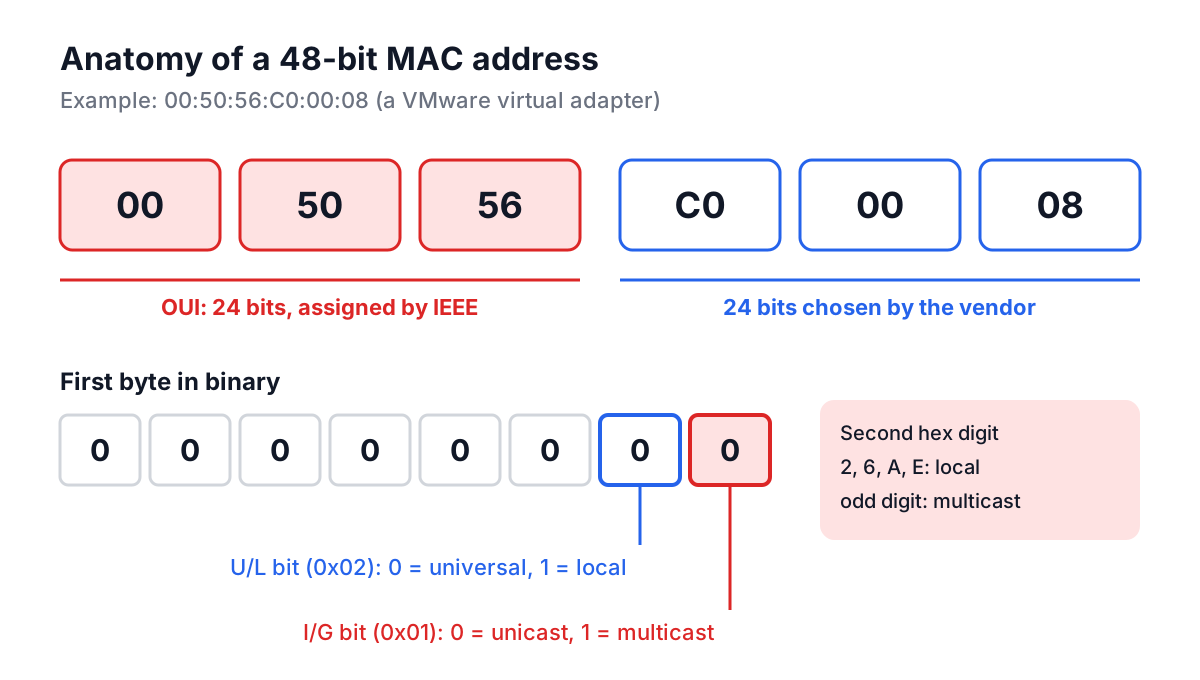
Two bits in the very first byte change the meaning of everything else:
| Bit (in first byte) | Name | 0 means | 1 means |
|---|---|---|---|
| Least significant bit (0x01) | I/G, individual/group | Unicast: one interface | Multicast or broadcast: a group |
| Second bit (0x02) | U/L, universal/local | Universally administered: assigned by the IEEE OUI owner | Locally administered: set by software or an admin |
Because hexadecimal digits are 4 bits each, both flags live in the second hex character of the address. If that character is 2, 6, A or E, the address is locally administered unicast. If it is odd (1, 3, 5, 7, 9, B, D, F), the address is multicast. That second-character rule is worth memorising; it answers half the questions people ask about strange MACs.
Some multicast prefixes you will see in packet captures:
FF:FF:FF:FF:FF:FF   Ethernet broadcast (every bit set, so I/G = 1)
01:00:5E:xx:xx:xx   IPv4 multicast (RFC 1112 mapping)
33:33:xx:xx:xx:xx   IPv6 multicast (RFC 2464 mapping)
01:80:C2:00:00:00   Spanning Tree Protocol
MA-L, MA-M and MA-S blocks
Sixteen million addresses is more than a small manufacturer of industrial sensors needs, so the IEEE sells smaller blocks too:
| Registry | Prefix length | Addresses in the block | Typical buyer |
|---|---|---|---|
| MA-L (the classic OUI) | 24 bits | 16,777,216 | Large hardware vendors |
| MA-M | 28 bits | 1,048,576 | Mid-size manufacturers |
| MA-S (formerly OUI-36) | 36 bits | 4,096 | Small runs, lab equipment |
This has a practical consequence for lookups. The MA-M and MA-S blocks are carved out of OUIs that the IEEE itself holds, and a lookup on only the first three bytes returns "IEEE Registration Authority" for those devices. For example, 00:50:C2 is one of those parent prefixes. To identify the real owner you need the longer prefix and the MA-M or MA-S registry.
Private and randomised addresses
Phones broadcast Wi-Fi probe requests constantly, and a fixed hardware MAC made it easy for shops, stations and anyone with a monitor-mode adapter to track a device across places and days. The operating systems responded by randomising:
- iOS 14 and later (2020) use a "Private Wi-Fi Address" per network by default.
- Android 10 and later use a randomised MAC per saved network by default.
- Windows 10 and 11 offer "Random hardware addresses" in the Wi-Fi settings.
- macOS and many Linux distributions (through NetworkManager) randomise during scans and can do so per connection.
All of them set the U/L bit, so the address is locally administered, and the remaining bits are random. No OUI lookup can name the manufacturer, because there is no manufacturer prefix in it. That is the DA:A1:19:... device from the opening paragraph: DA is 11011010 in binary, the lowest bit is 0 (unicast) and the next bit is 1 (local).
Virtual machines are the other big source of unusual MACs. Hypervisors usually generate addresses under their vendor's OUI, so they do look up cleanly: VMware uses 00:50:56 and 00:0C:29, Hyper-V uses 00:15:5D, and VirtualBox uses 08:00:27, an OUI registered to PCS Systemtechnik GmbH, the company whose software became VirtualBox.
Formats you will be asked to read
The same address shows up in at least four spellings depending on where you copy it from:
00:50:56:c0:00:08    Linux, macOS (ip link, ifconfig)
00-50-56-C0-00-08    Windows (ipconfig /all, getmac)
0050.56c0.0008       Cisco IOS (show mac address-table)
005056C00008         Databases, DHCP exports, some APIs
Getting the address from each system:
 # Linux
ip link show eth0 | awk '/link\/ether/ {print $2}'

 # macOS
ifconfig en0 | awk '/ether/ {print $2}'

 # Windows (PowerShell)
Get-NetAdapter | Select-Object Name, MacAddress

 # Cisco switch: which port is this device on?
show mac address-table address 0050.56c0.0008
Before comparing addresses from different sources, normalise them: strip every separator, upper-case the result, and regroup in pairs. Comparing 0050.56c0.0008 with 00:50:56:C0:00:08 as raw strings is a classic source of "device not found" bugs in inventory scripts.
Worked example
Paste 0050.56c0.0008, copied from a switch, into the MAC Address Lookup tool and press Lookup. The tool accepts colons, dashes, Cisco dots, spaces or no separators in any case, and normalises the input to 00:50:56:C0:00:08. It then reports:
- OUI:
00:50:56, found in its built-in table as VMware, Inc. - Address type: Universally Administered, because the first byte
00has both low bits clear. - Multicast: No. Local Admin: No.
So the switch port leads to a VMware virtual machine's network adapter, which tells you to look in vCenter rather than in the hardware asset list.
Now try DA:A1:19:3E:7C:02. The tool shows Locally Administered and no vendor match, which is the correct answer for a randomised phone address. The built-in table is small, about twenty common OUIs checked against the IEEE registry, and it only accepts exact three-byte matches, so a miss means "not in this list", not "fake address". Everything runs in the browser; the address is not sent anywhere. For a full answer on an unknown universally administered prefix, search the IEEE public listing at standards-oui.ieee.org. The Random button fills in an address under one of the known OUIs, which is handy for test fixtures.
Common mistakes
- Reading the multicast bit from the first hex character. The I/G bit is the lowest bit of the first byte, which is in the second hex character.
01:00:5Eis multicast even though its first character is 0. - Assuming an unknown vendor means spoofing. Randomised privacy addresses, IEEE sub-blocks and newly issued OUIs all miss in small lookup tables.
- Using MAC addresses as security. MAC filtering on Wi-Fi stops nobody who can run
ip link set dev wlan0 address .... Treat a MAC as an identifier on a trusted network, not as a credential. - Expecting MACs to cross routers. A MAC address is only visible on the local link. A server on the internet never sees yours; it sees your public IP.
- Pinning DHCP reservations to a phone's hardware MAC. With private addresses on, the phone presents a different MAC to each network, and sometimes a new one after a reset. Reserve against the address the phone actually shows on your network.
Putting it to work
When an unknown device appears in a DHCP lease table, check the second hex character first. If it is 2, 6, A or E, it is a randomised address, and the device name or a quick look at who is in the room will tell you more than any vendor database. If it is universally administered, look up the OUI to get the manufacturer, then follow it to a switch port. For the layer above, the IP Address Lookup tool shows who owns a public address, and the Subnet Calculator tells you which local network a device's IP belongs to.