
MIME Types and Content-Type: Getting Files Served Correctly
Where MIME types come from, how type, subtype, suffix and charset fit together, why browsers sniff and how nosniff stops it, recent type changes, and nginx, Apache and IIS setup.
· 10 min read
A file name ending in .svg means nothing to a browser fetching it over HTTP. What the browser acts on is the Content-Type header, and if that header is wrong the symptoms rarely point at it: an image that shows as a broken icon, a font that silently falls back, a script blocked with a vague console message, a PDF that downloads instead of opening. This article explains how MIME types are built, how browsers use and sometimes second-guess them, which types changed recently and how to configure a server so it sends the right ones. The MIME Type Lookup gives you the type for any extension, and the config line for nginx, Apache or IIS, while you read.
Where MIME types come from
MIME stands for Multipurpose Internet Mail Extensions. RFC 2045 and RFC 2046 defined it in 1996 so email could carry attachments and say what they were. HTTP adopted the same labels for its Content-Type and Accept headers, and the Internet Assigned Numbers Authority (IANA) keeps the official Media Types registry. "Media type" is the current formal name; "MIME type" is what everyone says.
A media type has a top-level type and a subtype, separated by a slash, and may carry parameters after a semicolon:
Content-Type: text/html; charset=utf-8
              ^^^^ ^^^^  ^^^^^^^^^^^^^
              type subtype parameter
The top-level types are few: text, image, audio, video, font, model, application, multipart and message. Application is the catch-all for anything a program has to interpret, from application/json to application/pdf.
Reading a subtype: trees and suffixes
Subtypes follow conventions that tell you who registered them and how to parse them.
| Pattern | Meaning | Example |
|---|---|---|
| No prefix | Standards tree, registered through the IETF or a standards body | application/json |
| vnd. | Vendor tree, registered by a company or project | application/vnd.ms-excel |
| prs. | Personal tree | rarely seen |
| x- | Unregistered, experimental | application/x-7z-compressed |
| +json, +xml, +zip | Structured syntax suffix: the bytes are JSON, XML or ZIP | application/ld+json, image/svg+xml, application/epub+zip |
The suffixes are the most useful part. A client that has never heard of application/problem+json still knows it can parse the body as JSON. RFC 6648 (2012) discourages new x- types, because private names tend to escape and become permanent, which is exactly what happened to application/x-tar and many others still in use.
What changed in the last few years
Several common types were cleaned up recently, and old tutorials still show the previous values.
- JavaScript. RFC 9239 (2022) made text/javascript the only recommended type for .js and .mjs and marked application/javascript and application/x-javascript obsolete. Browsers accept all three.
- YAML. RFC 9512 (2024) registered application/yaml. Before that, servers sent application/x-yaml or text/yaml.
- WebP. The format finally got its own RFC, 9649, in 2024, confirming image/webp.
- Fonts. RFC 8081 (2017) created the font top-level type, so WOFF2 is font/woff2 rather than application/font-woff2.
- JSON charset. RFC 8259 requires JSON exchanged between systems to be UTF-8, and application/json has no charset parameter. Adding one is harmless but meaningless.
Some extensions are simply ambiguous. On almost every server .ts maps to video/mp2t, the MPEG transport stream used by HLS video, not to TypeScript. image/jpg looks plausible but has never been a registered type; JPEG is image/jpeg. The Lookup's notes flag these.
How browsers use the header, and when they sniff
When a response arrives, the browser decides what to do with it mostly from Content-Type: render HTML, show an image, play media, run a script or offer a download. The WHATWG MIME Sniffing standard describes what happens when the header is missing or vague. The browser reads the first bytes of the body and looks for signatures: %PDF- for PDF, \x89PNG for PNG, <html or <!DOCTYPE html for HTML, and so on.
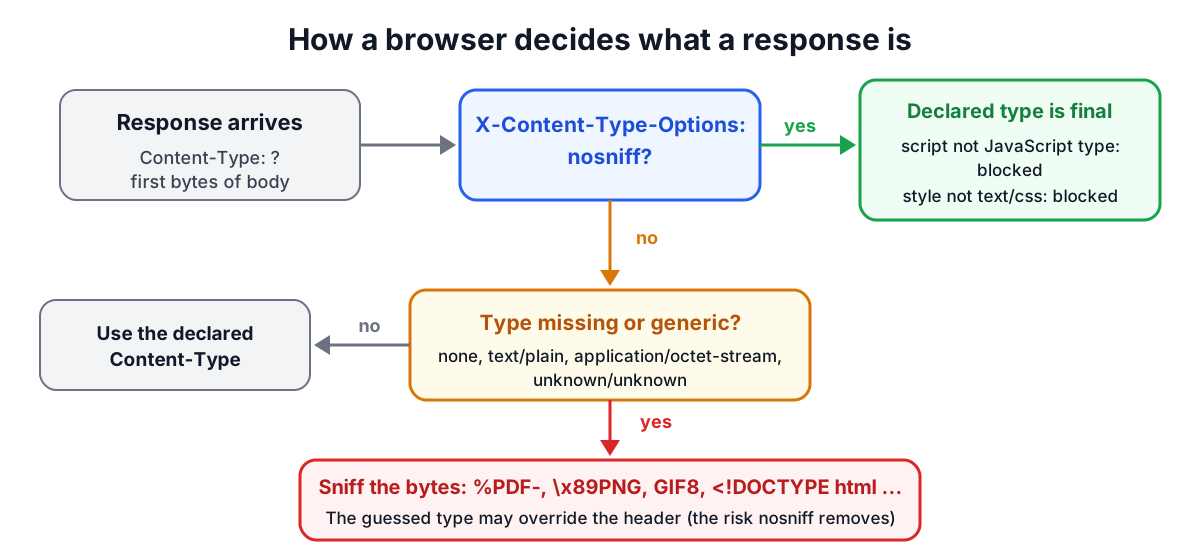
Sniffing exists to cope with misconfigured servers, but it has a security cost. If a site lets users upload files and then serves them back, a file named photo.txt containing HTML could be sniffed as HTML and run scripts in the site's origin. The defence is the response header X-Content-Type-Options: nosniff. With it, browsers stop guessing, and in return they refuse to run a script or apply a stylesheet whose Content-Type is not a JavaScript or CSS type. That makes correct server types a security setting, not only a convenience.
A few types are strictly required by specific features:
| Feature | Required type |
|---|---|
SVG in an <img> element | image/svg+xml |
| WebAssembly.instantiateStreaming | application/wasm |
Module scripts (<script type="module">) | a JavaScript MIME type |
Subtitles in <track> | text/vtt |
| Server-sent events (EventSource) | text/event-stream |
| Stylesheets under nosniff | text/css |
Charset: when it matters
For text types, the charset parameter tells the browser how to turn bytes into characters. Without it, a browser falls back to detection, defaults or a <meta charset> tag, and the result can vary. Send text/html; charset=utf-8, text/css; charset=utf-8 and text/plain; charset=utf-8 explicitly. XML-based types such as image/svg+xml can declare their encoding inside the document, but adding the parameter does no harm. Binary types such as image/png and application/pdf have no charset.
Configuring a server
Servers map extensions to types with a table. Each has its own syntax.
nginx reads /etc/nginx/mime.types, included in the http block. Add missing entries in a types block:
types {
    image/avif avif;
    application/manifest+json webmanifest;
}
Note that a types block inside a server or location replaces the inherited table rather than adding to it, so either edit mime.types or include it again. Set default_type application/octet-stream; so unknown files download.
Apache uses its mime.types file plus AddType in configuration or .htaccess:
AddType image/avif .avif
AddType application/manifest+json .webmanifest
IIS uses a staticContent section in web.config. Remove the entry first if one may already exist, because a duplicate mimeMap is a configuration error:
<staticContent>
  <remove fileExtension=".avif" />
  <mimeMap fileExtension=".avif" mimeType="image/avif" />
</staticContent>
Object storage such as Amazon S3 does not use an extension table at serving time. It stores the Content-Type you set when the object was uploaded, and many upload tools default to binary/octet-stream or application/octet-stream if they cannot guess. If files from a bucket download instead of displaying, check the object metadata.
Uploads: do not trust either label
When a user uploads a file, the browser fills in the part's Content-Type from the file extension using the operating system's table. That is why the "Check a file" panel in the Lookup sometimes shows a different guess than the table: a machine without AVIF registered may send an empty type. Both the extension and the declared type are under the user's control, so neither is proof of what the file contains. For anything security-relevant, inspect the magic bytes on the server, re-encode images, and serve user content from a separate domain with nosniff.
Worked examples
- AVIF images show as broken. The server is an older nginx whose mime.types predates AVIF, so it sends application/octet-stream. Adding
image/avif avif;and reloading fixes it. - A script is blocked under nosniff. The console reports a MIME type mismatch. The script is served as text/plain from a storage bucket. Setting the object's Content-Type to text/javascript fixes it.
- A web app manifest is ignored. It is named manifest.json and served as application/json, which browsers accept; the official type, application/manifest+json, applies to .webmanifest. Either works, but the link tag must point at the file you actually serve.
- An API returns JSON as text/html. Clients that check the type before parsing fail. Set application/json explicitly in the framework's response, and use application/problem+json for errors.
When the header is right but the response still misbehaves, check the status line with the HTTP Status Codes reference and the remaining headers with the Security Headers Analyzer.
Sources
- RFC 2045 and RFC 2046, MIME Parts One and Two, IETF, 1996.
- IANA, Media Types registry.
- RFC 6838, Media Type Specifications and Registration Procedures; RFC 6648, Deprecating the "X-" Prefix.
- RFC 9239 (JavaScript), RFC 9512 (YAML), RFC 9649 (WebP), RFC 8081 (font types), RFC 8259 (JSON), RFC 7303 (XML media types).
- WHATWG, MIME Sniffing Standard; WHATWG Fetch Standard (X-Content-Type-Options).
- nginx documentation for the types and default_type directives; Apache httpd mod_mime documentation; Microsoft IIS staticContent documentation.
Related searches
- mime type list
- content-type header
- text/javascript vs application/javascript
- x-content-type-options nosniff
- mime sniffing
- nginx mime types
- apache addtype
- svg content type
- charset utf-8 json
- application/octet-stream