
Speed, Distance and Download Time: Getting Rates Right
Travel time and transfer time are the same sum. Why averaged speeds mislead, why 100 Mbit/s is 12.5 MB/s, GB versus GiB, and what overhead really costs.
· 8 min read

A car covering 350 km and a 50 GB game crossing a 100 Mbit/s line are the same problem in different clothes: an amount, a rate, and the time it takes. The arithmetic is one line, amount = rate × time. What goes wrong in practice is almost always units, averages, or a hidden assumption about what the rate really is. This guide covers both cases with figures you can reproduce in the Speed, Distance and Time Calculator and the Download Time Calculator.
One equation, three unknowns
Average speed is distance divided by time. Rearranged, distance = speed × time and time = distance ÷ speed. Data transfer is identical: time = data ÷ throughput, and throughput = data ÷ time.
The equation is only as good as the units fed into it. Three habits prevent most mistakes:
- Convert minutes to decimal hours properly. 1 hour 30 minutes is 1.5 hours, not 1.3. The calculators take hours, minutes and seconds in separate fields so this conversion never happens in your head.
- Keep the same base on both sides. km with hours gives km/h; metres with seconds gives m/s. To go from km/h to m/s, divide by 3.6.
- Know which units are exact. The international mile is exactly 1,609.344 m, the foot exactly 0.3048 m and the nautical mile exactly 1,852 m. So 1 mph is 1.609344 km/h and 1 knot is 1.852 km/h, by definition rather than by measurement.
Pace is the same relation turned upside down: time per distance rather than distance per time. 12 km/h is 60 ÷ 12 = 5 minutes per kilometre. A two-hour marathon (42.195 km) averages 21.098 km/h, which is 2:50.6 per kilometre or 4:34.6 per mile. Runners think in pace because splits add up, while speeds do not.
Averages that trip people up
The most common error with speeds is averaging them directly. Drive 60 km at 60 km/h and come back at 40 km/h. The average is not 50 km/h. The outbound leg takes 1 hour and the return 1.5 hours, so 120 km in 2.5 hours is 48 km/h. When the distances are equal, the right average is the harmonic mean, and it is always pulled towards the slower speed because you spend longer going slowly.
The same logic applies to anything measured per unit of time. If half a file transfers at 100 Mbit/s and the other half at 20 Mbit/s, the average throughput is 33 Mbit/s, not 60.
For trip planning, the useful number is a realistic average that already includes stops, junctions and traffic, not the speed limit. A 350 km drive at a 100 km/h limit takes 3 hours 30 minutes in theory; at an 85 km/h average it takes 4 hours 7 minutes. That 37-minute gap is the difference between an estimate and a plan.
For ships and aircraft, speed over the ground differs from speed through the water or air whenever there is current or wind. A boat making 12 knots through the water against a 2-knot current covers ground at 10 knots, which turns a 300 nautical mile, 25-hour passage into a 30-hour one.
Bits, bytes and the factor of eight
Network speeds are sold in bits per second; file sizes are given in bytes. One byte is eight bits, and that factor of eight is the single biggest source of disappointment in download estimates. A 100 Mbit/s plan delivers at most 12.5 megabytes per second, so a 1 GB file takes 80 seconds at best.
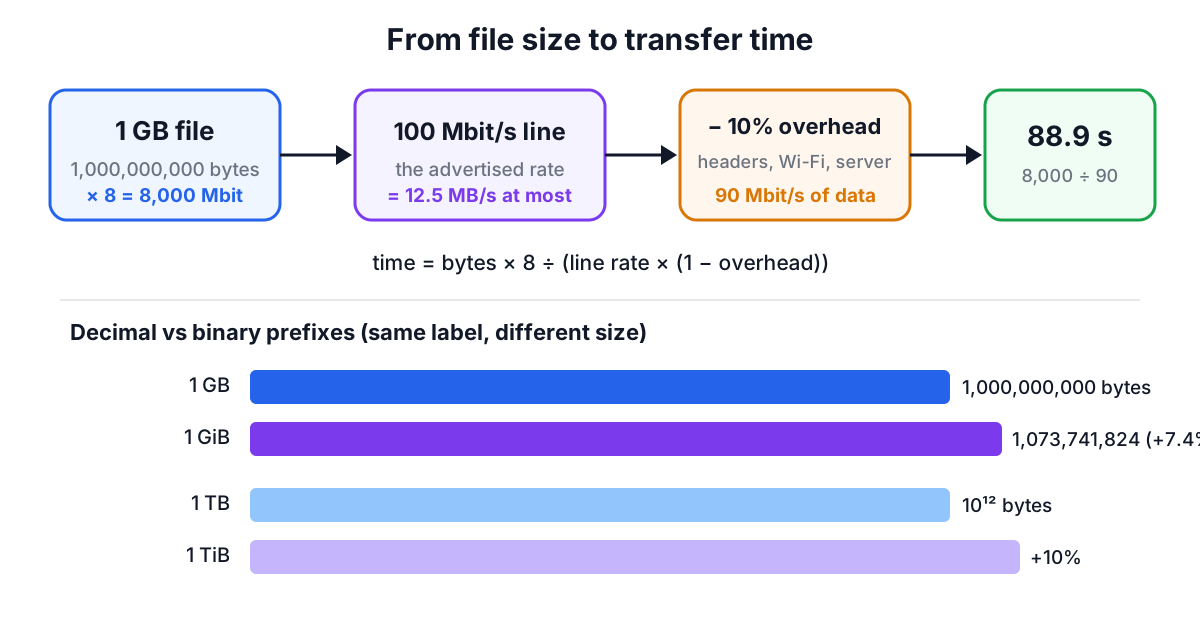
A second trap sits in the prefixes. Network rates always use decimal prefixes: 1 Mbit/s is 1,000,000 bits per second. Storage makers also sell decimal gigabytes (10⁹ bytes). But many operating systems count in powers of 1024 and still label the result "GB". The IEC 80000-13 standard gives those binary units their own names, KiB, MiB, GiB and TiB, precisely to remove the ambiguity. The gap grows with size: 2.4% at kilo, 4.9% at mega, 7.4% at giga and 10% at tera. A file Windows shows as "5 GB" is 5 GiB, which takes 429 seconds at 100 Mbit/s rather than 400, and a "1 TB" drive shows up as about 931 "GB".
The Download Time Calculator keeps both sets of units, so pick GB when the number came from a store page or a cloud provider and GiB when it came from your file manager.
Why real transfers are slower than the plan
The advertised speed is the line rate. The rate at which file data arrives is lower for several reasons, and the overhead field in the calculator is where you account for them.
- Protocol headers. Each full-size Ethernet frame carries about 1,460 bytes of TCP payload out of roughly 1,538 bytes on the wire once headers, preamble and the inter-frame gap are counted, so around 5% goes to framing before anything else happens.
- Wi-Fi. Wireless links share the air, retransmit lost frames and adapt their rate to signal strength. Real throughput is often half the link rate shown in the settings, or less through walls.
- The other end. A server sending at 50 Mbit/s caps your download at 50 Mbit/s no matter what plan you have. Disk speed, VPN encryption and antivirus scanning can each become the slowest link.
- Latency and TCP windows. A single TCP connection can only have a window of unacknowledged data in flight. Throughput is at most window ÷ round-trip time. With the old 64 KiB window and a 100 ms round trip, that is about 5.2 Mbit/s, which is why long-distance transfers once crawled on fast lines. Modern window scaling lifts this limit, but high latency still slows the start of every connection.
- Many small files. Each file adds request and metadata overhead, so 10,000 small files transfer more slowly than one archive of the same total size. Compressing them into a single archive first often helps twice: less data and fewer round trips.
A 5 to 15% overhead allowance is a fair default on a good wired connection; use more for Wi-Fi or a busy network, and 0% when you want the theoretical best case. With 10% overhead, a 50 GB download on 100 Mbit/s takes 1 hour 14 minutes instead of 1 hour 7.
Working backwards from a deadline
Often the real question is the reverse: what speed do I need? Divide the data by the time you have, then allow for overhead. To move 25 GB in an hour you need 25 × 8 × 10⁹ ÷ 3,600 = 55.6 Mbit/s of actual data, or about 61.7 Mbit/s of line rate with a 10% allowance. The same sum sizes a link for a nightly backup window or a data-centre migration.
Upload speed deserves its own check. Many cable and DSL plans upload at a fraction of their download speed. A first cloud backup of 1 TB at 20 Mbit/s up takes over five days with modest overhead, which is why providers offer to seed large backups by shipping a drive. For uploads, enter the upload figure from a speed test, not the headline download number.
The same habits for both
Whether the amount is kilometres or gigabytes, the method is the same: get the amount into one clear unit, get the rate into the matching unit per second or per hour, divide, and then ask what the average hides. For journeys, the hidden part is stops and conditions; for data, it is bits versus bytes, binary versus decimal prefixes and the slowest link in the chain. Write the units next to every number, and the arithmetic takes care of itself.