
301, 302, 307 or 308? Writing Redirects for Apache, Nginx, Netlify and Vercel
The right redirect code for pages and APIs, what each does for SEO and caching, and working rules for Apache mod_rewrite, Nginx return, Netlify _redirects and vercel.json, plus chains and loops.
· 11 min read

Redirects are the plumbing of every site move, rebrand, URL cleanup and API version bump. When they are right nobody notices. When they are wrong, search rankings drop, form submissions vanish, browsers cache a mistake for months, or a visitor bounces between two URLs until the browser gives up. This article covers choosing the status code, what each one means for search engines and caches, and how to write working rules for Apache, Nginx, Netlify and Vercel, including the quirks each platform has. The Redirect Rules Generator turns a list of old and new URLs into rules for all four and checks them for loops and chains.
Two questions decide the code
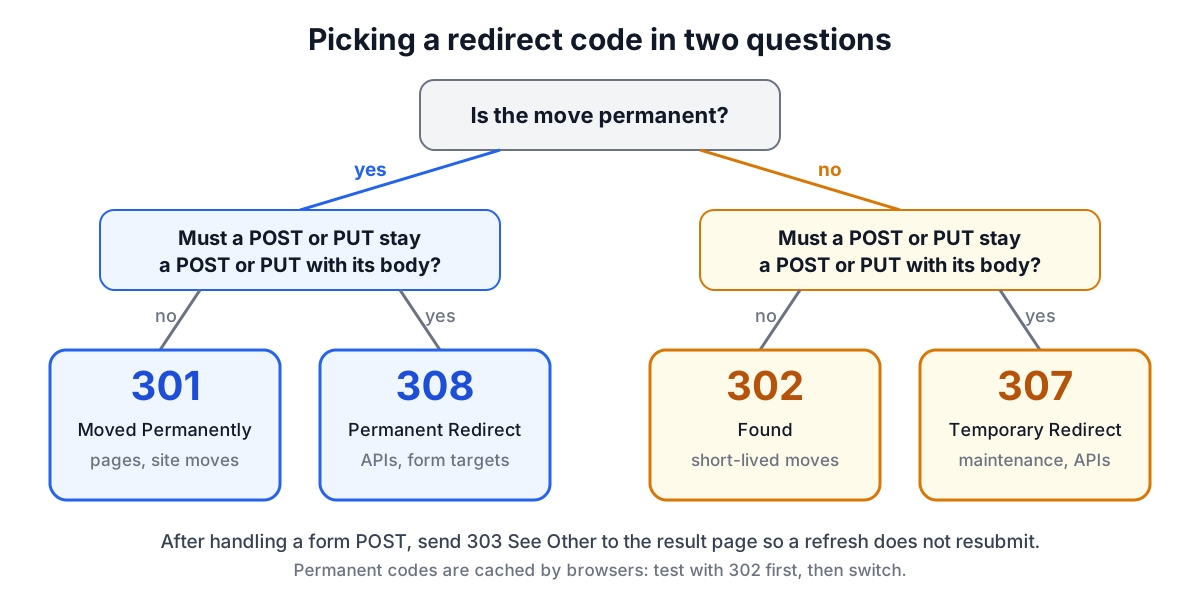
RFC 9110 defines several redirect codes, but for moving URLs you choose between four, and two questions decide which.
| Client may change POST to GET | Client must keep method and body | |
|---|---|---|
| Permanent | 301 Moved Permanently | 308 Permanent Redirect |
| Temporary | 302 Found | 307 Temporary Redirect |
The left column exists for historical reasons. Early browsers followed a 301 or 302 after a form POST by sending a GET to the new URL, dropping the body, and so many did it that the behaviour became allowed. HTTP/1.1 introduced 307 and RFC 7538 introduced 308 so servers could insist that the request be repeated as it was. For pages people click through to, 301 and 302 are fine and remain the most widely understood. For API endpoints, webhooks and form targets, use 308 or 307, or uploads will arrive as empty GETs.
The fifth code worth knowing is 303 See Other, which always means "now GET this other URL". It is the right answer after handling a form POST, so that refreshing the result page does not resubmit the form.
What search engines and caches do with them
Google's documentation treats 301 and 308 as permanent: a strong signal that the target should replace the old URL in results, with ranking signals consolidated on it. 302 and 307 are temporary: a weak signal, and the old URL usually stays indexed. For a migration you want permanent codes. Google recommends keeping redirects in place for as long as possible, generally at least a year, and pointing each old URL at its closest equivalent. Sending every old URL to the home page tends to be treated as a soft 404, which loses the value you were trying to keep.
Browsers cache permanent redirects. RFC 9110 lists 301 and 308 among the codes that are cacheable by default, and in practice browsers keep them until the cache is cleared, often ignoring later changes on the server. A wrong 301 therefore keeps sending visitors to the wrong place even after you fix it. Test new rules with 302, confirm them with curl -I, and switch to 301 or 308 once they are right.
Chains and loops
A chain is A redirecting to B which redirects to C. Each hop costs a round trip, often a new TLS connection to a different host, and crawlers stop following after a handful of hops. Chains accumulate over years: http to https, then non-www to www, then an old slug to a new one. Fix them by pointing each old URL directly at its final destination, and order site-wide rules so that a single redirect lands on the canonical scheme, host and path at once.
A loop is a chain that returns to its start, such as /a to /b and /b to /a, or a folder rule whose destination is inside the folder it moves: /docs/* to /docs/v2/:splat matches its own output forever. Browsers stop with "too many redirects". The generator flags self-redirects, folder loops, two-way loops, duplicate sources and chains before you copy anything.
Apache: use mod_rewrite, not Redirect
Apache offers two modules. mod_alias's Redirect is simple but matches by prefix: Redirect 301 /old /new also sends /old-stuff to /new-stuff and /old/page to /new/page, because the rest of the path is appended. That is rarely what someone redirecting one page intended. RedirectMatch takes a regular expression and avoids this.
mod_rewrite gives the most control, and the generator uses it:
RewriteEngine On
RewriteRule ^old-page/?$ /new-page [R=301,L]
RewriteRule ^blog/(.*)$ /news/$1 [R=301,L]
Three details matter in .htaccess. The pattern is matched against the path without its leading slash. R=301 sets the status (any 3xx works) and L stops processing further rules. And mod_rewrite appends the original query string to the target unless the target contains its own ? or you add the QSD flag (Apache 2.4 and later). Escape dots and other regex characters in paths: ^about\.html$.
Canonical host and HTTPS rules use conditions:
RewriteCond %{HTTP_HOST} ^www\.example\.com$ [NC]
RewriteRule ^(.*)$ https://example.com/$1 [R=301,L]
RewriteCond %{HTTPS} off
RewriteRule ^(.*)$ https://example.com/$1 [R=301,L]
Behind a load balancer that terminates TLS, %{HTTPS} is always off; test %{HTTP:X-Forwarded-Proto} instead.
Nginx: return for redirects
In Nginx, return is the clearest way to redirect, and exact-match locations are checked before regular-expression locations:
location = /old-page {
    return 301 /new-page$is_args$args;
}
location ~ ^/blog/(.*)$ {
    return 301 /news/$1$is_args$args;
}
return sends exactly the URL you give it, so the query string is lost unless you append $is_args$args (which expands to ? plus the arguments, or nothing). The older rewrite ... permanent; form appends the arguments automatically, which is the opposite default. For HTTPS and host canonicalisation, use separate small server blocks that return 301 https://example.com$request_uri;, which is faster and clearer than if statements. Run nginx -t before reloading.
Netlify: _redirects
Netlify reads a _redirects file from the publish directory (or [[redirects]] in netlify.toml):
/old-page      /new-page        301
/blog/*        /news/:splat     301
/api/v1/*      /api/v2/:splat   308
The asterisk is a splat that captures the rest of the path, reused as :splat. If the status is omitted, Netlify uses 301. The first matching rule wins, so specific rules go above general ones. Netlify normalises trailing slashes before matching, so you cannot add or remove a trailing slash with a rule, and it passes query string parameters through to the destination for 301 and 302 by default.
The quirk that catches most people is shadowing: if a file exists at the source path, Netlify serves the file and ignores the rule. Append ! to the status (301!) to force the redirect. Domain-level rules can include the host, which is how www and apex are joined: https://www.example.com/* https://example.com/:splat 301!.
Vercel: vercel.json
Vercel uses a redirects array:
{
  "redirects": [
    { "source": "/old-page", "destination": "/new-page", "permanent": true },
    { "source": "/blog/:path*", "destination": "/news/:path*", "statusCode": 301 },
    { "source": "/:path(.*)", "has": [{ "type": "host", "value": "www.example.com" }],
      "destination": "https://example.com/:path", "permanent": true }
  ]
}
permanent: true sends 308 and false sends 307; use statusCode for 301 or 302 instead, never both. Wildcards use path-to-regexp syntax (:path*), and has conditions match on host, header, cookie or query. Next.js apps can put the same objects in redirects() in next.config.js. Vercel serves all domains over HTTPS and redirects plain HTTP itself.
Testing
Check every rule from the command line before and after deploying:
curl -sI https://example.com/old-page | grep -iE '^(HTTP|location)'
curl -sIL https://example.com/old-page | grep -iE '^(HTTP|location)'
The first shows one hop; the second follows the whole chain, so you can count hops. Check one URL with a query string to confirm it survives, one with a trailing slash, and one from each folder rule. After a migration, crawl the old URL list and confirm every one ends in a single 301 or 308 to a 200 page.
Worked example: a small migration
A site moves its blog from /blog to /news, renames /about-us to /about, retires a promo page temporarily and versions an upload API. The input list:
/blog/* /news/:splat
/about-us /about
/summer-sale /sale 302
/api/v1/upload /api/v2/upload 308
On Apache this becomes four RewriteRules; on Nginx an exact location for each page and a regex location for the folder; on Netlify four lines; on Vercel four objects, with the 308 written as permanent: true. If an older rule already sent /about-company to /about-us, the generator reports the chain and suggests pointing /about-company straight at /about.
For the meaning of every code, including the 4xx you might use when retiring pages (404 or 410), see the HTTP Status Codes reference, and update your sitemap with the XML Sitemap Generator so it lists only final URLs.
Sources
- RFC 9110, HTTP Semantics, sections 15.4 (redirection) and 15.1 (cacheability).
- RFC 7538, The Hypertext Transfer Protocol Status Code 308 (Permanent Redirect).
- Google Search Central, "Redirects and Google Search" and "Site moves with URL changes".
- Apache HTTP Server 2.4 documentation: mod_rewrite (RewriteRule flags R, L, QSD) and mod_alias (Redirect, RedirectMatch).
- nginx documentation: ngx_http_rewrite_module (return, rewrite) and ngx_http_core_module (location).
- Netlify Docs, "Redirects and rewrites" and "Redirect options".
- Vercel Docs, "Static configuration with vercel.json: redirects".
Related searches
- 301 vs 302 vs 307 vs 308
- htaccess redirect
- nginx return 301
- netlify _redirects
- vercel json redirects
- redirect chain seo
- force https htaccess
- www to non-www redirect
- mod_rewrite query string
- site migration redirects