
Rounding Rules: Half Up, Half Even and Why Software Disagrees
The ten rounding rules, banker's rounding and bias, significant figures, rounding negatives, and why 2.675 becomes 2.67 in JavaScript but 2.68 on paper.
· 10 min read
Rounding looks like the easiest operation in arithmetic, and for most numbers it is: 3.14159 to two decimal places is 3.14 under every rule anyone uses. The trouble is concentrated in two places. One is the exact tie, a number sitting precisely halfway between two candidates, where different rules give different answers. The other is the gap between the decimal number you typed and the binary number a computer actually stores. Between them they explain why Excel, Python, JavaScript and a school textbook can give four different answers for the same rounding. The Rounding Calculator shows all of these side by side.
Rounding is snapping to a grid
Every rounding task picks a grid and moves the number to a point on it:
- Decimal places: the grid is multiples of 10⁻ⁿ. Two places means multiples of 0.01.
- Significant figures: the grid depends on the size of the number. Three figures of 0.0045678 is multiples of 0.00001; three figures of 45,678 is multiples of 100.
- Nearest multiple: any step you like, such as 5, 1000, 0.05 or 1/8.
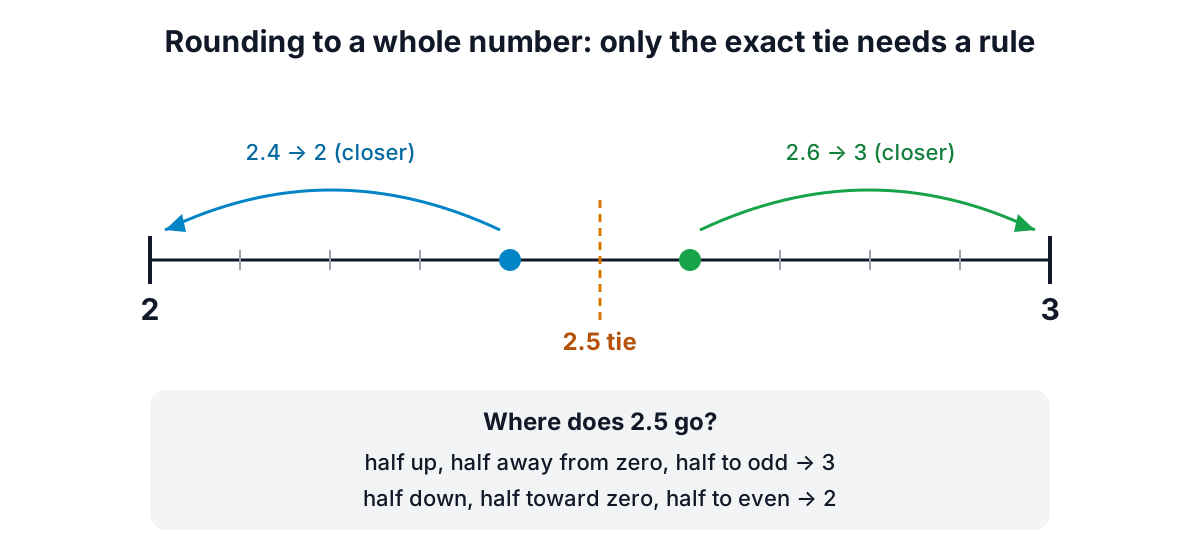
The number usually lies between two grid points, a lower neighbour and an upper neighbour. A "nearest" rule picks the closer one, and only when the number is exactly halfway does the rule need a tie-breaker. A "directed" rule ignores distance and always picks one side.
The ten rules
| Rule | 2.5 | 3.5 | −2.5 | 2.4 | −2.6 | Where you meet it |
|---|---|---|---|---|---|---|
| Half up (toward +∞) | 3 | 4 | −2 | 2 | −3 | JavaScript Math.round, many textbooks |
| Half down (toward −∞) | 2 | 3 | −3 | 2 | −3 | Rare |
| Half away from zero | 3 | 4 | −3 | 2 | −3 | Excel ROUND, school rounding, Java HALF_UP |
| Half toward zero | 2 | 3 | −2 | 2 | −3 | Java HALF_DOWN |
| Half to even (banker's) | 2 | 4 | −2 | 2 | −3 | IEEE 754 default, Python round(), ASTM E29 |
| Half to odd | 3 | 3 | −3 | 2 | −3 | Rare |
| Ceiling | 3 | 4 | −2 | 3 | −2 | Excel CEILING.MATH, Math.ceil |
| Floor | 2 | 3 | −3 | 2 | −3 | Excel FLOOR.MATH, Math.floor |
| Truncate (toward zero) | 2 | 3 | −2 | 2 | −2 | Excel TRUNC and ROUNDDOWN, Math.trunc |
| Away from zero | 3 | 4 | −3 | 3 | −3 | Excel ROUNDUP |
Look at the 2.4 and −2.6 columns: the six "half" rules agree, because those values are not ties. The disagreements live entirely in the tie columns, and among the directed rules.
Watch the names
"Round half up" is the worst-named rule in computing. In many maths textbooks it means "toward positive infinity", so −2.5 becomes −2, which is what JavaScript's Math.round does. In Java's BigDecimal, RoundingMode.HALF_UP means "away from zero", so −2.5 becomes −3, and HALF_DOWN means toward zero. Excel's ROUND also rounds half away from zero, while ROUNDUP and ROUNDDOWN have nothing to do with halves: they always move away from or toward zero. When you document a rounding choice, describe the behaviour ("ties away from zero") rather than relying on a name.
Why banker's rounding exists
Rounding every tie in the same direction adds a small bias. Imagine a column of amounts whose last digit is equally likely to be 0 to 9. Digits 1 to 4 round down, 6 to 9 round up, and they balance. But the 5s all round up, so on average the rounded total is higher than the true total by half a unit for every tie.
Round half to even fixes this by sending ties up and down equally often. 0.5 → 0, 1.5 → 2, 2.5 → 2, 3.5 → 4: two go down and two go up.
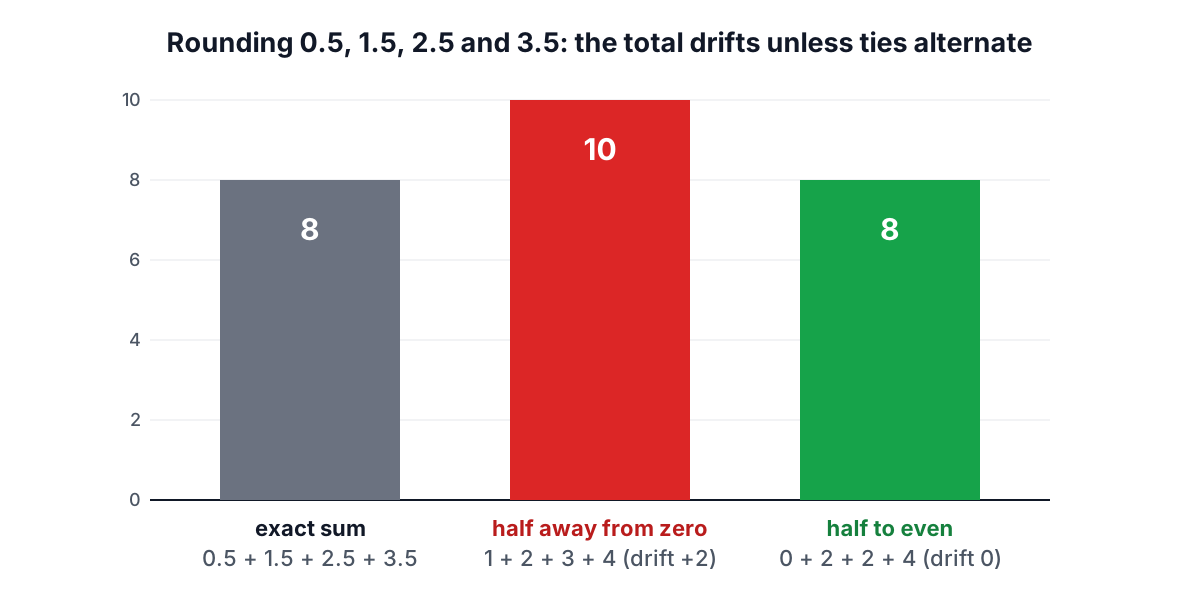
The values 0.5, 1.5, 2.5 and 3.5 add up to 8. Rounded half away from zero they become 1, 2, 3 and 4, which add to 10. Rounded half to even they become 0, 2, 2 and 4, which add to 8, so there is no drift. The calculator's list mode reports this drift for any column you paste.
That is why half to even is the default rounding mode in the IEEE 754 floating-point standard, so every addition in your computer rounds this way, and why the ASTM E29 practice for rounding test data uses it: a 5 followed only by zeros rounds the last kept digit up if it is odd and leaves it if it is even. Python 3's round() follows the same rule, so round(2.5) is 2, which surprises people who expect 3.
The name "banker's rounding" is traditional rather than a description of banking law. Financial rules vary by country and contract; many invoices and tax calculations specify half away from zero. Check the rule that applies to you.
The floating-point trap
Most software stores numbers in binary, and most decimal fractions have no exact binary form, just as 1/3 has no exact decimal form. The literal 2.675 is stored as the nearest binary double, which is
2.67499999999999982236431605997495353221893310546875
That is slightly less than 2.675, so it is not a tie at all, and rounding to two places correctly gives 2.67. JavaScript's (2.675).toFixed(2) returns "2.67", and Python's round(2.675, 2) returns 2.67 for the same reason. The Python documentation calls this out explicitly as a floating-point effect, not a bug in round().
The Rounding Calculator reads your input as exact decimal text, so 2.675 is a true tie and rounds to 2.68 under half away from zero (and under half to even, because 7 is odd). For money in code, use a decimal type (Python's decimal module, Java's BigDecimal created from a string, or integer cents) so that the number you round is the number you meant.
Significant figures
Significant figures count digits from the first non-zero one:
| Number | Significant figures | Why |
|---|---|---|
| 0.0045678 → 3 s.f. | 0.00457 | Leading zeros only place the point |
| 45,678 → 3 s.f. | 45,700 | Round on the fourth digit, keep the place |
| 9.996 → 3 s.f. | 10.0 | The carry adds a digit; keep the trailing zero |
| 12,345 → 2 s.f. | 12,000 or 1.2 × 10⁴ | Trailing zeros are ambiguous without the exponent |
| 2.5 → 3 s.f. | 2.50 | Padding with a zero states the precision |
Two details cause most errors. First, a carry can move the leading digit up a place, as 9.996 becomes 10.0. The answer still has three significant figures, so it is written 10.0, not 10 or 10.00. Second, whole numbers ending in zeros do not say which zeros are significant: 12,000 might be two, three, four or five figures. Scientific notation removes the doubt, 1.2 × 10⁴ is two figures and 1.200 × 10⁴ is four, so the calculator gives it whenever the plain form is ambiguous. The Scientific Notation Calculator covers how significant figures carry through multiplication and addition.
Rounding to a step
The general method is to divide by the step, round to a whole number with your rule, and multiply back:
round(x to step s) = round(x / s) × s
4.37 to nearest 0.05:  4.37 / 0.05 = 87.4  → 87  → 87 × 0.05 = 4.35
1,234,567 to nearest 1000: 1234.567 → 1235 → 1,235,000
7.3 to nearest 1/8: 7.3 × 8 = 58.4 → 58 → 58/8 = 7 1/4
Countries that have withdrawn one-cent coins, including Canada (2013) and Australia (in the early 1990s), round cash totals to the nearest 5 cents this way, while card payments keep the exact amount. Time sheets round to the nearest quarter hour (step 0.25), and woodworkers round to the nearest 1/16 inch. In Excel the same idea is MROUND(number, multiple), and negative digits in ROUND(number, −3) round to the nearest thousand.
Round once, at the end
Rounding in stages can change the answer. 2.445 rounded to two places is 2.45 (half away from zero), and 2.45 rounded to one place is 2.5. But 2.445 rounded straight to one place is 2.4, because 2.445 is below the midpoint 2.45. ASTM E29 makes the same point: round in a single step from the full-precision value. Keep full precision through a calculation and round only what you report.
Choosing a rule
- Reporting a single number to people: half away from zero is what most readers expect.
- Adding many rounded values, or statistics on rounded data: half to even avoids drift.
- Measurements and test data under a standard: follow the standard; ASTM E29 uses half to even.
- Never exceed a limit (capacity, dosage, budget): use ceiling or floor deliberately, not nearest.
- Converting to an integer index or count: floor or truncate, and be clear which for negatives.
Whatever you choose, write it down. Most rounding bugs are not arithmetic errors but two systems using different rules for the same column.
Try any number in the Rounding Calculator: it shows the neighbours, the error you introduce, every rule's result and, for a list, the total drift.
Sources
- IEEE 754-2019, Standard for Floating-Point Arithmetic: roundTiesToEven is the default rounding-direction attribute for binary formats.
- ASTM E29, Standard Practice for Using Significant Digits in Test Data to Determine Conformance with Specifications, rounding method.
- Python documentation, built-in round() and "Floating Point Arithmetic: Issues and Limitations".
- Oracle Java SE documentation, java.math.RoundingMode.
- Microsoft Support documentation for Excel ROUND, ROUNDUP, ROUNDDOWN, TRUNC and MROUND.
- Royal Canadian Mint and Government of Canada, phasing out the penny (2013): rounding cash transactions to the nearest five cents.
Related searches
- banker's rounding explained
- round half to even
- rounding rules for negative numbers
- significant figures rounding
- why toFixed rounds wrong
- excel round vs roundup vs trunc
- rounding bias in totals
- round to nearest 0.05 cash rounding