
RSA vs ECDSA vs Ed25519: Choosing and Formatting Key Pairs
Security strength by key size, when RSA still makes sense, why Ed25519 became the SSH default, and how PEM, PKCS#8, JWK and OpenSSH formats relate.
· 11 min read
Generating a key pair takes one click. Choosing which kind, what size, and which of half a dozen file formats to save it in is where people get stuck, and where old advice ("use RSA 4096 to be safe") lingers long after it stopped being the best answer. This guide compares the three key types you are likely to need, explains what security strength means for each, and maps out the formats so you can tell a PKCS#8 file from an OpenSSH one at a glance. Every key type and format discussed here can be produced in the RSA and EC Key Pair Generator.
Three families of public-key cryptography
RSA (Rivest, Shamir and Adleman, 1977) rests on the difficulty of factoring a large number n = p × q into its two prime factors. The public key is n and an exponent e, almost always 65537; the private key is the matching exponent d, plus p, q and some precomputed values that speed up signing. RSA can both sign and encrypt, with different padding schemes for each: PKCS#1 v1.5 or PSS for signatures, OAEP for encryption.
ECDSA signs using points on an elliptic curve. The NIST curves P-256, P-384 and P-521 (FIPS 186-5) are the common ones. The private key is a random number d, and the public key is the point d × G, where G is a fixed generator point. Security rests on the elliptic-curve discrete logarithm problem: given d × G, finding d is infeasible.
Ed25519 (RFC 8032) is an EdDSA signature scheme on the Edwards form of Curve25519, designed by Daniel J. Bernstein and colleagues. It reaches the same security level as P-256 with simpler, faster code that is easier to implement without side channels, and its signatures are deterministic.
Security strength: what the numbers mean
Key sizes are not comparable across families. A 256-bit elliptic-curve key is far stronger than a 256-bit RSA key would be. To compare them, NIST SP 800-57 Part 1 expresses each in bits of security, the work of brute-forcing a symmetric key of that length.
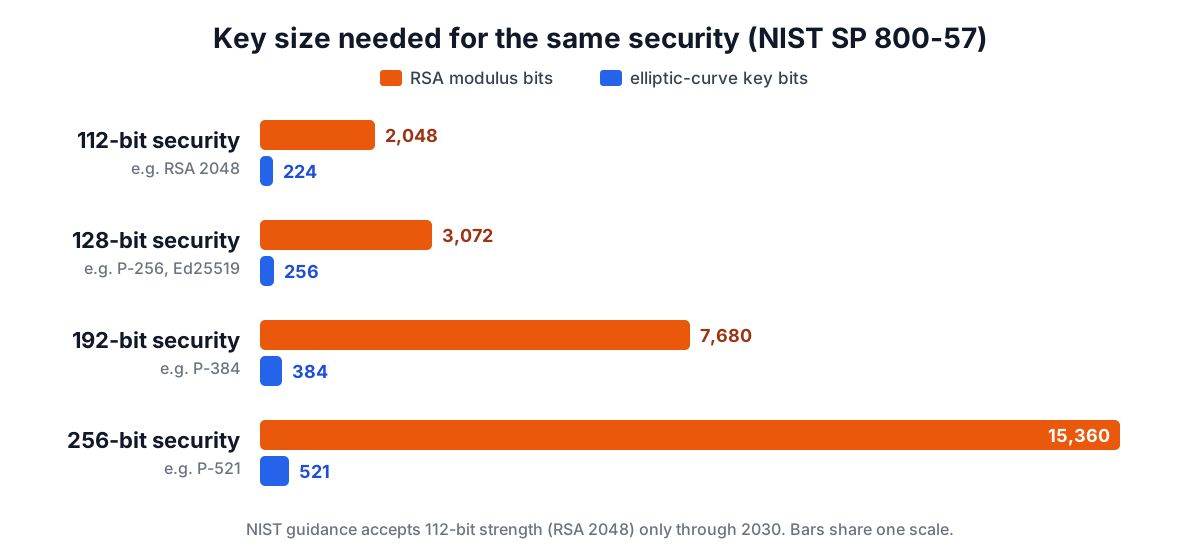
| Security bits | RSA modulus | Elliptic curve | Example |
|---|---|---|---|
| 112 | 2048 | 224 bits | RSA 2048 |
| 128 | 3072 | 256 bits | P-256, Ed25519 |
| 192 | 7680 | 384 bits | P-384 |
| 256 | 15360 | 512 bits or more | P-521 |
RSA grows painfully: doubling security from 128 to 256 bits takes the modulus from 3072 to 15360 bits, while the curve only doubles. That is the main reason elliptic curves took over.
NIST's transition guidance (SP 800-131A, with the draft IR 8547 setting later dates) allows 112-bit strength, and therefore RSA 2048, only through 2030. RSA 4096 is not rated higher than 128 bits in the table, because the next row needs 7680. It still has a larger margin than 3072, but it costs noticeably more to generate (seconds rather than a fraction of a second in a browser) and each signature takes several times longer.
All of these, RSA and elliptic curves alike, would fall to a large fault-tolerant quantum computer running Shor's algorithm. NIST published the first post-quantum signature standards, ML-DSA (FIPS 204) and SLH-DSA (FIPS 205), in 2024. They are not yet usable in browsers' Web Crypto or in most SSH and certificate tooling, so the choice today is still among the classical types, with a plan to migrate.
Size and speed in practice
| RSA 2048 | RSA 4096 | ECDSA P-256 | Ed25519 | |
|---|---|---|---|---|
| Public key | 256-byte modulus | 512-byte modulus | 65 bytes (uncompressed point) | 32 bytes |
| Private key | about 1.2 KB as PKCS#8 | about 2.4 KB as PKCS#8 | 32 bytes | 32-byte seed |
| Signature | 256 bytes | 512 bytes | 64 bytes (r and s) | 64 bytes |
| Key generation | fast | slow | instant | instant |
| Verification | very fast | fast | moderate | fast |
RSA verification is quick because the public exponent 65537 is small, which is one reason RSA remains popular for certificates that are verified millions of times. For SSH logins and API signing, where both signing and verification happen often and keys are pasted around by hand, Ed25519's 68-character public key is hard to beat.
The nonce problem, and why Ed25519 avoids it
ECDSA needs a fresh secret random number k for every signature. If k is ever reused, or even slightly biased, the private key can be computed from the signatures. This is not theoretical: in 2010 the fail0verflow group recovered Sony's PlayStation 3 signing key because the same k was used for every signature, and weak random number generators on Android led to stolen Bitcoin in 2013.
RFC 6979 fixes this for ECDSA by deriving k deterministically from the private key and the message. Ed25519 builds the same idea into the standard: the per-signature secret comes from a hash of part of the private key and the message, so signing needs no randomness at all and the same message always produces the same signature. Key generation still needs good randomness, which Web Crypto takes from the operating system.
Which one should you choose?
- SSH keys: Ed25519. OpenSSH has supported it since 6.5 (2014), and ssh-keygen creates it by default since OpenSSH 9.5. Fall back to RSA 3072 only for old servers or network devices that lack Ed25519. OpenSSH 8.8 disabled the old SHA-1 "ssh-rsa" signature algorithm by default, but RSA keys still work through rsa-sha2-256 and rsa-sha2-512.
- TLS certificates: ECDSA P-256 is widely supported and makes handshakes smaller; RSA 2048 or 3072 for maximum compatibility. Ed25519 certificates are not accepted by browsers.
- JWT signing: ES256 (P-256) or EdDSA where your libraries support it; RS256 (RSA PKCS#1 v1.5) is the most universally supported; PS256 if you want RSA with the PSS padding that has the stronger security proof.
- Encryption with a public key: RSA-OAEP for small payloads such as wrapping an AES key; for anything else use a hybrid scheme (ECDH plus AES-GCM) rather than encrypting data with RSA directly.
- Code signing, package repositories, hardware tokens: follow what the platform requires; many still mandate RSA.
Key formats: same numbers, different wrappers
A private key is a handful of integers. The formats differ only in how those integers are packaged, which is why converting between them is lossless.
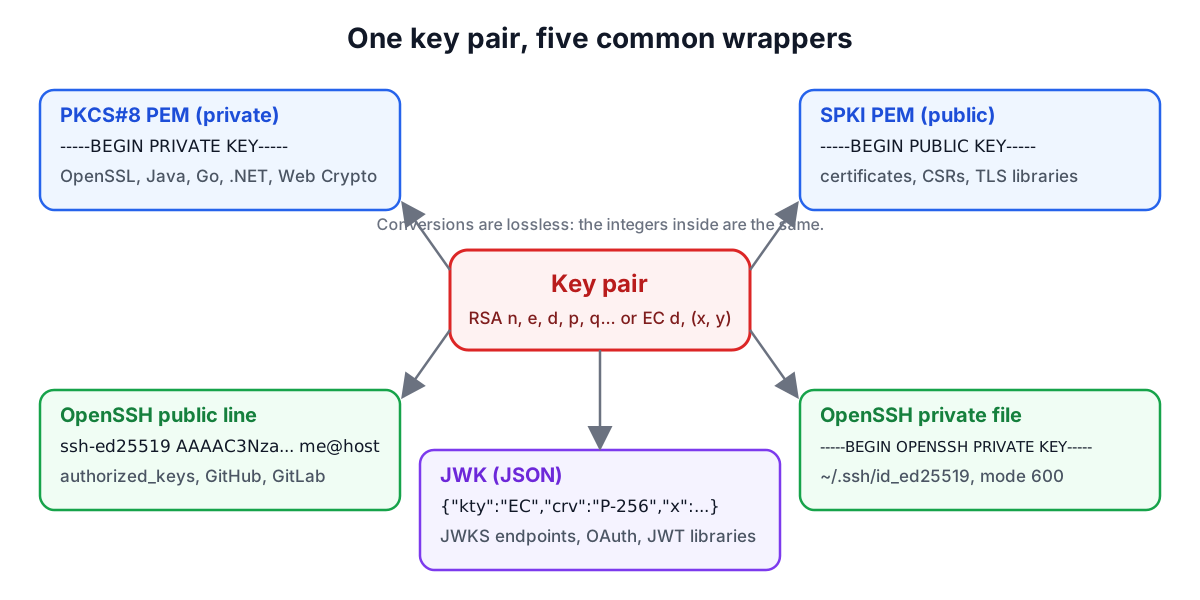
PEM is Base64 of DER-encoded ASN.1 between -----BEGIN ...----- and -----END ...----- lines, wrapped at 64 characters. The label tells you the structure inside:
| PEM label | Structure | Holds |
|---|---|---|
PRIVATE KEY | PKCS#8 (RFC 5208, 5958) | any algorithm, with an algorithm identifier |
ENCRYPTED PRIVATE KEY | PKCS#8, password-protected | any algorithm |
RSA PRIVATE KEY | PKCS#1 (RFC 8017) | RSA only |
EC PRIVATE KEY | SEC 1 (RFC 5915) | EC only |
PUBLIC KEY | SubjectPublicKeyInfo (RFC 5280) | any algorithm |
RSA PUBLIC KEY | PKCS#1 | RSA only |
OPENSSH PRIVATE KEY | openssh-key-v1 (OpenSSH PROTOCOL.key) | any SSH key type |
PKCS#8 and SPKI are the modern defaults: OpenSSL 3, Java, .NET, Go and Web Crypto all read them. The generator exports those two.
JWK (RFC 7517 and 7518) writes the same integers as Base64url strings in JSON: n and e for an RSA public key, plus d, p, q, dp, dq and qi for the private key; crv, x and y for an EC public key, plus d for the private one; crv: "Ed25519" and x (and d) for Ed25519, which uses key type OKP from RFC 8037. JWKs are what OAuth and OpenID Connect servers publish at their JWKS endpoints.
A JWK thumbprint (RFC 7638) is the SHA-256 of the key's required members in a fixed order, Base64url-encoded. For the RSA example key in RFC 7638 it is NzbLsXh8uDCcd-6MNwXF4W_7noWXFZAfHkxZsRGC9Xs. Many identity providers use the thumbprint as the kid, so the key ID is derived from the key and cannot drift.
OpenSSH public keys are one line: the type, the Base64 of a binary blob in the SSH wire format (RFC 4253), and a comment. The blob begins with the type name, so the Base64 begins predictably: AAAAB3NzaC1yc2E for ssh-rsa, AAAAE2VjZHNhLXNoYTItbmlzdHAyNTY for ecdsa-sha2-nistp256 and AAAAC3NzaC1lZDI1NTE5 for ssh-ed25519.
OpenSSH private keys have used their own openssh-key-v1 container since OpenSSH 6.5. It holds the public blob, then a private section with two copies of a random check value, the key's numbers, the comment and padding. When a passphrase is set, the private section is encrypted (aes256-ctr) with a key derived by bcrypt-pbkdf. The files from the generator are unencrypted; add a passphrase with ssh-keygen -p -f ~/.ssh/id_ed25519.
Fingerprints
When GitHub or a server shows "SHA256:..." for your key, that is the SHA-256 of the OpenSSH public blob, Base64-encoded without the trailing =. ssh-keygen -l -f key.pub prints the same value, and so does the generator. Older tools showed an MD5 fingerprint as colon-separated hex (ssh-keygen -l -E md5); it identifies the same key but should not be relied on for anything security sensitive.
Converting between formats
| Task | Command |
|---|---|
| Public key from a private PEM | openssl pkey -in private.pem -pubout -out public.pem |
| Add a passphrase to PKCS#8 | openssl pkcs8 -topk8 -v2 aes-256-cbc -in private.pem -out private-enc.pem |
| SPKI PEM to OpenSSH public line | ssh-keygen -i -m PKCS8 -f public.pem |
| OpenSSH public line to SPKI PEM | ssh-keygen -e -m PKCS8 -f id_ed25519.pub |
| Public key from an OpenSSH private file | ssh-keygen -y -f id_ed25519 |
| Inspect any PEM | openssl pkey -in private.pem -text -noout |
For JWK conversions, Web Crypto's importKey('jwk', ...) followed by exportKey('spki' | 'pkcs8', ...) does the job in a browser, which is what the JWK Tool uses.
Handling private keys safely
- Generate long-lived production keys on the machine or HSM that will use them, so the private key never travels. A browser generator is convenient for SSH keys on a personal machine, development and test keys, and learning.
- Encrypt private keys at rest with a passphrase or keep them in an agent, keychain or secrets manager.
- Set file permissions to 600; OpenSSH refuses to use a private key that other users can read.
- Never commit private keys. Secret-scanning services find them in public repositories within minutes.
- Rotate keys you suspect have leaked, and remove the old public key from every authorized_keys file and JWKS endpoint.
To inspect an existing certificate's key, the X.509 Parser shows the algorithm and size, and the Digital Signature Validator verifies signatures made with these keys.
Sources
- NIST SP 800-57 Part 1 Rev. 5, Recommendation for Key Management, Table 2 (comparable strengths).
- NIST SP 800-131A Rev. 2 and draft NIST IR 8547, transition of cryptographic algorithms and key lengths.
- FIPS 186-5, Digital Signature Standard; RFC 8032, Edwards-Curve Digital Signature Algorithm; RFC 6979, deterministic ECDSA.
- RFC 5208 and 5958 (PKCS#8), RFC 5280 (SubjectPublicKeyInfo), RFC 8017 (PKCS#1), RFC 7517, 7518, 7638 and 8037 (JWK).
- RFC 4253 (SSH transport, public key format) and OpenSSH PROTOCOL.key; OpenSSH 8.8 and 9.5 release notes.
Related searches
- rsa vs ecdsa
- ed25519 vs rsa
- rsa key size
- pem vs jwk
- pkcs8 vs pkcs1
- openssh private key format
- ssh key fingerprint
- rsa 2048 security bits
- jwk thumbprint