
Debugging SAML SSO: Decoding Requests, Responses and Bindings
How SAML messages travel through the HTTP-Redirect and HTTP-POST bindings, how to decode them, and the fields to check when a login fails.
· 7 min read
A user clicks "Sign in with SSO", lands on the identity provider, types a password, and bounces back to your app with a generic "login failed" page. The logs show one long blob of Base64 called SAMLResponse. Nearly every SAML failure can be explained by a handful of fields inside that blob, and decoding it takes seconds once you know which of the two encodings you are looking at.
This guide explains how SAML messages travel, how to decode them with the SAML Decoder, and the fields to check first when a login breaks.
The two parties and the two messages
SAML 2.0 was approved as an OASIS standard in March 2005 and still runs a large share of enterprise single sign-on. Two parties take part:
- The Service Provider (SP) is your application. It wants to know who the user is.
- The Identity Provider (IdP) is Okta, Microsoft Entra ID, Google Workspace, Keycloak, ADFS and the like. It authenticates the user.
In the usual SP-initiated flow there are two messages. The SP sends an AuthnRequest saying "please authenticate this user and send the answer to this URL". The IdP replies with a Response containing an Assertion: the user's identity (NameID), attributes such as email and groups, conditions on when and where the assertion is valid, and an XML signature. In IdP-initiated flows the user starts at the IdP portal and only the Response exists, without an InResponseTo value.
Bindings: how the XML gets onto the wire
SAML messages are XML, but they travel through the browser as URL parameters or form fields. The SAML Bindings specification defines how. Two bindings cover almost all traffic, and they encode the XML differently.
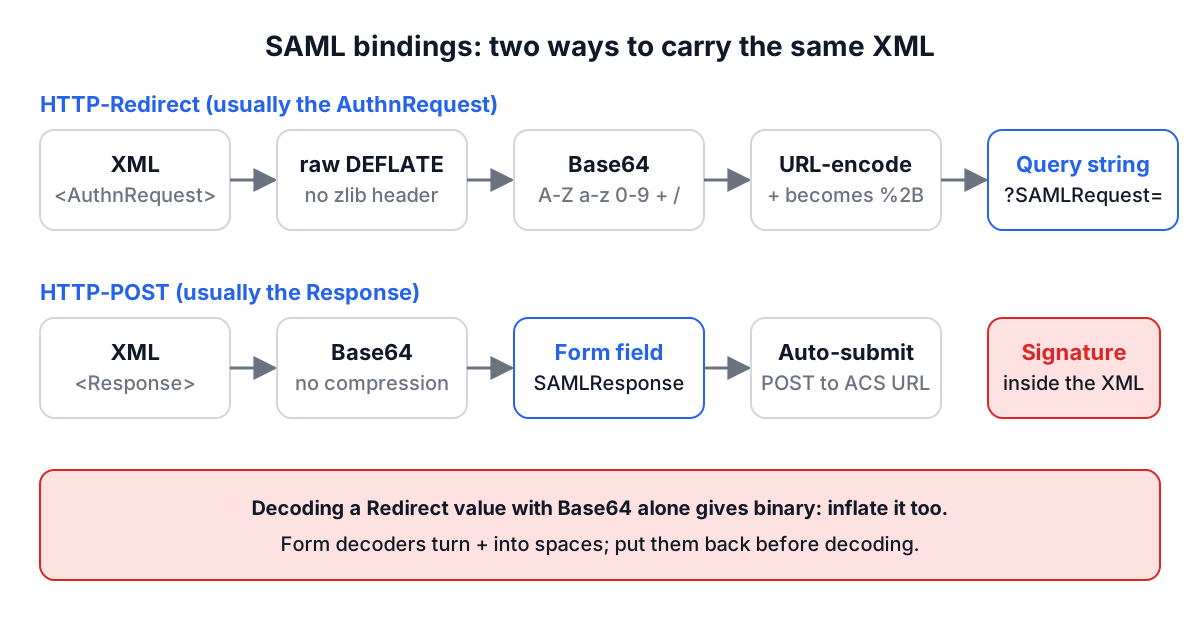
HTTP-Redirect is used mostly for the AuthnRequest, because it fits in a URL. The XML is compressed with raw DEFLATE (RFC 1951, with no zlib header or checksum), then Base64-encoded, then URL-encoded and placed in a SAMLRequest query parameter. If the request is signed, the signature does not live inside the XML: it travels in separate SigAlg and Signature query parameters, computed over the query string.
HTTP-POST is used for the Response, which is too large for a URL once it carries a signed assertion. The XML is Base64-encoded without compression and placed in a hidden SAMLResponse field of an HTML form that auto-submits to the SP's Assertion Consumer Service (ACS) URL. The signature lives inside the XML.
| HTTP-Redirect | HTTP-POST | |
|---|---|---|
| Typical message | AuthnRequest, LogoutRequest | Response |
| Compression | Raw DEFLATE | None |
| Encoding | Base64, then URL-encoding | Base64 |
| Carried in | Query string (?SAMLRequest=) | Form field (SAMLResponse) |
| Signature | SigAlg and Signature query params | XML-DSig <Signature> element |
This difference is why decoding a redirect value with a plain Base64 decoder gives binary garbage: what comes out is compressed DEFLATE data, not XML. You need to inflate it as well.
A smaller trap: Base64 uses +, and form decoders turn a literal + into a space. If someone copies a value from a log that was already form-decoded, the spaces must go back to + before decoding. The SAML Decoder does that for you.
Worked example: decoding a redirect URL
Paste a whole redirect URL into the SAML Decoder and click Decode. It finds the SAMLRequest parameter, ignores RelayState, URL-decodes the value, Base64-decodes it, sees that the bytes are not XML, and inflates them:
https://idp.example.com/sso?SAMLRequest=fZBNC4JAEIb%2FiuxdXTWCBl0QvAh1qejQJTZbUHA%2F2hnBn58a...&RelayState=x
The result:
<samlp:AuthnRequest xmlns:samlp="urn:oasis:names:tc:SAML:2.0:protocol"
    ID="_abc123" Version="2.0" IssueInstant="2026-10-24T09:30:10Z"
    Destination="https://idp.example.com/sso">
  <saml:Issuer xmlns:saml="urn:oasis:names:tc:SAML:2.0:assertion">https://sp.example.com</saml:Issuer>
</samlp:AuthnRequest>
The summary panel reports the encoding as HTTP-Redirect, the type as AuthnRequest, the ID _abc123, the Issuer https://sp.example.com and the Destination. Paste a SAMLResponse from a POST instead and it reports HTTP-POST, with the status code, NameID, Audience and the assertion's validity window. All decoding happens in your browser, which matters because a real SAMLResponse carries personal data.
To go the other way, paste XML and click Encode. The tool produces both forms: Base64 for a POST form field and DEFLATE plus Base64 plus URL-encoding for a redirect query parameter.
Fields to check when a login fails
Work through the response in this order. Most failures show up in the first few rows.
| Field | Where | What goes wrong |
|---|---|---|
StatusCode | Response | Anything other than ...:status:Success means the IdP refused. Look for a nested second-level status such as RequestDenied |
Destination | Response | Must equal the ACS URL the SP expects, exactly. http vs https, a trailing slash or a different host behind a proxy all fail |
AssertionConsumerServiceURL | AuthnRequest | Must be registered at the IdP. Unregistered URLs are rejected |
Issuer | Both | The SP checks the IdP's entity ID; the IdP checks the SP's. Typos and environment mix-ups are common |
Audience | Assertion | Must equal the SP's entity ID |
InResponseTo | Response | Must match the ID of a request the SP actually sent. Fails if the session that stored the request ID was lost |
NotBefore / NotOnOrAfter | Conditions | A few minutes of clock skew between servers is enough to fail. Most libraries allow a configurable skew |
NameID and its Format | Assertion | The SP may expect an email address and receive a persistent opaque ID |
<Signature> | Response or Assertion | The SP may require the assertion itself to be signed, not just the response, or the other way round |
If the summary says the message contains an EncryptedAssertion, the interesting fields are inside ciphertext. Only the SP's private key can decrypt it, and that key should not be pasted into a web page. Decrypt with your SAML library's debug logging instead.
Common mistakes
Decoding a redirect value as plain Base64. You get unreadable bytes because the XML is compressed. Inflate it with raw DEFLATE, not zlib.
Reformatting signed XML. Pretty-printing a signed response and then re-encoding it changes the whitespace inside the signed element, and the XML signature no longer verifies. The SAML Decoder encodes XML exactly as you entered it for this reason. Keep the original if you plan to replay a message in a test.
Treating "signature present" as "signature valid". The decoder reports whether a <Signature> element exists. It does not verify it. Verification needs the IdP's certificate and careful XML canonicalisation. XML signature wrapping attacks, where an attacker moves a signed element and inserts an unsigned one that the application reads instead, have hit real SAML libraries. Use a maintained library, validate the schema, and read only the assertion the signature actually covers.
Mismatched certificates after a rotation. IdPs rotate signing certificates. If logins fail on a specific date, compare the certificate in the IdP metadata with the one your SP has configured. The X.509 Certificate Parser shows the validity dates and fingerprint of either.
Ignoring clock skew. A server whose clock drifts two minutes ahead will reject assertions as not yet valid. Run NTP everywhere.
Logging full responses in production. They contain names, emails and group memberships. Log the ID and status, and decode full messages only while debugging.
A practical routine
When an SSO login fails, grab the SAMLResponse from the browser's network tab (the POST to your ACS URL), decode it, and check the status, Destination, Audience, InResponseTo and the time window before anything else. For a request that never reaches the IdP, decode the SAMLRequest from the redirect URL and confirm the ACS URL and Issuer. If you need to look at raw Base64 for other reasons, the Base64 tool and the Base64 encoding guide explain the encoding itself.