
Scenario Planning: Building Futures That Change What You Do
From RAND and Shell to a 2x2 of critical uncertainties: how to build distinct scenarios, when to attach probabilities, and how to find no-regret moves.
· 6 min read
Picture a mid-size European road haulier in 2022 with a budget built on one fuel price. By spring that number was wrong by more than 30%, and every decision that depended on it (fleet renewal, hiring, a new depot) had to be reopened under pressure. A competitor with a smaller planning team came through the same months in better shape. It had not predicted the price. It had simply written down, a year earlier, what it would do if diesel went above a certain level, and it started doing it the week that happened.
That is scenario planning. Instead of betting on one forecast, you describe a few plausible futures, decide in advance how you would respond to each, and agree the signals that tell you which one is unfolding. This guide covers where the method came from, how to build a good set of scenarios, the argument about probabilities, and how to lay a plan out in the Scenario Planning Tool.
From RAND to Shell
Modern scenario planning has two roots. In the 1950s Herman Kahn, working at the RAND Corporation, developed ways of thinking through possible futures for US military strategy, writing them as detailed stories rather than single predictions. In the early 1970s Pierre Wack and his colleagues at Royal Dutch Shell adapted the approach for business. Their scenarios included a world in which oil-producing countries sharply raised prices. When the 1973 oil crisis arrived, Shell's managers had already thought through that world and were widely credited with reacting faster than their rivals.
Wack described the method in two Harvard Business Review articles in 1985. His central argument was that scenarios are not forecasts. Their job is to change the mental models of the people making decisions, so that when the future surprises them, it surprises them less.
Building scenarios that are actually different
The most common weak scenario set is a best case, a base case and a worst case that differ only in one number, usually revenue growth. That is a sensitivity analysis, and it misses the point: the futures that hurt you are usually different in kind, not just in size.
A more useful method is the 2x2 of critical uncertainties:
- List the external drivers that matter for the decision. A PEST analysis is a good source.
- Rate each for importance and for uncertainty. Drop anything that is important but predictable (that belongs in every scenario) and anything uncertain but unimportant.
- Pick the two drivers that are most important and most uncertain.
- Cross them. Each quadrant is a scenario, with its own internally consistent story.
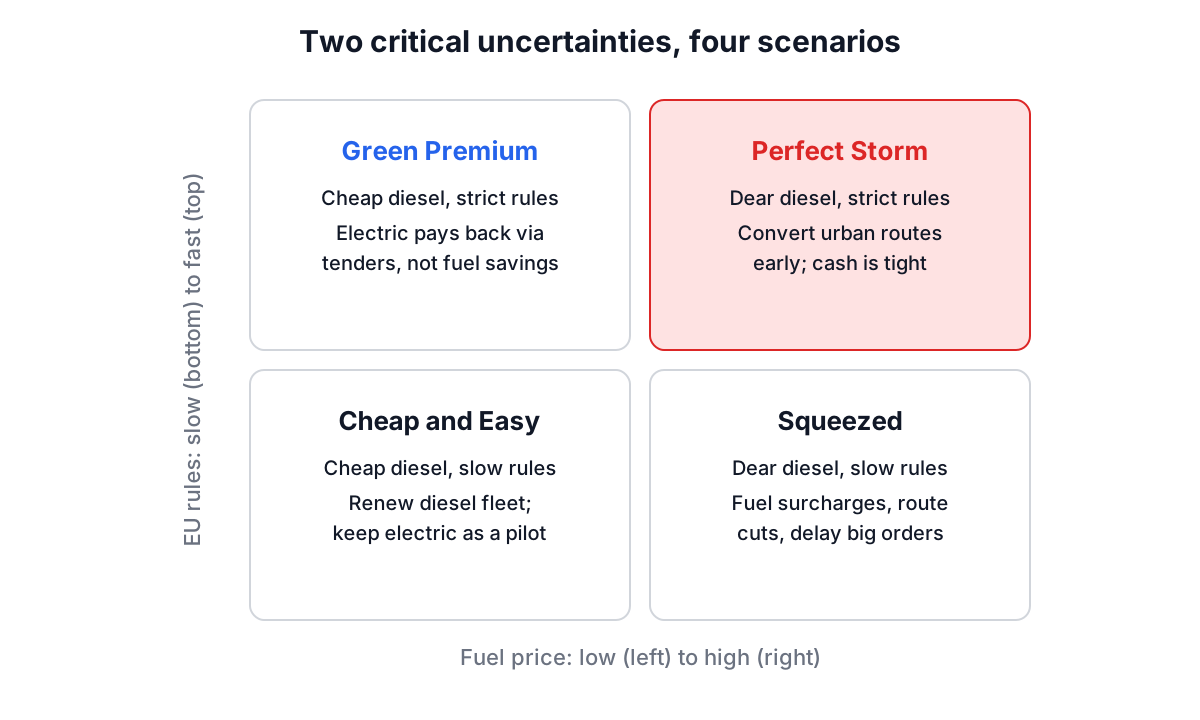
For the haulier, the two drivers were the fuel price over three years and the pace of EU emissions regulation for heavy goods vehicles. That gives four futures that need genuinely different responses: in a high-fuel, fast-regulation world electric trucks pay back early, while in a low-fuel, slow-regulation world the same investment is a drag on margins.
The argument about probabilities
Shell-style scenarios deliberately carry no probabilities. Attaching a percentage tempts people to plan only for the scenario with the biggest number, which is exactly the habit scenario planning is meant to break.
Finance and operations teams often want probabilities anyway, for budgeting and for weighting options. The Scenario Planning Tool lets you set one for each scenario with a slider from 0 to 100%, and the summary adds them up in a Total line. If the scenarios are mutually exclusive (exactly one of them will happen), the total should be 100%, and the tool shows a note when it is not. If your scenarios overlap or are not exhaustive, treat the numbers as rough weights and ignore the total.
| Use probabilities when | Leave them out when |
|---|---|
| Scenarios are mutually exclusive and cover the outcomes you care about | Scenarios overlap or are illustrative |
| You need expected values for a budget or an investment case | The goal is to challenge assumptions in a leadership team |
| You have data (forward prices, base rates) to anchor them | The numbers would be pure guesses that give false precision |
Worked example: a haulier's three-year plan
Here is the haulier's plan as it went into the Scenario Planning Tool.
- Context & Background: "Fleet renewal decision for 140 trucks; whether to order electric units for urban routes." Time Horizon: "36 months".
- Under Add New Scenario, the team added four scenarios, each with a name, a description, a type, an impact level and a probability:
| Scenario | Type | Impact | Probability |
|---|---|---|---|
| Squeezed: high fuel, slow regulation | Most Likely | High | 40% |
| Cheap and Easy: low fuel, slow regulation | Best Case | Low | 25% |
| Perfect Storm: high fuel, fast regulation | Worst Case | High | 20% |
| Green Premium: low fuel, fast regulation | Alternative | Medium | 15% |
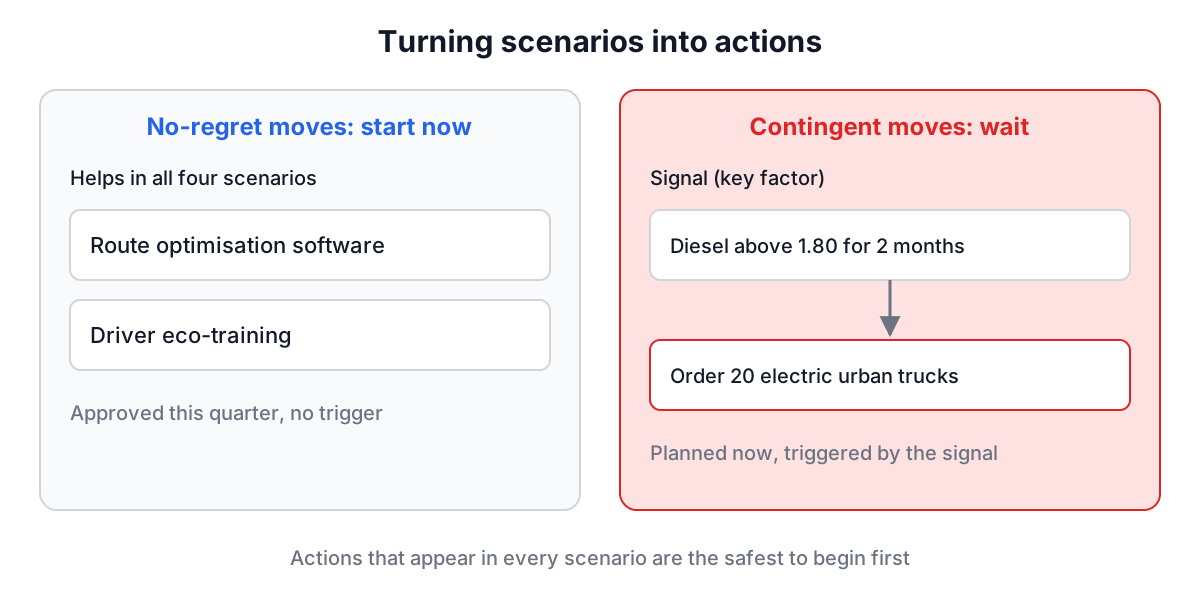
- For each scenario they clicked Expand and added key factors, planned actions with a timeline and impact, and expected outcomes. For Perfect Storm, a key factor was "diesel above 1.80 per litre for two consecutive months"; an action was "trigger order for 20 electric urban units (lead time 9 months), High impact"; an outcome was "fuel cost per km down 35% on converted routes".
- The summary showed 4 scenarios, 1 Best Case, 1 Worst Case, the total number of planned actions, and a Probability Distribution listing each scenario with a Total of 100%.
Then they looked for actions that appeared in more than one scenario. Route optimisation software helped in every quadrant, so it was approved immediately. The electric truck order was attached to a trigger instead of a date. That is the main product of a good scenario plan: a short list of no-regret moves to start now, and a set of contingent moves with clear triggers.
The team used Download as Text to put the whole plan in the board pack, Download as Image for a PNG of the summary card, and Export JSON to keep an editable version. The page does not save between visits, so exporting at the end of each session matters.
Signals: knowing which world you are in
A scenario plan is only useful if you notice when a scenario is starting. The key factors field is where those signals go, and the best ones are specific and checkable:
- "Diesel above 1.80 per litre for two consecutive months" rather than "fuel prices rise".
- "EU adopts the revised HGV CO2 standards with an earlier deadline" rather than "regulation tightens".
- "Two of our top five customers ask for emissions data in tenders" rather than "customers care more about sustainability".
Assign someone to check the signals monthly, and review the plan formally every quarter.
Common mistakes
- One number moving. If your scenarios differ only in growth rate, you have a sensitivity table, not scenarios.
- Too many scenarios. Three or four is the practical maximum for planning responses. Six scenarios usually end with nobody remembering any of them.
- Planning only for Most Likely. If the actions for the other scenarios are blank, the exercise has failed.
- Vague signals. "Watch the market" is not a trigger.
- Probabilities that add up to 140%. If you use them, make them consistent; the Total line in the tool is there to catch this.
- Never revisiting. Scenarios age. Update them when a signal fires or at least once a year.
How it connects to other tools
Scenario planning sits between broad scanning and specific risk management. A PEST analysis finds the drivers; scenario planning explores the biggest uncertainties among them; a risk matrix handles the narrower, more predictable risks inside each scenario. For the strategic choices that follow, a SWOT analysis helps you check each scenario against your own strengths and weaknesses.
Pick the one decision on your desk with the most uncertainty around it, name the two drivers you are least sure about, and sketch four short scenarios in the Scenario Planning Tool. If one action shows up in all four, you have found something worth starting this month.