
Preventing SQL Injection: Spotting Unsafe Queries in Code Review
Why string-built SQL is the root cause, what parameterised queries look like in common languages, the cases parameters cannot cover, and how to review for injection.
· 7 min read
Most SQL injection bugs found in code review look harmless. A template literal that builds a WHERE clause, a helper that glues a sort column onto a query, a quick admin script that formats a string. Each one works in testing, passes every unit test, and stays that way until someone sends input the author did not imagine. The fix is almost always the same, and it is easy to apply once you can spot the pattern.
This guide explains why injection happens, what safe query code looks like in five common languages, the cases parameters cannot cover, and how the SQL Injection Tester and the Security Threat Checklist fit into a review. Everything here is about recognising and preventing the problem in your own code.
The root cause: data mixed into code
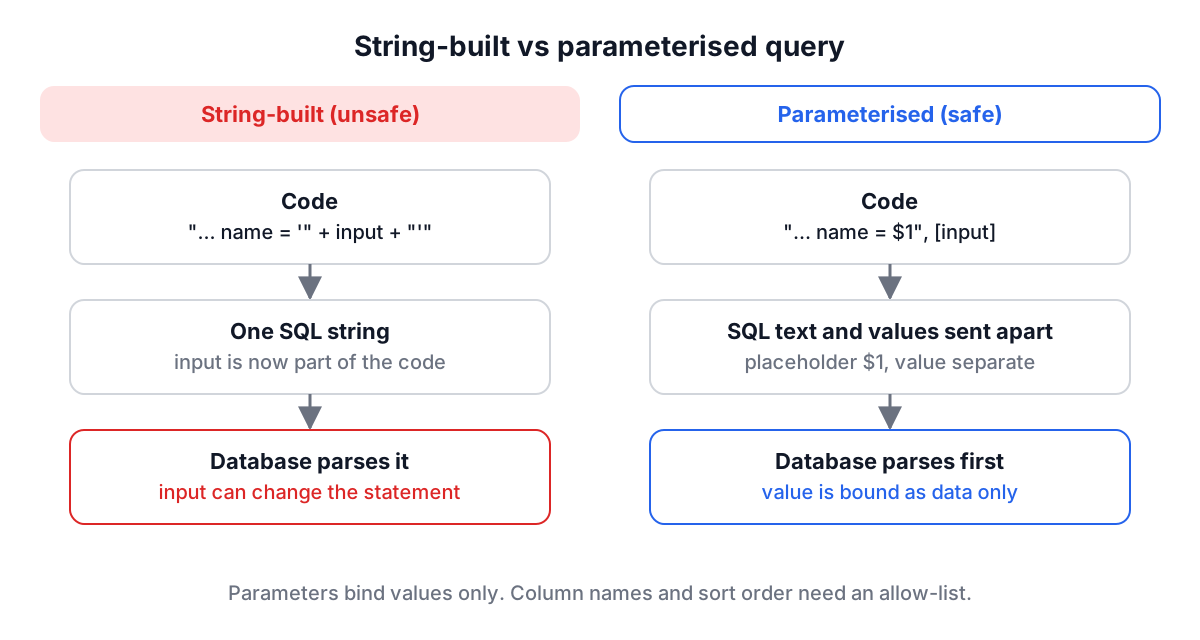
A SQL statement is a small program. When an application builds that program by pasting user input into the text, the database cannot tell which characters were meant as code and which were meant as data. A quote in a surname, a semicolon in a search box, or a comment marker in a form field can change the structure of the statement.
Parameterised queries (also called prepared statements or bound parameters) remove the ambiguity. The SQL text is sent with placeholders, and the values travel separately. The database parses the statement first and only then plugs the values in as data, so no value can change the statement's shape. Escaping, by contrast, tries to make dangerous characters safe inside the text, and it depends on the database, the character set and the context (string literal, identifier, LIKE pattern). It is easy to get wrong, which is why OWASP recommends parameters as the primary defence.
Injection is not a niche concern. The OWASP Top 10 2021 lists Injection at A03, and SQL injection is the best-known member of that category.
What parameterised code looks like
The placeholder syntax varies by driver, but the shape is the same everywhere: SQL text with markers, values passed as a separate argument.
JavaScript, node-postgres:
const { rows } = await pool.query(
  'SELECT id, email FROM users WHERE email = $1 AND active = $2',
  [email, true]
);
Python, psycopg:
cur.execute(
    "SELECT id, email FROM users WHERE email = %s",
    (email,),
)
The %s here is a driver placeholder, and the value goes in the second argument. That is completely different from "... WHERE email = '%s'" % email, which is Python string formatting and builds the SQL text from the value. The two lines look similar; only the first one is safe.
Java, JDBC:
PreparedStatement ps = conn.prepareStatement(
    "SELECT id, email FROM users WHERE email = ?");
ps.setString(1, email);
ResultSet rs = ps.executeQuery();
PHP, PDO:
$stmt = $pdo->prepare('SELECT id, email FROM users WHERE email = :email');
$stmt->execute(['email' => $email]);
C#, ADO.NET:
using var cmd = new SqlCommand(
    "SELECT id, email FROM users WHERE email = @email", conn);
cmd.Parameters.Add("@email", SqlDbType.NVarChar, 256).Value = email;
ORMs such as Prisma, SQLAlchemy, Hibernate, Eloquent and Entity Framework parameterise their query builders for you. Each also has a raw-SQL escape hatch ($queryRawUnsafe, text(), createNativeQuery, DB::raw, FromSqlRaw), and those are where string-built queries come back in. Review every use of them.
Where parameters cannot help
Placeholders bind values. They cannot stand in for identifiers or keywords, so some parts of a query still need care:
| Part of the query | Can it be a parameter? | Safe approach |
|---|---|---|
Comparison values, INSERT values | Yes | Bind them |
LIMIT / OFFSET | Usually | Bind, or parse to an integer first |
Column in ORDER BY | No | Map user input to an allow-list of known columns |
| Sort direction | No | Accept only ASC or DESC from a fixed set |
| Table or schema name | No | Allow-list; never take it straight from input |
LIKE pattern | Yes, but | Bind it, and escape % and _ if users should not use wildcards |
IN (...) list | One placeholder per item | Generate $1, $2, $3 from the array length, or use = ANY($1) in PostgreSQL |
Two more layers limit the damage when something slips through. Run the application with a least-privilege database account that cannot drop tables or read other schemas. And treat stored procedures with care: they only help if they do not build dynamic SQL inside with EXEC or EXECUTE on concatenated strings, which moves the same bug into the database.
Review cues the SQL Injection Tester looks for
The SQL Injection Tester is a static checker. You paste SQL text, the code that builds it, or a query copied from a log, and it matches patterns that usually mean a value was written into the SQL text instead of bound. It runs in your browser, does not connect to any database and sends nothing anywhere.
The patterns it flags, from most to least serious:
- Interpolated values:
${name}in a JavaScript template literal,{name}in a Python f-string, or a quoted'%s'that suggests string formatting. - Unescaped variables: PHP or shell style
$idwritten straight into the query. Positional parameters like$1are recognised as safe and not flagged. - String concatenation:
"... = '" + name + "'"in JavaScript, Java or C#, or'...' . $namein PHP. - Classic signatures: an
OR 1=1tautology, aUNION SELECTafter a quote, or a stacked second statement after a quote. In source code these rarely appear; in a logged runtime query they are a sign that injected input already reached the database, and the incident deserves attention. - Low-severity notes: a
WHEREclause comparing against a quoted literal (fine for constants, a problem if that literal ever comes from input) and--comments.
It also notes when it sees bound parameters (?, $1, :name, @name or an unquoted %s) and suggests allow-lists when a sort column looks interpolated.
Because it reads text, not program semantics, it has blind spots in both directions. Entity Framework Core's FromSqlInterpolated turns {id} into a real parameter, so a flag there is a false positive. MyBatis is the opposite trap: #{id} binds safely while ${id} pastes text. A query assembled across several functions may not look dangerous in any single line. Treat the result as a reviewer's checklist, not a verdict.
Worked example
Click Load Sample. The first query is:
SELECT * FROM users WHERE username = '${username}' AND password = '${password}';
The tester reports Interpolated Value (Critical) because ${username} builds the SQL text from a variable. It also suggests listing columns instead of SELECT *. Two more things a human reviewer should notice: the query compares a password in SQL, which means passwords are stored in a comparable form. They should be hashed with a slow algorithm such as bcrypt and checked in application code; the bcrypt guide covers why.
The parameterised version:
SELECT id, password_hash FROM users WHERE username = $1 LIMIT 1
Paste it in and the tester finds no risky patterns, scores 100 and notes that bound parameters were detected. The value of username now travels separately and cannot change the statement. To tidy long queries before review, the SQL Beautifier and the SQL formatting guide help.
Putting injection in context with the Security Threat Checklist
SQL injection is one threat among many, and a review that only checks queries misses the rest. The Security Threat Checklist holds 22 threat classes, from cross-site scripting, CSRF and broken authentication to SSRF, insecure deserialization, supply chain attacks, cloud misconfiguration and phishing. Each entry lists how the attack typically works at a high level, prevention measures, detection methods, impact and related threats.
To build a checklist for a review:
- Search for a term such as "injection" or "token", or filter by domain (Frontend, Backend, Database, API, Cloud and others) and by category.
- Click a card to read the full entry, and use the plus button to add it to your checklist.
- Open the Security Checklist tab, name the list, and click Download MD. The Markdown export turns prevention and detection items into
- [ ]checkboxes you can paste into a pull request, a ticket or a wiki page.
For a typical web API, the SQL Injection, Broken Authentication, API Security and Cryptographic Failures entries make a reasonable starting set. Pair it with the Security Headers Analyzer for the browser-facing side.
Common mistakes
Escaping instead of binding. Hand-written escape functions miss multibyte encodings, backslash modes and identifier contexts. Bind values.
Parameterising the value but not the column. ORDER BY ${sort} stays dangerous even when every WHERE value is bound. Use an allow-list.
Trusting "internal" input. Values from another service, a queue, a CSV import or an admin form still reach the database as text. Bind them too.
Formatting with the driver's placeholder character. In Python, "%s" % value and cursor.execute(sql, (value,)) look alike. Only the second is parameterised.
Using the raw-SQL escape hatch for convenience. A single FromSqlRaw with an interpolated string undoes the ORM's protection.
Running as the database owner. An application account that can drop tables turns a read bug into a data-loss incident.
A practical habit
When you review a pull request that touches data access, search the diff for template literals, f-strings, + and . next to SQL keywords, and raw-query calls. Paste anything suspicious into the SQL Injection Tester, rewrite it with placeholders, and keep an allow-list for every identifier that comes from a request. Then run through the relevant entries of the Security Threat Checklist so the review covers more than queries.