
Time Zones for Developers: Offsets, DST and IANA Zone Names
A UTC offset is not a time zone. How the IANA database works, what happens to 02:30 on a DST night, and the rules that keep scheduling code out of trouble.
· 6 min read
A team in London and Berlin schedules its daily standup for 09:00 UTC. All winter, that is 09:00 in London. On Monday 30 March 2026 half the team turns up an hour late, because the calendar entry is now at 10:00 local time. Nothing was misconfigured. The UK moved to British Summer Time the day before, and UTC, by design, did not.
Time zone bugs are rarely about arithmetic. They come from treating an offset as if it were a zone, from abbreviations that mean three different things, and from the two nights a year when local clocks skip or repeat an hour. This guide covers the model that avoids them.
An offset is not a time zone
An offset is a fixed distance from UTC at one moment: -05:00, +05:30. A time zone is a region's full set of rules: which offset applies on which dates, when daylight saving starts and ends, and how those rules changed over the decades.
America/New_York is a time zone. It is UTC-5 in winter and UTC-4 in summer, the switch dates were moved by US law in 2007, and they could change again. -05:00 is just one of its offsets. If you store -05:00 for a meeting in July, you have stored the wrong time.
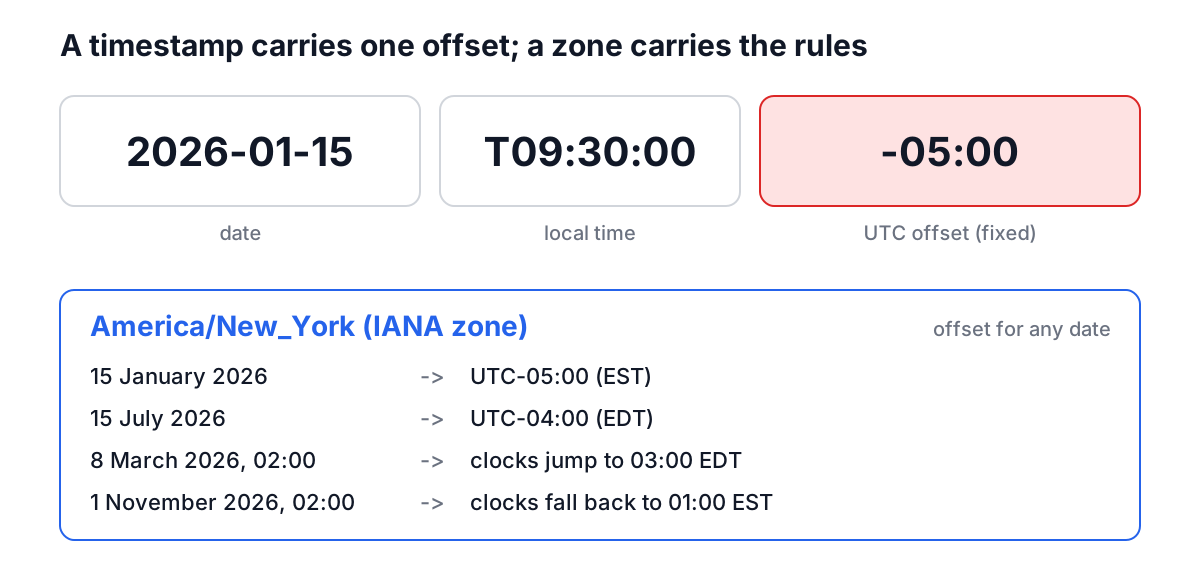
The timestamp on the left pins down one instant exactly. It does not tell you what the local time will be a week later in the same place. Only the zone name can do that.
The IANA time zone database
The rules live in the IANA Time Zone Database, also called tzdata or the Olson database after Arthur David Olson, who started it in the 1980s. It has been hosted by IANA since 2011 and is maintained by volunteers, with several releases a year as governments change their clocks, sometimes with only weeks of notice.
Every major operating system, browser, programming language runtime and database ships a copy. Zone names follow an Area/Location pattern, named after the most populous city in a region whose clocks have agreed since 1970: Europe/Paris, Asia/Tokyo, America/Sao_Paulo. There is one zone for all of India, Asia/Kolkata (renamed from Asia/Calcutta in 2008, which is kept as an alias), so there is no Asia/Mumbai or Asia/Delhi. Mainland China is Asia/Shanghai; there is no Asia/Beijing.
Your browser exposes the database through Intl:
const instant = new Date('2026-01-15T14:30:00Z');
new Intl.DateTimeFormat('en-GB', {
  timeZone: 'Asia/Tokyo',
  dateStyle: 'medium',
  timeStyle: 'short',
}).format(instant);
// "15 Jan 2026, 23:30"

Intl.DateTimeFormat().resolvedOptions().timeZone;
// the user's zone, e.g. "Europe/London"
An invalid name such as Asia/Mumbai throws a RangeError, which is a cheap way to validate user input.
Daylight saving: gaps and overlaps
Twice a year, local time in a DST zone does something no ordinary clock does.
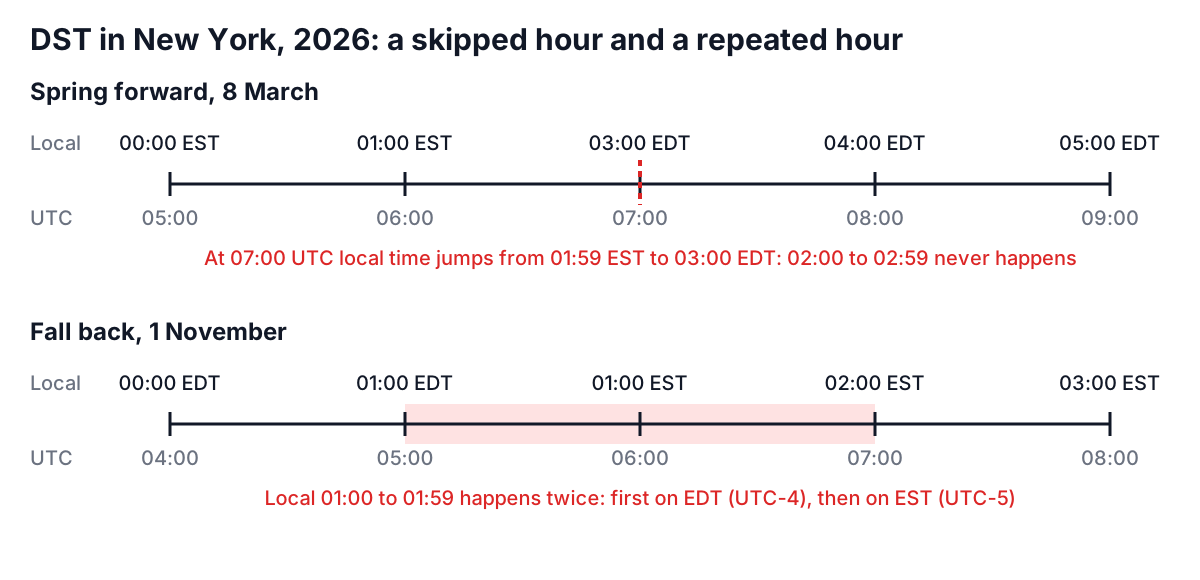
In spring, clocks jump forward. In New York on 8 March 2026, 01:59 EST is followed by 03:00 EDT. Any local time from 02:00 to 02:59 does not exist. In autumn, clocks fall back. On 1 November 2026, 01:00 to 01:59 happens twice, first in EDT and then in EST.
Every scheduling system has to pick an answer for both cases. The common convention, used by the Time Zone Converter and by most date libraries, is to push a nonexistent time forward by the length of the gap (02:30 becomes 03:30 EDT) and to resolve an ambiguous time to its first occurrence (01:30 EDT, which is 05:30 UTC). Cron is the classic victim: a job scheduled at 02:30 local time may run zero times on the spring night and twice on the autumn one, depending on the implementation. That is one reason to run servers in UTC and to check schedules with the Cron Expression Validator.
The dates differ by region. The US switches on the second Sunday in March and the first Sunday in November. The EU switches on the last Sunday in March and the last Sunday in October, at 01:00 UTC everywhere at once. So for two or three weeks each spring and one week each autumn, New York and London are four hours apart instead of five. The southern hemisphere runs the other way: Sydney is on summer time from October to April.
Abbreviations and odd offsets
Abbreviations are display labels, not identifiers. Many collide:
| Abbreviation | Can mean | Offset |
|---|---|---|
| CST | US Central Standard Time | UTC-6 |
| CST | China Standard Time | UTC+8 |
| CST | Cuba Standard Time | UTC-5 |
| IST | India Standard Time | UTC+5:30 |
| IST | Irish Standard Time (summer) | UTC+1 |
| IST | Israel Standard Time | UTC+2 |
| BST | British Summer Time | UTC+1 |
| BST | Bangladesh Standard Time | UTC+6 |
Offsets are not always whole hours either. India is +5:30, Nepal +5:45, Adelaide +9:30 in winter, and New Zealand's Chatham Islands +12:45. Lord Howe Island in Australia moves its clocks by only 30 minutes for daylight saving. Code that stores offsets as integer hours, or assumes DST is always one hour, breaks on all of these.
A worked example
You are in New York and want a 09:30 meeting on 15 January 2026 to suit colleagues in London, Bangalore, Tokyo and Sydney. In the Time Zone Converter, set Time to 2026-01-15 09:30, choose America/New_York as the Source Timezone, and add the other zones.
| Zone | Local time | Offset |
|---|---|---|
| America/New_York | 15 Jan, 09:30 | UTC-5 |
| Europe/London | 15 Jan, 14:30 | UTC+0 |
| Asia/Kolkata | 15 Jan, 20:00 | UTC+5:30 |
| Asia/Tokyo | 15 Jan, 23:30 | UTC+9 |
| Australia/Sydney | 16 Jan, 01:30 | UTC+11 |
Sydney is already into Friday, at half past one in the morning. Now change the date to 15 July. New York moves to UTC-4 and London to UTC+1, so London stays at 14:30, but Bangalore becomes 19:00, Tokyo 22:30 and Sydney, now on winter time at UTC+10, 23:30 on the same day. The same "09:30 New York" means different things to three of the five offices depending on the season, which is exactly what a fixed offset cannot capture.
Rules that keep scheduling code sane
- Store instants in UTC. Log lines, created-at columns and event timestamps should be UTC, or ISO 8601 with an explicit offset such as
2026-01-15T14:30:00Z. The Epoch Converter helps when the source is a Unix timestamp. - Store future local events as local time plus an IANA zone. A meeting at 09:00 Europe/Berlin next year should be stored as exactly that, not as a UTC instant, because the rules might change before then. Mexico abolished most daylight saving in 2022, and anything converted to UTC before the change was then wrong.
- Convert at the edges. Keep UTC inside the system and convert to the viewer's zone only for display.
- Never hand-roll offset arithmetic. Use the platform's tz data (
Intl,java.time, Python'szoneinfo), and keep that data updated. - Ask users for a city or zone, not an abbreviation. Show the numeric offset next to it so they can sanity-check.
Common mistakes
- Adding 24 hours to get "tomorrow at the same time". Across a DST change that lands an hour off. Add a calendar day in the zone instead.
- Saving the browser's current offset as the user's zone.
getTimezoneOffset()returns today's offset, not the zone. Save the IANA name fromresolvedOptions(). - Parsing date-only strings. In JavaScript,
new Date('2026-01-15')is UTC midnight, which is the evening of the 14th in the Americas. - Assuming every day has 24 hours. DST days have 23 or 25, which breaks per-hour charts and billing.
- Hard-coding zone lists. Validate names against the runtime instead; aliases like
Asia/Calcuttastill resolve, while made-up names likeAsia/Mumbaido not.
When a time looks wrong, write down the instant in UTC first, then the zone it should be shown in, and check the offset that applies on that exact date. The World Clock is useful for a live view, and the converter for any other date.