
Title Tag and Meta Description Length: Pixels, Not Characters
Why Google cuts titles by pixel width, how wide letters are in Arial, the 600 px and 920 px rules of thumb, when Google rewrites titles and how to write snippets that survive.
· 9 min read
"Keep your title under 60 characters" is the most repeated piece of SEO advice, and it is only approximately right. Google does not count characters. It lays the title out in a font, measures how wide it is, and cuts it with an ellipsis when it runs out of room. Sixty narrow characters can fit with space to spare while forty wide ones get cut. This guide explains how the truncation works, how wide letters really are, what the commonly quoted pixel limits mean, and when Google ignores your title and description altogether. The SERP Snippet Preview measures your text the same way as you type.
How a search result is laid out
A standard Google result has three parts:
- The site line: site name, favicon and a breadcrumb version of the URL.
- The title link: the clickable headline, usually taken from the page's
<title>element. - The snippet: a description, often taken from the meta description, sometimes from the page text.
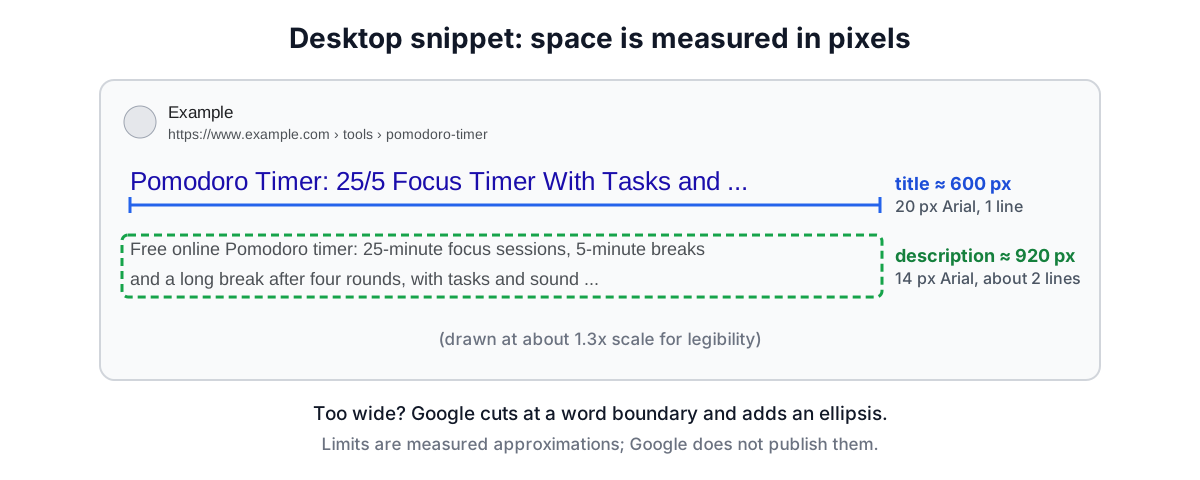
On desktop the title link is set in Arial at about 20 px and the snippet in Arial at about 14 px. The results column has a fixed width, so long titles are cut to one line and snippets to about two lines.
Why pixels, not characters
Arial is a proportional font: each letter has its own width. The widths come from the font's metrics, measured in thousandths of an em (the font size). Arial shares its metrics with Helvetica, so the published Helvetica values apply:
| Characters | Width (1/1000 em) | At 20 px |
|---|---|---|
| i, l, j | 222 | 4.4 px |
| space, f, t, I | 278 | 5.6 px |
| r | 333 | 6.7 px |
| a, e, n, o, digits | 556 | 11.1 px |
| A, B, E, S | 667 | 13.3 px |
| C, D, H, N, U | 722 | 14.4 px |
| m, M | 833 | 16.7 px |
| W | 944 | 18.9 px |
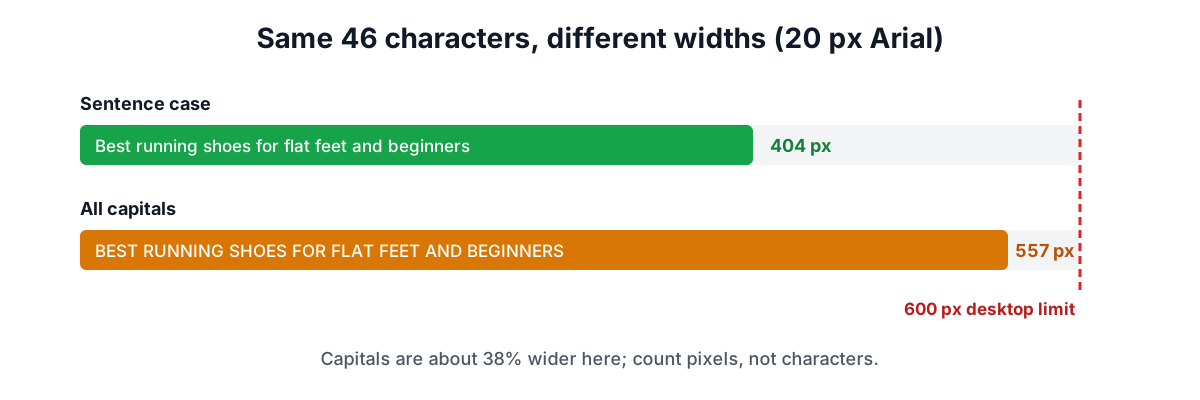
The spread is more than four to one between i and W. Ordinary mixed-case English averages roughly 9 to 10 px per character at 20 px, so 600 px holds about 55 to 65 characters. A title in capital letters uses about 12 to 14 px per character, spaces included, and is cut after roughly 43 to 50.
Example widths
- "Pomodoro Timer: 25/5 Focus Timer With Tasks and Long Breaks" (60 characters) measures about 577 px at 20 px Arial and fits.
- A 60-character run of lowercase prose measures about 545 px.
- Sixty capital A's measure 800 px and are cut after about 43 letters.
The 600 px and 920 px rules of thumb
Google does not publish its limits. Its documentation on title links says there is no limit on the length of a <title> element, but that title links are truncated as needed to fit the device width. SEO tools have measured the layout for years and settled on about 600 px for desktop titles and about 920 px for desktop descriptions (two lines). Those figures are approximations of the current design and change when Google restyles results; mobile layouts depend on the phone's width.
In characters, 920 px of 14 px Arial is roughly 140 to 150 characters of ordinary text. That is why older advice says 155 to 160 characters for descriptions; it depends heavily on the words.
| Element | Desktop width | Typical characters | Notes |
|---|---|---|---|
| Title link | about 600 px at 20 px | 55-60 | One line, cut with an ellipsis |
| Description | about 920 px at 14 px | 140-150 | Two lines; may show a date first |
| Mobile title | wraps | longer | Up to two or three lines on many phones |
How the cut is made
When a title is too wide, Google removes text from the end and adds an ellipsis, generally at a word boundary. The preview tool does the same: it finds the longest prefix that fits with room for " ...", backs up to the last space, and trims trailing punctuation. Two consequences:
- Front-load the important words. Whatever comes last is the first thing to go. Put the query people search for at the start and the brand at the end.
- Do not tune to the last pixel. A title that fits at 598 px today may be cut after a redesign. Leave a margin.
When Google rewrites your title
Since an update in August 2021, Google more often builds title links from other parts of the page. Its documentation lists the sources it can use: the <title> element, the main visible heading, other headings, prominent text, anchor text of links to the page and structured data. It is more likely to replace your title when the title is:
- Missing or empty.
- Stuffed with keywords ("Cheap Shoes, Buy Shoes, Shoes Online, Shoes Sale").
- Too long, so the useful part would be cut.
- Boilerplate repeated across many pages ("Home", "Untitled", the same title on every product).
- Out of date or not matching the main heading.
The best defence is a unique, descriptive title that agrees with the H1.
When Google ignores your meta description
Google uses the meta description when it describes the page better than text it could pull from the page itself for that query. Otherwise it builds a snippet from the page body. It is more likely to ignore your description when it is:
- Very short (a few words do not describe much). The preview warns below about 70 characters.
- Generic, the same on many pages.
- Unrelated to the query. For a long-tail search, a sentence from the body may match better.
A good description reads like a short advert: what the page offers, who it is for and what to do next, in one or two plain sentences. Including numbers, prices or concrete details helps it stand out.
A checklist for titles and descriptions
- One unique title per page that matches the main heading.
- Main query first; brand last and short.
- Under about 600 px on desktop, with a little room to spare.
- Avoid all caps and long runs of wide characters.
- A unique description of 120 to 150 characters that summarises the page.
- Key message in the first line of the description.
- No keyword lists in either.
How the preview tool measures
The SERP Snippet Preview draws the text on an invisible canvas in your browser with the font set to 20 px or 14 px Arial (or a metric-compatible font such as Liberation Sans) and reads back the width. Where canvas measuring is not available it uses the Helvetica/Arial metrics in the table above. The meters turn amber near the limit and red over it, and the preview shows where the cut would fall. Copy the finished tags as HTML when you are done; to check the tags on a live page, use the Meta Tag Analyzer.
Sources
- Google Search Central, "Influencing your title links in search results".
- Google Search Central, "Control your snippets in search results".
- Google Search Central blog, title link updates (August and September 2021).
- Adobe Helvetica font metrics (AFM), metric-compatible with Arial.
Related searches
- title tag length pixels
- meta description length
- google title truncation
- serp snippet width
- google rewrites title tags
- title link google
- meta description best practices
- arial font width characters