
TOML Explained: Syntax, Types and Converting to JSON and YAML
TOML 1.0 from the ground up: tables, inline tables, arrays of tables, the four date and time types, why there is no null, common errors, and how values map to JSON and YAML.
· 11 min read
If you write Rust you edit Cargo.toml, if you package Python you edit pyproject.toml, and if you deploy static sites you may have a netlify.toml or a Hugo config.toml. TOML has become the default format for tool configuration because it is easy to read, has comments, and maps cleanly to a dictionary. This guide covers the syntax, the type system, the mistakes the parser will catch, and what happens when you convert TOML to JSON or YAML. To experiment, paste any example into the TOML to JSON and YAML Converter.
Where TOML came from
TOML, short for Tom's Obvious, Minimal Language, was created by Tom Preston-Werner in 2013. The goal was a configuration format that is "obvious" to read and maps unambiguously to a hash table, avoiding the surprises of YAML (where no can become a boolean and indentation carries meaning) and the noise of JSON (no comments, quotes on every key, no trailing commas). Version 1.0.0 of the specification was released in January 2021 and is the version current parsers implement.
Adoption followed the tools. Rust's package manager Cargo used TOML from the start. Python standardised pyproject.toml for build configuration in PEP 518 and project metadata in PEP 621, and Python 3.11 added tomllib to the standard library for reading it. Hugo, Netlify, Fly.io, Ruff, uv and Black all read TOML configuration.
Keys, values and tables
A TOML document is a table: a set of key/value pairs.
title = "TOML Example"  # a comment starts with a hash
port = 8080
debug = false
Keys can be bare (letters, digits, - and _), quoted ("key with spaces" = 1) or dotted (server.port = 8080, which means "the port key inside the server table").
A header in square brackets starts a new table, and everything below it belongs to that table until the next header:
[database]
host = "localhost"
ports = [8000, 8001]

[servers.alpha]
ip = "10.0.0.1"
[servers.alpha] creates the table servers (implicitly) and the table alpha inside it. Indentation is allowed but means nothing.
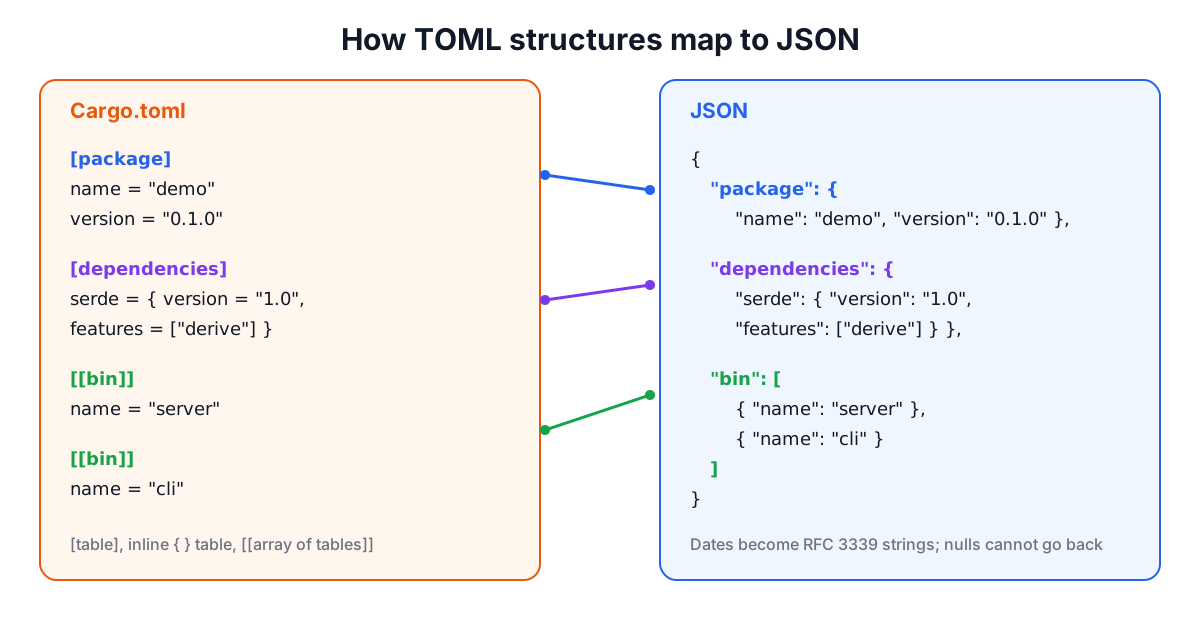
Inline tables put a small table on one line, which Cargo uses for dependencies with options:
serde = { version = "1.0", features = ["derive"] }
Inline tables must stay on one line and cannot be extended later in the file.
Arrays of tables use double brackets. Each [[name]] header appends a new table to an array:
[[bin]]
name = "server"
path = "src/main.rs"

[[bin]]
name = "cli"
path = "src/cli.rs"
In JSON this is "bin": [{"name": "server", ...}, {"name": "cli", ...}].
The type system
TOML is strongly typed, which is one of its advantages over YAML.
| Type | Example | Notes |
|---|---|---|
| String | "basic\n", 'literal', """multi-line""" | Literal strings ignore backslashes, handy for Windows paths and regexes |
| Integer | 42, -17, 1_000_000, 0xff, 0o755, 0b1010 | 64-bit signed range |
| Float | 3.14, 6.626e-34, inf, nan | IEEE 754 binary64 |
| Boolean | true, false | Lower case only |
| Offset date-time | 1979-05-27T07:32:00-08:00 | RFC 3339, an instant in time |
| Local date-time | 1979-05-27T07:32:00 | No time zone |
| Local date | 1979-05-27 | |
| Local time | 07:32:00 | |
| Array | [1, 2, 3], ["a", 1] | Mixed types allowed since 1.0 |
| Table | [name] or { a = 1 } |
Two things are missing on purpose. There is no null: a value that is not set is simply absent. And there are no references or anchors like YAML's & and *.
Errors the parser catches
TOML parsers are strict, which is good for configuration: a typo fails loudly instead of producing a surprising value. Common errors:
- Defining a key twice.
title = "a"thentitle = "b"is an error, not "last one wins". Our converter reports it as "trying to redefine an already defined table or value" at line 2, column 1. - Defining a table twice. Two
[database]headers are an error. So is a[database]header after you already setdatabase.host = ...with a dotted key at the top level. - Extending an inline table. After
owner = { name = "Tom" }, a later[owner]orowner.age = 1is an error. - Unquoted strings.
name = Tomis invalid; strings always need quotes. - Wrong-case booleans.
TrueandTRUEare invalid. - Integers out of range. Values beyond the 64-bit signed range are rejected.
- Bad dates.
2023-02-30is rejected as a date.
The converter shows each error with its line and column, and you can choose TOML as both input and output to use it purely as a validator.
Converting TOML to JSON and YAML
Most TOML maps directly to JSON and YAML: tables become objects, arrays stay arrays, strings, numbers and booleans keep their types. Three areas need care.
Dates and times. JSON has no date type, so TOML dates become strings in RFC 3339 form: "1979-05-27T07:32:00-08:00", "1979-05-27" or "07:32:00". YAML output uses the same strings. On the way back, those strings stay strings unless you tick the option to turn date-shaped strings into native TOML dates. That is off by default because a string that happens to look like a date may be meant as text (a version label, for example).
Large integers. TOML integers are 64-bit, but JavaScript numbers are exact only up to 2^53 (9,007,199,254,740,992). The converter parses big integers exactly and writes them as exact digits in JSON, then warns you, because a JavaScript program reading that JSON will round them. Snowflake IDs and nanosecond timestamps are the usual culprits.
inf and nan. TOML floats can be inf, -inf or nan. YAML has .inf and .nan, but JSON has no way to write them, so the JSON output uses the strings "inf" and "nan" and lists them in the warnings.
Converting JSON and YAML to TOML
The other direction has its own edges.
- The top level must be an object. A TOML document is a table, so a JSON array at the top level cannot be converted. Wrap it:
{"items": [...]}becomes an array of tables written as[[items]]. - Nulls are dropped. Because TOML has no null, keys with null values are removed and listed in the warnings. Nulls inside arrays are removed too.
- Floats with no fraction become integers. JSON parsers read
1.0as the number 1, so it is written to TOML as the integer1. Strictly typed readers, such as Rust's serde with anf64field, may then reject it. Check fields that must be floats. - Comments cannot be created, and comments in a TOML source do not survive a round trip through JSON or YAML, because they are not part of the data.
- YAML anchors are expanded. A YAML alias becomes a full copy of the referenced value in TOML.
The output follows common TOML style: plain keys first, then [table] sections for nested objects and [[array]] sections for arrays of objects.
TOML, YAML or JSON?
| TOML | YAML | JSON | |
|---|---|---|---|
| Comments | Yes | Yes | No |
| Null | No | Yes | Yes |
| Dates | Native | As strings in YAML 1.2 core schema | No |
| Deep nesting | Gets verbose | Natural | Natural |
| Whitespace-sensitive | No | Yes | No |
| Typical use | Tool and package config | CI pipelines, Kubernetes | APIs, data exchange |
TOML shines for flat-ish configuration that humans edit. Deeply nested data, such as a Kubernetes manifest, reads better in YAML, and data exchanged between programs belongs in JSON. Our guide on JSON and YAML compares those two in more depth.
A quick reference for Cargo.toml and pyproject.toml
[package]  # Cargo.toml
name = "demo"
version = "0.1.0"
edition = "2021"

[dependencies]
serde = { version = "1.0", features = ["derive"] }

[profile.release]
lto = true
[project]  # pyproject.toml
name = "demo"
version = "0.1.0"
requires-python = ">=3.11"
dependencies = ["requests>=2.32"]

[build-system]
requires = ["hatchling"]
build-backend = "hatchling.build"
Both files are ordinary TOML, so the converter can show them as JSON when you want to process them with a tool such as jq, or validate them before a release.
Related tools: JSON to YAML Converter, YAML Beautifier and the JSON Schema Validator for checking the converted data.
Related searches
- toml format explained
- toml array of tables
- toml vs yaml vs json
- toml inline table syntax
- why toml has no null
- cargo.toml syntax
- pyproject.toml format
- toml datetime types