
User-Agent Strings Explained: Reading Them, Reduction and Bots
Why every browser claims to be Mozilla, how to read each token, what Chrome's User-Agent reduction removed, when to use Client Hints instead, and how to verify that Googlebot or GPTBot is real.
· 10 min read
Every HTTP request a browser sends carries a User-Agent header, and almost every analytics tool, bot filter and bug report leans on it. Yet the string is a pile of historical accidents, a growing part of it is now frozen on purpose, and any client can set it to anything. This article explains how to read one token by token, what Chrome's User-Agent reduction removed and where that information went, and how to tell a real crawler from an impostor. The User Agent Parser breaks any string into browser, engine, OS, device and bot, and shows your own browser's string when you open it.
Why everyone says Mozilla
Here is Chrome 130 on Windows:
Mozilla/5.0 (Windows NT 10.0; Win64; x64) AppleWebKit/537.36 (KHTML, like Gecko) Chrome/130.0.0.0 Safari/537.36
Only "Chrome/130" is really about Chrome. The rest is camouflage. In the mid-1990s Netscape Navigator identified itself as Mozilla, and many sites sent frames and other new features only to clients whose string started with "Mozilla". Internet Explorer added "Mozilla/... (compatible; MSIE ...)" to get those pages. Later, sites sniffed for Gecko (Firefox's engine), so Apple's WebKit added "KHTML, like Gecko". Sites sniffed for Safari, so Chrome added "Safari". Edge, Opera, Samsung Internet and Brave all build on Chrome's string. Each new browser had to look like the previous winners to avoid being sent a broken page.
RFC 9110 section 10.1.5 defines the header only loosely: a list of product tokens (name/version) and comments in parentheses, most significant first. It also advises against needlessly fine-grained detail, because detail makes users easier to fingerprint. There is no grammar for what goes inside the parentheses, which is why parsing relies on curated regular expressions such as those in the ua-parser-js library the tool uses.
Reading the tokens
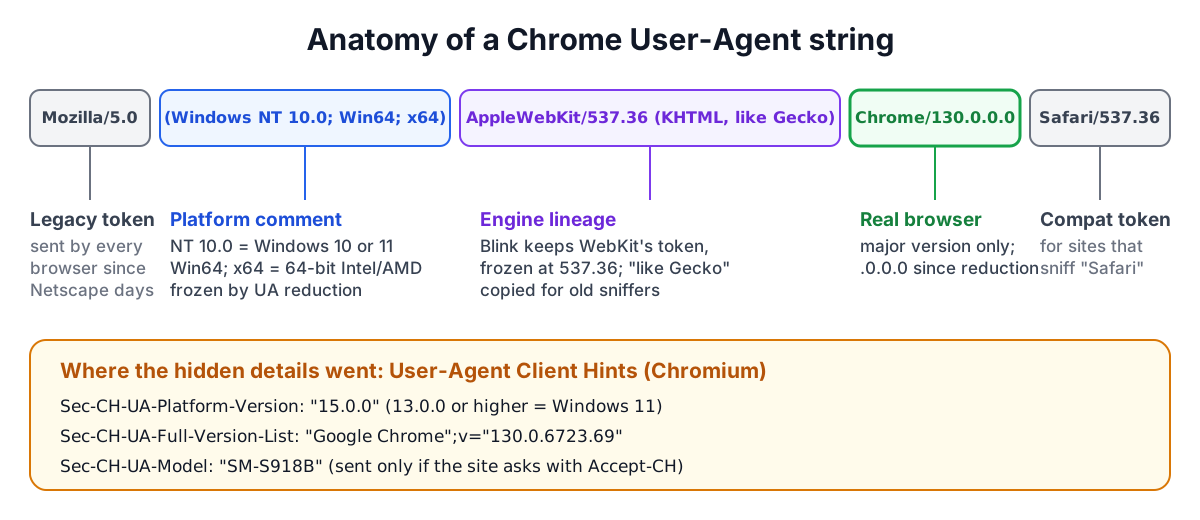
| Part | Example | What it tells you |
|---|---|---|
| Legacy token | Mozilla/5.0 | Nothing; every modern browser sends it |
| Platform comment | (Windows NT 10.0; Win64; x64) | OS family, frozen OS version, CPU architecture |
| Engine | AppleWebKit/537.36 (KHTML, like Gecko) | Blink or WebKit lineage; Chromium freezes 537.36 |
| Engine (Firefox) | Gecko/20100101 | Firefox on desktop sends this fixed date |
| Browser | Chrome/130.0.0.0, Firefox/131.0, Version/17.5 | The real browser and major version; Safari's version is in "Version/" |
| Rebrand | Edg/130.0.0.0, OPR/115.0.0.0, SamsungBrowser/26.0 | Which Chromium browser it actually is |
| Device hint | Mobile, iPhone, iPad, Android 14; SM-S918B | Phone or tablet, sometimes the model |
Order matters when you parse. "Safari" appears in Chrome's string and "Chrome" appears in Edge's, so a parser must check for the most specific brand first. Writing your own regular expressions for this is a reliable way to misclassify a browser released next year.
User-Agent reduction: what was removed
Starting in 2022, Google rolled out User-Agent Reduction in phases through Chrome 101 to 113. Other Chromium browsers followed. Safari and Firefox had already frozen parts of their strings. The result:
| Detail | Before | After reduction |
|---|---|---|
| Chrome version | 130.0.6723.69 | 130.0.0.0 |
| Windows version | Windows NT 10.0 for 10 and 11 alike | unchanged, still NT 10.0 |
| macOS version | real version | 10_15_7 on every Mac (Safari, Chrome, Firefox) |
| Android version | Android 14 | Android 10 |
| Android model | SM-S918B | K |
So a string can no longer tell you whether someone runs Windows 10 or 11, which macOS release they have, or which phone they hold. Analytics dashboards that still show detailed OS versions from the User-Agent alone are showing frozen values.
Client Hints: where the details went
The detail moved to User-Agent Client Hints. By default, Chromium browsers send three low-entropy headers on every request:
Sec-CH-UA: "Chromium";v="130", "Google Chrome";v="130", "Not?A_Brand";v="99"
Sec-CH-UA-Mobile: ?0
Sec-CH-UA-Platform: "Windows"
The "Not A Brand" entry is deliberate noise, a GREASE value meant to stop sites from matching the list exactly. A site that needs more asks for it by sending Accept-CH: Sec-CH-UA-Platform-Version, Sec-CH-UA-Model, Sec-CH-UA-Full-Version-List in a response; the browser then includes those headers on later requests to that site. In JavaScript, navigator.userAgentData.getHighEntropyValues([...]) returns the same data. Microsoft documents that a Sec-CH-UA-Platform-Version of 13.0.0 or higher means Windows 11, and below 13 means Windows 10. Safari and Firefox do not implement Client Hints, so code must still fall back to the User-Agent.
The parser reads your own browser's hints locally when they are available, which is a quick way to see the gap between what the string says and what the browser knows.
Bots: identifying them and proving it
Well-behaved crawlers announce themselves. Googlebot's smartphone crawler looks like an Android phone with "(compatible; Googlebot/2.1; +http://www.google.com/bot.html)" appended. AI crawlers have their own names: GPTBot, OAI-SearchBot and ChatGPT-User from OpenAI, ClaudeBot from Anthropic, PerplexityBot, CCBot from Common Crawl, Bytespider from ByteDance. Link previews come from facebookexternalhit, Twitterbot, LinkedInBot, Slackbot and Discordbot. Scripts often reveal the library: curl/8.4.0, python-requests/2.32.3, Go-http-client/1.1, okhttp. Headless Chrome includes "HeadlessChrome" unless the operator changes it.
But a User-Agent is only a claim. Scrapers routinely pretend to be Googlebot to get past paywalls and rate limits. Google and Bing document how to check:
- Take the request's IP address, for example 66.249.66.1.
- Run a reverse DNS lookup:
host 66.249.66.1should return a name ending in googlebot.com or google.com (search.msn.com for Bingbot). - Run a forward lookup on that name and confirm it resolves back to the same IP.
Google also publishes its crawler IP ranges as JSON, and OpenAI and others publish theirs, which is easier to apply at a firewall. Never grant special treatment, such as skipping a paywall or a rate limit, on the User-Agent alone.
Worked examples
- "It is broken on my phone." The support ticket includes
Mozilla/5.0 (Linux; Android 10; K) AppleWebKit/537.36 (KHTML, like Gecko) Chrome/130.0.0.0 Mobile Safari/537.36. You learn Chrome 130 on an Android phone, and nothing else: the real Android version and model are hidden. Ask the user for Settings, About phone, or log Sec-CH-UA-Model if you request it. - Is this a Mac or an iPad? iPadOS Safari requests the desktop site by default and sends a Macintosh User-Agent. In the page,
navigator.maxTouchPoints > 1on a "Mac" almost always means an iPad. - Who is using our bandwidth? Paste a day of user agents from the access log into the parser's bulk mode. If ClaudeBot, GPTBot and AhrefsBot together make up a large share, you can decide which to allow in robots.txt with the Robots.txt Generator, and enforce it at the firewall for any that ignore it.
- A spike of python-requests. Someone is scripting against your site. Check whether it is a partner integration with the IP and request pattern, then rate-limit or require an API key; 429 is the right response code for throttling, as the HTTP Status Codes reference explains.
Practical advice
- Use feature detection in the page (
'IntersectionObserver' in window, CSS@supports) rather than User-Agent sniffing for layout and capability decisions. - When you must branch on the browser server-side, use a maintained parser library and keep it updated.
- Request only the Client Hints you need; each one adds bytes to every request and fingerprinting surface.
- Treat the User-Agent as analytics data, never as authentication.
- Verify crawler identity by DNS or published IP ranges before trusting it.
Sources
- RFC 9110, HTTP Semantics, section 10.1.5 (User-Agent).
- Chromium project, User-Agent Reduction documentation and rollout timeline.
- WICG, User-Agent Client Hints specification; RFC 8942, HTTP Client Hints.
- Microsoft Learn, "Detect Windows 11 using User-Agent Client Hints".
- Google Search Central, "Verifying Googlebot and other Google crawlers"; Bing Webmaster, "Verifying Bingbot".
- OpenAI and Anthropic crawler documentation; ua-parser-js project documentation.
Related searches
- user agent string explained
- why mozilla in user agent
- user agent reduction chrome
- user agent client hints
- sec-ch-ua-platform-version windows 11
- verify googlebot reverse dns
- gptbot user agent
- detect bots by user agent
- android k user agent
- parse user agent logs