
UTM Parameters for GA4: Naming, Channels and Common Mistakes
Every UTM parameter GA4 reads, how source and medium decide the default channel group, a naming convention that keeps reports clean, and the mistakes that send traffic to Unassigned.
· 10 min read
UTM parameters are the labels you stick on a link so your analytics can tell where a visitor came from. Without them, a click from your newsletter, a QR code on a flyer and a link in a partner's blog post can all look like "direct" or "referral" traffic, and you cannot say which campaign worked. With them, Google Analytics 4 can report source, medium and campaign for every session. This guide covers each parameter, how GA4 turns them into channels, a naming convention that keeps reports clean, and the mistakes that send traffic to "Unassigned". The UTM Link Builder applies all of it and predicts the channel for you.
What a UTM-tagged link looks like
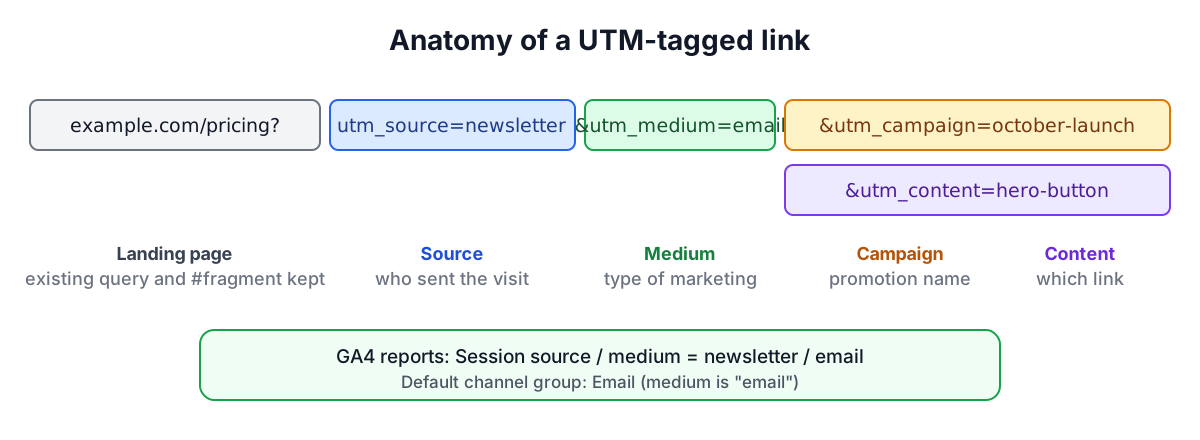
A tagged link is an ordinary URL with extra query parameters:
https://example.com/pricing?utm_source=newsletter&utm_medium=email&utm_campaign=october-launch&utm_content=hero-button
When someone clicks it, the analytics tag on the landing page reads the parameters and records them against the session. The page itself ignores them. The name comes from Urchin Tracking Module: Urchin Software made the web analytics product that Google bought in 2005 and relaunched as Google Analytics, and the parameter names survived.
The parameters GA4 reads
Google's GA4 documentation lists these parameters:
| Parameter | What it records | Example values | Google's guidance |
|---|---|---|---|
| utm_source | Who sent the traffic | google, newsletter, linkedin, partner-name | Always use |
| utm_medium | The type of marketing | cpc, email, social, referral, affiliate | Always use |
| utm_campaign | The campaign, product or promotion | october-launch, black-friday | Always use |
| utm_id | Campaign ID for data import | 2026q4-123 | Strongly recommended |
| utm_source_platform | The buying platform | Search Ads 360, Display & Video 360 | Strongly recommended |
| utm_term | Paid keyword | running shoes | Optional |
| utm_content | Which link or creative | hero-button, footer-link | Optional |
| utm_creative_format | Type of creative | display, video, native | Optional, not yet reported |
| utm_marketing_tactic | Targeting approach | remarketing, prospecting | Optional, not yet reported |
Missing parameters show up as "(not set)" in reports. In practice, source, medium and campaign do almost all the work; content is the next most useful because it tells you which of several links in the same email or page was clicked.
How GA4 assigns a channel
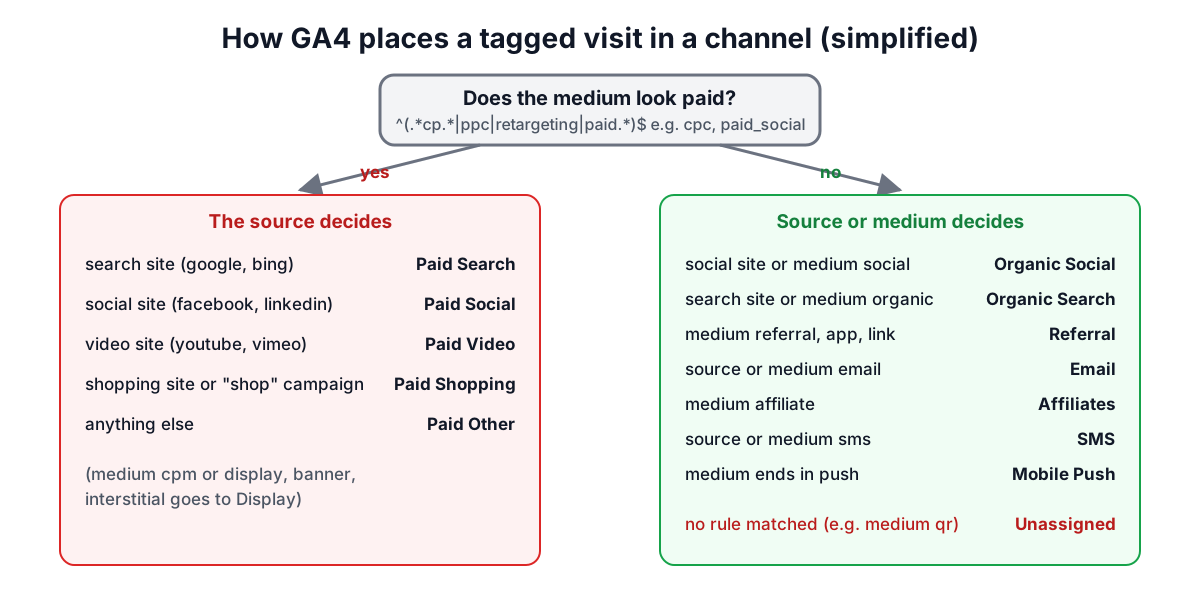
GA4 groups sessions into default channels such as Email, Organic Social, Paid Search and Referral. For manually tagged traffic it decides from the source, the medium and sometimes the campaign name. The main rules from Google's documentation:
| Channel | Condition (simplified) |
|---|---|
| Paid Search | Source is a known search engine and medium matches ^(.cp.|ppc|retargeting|paid.*)$ |
| Paid Social | Source is a known social site and medium matches the paid pattern |
| Paid Video | Source is a known video site and medium matches the paid pattern |
| Display | Medium is display, banner, expandable, interstitial or cpm |
| Paid Other | Medium matches the paid pattern but the source is not a known site |
| Organic Social | Source is a known social site, or medium is social, social-network, social-media, sm, "social network" or "social media" |
| Organic Video | Source is a known video site, or medium contains video |
| Organic Search | Source is a known search engine, or medium is organic |
| Referral | Medium is referral, app or link |
| Source or medium is email, e-mail, e_mail or "e mail" | |
| Affiliates | Medium is affiliate |
| SMS | Source or medium is sms |
| Audio | Medium is audio |
| Mobile Push Notifications | Medium ends with push, or contains mobile or notification, or source is firebase |
| Unassigned | Nothing matched |
There are also Cross-network (campaign name contains cross-network) and shopping channels (a shopping site source, or a campaign name containing shop or shopping). The "known site" lists are long spreadsheets that Google maintains; facebook, instagram, linkedin and x are on the social list, google and bing on the search list, youtube and vimeo on the video list.
What that means in practice
- Paid social needs a paid medium.
utm_source=facebook&utm_medium=socialis Organic Social even if you paid for the ad. Usepaid_social,cpcorpaidas the medium. - "qr", "print" and "flyer" are not channels. A medium that matches no rule lands in Unassigned. Either accept that and filter by source, use a recognised medium such as referral, or create a custom channel group in GA4 for offline traffic.
- Email is easy. Either the source or the medium being email is enough.
The UTM Link Builder runs these rules in the order Google lists them and shows the predicted channel under the link. Because it only knows the best-known sites on Google's lists, a niche network may show as Unassigned in the tool but be recognised by GA4.
A naming convention that keeps reports clean
GA4 parameter values are case sensitive: Newsletter, newsletter and news-letter are three different sources in your reports. Google's own documentation recommends a strict naming convention and lowercase. A workable set of rules:
- Lowercase everything. The builder does this by default.
- Pick one separator (dash or underscore) and never use spaces. Spaces become
%20or+in the link. - Fix a short list of mediums and keep to it:
email,social,paid_social,cpc,display,affiliate,referral,sms,video. - Name sources after the sender, not the format:
newsletter,linkedin,partner-acme. - Give campaigns a stable, dated name:
2026-10-launch,black-friday-2026. - Use utm_content for the link, not the campaign:
hero-button,footer,variant-b. - Keep the list in a shared sheet so everyone on the team builds links the same way.
Common mistakes
Tagging internal links. Never put UTM parameters on links from one page of your site to another. GA4 treats a new campaign value as a new traffic source for that session, so the visitor who arrived from Google search is suddenly attributed to your "homepage-banner" campaign.
Manual tags on Google Ads. Google Ads auto-tagging (the gclid parameter) gives GA4 far richer data than manual UTMs. Use manual tags for channels that do not tag automatically.
Tags after the #. Anything after a # fragment is not sent to the server and may not be read by analytics. The builder inserts the tags before the fragment: /page?ref=1&utm_source=x#section.
Personal data in the URL. Do not put email addresses, names or customer IDs in UTM values. They are stored in analytics and in server logs, and Google's terms prohibit sending personally identifiable information to Analytics.
Inconsistent spelling. Facebook, facebook.com and fb split one source into three rows. Agree the list and use presets.
Losing parameters on redirect. Some link shorteners or redirects drop query strings. Click the final link once and check that the UTMs survive to the landing page.
Bulk tagging
Launches often need dozens of links: every article in a newsletter, every post in a social calendar. The builder's bulk mode takes one URL per line, optionally followed by a comma and a utm_content value, applies the same source, medium and campaign, and gives you a list to copy or a CSV with each part in its own column. That CSV doubles as a record of what was sent where.
Checking what you sent
To read an existing tagged link, paste it into the builder's "Read a link" tab. It splits out the parameters, shows the clean landing URL and predicts the channel. In GA4 itself, look at Reports, Acquisition, Traffic acquisition with "Session source / medium" and "Session campaign" as dimensions.
Sources
- Google Analytics Help, "[GA4] URL builders: Collect campaign data with custom URLs" (UTM parameters and best practices).
- Google Analytics Help, "[GA4] Default channel group" (channel definitions and regular expressions).
Build your links with the UTM Link Builder and print them as a QR code with the QR Code Generator.
Related searches
- utm parameters ga4
- utm naming convention
- ga4 default channel group rules
- utm medium values
- paid social utm
- unassigned traffic ga4
- utm case sensitive
- utm on internal links
- utm_id