
AI for Doctors and Nurses: Safe Prompts for Notes, Letters and Teaching
Where AI assistants save clinicians time, where they must not be trusted, how HIPAA and GDPR apply to pasting patient text, and a 30-day plan for trying it safely.
· 9 min read
A general AI assistant can take a page of rough dictation and hand back a tidy SOAP note in seconds, or turn a dense discharge plan into instructions a patient can follow at home. It can also invent a medication that was never prescribed, drop an allergy, or make up a guideline reference that reads perfectly. Both things are true at once, which is why clinicians who get value from these tools treat them as a fast junior drafter: useful for structure and wording, never trusted for facts or judgement, and never handed patient identifiers unless the organisation has approved the tool for that.
This article covers the tasks where AI drafting helps doctors and nurses, the ones it should stay out of, how HIPAA and the GDPR apply when you paste clinical text, worked prompts you can adapt, a review routine, and a 30-day plan for trying it. The AI Prompts for Doctors and AI Prompts for Nurses kits contain ready-made versions of every prompt here, run entirely in your browser, and include a masking helper for common identifiers.
Where AI drafting helps clinicians
The pattern that works is simple: you supply the facts, the model supplies the shape. Tasks that fit that pattern are mostly about rewriting, reorganising or translating register.
| Task | Why it works | What stays with you |
|---|---|---|
| SOAP note from dictation | Sorting statements into sections is mechanical | Assessment and plan wording |
| Discharge instructions at a reading level | Plain-language rewriting is a strength of language models | Medication list, warning signs |
| Referral and prior authorization letters | Letters follow predictable structures | Which facts meet the payer criteria |
| SBAR handoff from shift notes | SBAR is a fixed four-part frame | What is urgent and what to escalate |
| Nursing care plan draft | Goals and interventions follow a known format | Individualising to the patient |
| Teach-back questions for patient education | Generating varied questions is easy for a model | Checking the answers you hear |
| Literature question in PICO form | Framing and synonym lists, not answers | Running the search and appraising studies |
Tasks that ask the model to know something about the patient, the evidence or the drug that is not in front of it are where it fails. That includes picking a dose, choosing a diagnosis, summarising "the latest guidelines" from memory, or deciding whether a symptom is urgent. A differential diagnosis prompt can still be useful as a memory aid, provided it is framed as a checklist for the clinician to work through and the clinician makes the call.
What not to paste, and why
In the United States, the HIPAA Privacy Rule allows a covered entity to disclose protected health information to a vendor that handles it on its behalf only when there is a business associate agreement in place (45 CFR 164.502(e) and 164.504(e)). The Office for Civil Rights said in its 2016 guidance on cloud computing that a cloud service that creates, receives, maintains or transmits electronic PHI is a business associate, even when it only stores encrypted data and does not hold the key. Consumer AI chat apps generally do not sign business associate agreements, so pasting identifiable patient text into one is a disclosure your organisation has not approved. Some enterprise AI products are offered with a BAA; your compliance team will know which, if any, you are allowed to use.
The alternative is to de-identify first. HIPAA recognises two methods in 45 CFR 164.514(b): an expert determination, or the Safe Harbor method, which removes 18 kinds of identifier and requires that you have no actual knowledge the rest could identify the person. The 18 include names, geographic units smaller than a state, all elements of dates except the year, ages over 89, phone and fax numbers, email addresses, Social Security numbers, medical record numbers, health plan beneficiary numbers, account numbers, licence numbers, vehicle and device identifiers, URLs, IP addresses, biometrics, full-face photos and any other unique identifying number.
In the UK and EU, health data is special category personal data under Article 9 of the GDPR. Article 5(1)(c) asks you to process only the data you need, Article 28 requires a contract with any processor, and Recital 26 is clear that pseudonymised data, where a key could re-link it, is still personal data. Replacing a name with "Patient A" helps but does not take the text out of scope.
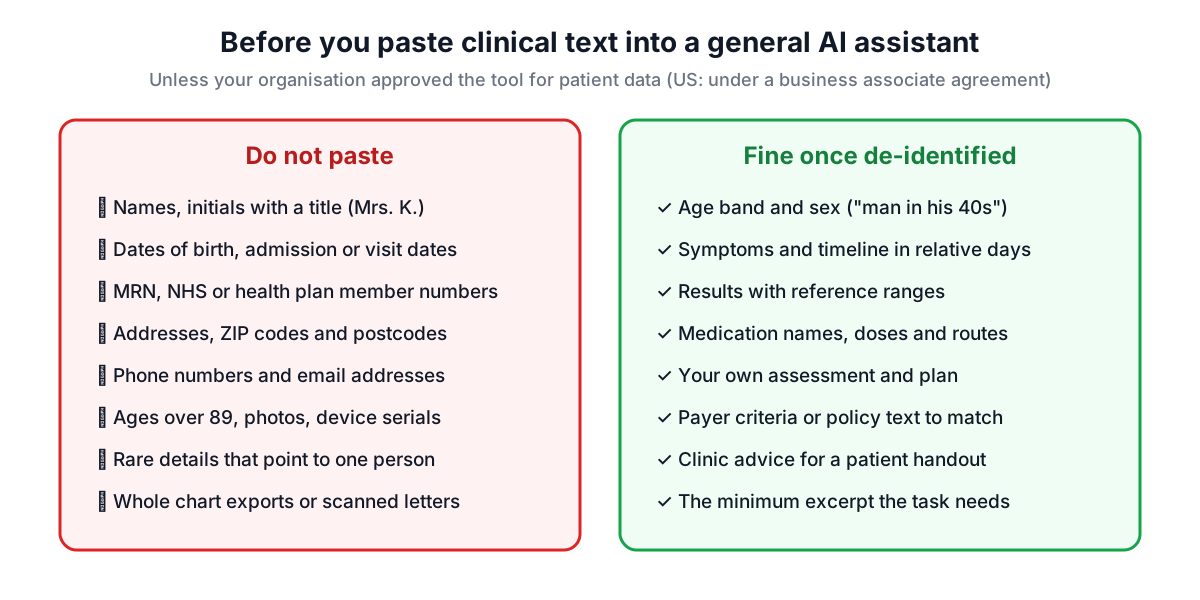
The kits include a masking helper that scans your pasted text in the browser and replaces common patterns with tokens such as [NAME-1] or [RECORD-ID-1]. It catches names after a title or a label like "Patient:", email addresses, phone numbers, dates, ages over 89, record, policy and account numbers, Social Security numbers, card numbers, street addresses, ZIP codes and postcodes, URLs and IP addresses. It is pattern-based, so it misses free-text clues: "the only pharmacist in a village of 300", a rare diagnosis plus an occupation, or a name written without a title. Use it as a second pair of eyes, then read the text yourself before you copy it anywhere.
Worked prompts
Every prompt in the kits follows the same five parts: role, context, task, constraints and output format. Spelling out constraints is what stops the model from filling gaps with invented detail.
A SOAP note from a follow-up visit:
## Role
You are a clinical documentation assistant working for a physician in a family medicine clinic. You draft text for the physician to review, edit and sign. You do not diagnose, prescribe or make clinical decisions.

## Task
Rewrite the dictation into a SOAP note for a follow-up visit. Keep the physician's own assessment wording; do not add differentials or plans that were not dictated.

Dictation:
"""
58 yo with T2DM and HTN back for 3 month review. Sugars mostly 6-9 at home. No hypos. BP today 138/86. HbA1c 58 up from 54. Plan: diet, add empagliflozin 10mg OD if no contraindication, check renal function, repeat HbA1c 3 months.
"""

## Constraints
- Use only facts present in the material. Write [MISSING: what is needed] where something is absent.
- Keep drug names, doses and units exactly as written.

## Output format
S, O, A, P sections, then "Gaps to confirm": items a reviewer would expect but that are not in the dictation.
The "Gaps to confirm" line is the useful trick: it turns the model's tendency to fill in blanks into a list you can check instead.
An SBAR handoff for a nurse going off shift:
## Role
You are a documentation assistant for a registered nurse on a medical-surgical ward. You draft handoff text for the nurse to check; you do not make clinical decisions.

## Task
Turn these shift notes into an SBAR handoff for the incoming nurse. Put anything that needs action in the next four hours first.

## Constraints
- Copy observations, times and medication details exactly as written.
- If a value is missing, write [MISSING] rather than estimating it.
- Do not add recommendations that are not in the notes.

## Output format
Situation, Background, Assessment, Recommendation, each under 60 words, then "Pending tasks with times".
For patient education, ask for a target reading level and then check it. The Readability Checker gives grade estimates for the result, which is a quick way to see whether "grade 6" really came back at grade 6.
Reviewing what the model gives back
Every output from these prompts is a draft that you sign, so the review is part of the task, not an optional extra. A routine that takes a minute or two:
- Line up the facts. Compare every finding, result, medication and date in the draft with your source. Look for additions as well as omissions.
- Check numbers character by character. Doses, units, frequencies and lab values are where a plausible-looking error does harm. "0.5 mg" becoming "5 mg" reads naturally.
- Own the reasoning. If the draft contains an assessment, a plan or a differential, it must be yours. A suggestion the model added is a prompt to think, not a conclusion.
- Verify anything cited. Guidelines, trials, drug-label statements, ICD-10 or CPT codes need to be checked in the primary source or your coding tool. Models produce convincing references that do not exist.
- Read patient-facing text as the patient. Is it at the reading level you asked for, does it match what you said in the room, and are the emergency instructions right for your area?
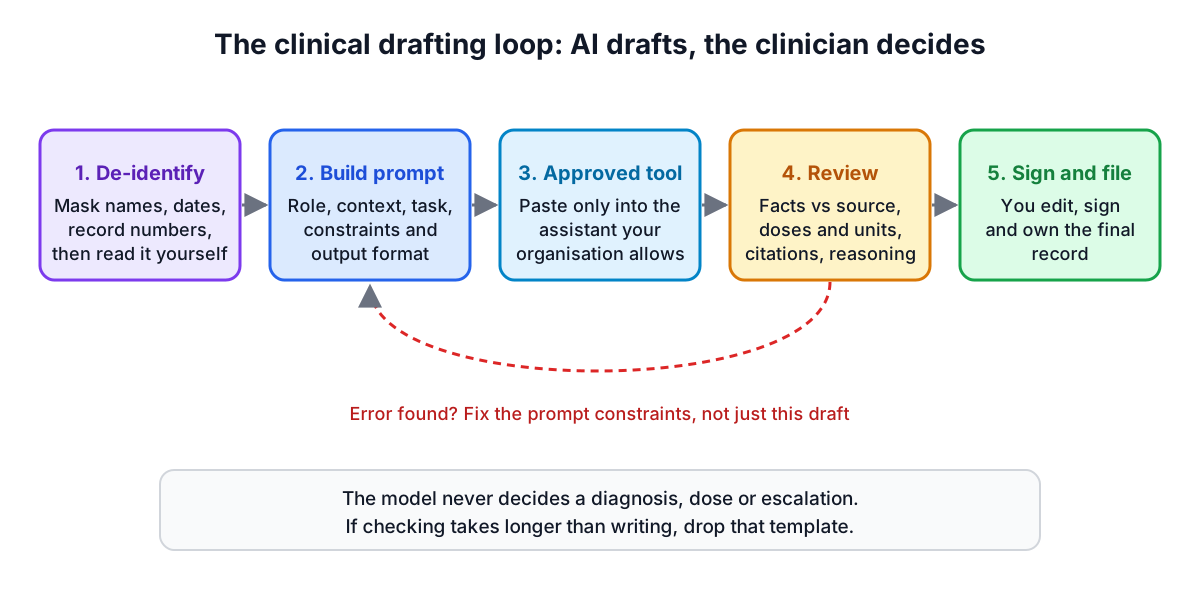
If the review takes longer than writing the text yourself, that template is not worth using for you. Drop it and keep the ones that do save time.
Nursing-specific uses
Nursing work has its own set of drafting tasks that suit this approach. Care plans follow a recognisable structure of problem, goal, interventions and evaluation, and a model is good at producing a first version from an assessment summary, which the nurse then individualises. Teach-back questions for a new insulin user or a patient going home with a drain are easy to generate in several phrasings. Incident reports benefit from a prompt that asks for objective, factual wording without blame or speculation, which is hard to achieve when writing at the end of a long shift.
The same limits apply. Do not ask a model for medication calculations or infusion rates; do those with your organisation's approved method and a second check. Do not rely on it for policy: if the prompt is "summarise our falls policy", paste the policy text in and ask for a summary of that, rather than asking what the policy probably says.
A 30-day plan for trying it
Trying this as an individual or a small team works best with a narrow start and a written record of what you find.
| Week | What to do | What to record |
|---|---|---|
| 1 | Ask your compliance or information governance team which AI tools are approved and for what data. Read your organisation's policy. | Approved tools, data allowed |
| 2 | Pick two templates that involve no patient data at all: a condition handout and a PICO search frame. Use them five times each. | Minutes saved or lost, errors found |
| 3 | Add one template that uses de-identified text, such as discharge instructions. Run the masking helper and your own read-through every time. | Identifiers the helper missed |
| 4 | Review the log with a colleague. Keep the templates that saved time after review; adjust or drop the rest. Share the exported library with the team. | Decision and next steps |
The record matters. "It felt faster" is not the same as "it saved four minutes per letter after checking", and identifiers the helper missed tell you what to look for by hand.
If you want to tune your own prompts beyond the kits, the AI Prompt Builder helps you structure them, and the Prompt Quality Checker flags vague instructions before you rely on a prompt for regular use. None of this changes who is accountable for the record: the clinician who signs it.