
Testing REST APIs from the Browser: Methods, cURL and CORS
Why an API call works in curl and fails in the browser, what a CORS preflight is, which headers a page can never set, and how to move requests between DevTools and a terminal.
· 7 min read
You paste an endpoint into a terminal, run curl, and get a clean 200 with JSON. You make the same call from the browser and get "Failed to fetch" with no status code at all. Nothing is wrong with the API's logic. The browser simply refused to hand the response to your page, and once you know the rules it follows, that error goes from baffling to a two-minute fix.
This guide covers the HTTP basics you need when testing an API by hand, the CORS rules that make browser testing different from curl, and how to move a request back and forth between DevTools, the REST API Tester and a terminal.
The methods, and what servers may assume about them
HTTP semantics are defined in RFC 9110 (2022). For testing, two properties matter more than the method names themselves.
| Method | Safe | Idempotent | Body | Typical use |
|---|---|---|---|---|
| GET | yes | yes | no | read a resource |
| HEAD | yes | yes | no | headers only, for size or freshness checks |
| OPTIONS | yes | yes | rarely | ask what is allowed (CORS preflight) |
| POST | no | no | yes | create, or run an action |
| PUT | no | yes | yes | replace a resource |
| PATCH | no | no | yes | change part of a resource |
| DELETE | no | yes | usually no | remove a resource |
Safe means the request should not change anything on the server. Idempotent means sending it twice has the same effect as sending it once. That is why a client may retry a PUT after a timeout but must be careful retrying a POST, and why payment APIs ask for an idempotency key on POST requests.
GET bodies deserve a special note. RFC 9110 says content in a GET request has no generally defined meaning, many proxies drop it, and the browser's fetch API refuses to send one at all. If an API wants a body on a search request, it should use POST. The REST API Tester leaves the body off GET and HEAD and tells you it did.
Why curl works and the browser does not
Browsers enforce the same-origin policy: a page from https://redbison.dev cannot read a response from https://api.example.com unless that API opts in. The opt-in mechanism is CORS, Cross-Origin Resource Sharing, defined in the WHATWG Fetch standard. curl has no origin and no such policy, so it sees everything.
For a "simple" request, the browser sends it and then checks the response for an Access-Control-Allow-Origin header matching your page's origin (or *). If the header is missing, the request still reached the server, but your JavaScript only sees a network error.
A request stops being simple as soon as it uses a method other than GET, HEAD or POST, or a header outside a short safelist, or a Content-Type other than application/x-www-form-urlencoded, multipart/form-data or text/plain. That last rule catches almost every JSON API: Content-Type: application/json makes the request non-simple. Non-simple requests trigger a preflight.
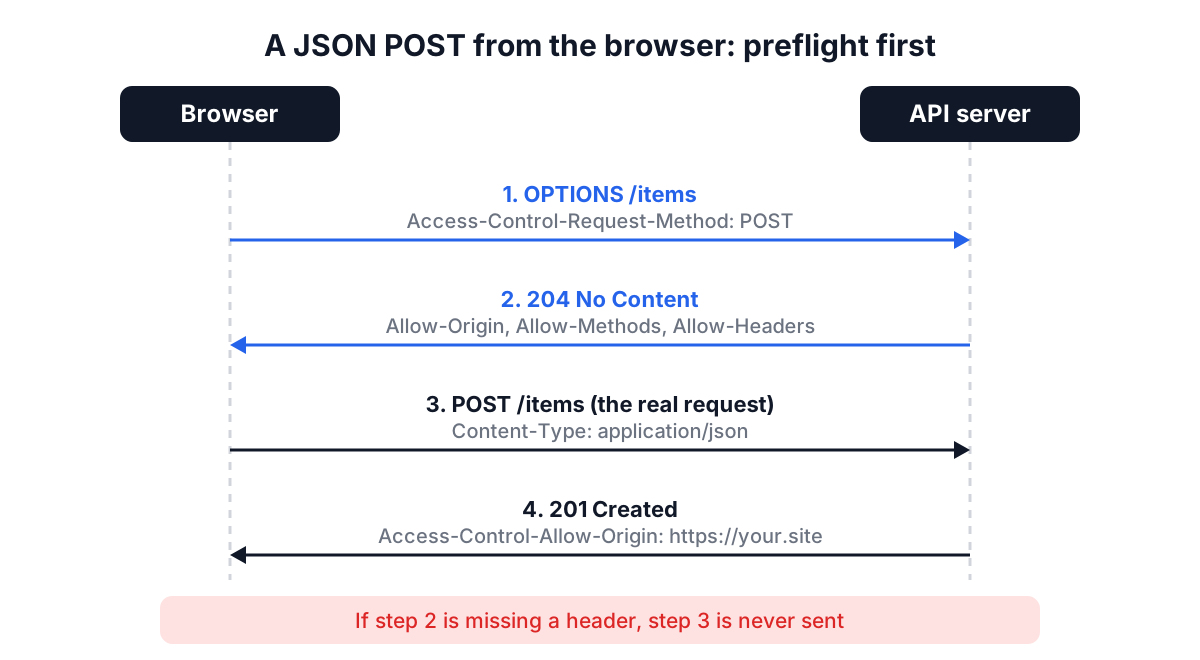
The browser sends an OPTIONS request first, carrying Access-Control-Request-Method and Access-Control-Request-Headers. The server must answer with matching Access-Control-Allow-Origin, Access-Control-Allow-Methods and Access-Control-Allow-Headers. Only then does the browser send your real request. If the preflight fails, your real request is never sent, which is why server logs often show only an OPTIONS line.
A small detail with a big effect: sending Content-Type: application/json on a GET with no body is pointless and turns a simple request into a preflighted one. The REST API Tester omits Content-Type whenever there is no body, so a plain GET stays simple.
Headers a page can never set
Some headers belong to the browser. The Fetch standard lists "forbidden request headers" that JavaScript cannot set, including Host, Cookie, Origin, Referer, Connection, Content-Length, Accept-Encoding and anything starting with Sec- or Proxy-. fetch drops them silently. The tester tells you when it drops one, so you are not left wondering why your Host header had no effect.
Cookies need a separate mention. By default, fetch sends cookies only to the same origin, so a cross-origin call from the tester goes out without the target site's cookies. Use an Authorization header or API key for testing instead.
On the way back there is a second filter. For cross-origin responses, scripts can only read seven safelisted response headers: Cache-Control, Content-Language, Content-Length, Content-Type, Expires, Last-Modified and Pragma. Everything else, including ETag and rate-limit headers, is hidden unless the server lists it in Access-Control-Expose-Headers. If the Response Headers tab looks thin, this is why; curl -i shows the full set.
A worked example
Open the REST API Tester and press Load Sample. It fills in:
GET https://jsonplaceholder.typicode.com/users
Content-Type: application/json
Accept: application/json
User-Agent: API-Tester/1.0
Press Send Request. JSONPlaceholder is a public fake API that allows any origin, so you get status 200, the round-trip time in milliseconds and a pretty-printed array of 10 users. The generated cURL command keeps every header you typed:
curl \
  -H 'Content-Type: application/json' \
  -H 'Accept: application/json' \
  -H 'User-Agent: API-Tester/1.0' \
  'https://jsonplaceholder.typicode.com/users'
Now switch the method to POST, set the body to {"name": "Ada"} and send again. You get a 201 with an id of 11. JSONPlaceholder does not actually store it; it just echoes what a real API would return, which makes it handy for practice.
Finally, change the URL to an API you know does not send CORS headers. The tester reports that the browser could not complete the request and explains the likely causes. Copy the cURL command, run it in a terminal, and it works. That difference is the diagnosis: the API needs CORS configuration for browser clients.
Moving requests between DevTools, the tester and a terminal
Every browser can export a request as curl. In Chrome or Edge, open DevTools, go to the Network tab, right-click a request and choose Copy > Copy as cURL (bash). Firefox has the same option under Copy Value. The result is long and multi-line, with every header the browser sent.
Click Import cURL in the tester and paste it. The parser understands single and double quotes, #x27;...' quoting, line continuations with a trailing backslash, -X, -H, -d, --data-raw, --json, -u user:password (turned into a Basic Authorization header) and --url. Like curl itself, a command with data and no -X is treated as POST. Flags that do not affect the request, such as --compressed and -L, are ignored.
Going the other way, Copy as cURL quotes every value with single quotes and escapes embedded quotes correctly, so a body like {"name":"O'Brien"} survives the trip into a shell. HEAD requests become curl -I.
Common mistakes
- Fixing CORS in the client. No client-side setting can grant permission the server did not give. The fix is on the API, or a backend proxy you control.
- Using
Access-Control-Allow-Origin: *with credentials. Browsers reject the wildcard when cookies or HTTP auth are involved; the server must echo the exact origin. - Calling
http://from an HTTPS page. Browsers block this as mixed content before CORS is even considered. - Reading a 302 as the final answer. fetch follows redirects, so you see the destination's status. Use
curl -ito inspect the redirect itself. - Pasting live production tokens into shared screenshots. Treat any token that ends up in a ticket or chat as exposed and rotate it.
If you are testing a GraphQL API, the same CORS rules apply, with a twist: errors come back inside a 200 response. The GraphQL schema and query guide covers that. For decoding the tokens you send in Authorization headers, see the JWT guide, and for tidying large responses the JSON formatter guide.
A short checklist for the next failing request
When a browser request fails, check three things in order: is the URL HTTPS, does the response include Access-Control-Allow-Origin for your origin, and does the OPTIONS preflight allow your method and headers. If the same request works with curl, the answer is almost always in that list. Keep the tester for quick checks and CORS debugging, and keep curl for anything that needs cookies, forbidden headers or a look at the raw redirect chain.