
GraphQL Schemas and Queries: Validation, Types and Query Cost
How SDL is checked, why nullability trips up TypeScript types, what a selection set needs, and how nested pagination turns a short query into a very expensive one.
· 9 min read
A GraphQL schema file can look fine in review, pass a quick glance, and still crash the server at startup because one field points at a type that was renamed last week. The query side has its own trap: a 20-line query that looks harmless can ask the server for a million objects. Both problems are easy to catch before they ship, once you know what to look for.
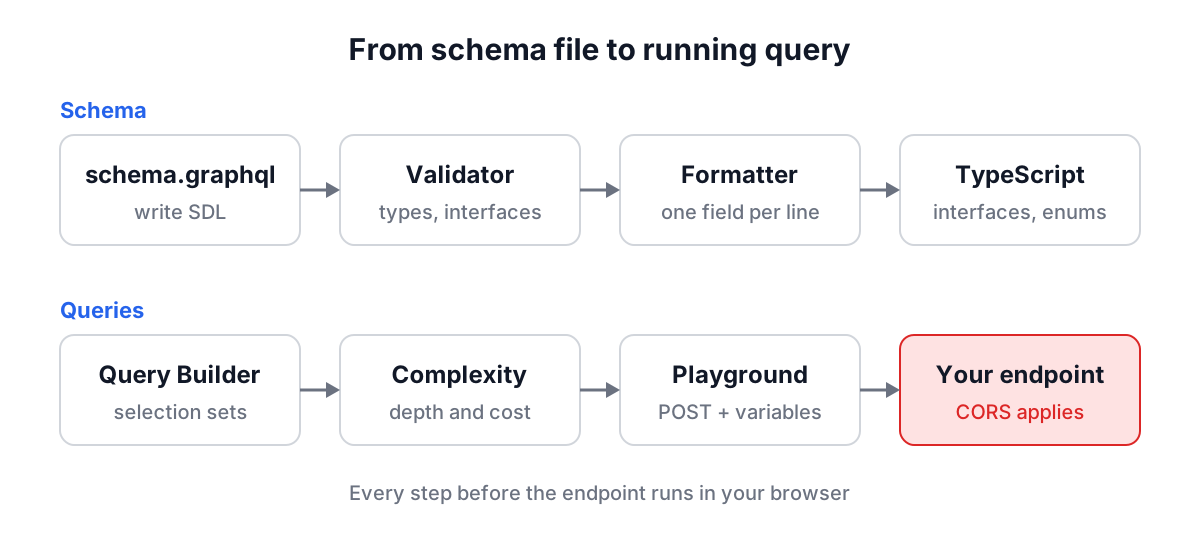
This guide walks through the full loop: writing and checking a schema, formatting it, turning it into TypeScript types, building queries, running them, and estimating what they cost. Each section uses one of the RedBison GraphQL tools, and all of them except the Playground run entirely in your browser.
Validating SDL: what a server checks at startup
SDL, the Schema Definition Language, is the text format for GraphQL schemas. It became part of the specification in the June 2018 edition, and today most teams keep a schema.graphql file in the repository even when the server builds its schema in code. The current spec edition is October 2021.
Parsing is only the first step. A server that builds a schema from SDL also checks the type system rules, and the GraphQL Schema Validator runs the same checks:
| Rule | Example that breaks it |
|---|---|
| Every referenced type exists | author: Usr |
| Type, field, argument and enum value names are unique | two type Query blocks |
| Output fields use output types | filter: FilterInput on an object type |
| Arguments and input fields use input types | createPost(author: User) |
| Objects implement every interface field with a compatible type | type User implements Node without id |
| Union members are object types | union Result = String |
| A query root exists | no type Query and no schema { query: ... } |
Names do not start with __ | __internal: String |
Two of these catch people repeatedly. The first is the split between input and output types. GraphQL keeps them as separate families on purpose: an object type can have fields with arguments and can be part of a cycle, which makes no sense for data a client sends. So when you need the same shape in both directions, you write it twice, type Address and input AddressInput.
The second is interface compatibility. If interface Node { friend: Node }, then type User implements Node may declare friend: User, because a User is a Node. It may also make a nullable interface field non-null. It may not do the opposite. The validator applies the covariance rule from the spec, so friend: User passes and friend: String fails with a message naming both types.
A quick example. Paste this into the validator:
interface Node { id: ID! }
type User implements Node { name: String }
type Query { node: Node }
You get Line 2: Interface field "Node.id" expected but "User" does not provide it. Add id: ID! to User and the schema builds.
The validator also warns about types that nothing can reach from Query, Mutation or Subscription. They build fine, but clients can never see them, which usually means a leftover from a refactor.
Formatting: small diffs and readable reviews
The GraphQL Schema Formatter parses the document and prints it back with two-space indentation, one field per line and a blank line between definitions. Because it parses rather than running find-and-replace, a minified schema such as type User{id:ID! name:String!} is split into fields correctly, colons inside description strings are left alone, and # comments stay on the line they belong to.
Commas are insignificant in GraphQL: the lexer treats them as whitespace. That is why a formatter can drop them between fields without changing anything. Descriptions are different. A "quoted" or """block""" string just before a definition is part of the schema, returned by introspection and shown in GraphiQL, so the formatter keeps it exactly.
The practical payoff is in pull requests. When every field sits on its own line, adding a field is a one-line diff, and reviewers see the change instead of reflowed whitespace.
From schema to TypeScript: getting nullability right
GraphQL and TypeScript have opposite defaults. In GraphQL every type is nullable unless you add !. In TypeScript a type is non-null unless you add | null. Get the translation backwards and the compiler stops warning you about real nulls, which is the bug types exist to prevent.
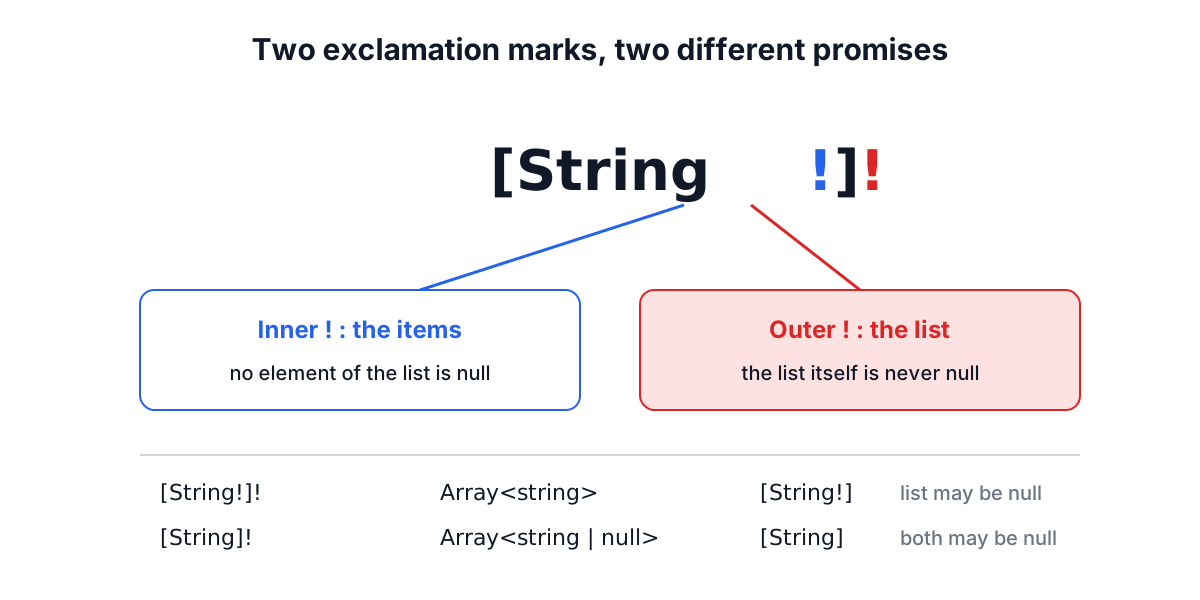
Lists have two layers of nullability, and the GraphQL to TypeScript Generator spells out each one:
| GraphQL | TypeScript | Meaning |
|---|---|---|
String! | string | always present |
String | string | null | may be null |
[String!]! | Array<string> | list always present, items never null |
[String]! | Array<string | null> | list present, items may be null |
[String!] | Array<string> | null | list may be null, items never null |
[String] | Array<string | null> | null | both may be null |
Inputs follow a slightly different rule. A server always sends every field you selected, so a nullable output field is field: T | null. A client may leave a nullable input field out entirely, so input fields and arguments become optional: age?: number | null. A field with a default value is optional too, even when it is non-null.
type Query { user(id: ID!, active: Boolean = true): User }
input CreateUser { name: String! role: Role = USER }
becomes
export interface QueryUserArgs {
  id: string;
  active?: boolean | null;
}
export interface CreateUser {
  name: string;
  role?: Role | null;
}
Custom scalars such as DateTime are emitted as export type DateTime = unknown;. Change that one line to string if your server sends ISO strings, and every field using it follows. If you need types for the exact fields each query selects rather than the whole schema, that is a job for a build-time tool such as GraphQL Code Generator, which reads your operation documents too. For REST payloads, the JSON to TypeScript guide covers the same problem from the other direction.
Writing queries: selection sets and variables
A GraphQL query mirrors the JSON you want back. The one rule beginners hit first: a field that returns an object must have its own selection set. posts on its own is invalid; posts { id title } is fine. Only scalars and enums can appear bare.
The GraphQL Query Builder is a teaching tool built around this rule. You click fields on a small sample User and Post schema, and object fields like posts and author automatically get a minimal selection. Add an operation name and variables, and it prints:
query GetUser($id: ID!) {
  user {
    name
    posts(first: 5) {
      id
      title
    }
  }
}
Two habits are worth building early. Name every operation: names appear in server logs, APM traces and persisted query registries, and they cost nothing. And use variables for anything that changes between requests. A query with inlined values is a different document every time, which defeats server-side caches and invites injection bugs when strings are concatenated.
Running queries against a real endpoint
The GraphQL Playground sends the operation the way nearly every GraphQL server expects: an HTTP POST with Content-Type: application/json and a body of query, variables and, when there is more than one operation, operationName. Put auth headers in the Headers tab as JSON.
Two things surprise people coming from REST. First, a GraphQL server usually answers HTTP 200 even when your query fails validation or a resolver throws. The failure is in the errors array, sometimes next to partial data. Read errors[].path to see which field failed.
Second, the request goes from your browser straight to the endpoint, so CORS applies. A POST with Content-Type: application/json is not a CORS-safelisted request, so the browser normally sends an OPTIONS preflight first, and the server must allow your origin plus the Content-Type and Authorization headers. If the Playground reports a network error while curl works, that is the reason. The API testing and CORS guide explains preflights in detail.
Estimating query cost before production does
Cost in GraphQL hides in nested lists. Take this query:
query {
  posts(first: 10) {
    title
    comments(first: 5) {
      body
    }
  }
}
It is seven lines, but it asks for up to 10 posts and up to 5 comments on each, so body resolves 50 times. The GraphQL Complexity Analyzer counts it this way: each field costs 1, multiplied by the page size of every paginated ancestor. Here that is 1 (posts) + 10 (title) + 10 (comments) + 50 (body) = 71.
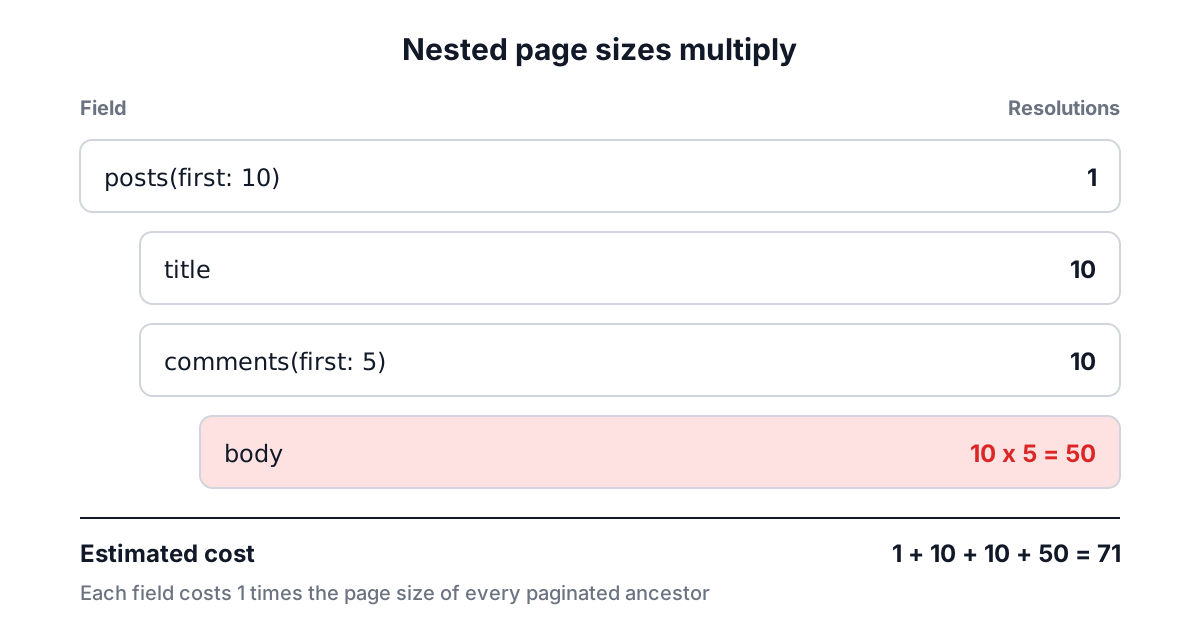
That multiplication is the same idea public APIs use to protect themselves. GitHub's GraphQL API requires first or last between 1 and 100 on connections and refuses a single call that would return more than 500,000 nodes. Add a third level asking for 100 items under two levels of 100 and you are at a million.
The analyzer reads page sizes from first, last, limit, take and similar arguments, from variable defaults, and assumes 10 when a variable has no default. It also reports depth (a root field is depth 1), fragments that are unused or spread themselves in a cycle, variables declared but never used, and page sizes above 100. It works without your schema, so it cannot know that an unpaginated tags field returns a list. Treat the number as a lower bound.
Common mistakes
- Renaming the root type without a schema block. Without
schema { query: RootQuery }, servers look for a type literally namedQuery. - Using one type for input and output. Write
type Addressandinput AddressInput; the spec does not allow sharing. - Treating HTTP 200 as success. Always check the
errorsarray. - Forgetting that list nullability has two parts.
[Tag]!still allows null items. - Large outer page sizes. The outermost
firstmultiplies everything below it, so shrink it first when a query is expensive. - Unused fragments and variables. Servers reject documents with an unused fragment, and most reject unused variables.
A workable routine
Keep the schema in a .graphql file, run it through the validator and formatter before every schema pull request, and regenerate TypeScript types when it changes. For queries, draft them with variables and an operation name, check the cost of anything with nested connections, and run them in the Playground against staging before they ship. Each step takes seconds, and together they catch the startup crash and the runaway query before your users do.