
WAV, MP3, AAC, FLAC and Opus: Audio Formats Explained
Containers versus codecs, why WAV files are ten times bigger, what sample rate to pick for music, video and speech, and why converting MP3 to WAV adds no quality.
· 6 min read
A 3-minute song as a 128 kbps MP3 is about 2.9 MB. Convert it to WAV and it becomes 31,752,044 bytes, roughly eleven times bigger, and it sounds exactly the same. That one fact explains most of the confusion around audio formats: some formats save space by throwing sound away, some save space without losing anything, and some do not try to save space at all.
This guide sorts out the formats you meet in practice, how to choose a sample rate, and how to predict file sizes, with worked numbers from the Audio to WAV Converter.
Containers and codecs are different things
A file extension usually names a container, the wrapper that holds audio plus metadata. The codec is how the samples inside are encoded. The two are often confused because some names are used for both.
| Extension | Container | Usual codec | Lossy? |
|---|---|---|---|
| .wav | RIFF/WAVE | PCM (uncompressed) | No |
| .mp3 | MPEG audio stream | MPEG-1 Audio Layer III | Yes |
| .m4a, .mp4 | MPEG-4 (ISO BMFF) | AAC, sometimes ALAC | AAC yes, ALAC no |
| .flac | FLAC | FLAC | No |
| .ogg, .oga | Ogg | Vorbis or Opus | Yes |
| .opus | Ogg | Opus | Yes |
| .webm | WebM (Matroska) | Opus, sometimes Vorbis | Yes |
So "convert M4A to MP3" really means "decode AAC, then encode MP3", and a .webm file from a browser recorder is almost always Opus audio in a WebM wrapper. When a player refuses a file, the codec inside is usually the problem, not the extension.
The formats in one paragraph each
WAV. Microsoft and IBM's RIFF-based format from 1991. The common form is a 44-byte header followed by raw PCM samples. Every editor, sampler, game engine and speech toolkit reads it, which is why it is the format of choice for editing and machine processing.
MP3. Standardized as MPEG-1 Audio Layer III in ISO/IEC 11172-3 (1993). It uses a psychoacoustic model to discard detail you are unlikely to hear. Its patents have expired, so MP3 is free to implement, and it plays everywhere. At 128 kbps it is acceptable; 192 to 256 kbps is transparent to most listeners.
AAC. The successor to MP3 in MPEG-2 and MPEG-4. At the same bitrate it generally sounds better than MP3. It is the default for Apple devices, YouTube and most streaming, usually in an .m4a or .mp4 container.
FLAC. Free Lossless Audio Codec, first released in 2001 and published as RFC 9639 in 2024. It compresses PCM to roughly 50 to 70 percent of its size and decodes back bit for bit. Use it to archive music without losing anything.
Opus. The IETF codec from RFC 6716 (2012). It covers everything from 6 kbps speech to high-quality music, has very low latency, and is what WebRTC calls, Discord and browser recorders use. In files it lives in Ogg (.opus, .ogg) or WebM.
Why WAV is so big: the arithmetic
PCM size has no mystery. Every second stores sample rate x channels samples of bit depth / 8 bytes:
bytes = 44 + seconds x sample_rate x channels x (bits / 8)

CD quality:   44,100 x 2 x 2 = 176,400 bytes/s  = 1,411.2 kbps
3:00 song:    180 x 176,400 + 44 = 31,752,044 bytes  (30.28 MB)
Speech model: 16,000 x 1 x 2 = 32,000 bytes/s
1:00 memo:    60 x 32,000 + 44 = 1,920,044 bytes     (1.83 MB)
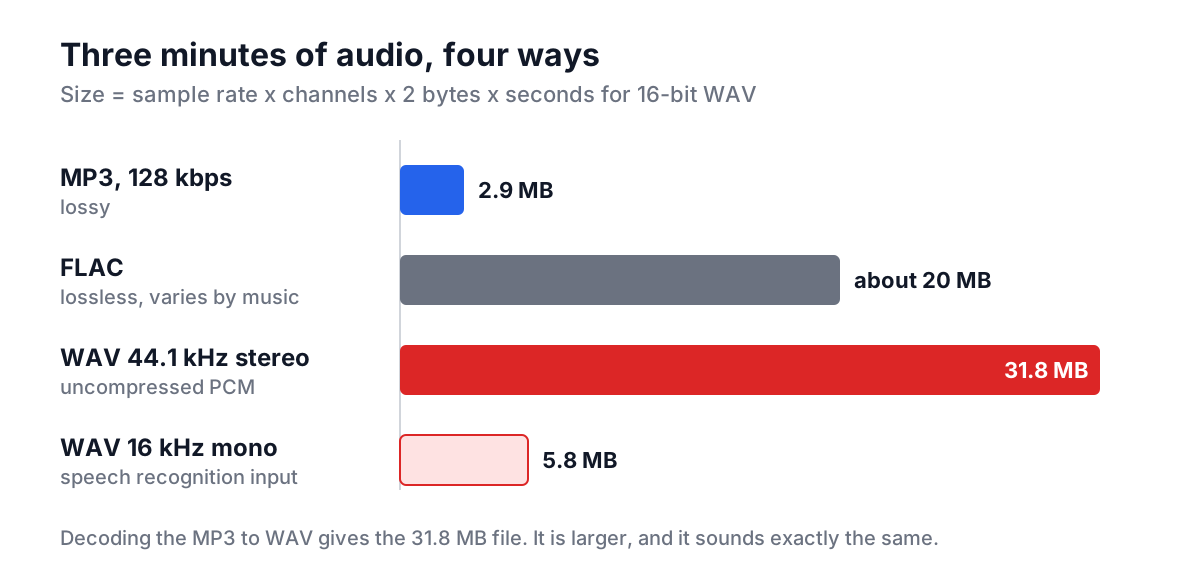
Lossy codecs are described by bitrate instead: a 128 kbps MP3 uses 16,000 bytes per second regardless of content. FLAC is variable; quiet acoustic music compresses better than dense rock.
Lossy to lossless does not restore quality
This is the most common misunderstanding. Decoding an MP3 to WAV produces a perfectly faithful copy of what the MP3 contains, and the MP3 no longer contains what the encoder discarded. The WAV sounds identical to the MP3; it is just bigger and easier for other software to read.
The opposite direction has a cost too. Every lossy encode throws more away, so MP3 to AAC to MP3 degrades each time. Keep a lossless master (WAV or FLAC) and encode lossy copies from it, never from each other.
Good reasons to convert to WAV anyway:
- An editor, DAW or game engine wants PCM.
- A speech recognition model wants 16 kHz mono PCM.
- You are about to edit and re-export, and want to avoid an extra generation of lossy encoding along the way.
Choosing a sample rate
The sample rate sets the highest frequency that can be stored: half the rate, the Nyquist frequency. 44.1 kHz captures up to 22.05 kHz, just above the roughly 20 kHz limit of human hearing.
| Rate | Typical use |
|---|---|
| 48 kHz | Video, film and broadcast; most phone and camera recordings |
| 44.1 kHz | Music and CD audio |
| 32 kHz | Some broadcast and older digital recorders |
| 22.05 kHz | Low-bandwidth music previews, retro game audio |
| 16 kHz | Speech recognition (Whisper, Vosk and most cloud APIs) |
Upsampling a 16 kHz recording to 48 kHz adds bytes, not detail. Downsampling throws away high frequencies, which is harmless for speech and noticeable on cymbals.
Worked example: preparing a voice memo for transcription
You have a 1-minute voice memo from an iPhone as memo.m4a (AAC, 48 kHz, mono) and a transcription script that expects 16 kHz mono WAV.
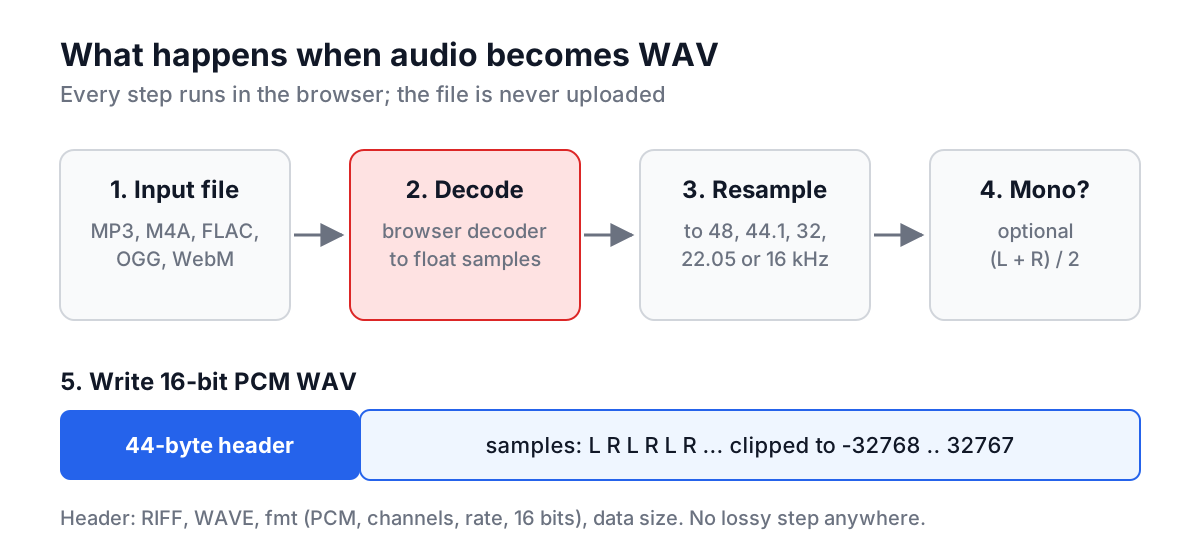
- Open the Audio to WAV Converter and set Sample Rate to 16 kHz and Channels to "Mix down to mono".
- Drop
memo.m4aon the upload area. Safari, Chrome and Firefox all decode AAC. - The result row shows something like
M4A → WAV | 470 KB → 1.83 MB(the M4A size depends on its bitrate). The WAV size is exactly 60 x 16,000 x 2 + 44 bytes. - Download
memo.wavand pass it to your script.
The same steps in ffmpeg, if you prefer the command line:
ffmpeg -i memo.m4a -ar 16000 -ac 1 -c:a pcm_s16le memo.wav
The browser tool decodes with the browser's own Web Audio decoder and writes the WAV in JavaScript, so nothing is uploaded. It only writes WAV; for MP3 or AAC output you need an encoder such as ffmpeg or Audacity.
Common mistakes
- Renaming instead of converting. Changing
song.wmatosong.mp3changes nothing inside. Some converters on the web have done exactly this and called it conversion; the file size staying the same is the giveaway. - Expecting WMA to work in a browser. No current browser decodes Windows Media Audio. Convert it with ffmpeg or a desktop tool.
- Mixing up kbps and kHz. Bitrate (kbps) controls lossy quality and size. Sample rate (kHz) sets the frequency range of PCM. A "320 kbps WAV" setting means nothing.
- Upsampling for quality. Going from 22.05 kHz to 48 kHz cannot invent the missing top end.
- Forgetting mono. A stereo WAV of a single speaker is double the size for no benefit.
Pick the format by what happens next: FLAC or WAV for anything you will edit or archive, AAC or MP3 for listening, Opus for voice and real-time use, and 16 kHz mono WAV for machines that transcribe. For recordings made in the browser, the web speech guide explains why they arrive as WebM or M4A in the first place, and the Speech to Text tool is a quick way to make one.