
Avro vs Protobuf: Schemas, Encoding and Safe Evolution
How Avro and Protocol Buffers encode the same record, why one needs the writer's schema and the other needs field numbers, and the evolution rules for each.
· 7 min read
A producer team adds a country field to an event and ships on Friday. On Monday half the consumers are crashing with deserialization errors and the other half are reading country into the wrong variable. Both outcomes come from the same root cause: binary formats only work when writer and reader agree on the schema, and each format has its own rules for what "agree" means.
Apache Avro and Protocol Buffers are the two schema-first binary formats most teams choose between, Avro mostly around Kafka and Hadoop, Protobuf mostly around gRPC. This guide puts them side by side at the byte level, lists the evolution rules for each, and shows how to check schemas and payloads with the Avro Schema Validator and the Protobuf Schema Validator. For how both compare with JSON and XML on size and speed, see the data format comparison guide.
The same record in both formats
Take a record with a 64-bit id of 42 and a name of "Ada". The Avro schema is JSON:
{
  "type": "record",
  "name": "User",
  "fields": [
    {"name": "id", "type": "long"},
    {"name": "name", "type": "string"}
  ]
}
The Protobuf schema is a .proto file:
syntax = "proto3";
message User {
  int64 id = 1;
  string name = 2;
}
The bytes they produce differ in one important way.
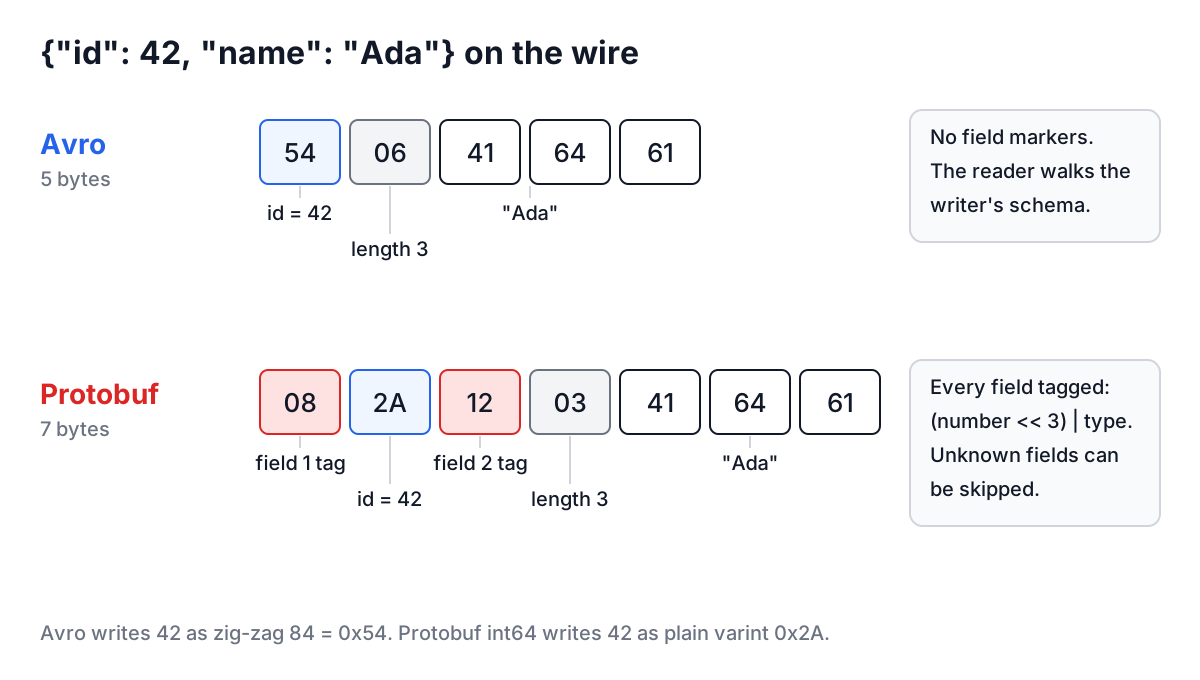
Avro: 54 06 41 64 61 (5 bytes). 54 is 42 as a zig-zag varint (42 becomes 84, which is 0x54), 06 is the string length 3 in zig-zag form, and 41 64 61 is "Ada". There is nothing saying which field is which. The reader walks the schema in order and consumes bytes accordingly.
Protobuf: 08 2A 12 03 41 64 61 (7 bytes). 08 is a tag: field number 1, wire type 0 (varint), computed as (1 << 3) | 0. 2A is 42. 12 is field 2 with wire type 2 (length-delimited), then length 3 and the text. Every field carries its own number.
That difference drives everything else. Avro's binary is smaller and cannot be read without the writer's schema. Protobuf's is a little larger and self-describing enough that a reader can skip fields it does not know.
How each format handles schema changes
Avro solves the "which schema?" problem by always having the writer's schema available: Avro container files embed it in the header, and Kafka setups store it in a schema registry and put a schema ID in each message. The reader then resolves the writer's schema against its own, matching fields by name. Protobuf instead relies on field numbers that never change meaning.
| Change | Avro | Protobuf |
|---|---|---|
| Add a field | Safe for old data only if the field has a default | Safe; old readers skip the unknown number |
| Remove a field | Safe if the field had a default (old readers fill it in) | Safe if you mark the number reserved |
| Rename a field | Breaks resolution unless you add an aliases entry | Safe in binary; breaks JSON, which uses names |
| Reorder fields | Safe; resolution is by name | Safe; order in the file does not matter |
| Change a type | Only listed promotions: int to long, float or double; long to float or double; float to double; string and bytes | Some scalar types share a wire type (int32, int64, uint32, uint64, bool) but values can truncate |
| Change a field number | Not applicable | Breaking; old data is read into the wrong field |
The Avro column has one rule that catches most teams: defaults. A field added without a default makes every old record unreadable by the new schema. And for unions, the default must match the first branch. ["null", "string"] with "default": null is the standard optional field. ["string", "null"] with "default": null is invalid, and some libraries only notice at read time.
The Protobuf column has the opposite trap. Because names do not travel in the binary, a well-meaning rename or a deleted field whose number is reused later produces wrong data with no error at all. reserved 4; reserved "legacy_flag"; in the message stops anyone reusing either.
Avro Schema Validator
The Avro Schema Validator checks a schema against the rules of the Avro specification: valid names ([A-Za-z_][A-Za-z0-9_]*), a fields array on records, unique field names, non-empty and unique enum symbols, integer size on fixed types, no unions nested in unions, no duplicate branch types, resolvable named type references, and defaults that match their field type (the first branch, for unions). It reports every problem with a path such as $.fields[2].type.
Worked example. Paste this schema and click Validate Schema:
{
  "type": "record",
  "name": "User",
  "fields": [
    {"name": "age", "type": ["int", "null"], "default": null}
  ]
}
The result is $.fields[0]: default null does not match the first union branch. Swap the branches to ["null", "int"] and it validates.
Validate Data then checks a JSON record against the schema. Records are written as plain JSON, so a nullable int is "age": 30, not Avro's own JSON encoding {"age": {"int": 30}}. The checker enforces the 32-bit range of int, enum symbols, nested records, arrays and maps. Missing fields that have defaults produce warnings, because a reader would fill them in. Fields not in the schema produce warnings too, because a writer would drop them.
Two more buttons help when you are starting out. Upload a JSON data file and the tool infers a record schema (every integer becomes long, every null becomes ["null", "string"] with a null default) that you can tighten by hand. Generate Sample builds a record that passes the current schema, which makes a quick fixture.
What it does not do: read binary .avro container files, or compare two schema versions for compatibility. For containers, java -jar avro-tools.jar tojson file.avro or Python's fastavro print the records as JSON. For compatibility, your schema registry's compatibility check compares the new version against the registered ones.
Protobuf Schema Validator
The Protobuf Schema Validator parses .proto text with protobufjs and resolves every type reference, so a typo in a message type or a missing semicolon is caught with the parser's message (syntax errors include the line number). A valid file is summarised: package, every message including nested ones with fields and numbers, enums with values, services with their RPC signatures.
Validate JSON checks a JSON object against the first message in the file using the proto3 JSON mapping, which is what gRPC-Gateway, Connect and most HTTP transcoding layers use:
- Field names can be the original
postal_codeor the lowerCamelCasepostalCode. int64,uint64and their fixed and signed variants may be strings. They should be, since JavaScript numbers are exact only up to 2^53.- Enums can be names (
"STATUS_ACTIVE") or numbers. bytesare Base64 strings.- Unknown fields are errors, matching the default behaviour of strict parsers.
Worked example. Load the sample and send {"id": 5, "nickname": "x"}. The result is an error: nickname: User has no field named "nickname". Missing fields are fine in proto3 and appear only as a note. With the sample's full JSON the tool reports the message is valid and shows the binary encoding, 105 bytes against 212 bytes of minified JSON, with the first bytes in hex.
Generate TS Types produces TypeScript interfaces for the JSON shape of each message and enum, with int64 typed as string. It is not a code generator for encoding and decoding; use protoc with ts-proto, buf generate, or protobufjs's pbjs for that.
Choosing between them
| Question | Leans Avro | Leans Protobuf |
|---|---|---|
| Main transport | Kafka, Hadoop, data lake files | gRPC, service-to-service RPC |
| Schema lives | In a registry or the file header | In code, compiled into each service |
| Dynamic consumers that discover schemas at runtime | Yes, schemas are JSON data | Possible, but less common |
| Hand-written JSON at the edges | Awkward union encoding | Well-defined JSON mapping |
| Big Data tooling (Spark, Hive, Flink) | First-class | Supported, less common |
Both are mature, well supported and far smaller than JSON on the wire. Teams rarely regret either choice; they regret skipping the evolution rules.
Common mistakes
Adding an Avro field without a default. The schema registry may reject it under backward compatibility; if it does not, old records become unreadable by new consumers.
Putting null second in an Avro union. Defaults are matched against the first branch, so optional fields should be ["null", T] with "default": null.
Reusing a Protobuf field number. Old messages still carry data under that number, and new code will read it as the new field. Reserve deleted numbers and names.
Sending int64 as a JSON number. IDs above 2^53 round silently in JavaScript. Use strings, as the proto3 JSON mapping does.
Treating proto3 zero values as "not set". A missing int32 and an explicit 0 are identical on the wire. Use optional (available again since protobuf 3.15) or a wrapper type when the difference matters.
Before you merge a schema change, paste the new version into the matching validator, then try one old payload and one new one against it. If you also store the data in files for analytics, the Parquet File Viewer shows whether the column types that landed match what the schema promised.