
Color Harmony Explained: Building Palettes That Work on Screen
Complementary, analogous, triadic and other harmony rules, RGB versus painter wheels, why OKLCH gives even lightness, building a 50-950 scale, and checking contrast before you ship.
· 11 min read
Most palettes start with one colour you already have: a logo, a brand guideline, a photo you like. The question is what goes with it. Colour harmony rules answer that with fixed angles on a colour wheel, and they work well as long as you know which wheel you are using, why lightness matters more than hue, and how to check that the result is readable. This guide covers the rules, the three wheels the Color Palette Generator offers, how a 50 to 950 design-system scale is built, and how to test contrast before anything ships.
The harmony rules
Every rule takes the base hue and adds colours at set angles around the wheel. Saturation and lightness stay the same in the classic versions; only hue moves.
| Rule | Angles from the base | Character |
|---|---|---|
| Complementary | 180° | Maximum hue contrast, energetic, can clash at full saturation |
| Split-complementary | 150°, 210° | Strong contrast with less tension |
| Analogous | -60°, -30°, +30°, +60° | Calm, close hues, natural-looking |
| Triadic | 120°, 240° | Balanced and colourful |
| Tetradic (rectangle) | 60°, 180°, 240° | Two complementary pairs, rich but hard to balance |
| Square | 90°, 180°, 270° | Four evenly spaced hues, very varied |
| Monochromatic | same hue, five lightness levels | Unified, easy to apply |
| Tints and shades | base mixed 30% and 60% toward white and black | Simple light and dark variants |
Starting from Tailwind's #3b82f6 (HSL 217°, 91%, 60%) on the RGB wheel:
| Rule | Palette |
|---|---|
| Complementary | #3b82f6, #f6af3b |
| Split-complementary | #3b82f6, #f6523b, #dff63b |
| Triadic | #3b82f6, #f63b82, #82f63b |
| Analogous | #3bf6af, #3bdff6, #3b82f6, #523bf6, #af3bf6 |
| Monochromatic | #e7effe, #91b9fa, #3b82f6, #0845aa, #021431 |
A rule gives you hues, not a finished design. The usual advice, sometimes called 60-30-10, is to use one colour for most surfaces, a second for supporting areas and the rest as small accents.
Which wheel? RGB, RYB and OKLCH
"Opposite on the colour wheel" depends on the wheel, and there are three in common use.
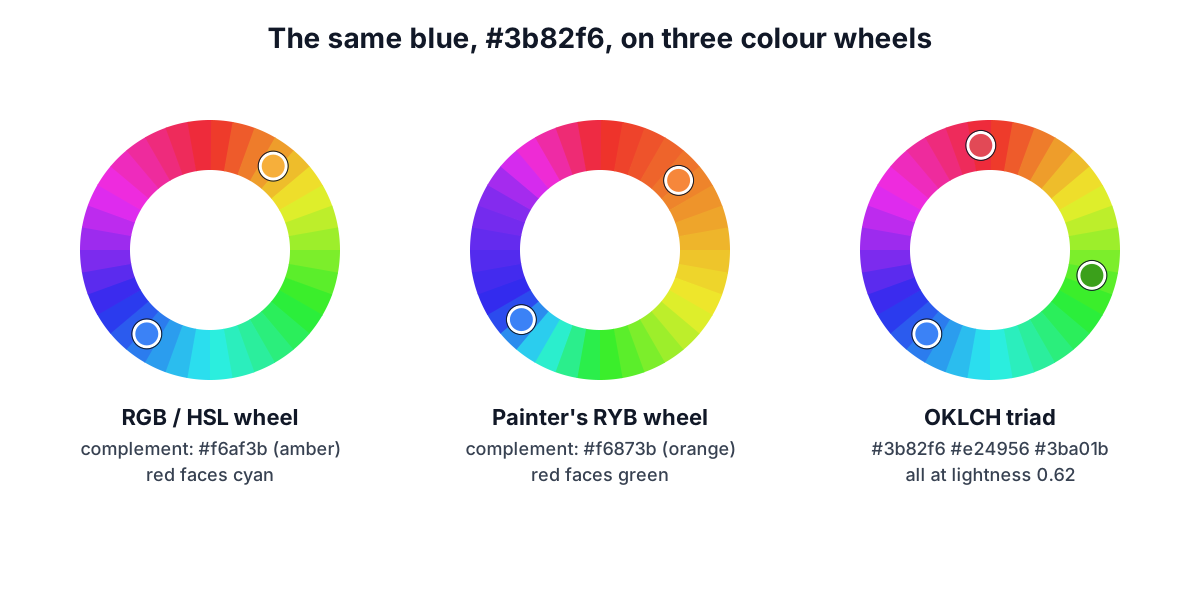
The RGB wheel is the hue circle of HSL and HSV, used by CSS hsl(), most design apps and most online palette tools. Red is at 0°, green at 120°, blue at 240°, and red's complement is cyan. It models mixing light, which is what screens do.
The painter's RYB wheel puts red, yellow and blue at the primaries, as in Johannes Itten's 12-part wheel taught in art schools. Here red's complement is green and blue's is orange, which matches how paint mixes and the pairings people expect from art class. There is no single standard RYB colour space, so the generator uses an approximation: it maps the six anchor colours (red, orange, yellow, green, blue, violet) to their usual RGB hues and interpolates between them. With RYB selected, the complement of #3b82f6 is the orange #f6873b rather than the amber #f6af3b of the RGB wheel.
The OKLCH wheel rotates hue in OKLCH, the polar form of the OKLab space published by Björn Ottosson in 2020 and adopted in CSS Color Module Level 4 as oklch(). Its lightness axis was fitted to human perception. That fixes the biggest flaw of HSL harmony: in HSL, pure yellow #ffff00 and pure blue #0000ff both have 50% lightness, but their OKLCH lightness is 0.97 and 0.45. Rotating in OKLCH keeps the perceived lightness constant. The triadic set for #3b82f6 becomes #3b82f6, #e24956, #3ba01b, all at OKLCH lightness 0.62, where the RGB triad ranged from 0.62 to 0.87.
When a rotated OKLCH colour falls outside what an sRGB screen can show, the generator keeps its lightness and hue and reduces chroma (colourfulness) until it fits, rather than clipping channels, which would shift the hue.
Which to use:
- RGB / HSL for compatibility with other tools and for bright, saturated web palettes.
- RYB for illustration, print and anything that should look like traditional colour theory.
- OKLCH when colours sit side by side at equal weight: chart series, tags, avatars, status badges.
Contrast: the check that harmony ignores
Harmony rules say nothing about readability, and harmonious colours often fail as text on each other. WCAG 2.2 measures contrast as
ratio = (L1 + 0.05) / (L2 + 0.05)
where L1 and L2 are the relative luminances of the lighter and darker colour, computed from linearised sRGB with weights 0.2126, 0.7152 and 0.0722. The thresholds:
| Use | Level AA | Level AAA |
|---|---|---|
| Body text | 4.5:1 | 7:1 |
| Large text (24 px, or about 18.7 px bold) | 3:1 | 4.5:1 |
| Icons, borders and focus rings (SC 1.4.11) | 3:1 |
For the triadic palette above, each swatch reads best with black text: #3b82f6 gives 5.71:1 with black but only 3.68:1 with white, so white text on that blue fails AA for body text, which surprises many people because the blue looks dark. #f63b82 gives 5.87:1 with black. And #f63b82 against #3b82f6 is just 1.03:1: two harmonious colours that are useless as text and background for each other.
The generator shows each swatch's best text colour and level, and a grid of every palette colour against every other plus white and black. Ratios are truncated, not rounded, so 4.499 shows as 4.49 and fails, matching how WCAG intends the threshold to work. For a single pair, the Contrast Checker gives more detail, and the WCAG colour contrast guide explains the formula.
From one colour to a 50 to 950 scale
Design systems rarely use a single shade. Tailwind CSS, Material and most component libraries use a ladder of 10 or 11 steps per hue, from a near-white 50 to a near-black 950, so you can pick backgrounds, borders, hover states and text from one family.
The generator builds that ladder in OKLCH:
- Lightness targets. Each step has a target OKLCH lightness, the average of Tailwind CSS 3.4's blue, red, green and violet scales: 0.973 for 50, 0.943, 0.897, 0.825, 0.734, 0.647 for 500, 0.573, 0.503, 0.437, 0.387 and 0.272 for 950. The test suite recomputes these from the installed Tailwind package.
- Chroma curve. Pale and very dark steps carry less colour. Relative to step 500, chroma runs from 0.08 at step 50 up to 1.05 at 600 and down to 0.46 at 950, again averaged from Tailwind's scales.
- Your colour stays exact. The step whose target lightness is closest to your colour is replaced by your exact colour.
#3b82f6has lightness 0.623, closest to 0.647, so it lands at 500.
For #3b82f6 the result runs #f1f7ff, #e1edff, #cadeff, #a4c7ff, #74a9ff, #3b82f6, #2571ea, #175dca, #144ca5, #174185, #0a2550. Tailwind's own palettes are tuned by hand, especially yellows and greens, so treat a generated scale as a strong starting point and adjust any step that looks off.
Exporting to code
The generator writes the palette and scale in five formats:
- CSS custom properties in a
:rootblock, such as--brand-palette-1and--color-brand-500. - Tailwind v3
theme.extend.colorsfortailwind.config.js, giving classes likebg-brand-500. - Tailwind v4
@themeblock with--color-brand-500variables, the CSS-first configuration introduced in version 4. - SCSS variables and JSON for design tokens or scripts.
Name the colour once (brand, accent, success) and every format uses it. The base, rule and wheel are stored in the page address, so you can bookmark or share a palette. AI assistants connected to the RedBison MCP server can call the same engine through its color_palette tool.
Worked example: a product UI
- Open the Color Palette Generator and enter your brand blue,
#3b82f6. - Choose Split-complementary on the OKLCH wheel for accents that are clearly different hues but share the brand's lightness, so none of them shouts.
- In the contrast grid, note that every accent needs dark text. For white text, step 600 (
#2571ea, 4.53:1) only just passes AA, so use 700 (#175dca, 6.07:1) or darker for comfortable margin. - Export Tailwind v4 and paste the
@themeblock into your CSS. - Pick a gradient between two palette colours with the CSS Gradient Generator, or sample colours from a photo first with Color Picker from Image.
Sources
- W3C, Web Content Accessibility Guidelines (WCAG) 2.2, definitions of contrast ratio and relative luminance; SC 1.4.3, 1.4.6 and 1.4.11.
- Björn Ottosson, "A perceptual color space for image processing" (2020), OKLab matrices.
- W3C CSS Color Module Level 4,
hsl()andoklch(), gamut mapping. - Johannes Itten, The Art of Color (1961), the 12-part colour circle.
- Tailwind CSS 3.4 default colour palette and Tailwind CSS v4
@themedocumentation.
Related searches
- complementary vs split complementary colors
- how to make a color palette from one color
- rgb vs ryb color wheel
- oklch color palette
- generate tailwind color scale
- triadic color scheme examples
- palette contrast wcag aa
- css variables color palette